


KeylessUniversal
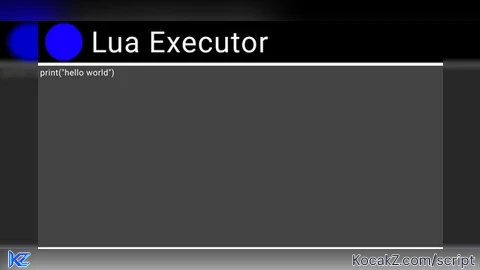
-- Waktunya Server Side Dan Ayo Kita Kacaukan Game INI hahahaha
-- Di Buat Oleh Python Dan Federalis
local ScreenGui = Instance.new("ScreenGui") -- <-- ScreenGUI Utama
local MainFrame = Instance.new("Frame") -- <-- Frame Utama
local Title = Instance.new("TextLabel") -- <-- Judul GUI
local BlueDot = Instance.new("Frame") -- <-- Titik Biru Di Samping Judul
local UICorner_Dot = Instance.new("UICorner") -- <-- UI corner
local TextBox = Instance.new("TextBox") -- <-- Textbox Untuk Exploit Dari Loadstring Hingga Require
local ExecuteBtn = Instance.new("TextButton") -- <-- Tombol Untuk Menjalankan Script Di Textbox
local ClearBtn = Instance.new("TextButton") -- <-- Tombol Untuk Menghapus Isi Textbox
local ToggleBtn = Instance.new("TextButton") -- <-- Tombol Untuk Menampilkan Dan Menyembunyikan GUI
local LogoImage = Instance.new("ImageLabel") -- <-- Logo Lua


ScreenGui.Name = "LuaExecutorGui"
ScreenGui.Parent = game.Players.LocalPlayer:WaitForChild("PlayerGui")
ScreenGui.ResetOnSpawn = false


ToggleBtn.Name = "ToggleBtn"
ToggleBtn.Parent = ScreenGui
ToggleBtn.BackgroundColor3 = Color3.fromRGB(40, 40, 40)
ToggleBtn.Position = UDim2.new(0, 10, 0, 10)
ToggleBtn.Size = UDim2.new(0, 80, 0, 30)
ToggleBtn.Font = Enum.Font.SourceSansBold
ToggleBtn.Text = "Toggle" -- <-- Kalau Mau Ubah Namanya Terserah Mau Jadi Apa
ToggleBtn.TextColor3 = Color3.fromRGB(255, 255, 255)
ToggleBtn.TextSize = 14


MainFrame.Name = "MainFrame"
MainFrame.Parent = ScreenGui
MainFrame.BackgroundColor3 = Color3.fromRGB(0, 0, 0)
MainFrame.Position = UDim2.new(0.5, -250, 0.5, -150)
MainFrame.Size = UDim2.new(0, 500, 0, 300)
MainFrame.Active = true
MainFrame.Draggable = true


Title.Parent = MainFrame
Title.BackgroundTransparency = 1
Title.Position = UDim2.new(0, 60, 0, 5)
Title.Size = UDim2.new(0, 200, 0, 40)
Title.Font = Enum.Font.SourceSans
Title.Text = "Lua Executor" -- <-- Ubah Nama GUI Di Sini Kalau Lu Mau Sih :/
Title.TextColor3 = Color3.fromRGB(255, 255, 255)
Title.TextSize = 35
Title.TextXAlignment = Enum.TextXAlignment.Left


BlueDot.Parent = MainFrame
BlueDot.BackgroundColor3 = Color3.fromRGB(0, 0, 255)
BlueDot.Position = UDim2.new(0, 10, 0, 5)
BlueDot.Size = UDim2.new(0, 40, 0, 40)
UICorner_Dot.CornerRadius = UDim.new(1, 0)
UICorner_Dot.Parent = BlueDot


TextBox.Parent = MainFrame
TextBox.BackgroundColor3 = Color3.fromRGB(60, 60, 60)
TextBox.Position = UDim2.new(0, 5, 0, 50)
TextBox.Size = UDim2.new(0, 490, 0, 180)
TextBox.Font = Enum.Font.Code
TextBox.Text = "print('hello world')"
TextBox.TextColor3 = Color3.fromRGB(255, 255, 255)
TextBox.TextSize = 16
TextBox.ClearTextOnFocus = false
TextBox.TextXAlignment = Enum.TextXAlignment.Left
TextBox.TextYAlignment = Enum.TextYAlignment.Top
TextBox.MultiLine = true


ExecuteBtn.Parent = MainFrame
ExecuteBtn.BackgroundColor3 = Color3.fromRGB(0, 0, 0)
ExecuteBtn.BorderMode = Enum.BorderMode.Inset
ExecuteBtn.BorderSizePixel = 2
ExecuteBtn.Position = UDim2.new(0, 10, 0, 240)
ExecuteBtn.Size = UDim2.new(0, 150, 0, 45)
ExecuteBtn.Font = Enum.Font.SourceSans
ExecuteBtn.Text = "Execute"
ExecuteBtn.TextColor3 = Color3.fromRGB(255, 255, 255)
ExecuteBtn.TextSize = 30


ClearBtn.Parent = MainFrame
ClearBtn.BackgroundColor3 = Color3.fromRGB(0, 0, 0)
ClearBtn.BorderMode = Enum.BorderMode.Inset
ClearBtn.BorderSizePixel = 2
ClearBtn.Position = UDim2.new(0, 170, 0, 240)
ClearBtn.Size = UDim2.new(0, 150, 0, 45)
ClearBtn.Font = Enum.Font.SourceSans
ClearBtn.Text = "Clear"
ClearBtn.TextColor3 = Color3.fromRGB(255, 255, 255)
ClearBtn.TextSize = 30


LogoImage.Parent = MainFrame
LogoImage.BackgroundTransparency = 1
LogoImage.Position = UDim2.new(0, 5, 1, -45)
LogoImage.Size = UDim2.new(0, 40, 0, 40)
LogoImage.Image = "rbxassetid://131112154" -- <-- Ganti Logo Disini Jadi Gambar Lua Atau Gambar Galeri Yang Udah di Sediain


ExecuteBtn.MouseButton1Click:Connect(function()
	local scriptToRun = TextBox.Text
	local success, err = pcall(function()
		loadstring(scriptToRun)()
	end)

	if not success then
		warn("Error: " .. err)
	end
end)


ClearBtn.MouseButton1Click:Connect(function()
	TextBox.Text = ""
end)


ToggleBtn.MouseButton1Click:Connect(function()
	MainFrame.Visible = not MainFrame.Visible
	ToggleBtn.Text = MainFrame.Visible and "Toggle" or "Toggle"
end)

-- Ingat GUI Ini Untuk Server Side Bisa Di Jebol Di Script Jadi Anda Tidak Boleh Ubah Script Ini Karena Sudah 5 Menit Yang Saya Buat
-- Tidak Ada Lagi Ubah Script Saya Karena Ini Privasi Jadi Tidak Boleh Di Ubah!!
-- Di Buat Oleh Federalis :)
-- Jangan Di Rusakkan Script Saya

-- Lu Mau Bonus Ga? Oke Nih Gua Kasih Script Require RC7 Sama Sensation HUB
-- require(100263845596551)("Nama Username Kamu") <-- Script Sensation HUB
-- require(12350030542).RC7("Nama Username Kamu") <-- Script RC7![[KEYLESS] Moondiety Script | 17+ supported Games](https://scriptblox.com/images/sb/0-1753093706828.png)


Lua? I've used it before and this script was ready in 6 minutes.
bro i try this at 9.00pm
I like This, This Is Work!
Bro This Discord Link Was Outdated
Y'all is this fe