


KeylessUniversal
--// Services
local Players = game:GetService("Players")
local RunService = game:GetService("RunService")
local UserInputService = game:GetService("UserInputService")
local player = Players.LocalPlayer

--// GUI Setup
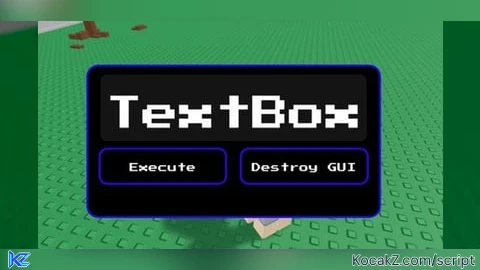
local screenGui = Instance.new("ScreenGui")
screenGui.Name = "ExecutorGUI"
screenGui.Parent = player:WaitForChild("PlayerGui")

-- Main Frame
local frame = Instance.new("Frame")
frame.Size = UDim2.new(0, 350, 0, 180)
frame.Position = UDim2.new(0.5, -175, 0.3, 0)
frame.BackgroundColor3 = Color3.fromRGB(0, 0, 0)
frame.BorderSizePixel = 0
frame.Parent = screenGui

-- UICorner for frame
local frameCorner = Instance.new("UICorner")
frameCorner.CornerRadius = UDim.new(0, 12)
frameCorner.Parent = frame

-- RGB Outline for frame
local frameOutline = Instance.new("UIStroke")
frameOutline.ApplyStrokeMode = Enum.ApplyStrokeMode.Border
frameOutline.Thickness = 2
frameOutline.Color = Color3.fromHSV(0, 1, 1)
frameOutline.Parent = frame

-- TextBox for script input
local textBox = Instance.new("TextBox")
textBox.Size = UDim2.new(0, 320, 0, 80)
textBox.Position = UDim2.new(0, 15, 0, 10)
textBox.ClearTextOnFocus = false
textBox.PlaceholderText = "Script here..."
textBox.TextWrapped = true
textBox.BackgroundColor3 = Color3.fromRGB(20, 20, 20)
textBox.TextColor3 = Color3.fromRGB(255, 255, 255)
textBox.Font = Enum.Font.Arcade
textBox.PlaceholderColor3 = Color3.fromRGB(200, 200, 200)
textBox.TextScaled = true
textBox.Parent = frame

-- UICorner for TextBox
local boxCorner = Instance.new("UICorner")
boxCorner.CornerRadius = UDim.new(0, 8)
boxCorner.Parent = textBox

-- Execute Button
local executeButton = Instance.new("TextButton")
executeButton.Size = UDim2.new(0, 150, 0, 40)
executeButton.Position = UDim2.new(0, 15, 0, 100)
executeButton.Text = "Execute"
executeButton.BackgroundColor3 = Color3.fromRGB(0, 0, 0)
executeButton.TextColor3 = Color3.fromRGB(255, 255, 255)
executeButton.Font = Enum.Font.Arcade
executeButton.TextSize = 20
executeButton.Parent = frame

-- UICorner for execute button
local buttonCorner = Instance.new("UICorner")
buttonCorner.CornerRadius = UDim.new(0, 8)
buttonCorner.Parent = executeButton

-- RGB Outline for execute button
local buttonOutline = Instance.new("UIStroke")
buttonOutline.ApplyStrokeMode = Enum.ApplyStrokeMode.Border
buttonOutline.Thickness = 2
buttonOutline.Color = Color3.fromHSV(0, 1, 1)
buttonOutline.Parent = executeButton

-- Destroy Button
local destroyButton = Instance.new("TextButton")
destroyButton.Size = UDim2.new(0, 150, 0, 40)
destroyButton.Position = UDim2.new(0, 185, 0, 100)
destroyButton.Text = "Destroy GUI"
destroyButton.BackgroundColor3 = Color3.fromRGB(0, 0, 0)
destroyButton.TextColor3 = Color3.fromRGB(255, 255, 255)
destroyButton.Font = Enum.Font.Arcade
destroyButton.TextSize = 20
destroyButton.Parent = frame

-- UICorner for destroy button
local destroyCorner = Instance.new("UICorner")
destroyCorner.CornerRadius = UDim.new(0, 8)
destroyCorner.Parent = destroyButton

-- RGB Outline for destroy button
local destroyOutline = Instance.new("UIStroke")
destroyOutline.ApplyStrokeMode = Enum.ApplyStrokeMode.Border
destroyOutline.Thickness = 2
destroyOutline.Color = Color3.fromHSV(0, 1, 1)
destroyOutline.Parent = destroyButton

-- RGB effect for outlines
local hue = 0
RunService.RenderStepped:Connect(function(delta)
    hue = (hue + delta * 0.2) % 1
    local color = Color3.fromHSV(hue, 1, 1)
    frameOutline.Color = color
    buttonOutline.Color = color
    destroyOutline.Color = color
end)

-- Execute the script safely
executeButton.MouseButton1Click:Connect(function()
    local func, err = loadstring(textBox.Text)
    if func then
        pcall(func)
    end
end)

-- Destroy GUI
destroyButton.MouseButton1Click:Connect(function()
    screenGui:Destroy()
end)

--// Make frame draggable (desktop + mobile)
local dragging = false
local dragInput, dragStart, startPos

local function update(input)
    local delta = input.Position - dragStart
    frame.Position = UDim2.new(startPos.X.Scale, startPos.X.Offset + delta.X, startPos.Y.Scale, startPos.Y.Offset + delta.Y)
end

frame.InputBegan:Connect(function(input)
    if input.UserInputType == Enum.UserInputType.MouseButton1 or input.UserInputType == Enum.UserInputType.Touch then
        dragging = true
        dragStart = input.Position
        startPos = frame.Position

        input.Changed:Connect(function()
            if input.UserInputState == Enum.UserInputState.End then
                dragging = false
            end
        end)
    end
end)

frame.InputChanged:Connect(function(input)
    if input.UserInputType == Enum.UserInputType.MouseMovement or input.UserInputType == Enum.UserInputType.Touch then
        dragInput = input
    end
end)

UserInputService.InputChanged:Connect(function(input)
    if input == dragInput and dragging then
        update(input)
    end
end)No comments yet for this script.
![[KEYLESS] Moondiety Script | 17+ supported Games](https://scriptblox.com/images/sb/0-1753093706828.png)

