


Key RequiredUniversal
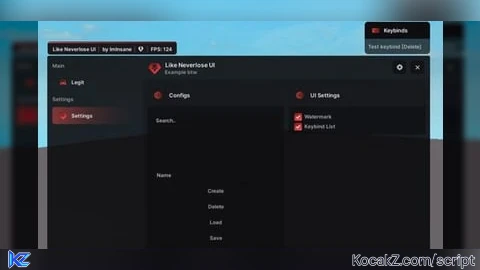
-- Taken from my GitHub: https://github.com/ImInsane-1337/neverlose-ui

local Library = loadstring(game:HttpGet("https://raw.githubusercontent.com/ImInsane-1337/neverlose-ui/refs/heads/main/source/library.lua"))()
local CheatName = "MyProject"

Library.Folders = {
    Directory = CheatName,
    Configs = CheatName .. "/Configs",
    Assets = CheatName .. "/Assets",
}

local Accent = Color3.fromRGB(255, 80, 80)
local Gradient = Color3.fromRGB(120, 20, 20)

Library.Theme.Accent = Accent
Library.Theme.AccentGradient = Gradient
Library:ChangeTheme("Accent", Accent)
Library:ChangeTheme("AccentGradient", Gradient)
local Window = Library:Window({
    Name = "Like Neverlose UI",
    SubName = "Example btw",
    Logo = "120959262762131"
})

local KeybindList = Library:KeybindList("Keybinds")
Library:Watermark({
    "Like Neverlose UI",
    "by ImInsane",
    120959262762131
})

task.spawn(function()
    while true do
        local FPS = math.floor(1 / game:GetService("RunService").RenderStepped:Wait())

        Library:Watermark({
            "Like Neverlose UI",
            "by ImInsane",
            120959262762131,
            "FPS: " .. FPS
        })
        task.wait(0.5)
    end
end)

Window:Category("Main")

local LegitPage = Window:Page({Name = "Legit", Icon = "138827881557940"})
local MainSection = LegitPage:Section({Name = "Main Features", Side = 1})

MainSection:Toggle({
    Name = "Enabled",
    Flag = "LegitEnabled",
    Default = true,
    Callback = function(Value)
        print("Legit Enabled:", Value)
    end
})

MainSection:Slider({
    Name = "Speed Hack",
    Flag = "SpeedSlider",
    Min = 1,
    Max = 100,
    Default = 16,
    Suffix = " studs",
    Callback = function(Value)
        print("Speed set to:", Value)
    end
})

MainSection:Dropdown({
    Name = "Hitbox Type",
    Flag = "HitboxType",
    Default = {"Head"},
    Items = {"Head", "Torso", "Arms", "Legs"},
    Multi = true,
    Callback = function(Value)
        print("Selected Hitboxes:", table.concat(Value, ", "))
    end
})

MainSection:Label("ESP Color"):Colorpicker({
    Name = "Color",
    Flag = "EspColor",
    Default = Color3.fromRGB(255, 255, 255),
    Callback = function(Value)
        print("Color changed")
    end
})

local MiscSection = LegitPage:Section({Name = "Misc", Side = 2})
MiscSection:Button({
    Name = "Test Notification",
    Callback = function()
        Library:Notification({
            Title = "System",
            Description = "This is a test notification!",
            Duration = 5,
            Icon = "73789337996373"
        })
    end
})

MiscSection:Keybind({
    Name = "Test keybind",
    Flag = "testkeybind",
    Default = Enum.KeyCode.Delete,
    Callback = function(Value)
        print("Keybind pressed")
    end
})

Window:Category("Settings")
local SettingsPage = Library:CreateSettingsPage(Window, KeybindList)
Window:Init()


Is it possible to only have the watermark?
@raycastparams As a separate script or do you mean in the menu?
if you want it in a seperate script
It works well on mobile but the UI is too big I do recommend adding custom UI scaling or auto scale to the mobile friendly scale
@Gpss i'll be fixing this
configggg?
this shi is fire
ts is so tuff
Actually peak
Library updated btw. From new its: Custom Logs. (If you dont want to use default notifications you can use logs, check on github) Update w/some fixes soon. Just wait
Interesting, it supports mobile fine but there's a huge flaw: the drag is terrible on mobile, you drag it every single time even if you don't want to, basically every part of the lib is draggable and it sucks for mobile, it's insufferable having the gui moving like a freaking snake while trying to use anything on mobile version, on PC though it works fine. Instead ONLY make the upper part draggable, so you dont drag it else where you touch/press on mobile