


KeylessUniversal
-- Load the UI library
local Library = loadstring(game:HttpGet('https://gist.githubusercontent.com/MjContiga1/5b9535166d60560ac884a871cb0dc418/raw/e7fdb16802d9486d8d04d3e41d3607d89e6b4a1b/Libsuck.lua'))()

-- Create main window
local window = Library:Window('Example UI')

-- Create tabs with icons replace ur own icon id
local mainTab = window:Tab({"Crafting", "rbxassetid://7734022041"})
local localTab = window:Tab({"LocalPlayer", "rbxassetid://7743875962"})
local settingsTab = window:Tab({"Reward", "rbxassetid://7733673987"})

-- Main Tab Elements
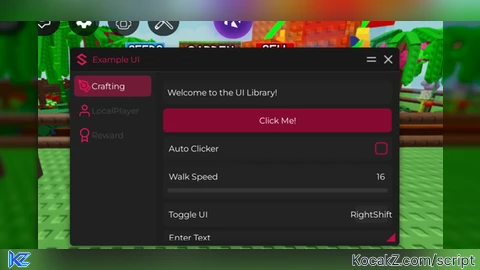
mainTab:Label("Welcome to the UI Library!")

-- Button
mainTab:Button('Click Me!', function()
    print("Button clicked!")
    game.StarterGui:SetCore("SendNotification", {
        Title = "Notification";
        Text = "Button was clicked!";
        Duration = 3;
    })
end)

-- Toggle
mainTab:Toggle('Auto Clicker', false, function(state)
    print("Auto Clicker is now:", state and "ON" or "OFF")
end)

-- Slider
mainTab:Slider("Walk Speed", 16, 100, 16, function(value)
    print("Walk Speed set to:", value)
    game.Players.LocalPlayer.Character.Humanoid.WalkSpeed = value
end)

-- Keybind
mainTab:Keybind("Toggle UI", Enum.KeyCode.RightShift, function(key)
    print("Key pressed:", key.Name)
end)

-- InputBox
mainTab:InputBox("Enter Text", "Type something...", function(text)
    print("Input text:", text)
end)

-- Single-select dropdown
local singleDropdown = mainTab:Dropdown("Select Weapon", {"Sword", "Gun", "Knife"}, function(selected)
    print("Selected weapon:", selected)
end)

-- Multi-select dropdown
local multiDropdown = mainTab:Dropdown("Select Features", {"ESP", "Aimbot", "Speed", "Jump"}, function(selected)
    print("Selected features:", table.concat(selected, ", "))
end, true) -- true enables multi-select

-- Button to refresh dropdowns
mainTab:Button('Refresh Dropdowns', function()
    singleDropdown:Refresh({"New Sword", "New Gun", "New Knife"})
    multiDropdown:Refresh({"New ESP", "New Aimbot", "New Speed", "New Jump", "New Feature"})
end)

-- LocalPlayer Tab Elements
localTab:Label("Local Player Settings")

localTab:Slider("Jump Power", 50, 200, 50, function(value)
    print("Jump Power set to:", value)
    game.Players.LocalPlayer.Character.Humanoid.JumpPower = value
end)

localTab:Toggle("Infinite Jump", false, function(state)
    print("Infinite Jump:", state and "ON" or "OFF")
    -- Add infinite jump logic here
end)

localTab:InputBox("Player Name", "Enter player name...", function(text)
    print("Looking for player:", text)
    -- Add player search logic here
end)

-- Settings Tab Elements
settingsTab:Label("UI Settings")

settingsTab:Toggle('Dark Mode', true, function(state)
    print("Dark Mode:", state)
    -- Add dark mode logic here
end)

settingsTab:Slider("UI Transparency", 0, 100, 100, function(value)
    print("UI Transparency:", value)
    -- Apply transparency to UI elements
end)

settingsTab:Keybind("Toggle Menu", Enum.KeyCode.Insert, function(key)
    print("Menu key changed to:", key.Name)
    -- Update menu toggle key here
end)

settingsTab:InputBox("Custom Title", "Enter title...", function(text)
    print("Custom title:", text)
    -- Update UI title here
end)


I update now minimize and exit still better rn
this is nice ui lib, undetected for the game im making it for 👍
how much detectable is this?