


KeylessUniversal
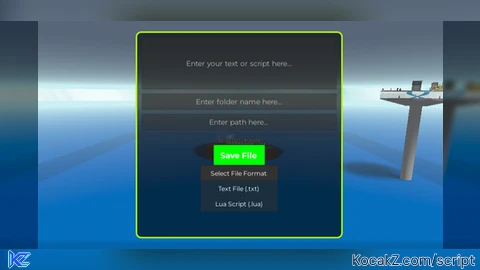
-- // Services
local Players = game:GetService("Players")
local UserInputService = game:GetService("UserInputService")
local TweenService = game:GetService("TweenService")
local CoreGui = game:GetService("CoreGui")
local TextService = game:GetService("TextService")
local HttpService = game:GetService("HttpService")
local StarterGui = game:GetService("StarterGui")

-- // Create GUI Elements
local ScreenGui = Instance.new("ScreenGui")
local Frame = Instance.new("Frame")
local UICorner = Instance.new("UICorner")
local UIStroke = Instance.new("UIStroke")
local TextBox = Instance.new("TextBox")
local FolderTextBox = Instance.new("TextBox")
local PathTextBox = Instance.new("TextBox")
local SaveButton = Instance.new("TextButton")
local DropdownButton = Instance.new("TextButton")
local DropdownFrame = Instance.new("Frame")
local UiListLayout = Instance.new("UIListLayout")
local DropdownOptions = {"Text File (.txt)", "Lua Script (.lua)"}
local FileFormat = ".txt"  -- Default format
local folderName = "savedFolder"
local pathFolder = "workspace"  -- Default path folder

-- // Parent GUI to CoreGui
ScreenGui.Parent = CoreGui
ScreenGui.ZIndexBehavior = Enum.ZIndexBehavior.Sibling

-- // Frame Properties
Frame.Parent = ScreenGui
Frame.BackgroundColor3 = Color3.fromRGB(0, 0, 0)
Frame.BackgroundTransparency = 0.4
Frame.BorderSizePixel = 0
Frame.Position = UDim2.new(0.3, 0, 0.3, 0)
Frame.Size = UDim2.new(0, 400, 0, 400)

UICorner.Parent = Frame

-- // UIStroke for Neon RGB Effect
UIStroke.Parent = Frame
UIStroke.Thickness = 3
UIStroke.ApplyStrokeMode = Enum.ApplyStrokeMode.Border

local function animateStroke()
    local hue = 0
    while true do
        UIStroke.Color = Color3.fromHSV(hue, 1, 1)
        hue = (hue + 0.01) % 1
        task.wait(0.05)
    end
end
task.spawn(animateStroke)

-- // Create the TextBox for Text Input
TextBox.Parent = Frame
TextBox.Position = UDim2.new(0, 10, 0, 10)
TextBox.Size = UDim2.new(1, -20, 0, 100)
TextBox.Font = Enum.Font.Gotham
TextBox.TextColor3 = Color3.fromRGB(255, 255, 255)
TextBox.TextSize = 16
TextBox.TextWrapped = true
TextBox.BackgroundColor3 = Color3.fromRGB(50, 50, 50)
TextBox.BackgroundTransparency = 0.5
TextBox.ClearTextOnFocus = false
TextBox.Text = "Enter your text or script here..."
TextBox.PlaceholderText = "Enter your text or script here..."

-- // Create the Folder Name TextBox
FolderTextBox.Parent = Frame
FolderTextBox.Position = UDim2.new(0, 10, 0, 120)
FolderTextBox.Size = UDim2.new(1, -20, 0, 30)
FolderTextBox.Font = Enum.Font.Gotham
FolderTextBox.TextColor3 = Color3.fromRGB(255, 255, 255)
FolderTextBox.TextSize = 16
FolderTextBox.BackgroundColor3 = Color3.fromRGB(50, 50, 50)
FolderTextBox.BackgroundTransparency = 0.5
FolderTextBox.ClearTextOnFocus = false
FolderTextBox.Text = folderName
FolderTextBox.PlaceholderText = "Enter folder name here..."

-- // Create the Path Folder TextBox
PathTextBox.Parent = Frame
PathTextBox.Position = UDim2.new(0, 10, 0, 160)
PathTextBox.Size = UDim2.new(1, -20, 0, 30)
PathTextBox.Font = Enum.Font.Gotham
PathTextBox.TextColor3 = Color3.fromRGB(255, 255, 255)
PathTextBox.TextSize = 16
PathTextBox.BackgroundColor3 = Color3.fromRGB(50, 50, 50)
PathTextBox.BackgroundTransparency = 0.5
PathTextBox.ClearTextOnFocus = false
PathTextBox.Text = pathFolder
PathTextBox.PlaceholderText = "Enter path here..."

-- // Create the Save Button
SaveButton.Parent = Frame
SaveButton.Position = UDim2.new(0.5, -50, 0, 220)
SaveButton.Size = UDim2.new(0, 100, 0, 40)
SaveButton.BackgroundColor3 = Color3.fromRGB(0, 255, 0)
SaveButton.Text = "Save File"
SaveButton.Font = Enum.Font.GothamBold
SaveButton.TextSize = 18
SaveButton.TextColor3 = Color3.fromRGB(255, 255, 255)
SaveButton.AutoButtonColor = false

-- // Create the Dropdown Button and Dropdown List
DropdownButton.Parent = Frame
DropdownButton.Position = UDim2.new(0.5, -75, 0, 260)
DropdownButton.Size = UDim2.new(0, 150, 0, 30)
DropdownButton.BackgroundColor3 = Color3.fromRGB(50, 50, 50)
DropdownButton.Text = "Select File Format"
DropdownButton.Font = Enum.Font.Gotham
DropdownButton.TextSize = 14
DropdownButton.TextColor3 = Color3.fromRGB(255, 255, 255)
DropdownButton.AutoButtonColor = false

-- // Dropdown Frame Properties
DropdownFrame.Parent = Frame
DropdownFrame.Position = UDim2.new(0.5, -75, 0, 290)
DropdownFrame.Size = UDim2.new(0, 150, 0, 0)
DropdownFrame.BackgroundColor3 = Color3.fromRGB(50, 50, 50)
DropdownFrame.Visible = false
DropdownFrame.BackgroundTransparency = 0.5

UiListLayout.Parent = DropdownFrame
UiListLayout.FillDirection = Enum.FillDirection.Vertical

-- // Populate Dropdown Options
for _, option in pairs(DropdownOptions) do
    local optionButton = Instance.new("TextButton")
    optionButton.Parent = DropdownFrame
    optionButton.Size = UDim2.new(1, 0, 0, 30)
    optionButton.Text = option
    optionButton.Font = Enum.Font.Gotham
    optionButton.TextSize = 14
    optionButton.TextColor3 = Color3.fromRGB(255, 255, 255)
    optionButton.BackgroundColor3 = Color3.fromRGB(50, 50, 50)
    optionButton.BackgroundTransparency = 0.5
    optionButton.AutoButtonColor = false
    optionButton.MouseButton1Click:Connect(function()
        FileFormat = option:match("%((.-)%)")
        DropdownFrame.Visible = false
        DropdownButton.Text = "Format: " .. option
    end)
end

-- // Toggle Dropdown Visibility
DropdownButton.MouseButton1Click:Connect(function()
    DropdownFrame.Visible = not DropdownFrame.Visible
end)

-- // Save File Function
local function saveFile(fileName, content)
    local folder = FolderTextBox.Text
    local path = PathTextBox.Text .. "/" .. folder .. "/" .. fileName
    local success, errorMsg = pcall(function()
        if FileFormat == ".lua" then
            writefile(path, content)  -- Saves as Lua script
        elseif FileFormat == ".txt" then
            writefile(path, content)  -- Saves as a plain text file
        end
    end)

    if success then
        print("File saved successfully: " .. path)
        -- Send Notification
        StarterGui:SetCore("SendNotification", {
            Title = "File Saved into",
            Text = path,
            Button1 = "OK",
            Duration = 5
        })
    else
        warn("Error saving file: " .. errorMsg)
    end
end

-- // Save Button Clicked
SaveButton.MouseButton1Click:Connect(function()
    local textContent = TextBox.Text
    local fileName = "savedFile" .. FileFormat  -- Default file name with format extension
    saveFile(fileName, textContent)
end)

-- // Draggable GUI
local dragging, dragStart, startPos

Frame.InputBegan:Connect(function(input)
    if input.UserInputType == Enum.UserInputType.MouseButton1 then
        dragging = true
        dragStart = input.Position
        startPos = Frame.Position
        input.Changed:Connect(function()
            if input.UserInputState == Enum.UserInputState.End then
                dragging = false
            end
        end)
    end
end)

UserInputService.InputChanged:Connect(function(input)
    if dragging and input.UserInputType == Enum.UserInputType.MouseMovement then
        local delta = input.Position - dragStart
        Frame.Position = UDim2.new(startPos.X.Scale, startPos.X.Offset + delta.X, startPos.Y.Scale, startPos.Y.Offset + delta.Y)
    end
end)

-- // Hide GUI with Keybind (F8)
UserInputService.InputBegan:Connect(function(input, gameProcessed)
    if gameProcessed then return end
    if input.KeyCode == Enum.KeyCode.F8 then
        ScreenGui.Enabled = not ScreenGui.Enabled
    end
end)


At least I dont have to NOT open Roblox :/
@ProBaconHub this script only for lazy peoples, like me, too lazy to open File Explorer, create NewFolder and do everything
I am sure clicking new, text file, paste is easier than open Roblox, open executor, inject, join game, execute, paste, click save