


KeylessUniversal
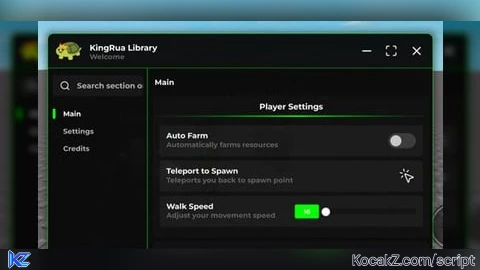
-- Example usage of King Rua UI Library
local Library = loadstring(game:HttpGet("https://raw.githubusercontent.com/mamafoni281/KingRua-Library/refs/heads/main/Source"))()

-- Create a new window with custom configuration
local Window = Library:NewWindow({
    Title = "KingRua Library",
    Description = "Welcome"
})

-- Create tabs
local MainTab = Window:T("Main")
local SettingsTab = Window:T("Settings")
local CreditsTab = Window:T("Credits")

-- Main Tab Sections
local PlayerSection = MainTab:AddSection("Player Settings")
local WorldSection = MainTab:AddSection("World Settings")

-- Settings Tab Sections
local VisualSection = SettingsTab:AddSection("Visuals")
local MiscSection = SettingsTab:AddSection("Miscellaneous")

-- Credits Tab
local InfoSection = CreditsTab:AddSection("Information")

-- Add Toggles
PlayerSection:AddToggle({
    Title = "Auto Farm",
    Description = "Automatically farms resources",
    Default = false,
    Callback = function(value)
        if value then
            print("Auto Farm Enabled")
            -- Add your auto farm code here
        else
            print("Auto Farm Disabled")
        end
    end
})

-- Add Buttons
PlayerSection:AddButton({
    Title = "Teleport to Spawn",
    Description = "Teleports you back to spawn point",
    Callback = function()
        print("Teleporting to spawn...")
        -- Add teleport code
        -- game.Players.LocalPlayer.Character.HumanoidRootPart.Position = Vector3.new(0, 50, 0)
    end
})

-- Add Slider
PlayerSection:AddSlider({
    Title = "Walk Speed",
    Description = "Adjust your movement speed",
    Min = 16,
    Max = 100,
    Increment = 1,
    Default = 16,
    Callback = function(value)
        print("Walk Speed set to:", value)
        -- game.Players.LocalPlayer.Character.Humanoid.WalkSpeed = value
    end
})

-- Add Dropdown
WorldSection:AddDropdown({
    Title = "Teleport Locations",
    Description = "Choose where to teleport",
    Values = {"Spawn", "Shop", "Arena", "Secret Area"},
    Default = "Spawn",
    Callback = function(value)
        print("Teleporting to:", value)
        -- Add teleport logic based on selection
    end
})

-- Add Input/Textbox
VisualSection:AddInput({
    Title = "Custom Message",
    Description = "Enter your custom message",
    PlaceHolder = "Type here...",
    Default = "Hello World",
    Callback = function(value)
        print("Message changed to:", value)
    end
})

-- Multi-select Dropdown example
MiscSection:AddDropdown({
    Title = "ESP Options",
    Description = "Select which ESP to enable",
    Values = {"Players", "Chests", "NPCs", "Items"},
    Default = {"Players", "Chests"},
    Multi = true,
    Callback = function(values)
        print("Selected ESP options:", table.concat(values, ", "))
        -- Enable/disable ESP based on selection
    end
})

-- Add Paragraphs for information
local CreditsPara = InfoSection:AddParagraph({
    Title = "Script Information",
    Content = "Version: 1.0.0\nCreated by: YourName\nLast Updated: 2024"
})

local FeaturesPara = InfoSection:AddParagraph({
    Title = "Features",
    Content = "• Auto Farm\n• ESP System\n• Speed Control\n• Teleport System\n• Customizable UI"
})

local NotesPara = InfoSection:AddParagraph({
    Title = "Notes",
    Content = "This is an example script showing how to use the King Rua UI Library. Replace the placeholder code with your actual functionality."
})

-- You can update paragraph content dynamically if needed
task.wait(3)
CreditsPara:SetTitle("Updated Information")
CreditsPara:SetDesc("This shows how you can update paragraph content!")No comments yet for this script.
![[KEYLESS] Moondiety Script | 17+ supported Games](https://scriptblox.com/images/sb/0-1753093706828.png)

