

KeylessUniversal
local player = game.Players.LocalPlayer
local gui = Instance.new("ScreenGui")
local frame = Instance.new("Frame")
local titleLabel = Instance.new("TextLabel")
local startButton = Instance.new("TextButton")
local playerDropdown = Instance.new("TextButton")
local playerListFrame = Instance.new("Frame")
local scrollingFrame = Instance.new("ScrollingFrame")
local uiListLayout = Instance.new("UIListLayout")
local distanceTextBox = Instance.new("TextBox")
local distanceLabel = Instance.new("TextLabel")
local distanceFrame = Instance.new("Frame")

gui.Name = "FEKillAllGUIv2"
gui.Parent = game.CoreGui

frame.Name = "MainFrame"
frame.Parent = gui
frame.BackgroundColor3 = Color3.fromRGB(35, 35, 35)
frame.BorderSizePixel = 0
frame.Position = UDim2.new(0.3, 0, 0.3, 0)
frame.Size = UDim2.new(0, 210, 0, 160)
frame.Active = true
frame.Draggable = true

titleLabel.Name = "TitleLabel"
titleLabel.Parent = frame
titleLabel.BackgroundColor3 = Color3.fromRGB(25, 25, 25)
titleLabel.BorderSizePixel = 0
titleLabel.Size = UDim2.new(1, 0, 0, 50)
titleLabel.Font = Enum.Font.SourceSansBold
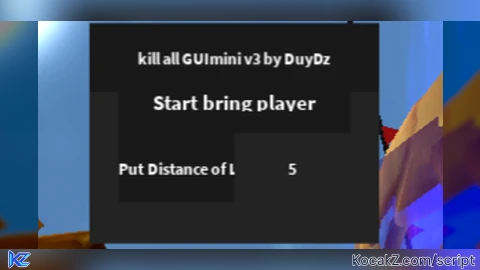
titleLabel.Text = "kill all GUImini v3 by DuyDz"
titleLabel.TextColor3 = Color3.fromRGB(255, 255, 255)
titleLabel.TextSize = 14

startButton.Name = "StartButton"
startButton.Parent = frame
startButton.BackgroundColor3 = Color3.fromRGB(25, 25, 25)
startButton.BorderSizePixel = 0
startButton.Position = UDim2.new(0.1, 0, 0.2, 0)
startButton.Size = UDim2.new(0.8, 0, 0, 50)
startButton.Font = Enum.Font.SourceSansBold
startButton.Text = "Start bring player"
startButton.TextColor3 = Color3.fromRGB(255, 255, 255)
startButton.TextSize = 18

playerDropdown.Name = "PlayerDropdown"
playerDropdown.Parent = frame
playerDropdown.BackgroundColor3 = Color3.fromRGB(25, 25, 25)
playerDropdown.BorderSizePixel = 0
playerDropdown.Position = UDim2.new(0.1, 0, 0.4, 0)
playerDropdown.Size = UDim2.new(0.8, 0, 0, 50)
playerDropdown.Font = Enum.Font.SourceSansBold
playerDropdown.Text = "Select Players"
playerDropdown.TextColor3 = Color3.fromRGB(255, 255, 255)
playerDropdown.TextSize = 18

playerListFrame.Name = "PlayerListFrame"
playerListFrame.Parent = frame
playerListFrame.BackgroundColor3 = Color3.fromRGB(25, 25, 25)
playerListFrame.BorderSizePixel = 0
playerListFrame.Position = UDim2.new(0.1, 0, 0.6, 0)
playerListFrame.Size = UDim2.new(0.8, 0, 0.3, 0)
playerListFrame.Visible = false

scrollingFrame.Parent = playerListFrame
scrollingFrame.Size = UDim2.new(1, 0, 1, 0)
scrollingFrame.CanvasSize = UDim2.new(0, 0, 5, 0)
scrollingFrame.ScrollBarThickness = 10

uiListLayout.Parent = scrollingFrame
uiListLayout.SortOrder = Enum.SortOrder.LayoutOrder

distanceFrame.Name = "DistanceFrame"
distanceFrame.Parent = frame
distanceFrame.BackgroundColor3 = Color3.fromRGB(25, 25, 25)
distanceFrame.BorderSizePixel = 0
distanceFrame.Position = UDim2.new(0.1, 0, 0.5, 0)
distanceFrame.Size = UDim2.new(0.8, 0, 0, 50)

distanceLabel.Name = "DistanceLabel"
distanceLabel.Parent = distanceFrame
distanceLabel.BackgroundColor3 = Color3.fromRGB(25, 25, 25)
distanceLabel.BorderSizePixel = 0
distanceLabel.Size = UDim2.new(0.5, 0, 1, 0)
distanceLabel.Font = Enum.Font.SourceSansBold
distanceLabel.Text = "Put Distance of Loopbring:"
distanceLabel.TextColor3 = Color3.fromRGB(255, 255, 255)
distanceLabel.TextSize = 14
distanceLabel.TextXAlignment = Enum.TextXAlignment.Left

distanceTextBox.Name = "DistanceTextBox"
distanceTextBox.Parent = distanceFrame
distanceTextBox.BackgroundColor3 = Color3.fromRGB(35, 35, 35)
distanceTextBox.BorderSizePixel = 0
distanceTextBox.Position = UDim2.new(0.5, 0, 0, 0)
distanceTextBox.Size = UDim2.new(0.5, 0, 1, 0)
distanceTextBox.Font = Enum.Font.SourceSansBold
distanceTextBox.PlaceholderText = "Distance in studs"
distanceTextBox.Text = "5"
distanceTextBox.TextColor3 = Color3.fromRGB(255, 255, 255)
distanceTextBox.TextSize = 14
distanceTextBox.TextXAlignment = Enum.TextXAlignment.Center

-- Functions to manage player selection
local selectedPlayers = {}
local function updatePlayerList()
    for _, v in pairs(scrollingFrame:GetChildren()) do
        if v:IsA("TextButton") then
            v:Destroy()
        end
    end

    -- Add special selection buttons
    local selectAllButton = Instance.new("TextButton")
    selectAllButton.Size = UDim2.new(1, 0, 0, 30)
    selectAllButton.Text = "Select All"
    selectAllButton.Parent = scrollingFrame
    selectAllButton.MouseButton1Click:Connect(function()
        selectedPlayers = {}
        for _, p in pairs(game.Players:GetPlayers()) do
            if p ~= player then
                table.insert(selectedPlayers, p)
            end
        end
        playerDropdown.Text = "Selected: All Players"
        playerListFrame.Visible = false
    end)

    local selectNoneButton = Instance.new("TextButton")
    selectNoneButton.Size = UDim2.new(1, 0, 0, 30)
    selectNoneButton.Text = "Deselect All"
    selectNoneButton.Parent = scrollingFrame
    selectNoneButton.MouseButton1Click:Connect(function()
        selectedPlayers = {}
        playerDropdown.Text = "Select Players"
        playerListFrame.Visible = false
    end)

    local selectTeamButton = Instance.new("TextButton")
    selectTeamButton.Size = UDim2.new(1, 0, 0, 30)
    selectTeamButton.Text = "Select Teammates"
    selectTeamButton.Parent = scrollingFrame
    selectTeamButton.MouseButton1Click:Connect(function()
        if player.Team then
            selectedPlayers = {}
            for _, p in pairs(game.Players:GetPlayers()) do
                if p.Team == player.Team and p ~= player then
                    table.insert(selectedPlayers, p)
                end
            end
            playerDropdown.Text = "Selected: Teammates"
            playerListFrame.Visible = false
        end
    end)

    local selectEnemiesButton = Instance.new("TextButton")
    selectEnemiesButton.Size = UDim2.new(1, 0, 0, 30)
    selectEnemiesButton.Text = "Select Enemies"
    selectEnemiesButton.Parent = scrollingFrame
    selectEnemiesButton.MouseButton1Click:Connect(function()
        if player.Team then
            selectedPlayers = {}
            for _, p in pairs(game.Players:GetPlayers()) do
                if p.Team ~= player.Team then
                    table.insert(selectedPlayers, p)
                end
            end
            playerDropdown.Text = "Selected: Enemies"
            playerListFrame.Visible = false
        end
    end)

    -- Add individual player buttons
    for _, p in pairs(game.Players:GetPlayers()) do
        if p ~= player then
            local button = Instance.new("TextButton")
            button.Size = UDim2.new(1, 0, 0, 30)
            button.Text = p.Name
            button.Parent = scrollingFrame
            button.MouseButton1Click:Connect(function()
                if table.find(selectedPlayers, p) then
                    for i, v in ipairs(selectedPlayers) do
                        if v == p then
                            table.remove(selectedPlayers, i)
                            break
                        end
                    end
                else
                    table.insert(selectedPlayers, p)
                end
                playerDropdown.Text = "Selected: " .. #selectedPlayers .. " Player(s)"
                playerListFrame.Visible = false
            end)
        end
    end
end

playerDropdown.MouseButton1Click:Connect(function()
    playerListFrame.Visible = not playerListFrame.Visible
    updatePlayerList()
end)

-- Functions to handle bringing players
local bringing = false

local function getLookVector()
    return player.Character and player.Character.PrimaryPart.CFrame.lookVector or Vector3.new(0, 0, -1)
end

local function bringPlayers()
    if not player.Character then return end

    local distance = tonumber(distanceTextBox.Text) or 5 -- Default distance is 5 studs
    local pos = player.Character.PrimaryPart.Position + getLookVector() * distance

    for _, otherPlayer in pairs(game.Players:GetPlayers()) do
        if otherPlayer ~= player and otherPlayer.Character and otherPlayer.Character.PrimaryPart then
            local otherCharacter = otherPlayer.Character
            local humanoid = otherCharacter:FindFirstChildOfClass("Humanoid")

            if humanoid and humanoid.Health > 0 then
                otherCharacter:SetPrimaryPartCFrame(CFrame.new(pos))
            end
        end
    end
end

startButton.MouseButton1Click:Connect(function()
    if not bringing then
        bringing = true
        startButton.Text = "Stop bring player"
        while bringing do
            bringPlayers()
            wait(0.1) -- Adjust the delay as needed
        end
    else
        bringing = false
        startButton.Text = "Start bring player"
    end
end)

-- Update distance functionality
distanceTextBox:GetPropertyChangedSignal("Text"):Connect(function()
    local newDistance = tonumber(distanceTextBox.Text)
    if newDistance and newDistance >= 0 then
        -- Update distance variable if valid input
        distance = newDistance
    end
end)No comments yet for this script.


