

KeylessUniversal
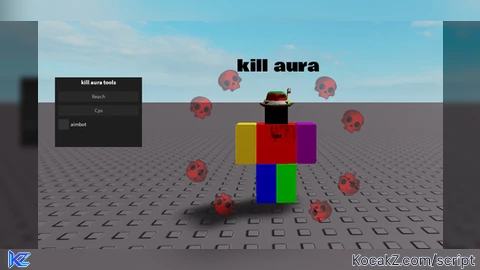
local player = game.Players.LocalPlayer
local mouse = player:GetMouse()
local uis = game:GetService("UserInputService")

local screenGui = Instance.new("ScreenGui", player:WaitForChild("PlayerGui"))
screenGui.ResetOnSpawn = false

local frame = Instance.new("Frame", screenGui)
frame.Size = UDim2.new(0, 250, 0, 200)
frame.Position = UDim2.new(0.1, 0, 0.1, 0)
frame.BackgroundColor3 = Color3.fromRGB(30, 30, 30)
frame.BorderSizePixel = 0
frame.Active = true
frame.Draggable = true
frame.Name = "KillAuraFrame"

local title = Instance.new("TextLabel", frame)
title.Text = "kill aura tools"
title.Size = UDim2.new(1, 0, 0, 30)
title.BackgroundTransparency = 1
title.TextColor3 = Color3.fromRGB(255, 255, 255)
title.Font = Enum.Font.SourceSansBold
title.TextSize = 20

local reachBox = Instance.new("TextBox", frame)
reachBox.PlaceholderText = "Reach"
reachBox.Size = UDim2.new(1, -20, 0, 30)
reachBox.Position = UDim2.new(0, 10, 0, 40)
reachBox.BackgroundColor3 = Color3.fromRGB(40, 40, 40)
reachBox.TextColor3 = Color3.fromRGB(255, 255, 255)
reachBox.BorderSizePixel = 0
reachBox.Font = Enum.Font.SourceSans
reachBox.TextSize = 18
reachBox.Text = ""
reachBox.ClearTextOnFocus = false

local cpsBox = Instance.new("TextBox", frame)
cpsBox.PlaceholderText = "Cps"
cpsBox.Size = UDim2.new(1, -20, 0, 30)
cpsBox.Position = UDim2.new(0, 10, 0, 80)
cpsBox.BackgroundColor3 = Color3.fromRGB(40, 40, 40)
cpsBox.TextColor3 = Color3.fromRGB(255, 255, 255)
cpsBox.BorderSizePixel = 0
cpsBox.Font = Enum.Font.SourceSans
cpsBox.TextSize = 18
cpsBox.Text = ""
cpsBox.ClearTextOnFocus = false

local toggleFrame = Instance.new("Frame", frame)
toggleFrame.Size = UDim2.new(0, 120, 0, 30)
toggleFrame.Position = UDim2.new(0, 10, 0, 120)
toggleFrame.BackgroundTransparency = 1

local toggleButton = Instance.new("TextButton", toggleFrame)
toggleButton.Size = UDim2.new(0, 30, 1, 0)
toggleButton.BackgroundColor3 = Color3.fromRGB(50, 50, 50)
toggleButton.BorderSizePixel = 0
toggleButton.Text = ""
toggleButton.AutoButtonColor = false
toggleButton.Font = Enum.Font.SourceSans
toggleButton.TextColor3 = Color3.new(1, 1, 1)
toggleButton.TextSize = 18
toggleButton.TextWrapped = true
toggleButton.TextXAlignment = Enum.TextXAlignment.Center
toggleButton.TextYAlignment = Enum.TextYAlignment.Center
toggleButton.Text = ""

local toggleLabel = Instance.new("TextLabel", toggleFrame)
toggleLabel.Size = UDim2.new(1, -35, 1, 0)
toggleLabel.Position = UDim2.new(0, 35, 0, 0)
toggleLabel.BackgroundTransparency = 1
toggleLabel.Text = "aimbot"
toggleLabel.Font = Enum.Font.SourceSans
toggleLabel.TextColor3 = Color3.fromRGB(255, 255, 255)
toggleLabel.TextSize = 18
toggleLabel.TextXAlignment = Enum.TextXAlignment.Left

local aimbotEnabled = false
toggleButton.MouseButton1Click:Connect(function()
    aimbotEnabled = not aimbotEnabled
    toggleButton.Text = aimbotEnabled and "✅" or ""
end)

local toolReach = 50
local toolEquipped = false
local clickLoop = nil

local function extendHitbox(tool)
    local handle = tool:FindFirstChild("Handle")
    if handle and handle:IsA("BasePart") then
        handle.Size = Vector3.new(toolReach, toolReach, toolReach)
        handle.Massless = true
        handle.CanCollide = false
        handle.Transparency = 0.5
    end
end

local function startClicking(cps)
    if clickLoop then clickLoop:Disconnect() end
    clickLoop = game:GetService("RunService").RenderStepped:Connect(function()
        if toolEquipped then
            local delayTime = 1 / math.clamp(cps, 1, 20)
            mouse1press()
            wait(delayTime)
            mouse1release()
        end
    end)
end

game:GetService("RunService").RenderStepped:Connect(function()
    if not aimbotEnabled then return end
    local char = player.Character
    if not char or not char:FindFirstChild("Head") then return end

    local head = char.Head
    local closest
    local shortest = math.huge

    for _, plr in ipairs(game.Players:GetPlayers()) do
        if plr ~= player and plr.Character and plr.Character:FindFirstChild("Head") then
            local dist = (plr.Character.Head.Position - head.Position).Magnitude
            if dist < toolReach + 20 and dist < shortest then
                closest = plr
                shortest = dist
            end
        end
    end

    if closest then
        local cam = workspace.CurrentCamera
        cam.CFrame = CFrame.new(cam.CFrame.Position, closest.Character.Head.Position)
    end
end)

player.CharacterAdded:Connect(function(char)
    char.ChildAdded:Connect(function(child)
        if child:IsA("Tool") then
            toolEquipped = true
            local reach = tonumber(reachBox.Text)
            if reach then toolReach = reach end
            extendHitbox(child)

            local cps = tonumber(cpsBox.Text) or 10
            startClicking(cps)
        end
    end)
    char.ChildRemoved:Connect(function(child)
        if child:IsA("Tool") then
            toolEquipped = false
            if clickLoop then clickLoop:Disconnect() end
        end
    end)
end)

if player.Character then
    for _, tool in ipairs(player.Character:GetChildren()) do
        if tool:IsA("Tool") then
            extendHitbox(tool)
        end
    end
end


What am I supposed to type in the two textboxes?
what is the Cps for?
@SirPwnsAlot "Reach" set number you want to make your tool be able to work on reach you want, "Cps" click per second on tool you want to use
hmmmmmmmmm I see
doesnt work pretty sure