


KeylessUniversal
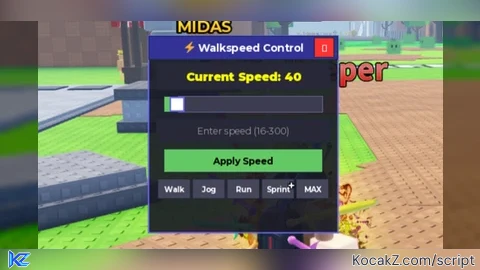
-- Advanced Walkspeed Control Script
-- Works with most exploits (Synapse, Fluxus, Krnl, etc.)

-- Configuration
local player = game.Players.LocalPlayer
local character = player.Character or player.CharacterAdded:Wait()
local humanoid = character:WaitForChild("Humanoid")

-- GUI Creation
local ScreenGui = Instance.new("ScreenGui")
ScreenGui.Name = "WalkspeedGUI"
ScreenGui.ResetOnSpawn = false
ScreenGui.Parent = player:WaitForChild("PlayerGui")

-- Main Frame
local MainFrame = Instance.new("Frame")
MainFrame.Name = "MainFrame"
MainFrame.Size = UDim2.new(0, 250, 0, 200)
MainFrame.Position = UDim2.new(0.5, -125, 0.5, -100)
MainFrame.BackgroundColor3 = Color3.fromRGB(25, 25, 35)
MainFrame.BackgroundTransparency = 0.1
MainFrame.BorderSizePixel = 2
MainFrame.BorderColor3 = Color3.fromRGB(100, 100, 255)
MainFrame.Active = true
MainFrame.Draggable = true
MainFrame.Parent = ScreenGui

-- Title Bar
local TitleBar = Instance.new("TextLabel")
TitleBar.Name = "TitleBar"
TitleBar.Size = UDim2.new(1, 0, 0, 30)
TitleBar.BackgroundColor3 = Color3.fromRGB(50, 50, 150)
TitleBar.Text = "⚡ Walkspeed Control"
TitleBar.TextColor3 = Color3.fromRGB(255, 255, 255)
TitleBar.TextSize = 16
TitleBar.Font = Enum.Font.GothamBold
TitleBar.Parent = MainFrame

-- Close Button
local CloseButton = Instance.new("TextButton")
CloseButton.Name = "CloseButton"
CloseButton.Size = UDim2.new(0, 25, 0, 25)
CloseButton.Position = UDim2.new(1, -30, 0, 2)
CloseButton.BackgroundColor3 = Color3.fromRGB(255, 50, 50)
CloseButton.Text = "✕"
CloseButton.TextColor3 = Color3.fromRGB(255, 255, 255)
CloseButton.TextSize = 14
CloseButton.Font = Enum.Font.GothamBold
CloseButton.Parent = MainFrame

-- Current Speed Display
local SpeedDisplay = Instance.new("TextLabel")
SpeedDisplay.Name = "SpeedDisplay"
SpeedDisplay.Size = UDim2.new(1, -20, 0, 35)
SpeedDisplay.Position = UDim2.new(0, 10, 0, 35)
SpeedDisplay.BackgroundColor3 = Color3.fromRGB(40, 40, 55)
SpeedDisplay.Text = "Current Speed: 16"
SpeedDisplay.TextColor3 = Color3.fromRGB(255, 255, 0)
SpeedDisplay.TextSize = 18
SpeedDisplay.Font = Enum.Font.GothamBlack
SpeedDisplay.Parent = MainFrame

-- Slider Background
local SliderFrame = Instance.new("Frame")
SliderFrame.Name = "SliderFrame"
SliderFrame.Size = UDim2.new(1, -40, 0, 20)
SliderFrame.Position = UDim2.new(0, 20, 0, 80)
SliderFrame.BackgroundColor3 = Color3.fromRGB(60, 60, 80)
SliderFrame.BorderSizePixel = 1
SliderFrame.BorderColor3 = Color3.fromRGB(100, 100, 150)
SliderFrame.Parent = MainFrame

-- Slider Fill
local SliderFill = Instance.new("Frame")
SliderFill.Name = "SliderFill"
SliderFill.Size = UDim2.new(0, 0, 1, 0)
SliderFill.BackgroundColor3 = Color3.fromRGB(100, 200, 100)
SliderFill.Parent = SliderFrame

-- Slider Button
local SliderButton = Instance.new("TextButton")
SliderButton.Name = "SliderButton"
SliderButton.Size = UDim2.new(0, 16, 0, 16)
SliderButton.Position = UDim2.new(0, 0, 0.5, -8)
SliderButton.BackgroundColor3 = Color3.fromRGB(255, 255, 255)
SliderButton.BorderSizePixel = 2
SliderButton.BorderColor3 = Color3.fromRGB(100, 100, 255)
SliderButton.Text = ""
SliderButton.Parent = SliderFrame

-- Speed Value Input
local SpeedInput = Instance.new("TextBox")
SpeedInput.Name = "SpeedInput"
SpeedInput.Size = UDim2.new(1, -20, 0, 30)
SpeedInput.Position = UDim2.new(0, 10, 0, 110)
SpeedInput.BackgroundColor3 = Color3.fromRGB(40, 40, 55)
SpeedInput.PlaceholderText = "Enter speed (16-300)"
SpeedInput.PlaceholderColor3 = Color3.fromRGB(150, 150, 150)
SpeedInput.Text = ""
SpeedInput.TextColor3 = Color3.fromRGB(255, 255, 255)
SpeedInput.TextSize = 14
SpeedInput.Font = Enum.Font.Gotham
SpeedInput.Parent = MainFrame

-- Apply Button
local ApplyButton = Instance.new("TextButton")
ApplyButton.Name = "ApplyButton"
ApplyButton.Size = UDim2.new(1, -40, 0, 30)
ApplyButton.Position = UDim2.new(0, 20, 0, 150)
ApplyButton.BackgroundColor3 = Color3.fromRGB(100, 200, 100)
ApplyButton.Text = "Apply Speed"
ApplyButton.TextColor3 = Color3.fromRGB(0, 0, 0)
ApplyButton.TextSize = 14
ApplyButton.Font = Enum.Font.GothamBold
ApplyButton.Parent = MainFrame

-- Presets Frame
local PresetsFrame = Instance.new("Frame")
PresetsFrame.Name = "PresetsFrame"
PresetsFrame.Size = UDim2.new(1, -20, 0, 60)
PresetsFrame.Position = UDim2.new(0, 10, 0, 190)
PresetsFrame.BackgroundTransparency = 1
PresetsFrame.Parent = MainFrame

-- Preset Buttons
local presets = {
    {name = "Walk", value = 16},
    {name = "Jog", value = 50},
    {name = "Run", value = 100},
    {name = "Sprint", value = 200},
    {name = "MAX", value = 300}
}

for i, preset in ipairs(presets) do
    local button = Instance.new("TextButton")
    button.Name = preset.name .. "Button"
    button.Size = UDim2.new(0.18, 0, 0, 25)
    button.Position = UDim2.new(0.01 + (i - 1) * 0.20, 0, 0, 0)
    button.BackgroundColor3 = Color3.fromRGB(70, 70, 90)
    button.Text = preset.name
    button.TextColor3 = Color3.fromRGB(255, 255, 255)
    button.TextSize = 11
    button.Font = Enum.Font.GothamBold
    button.Parent = PresetsFrame

    button.MouseButton1Click:Connect(function()
        setSpeed(preset.value)
    end)
end

-- Resize MainFrame to fit presets
MainFrame.Size = UDim2.new(0, 250, 0, 260)

-- Speed Setting Function
function setSpeed(speed)
    speed = math.clamp(speed, 16, 300)
    humanoid.WalkSpeed = speed
    SpeedDisplay.Text = "Current Speed: " .. speed

    -- Update slider position
    local percent = (speed - 16) / (300 - 16)
    local sliderWidth = SliderFrame.AbsoluteSize.X
    SliderButton.Position = UDim2.new(0, percent * sliderWidth - 8, 0.5, -8)
    SliderFill.Size = UDim2.new(0, percent * sliderWidth, 1, 0)
end

-- Slider Dragging
local dragging = false

SliderButton.MouseButton1Down:Connect(function()
    dragging = true
end)

game:GetService("UserInputService").InputEnded:Connect(function(input)
    if input.UserInputType == Enum.UserInputType.MouseButton1 then
        dragging = false
    end
end)

game:GetService("UserInputService").InputChanged:Connect(function(input)
    if dragging and input.UserInputType == Enum.UserInputType.MouseMovement then
        local sliderPos = SliderFrame.AbsolutePosition
        local sliderWidth = SliderFrame.AbsoluteSize.X
        local mouseX = input.Position.X - sliderPos.X
        local percent = math.clamp(mouseX / sliderWidth, 0, 1)

        local speed = math.floor(16 + percent * (300 - 16))
        setSpeed(speed)
    end
end)

-- Apply Button Function
ApplyButton.MouseButton1Click:Connect(function()
    local value = tonumber(SpeedInput.Text)
    if value then
        setSpeed(value)
    else
        SpeedInput.Text = "Invalid input!"
        task.wait(1)
        SpeedInput.Text = ""
    end
end)

-- Close Button Function
CloseButton.MouseButton1Click:Connect(function()
    ScreenGui:Destroy()
end)

-- Character Respawn Handler
player.CharacterAdded:Connect(function(newChar)
    character = newChar
    humanoid = character:WaitForChild("Humanoid")

    -- Preserve walkspeed on respawn
    local currentSpeed = humanoid.WalkSpeed
    if currentSpeed < 16 then
        currentSpeed = 16
    end
    setSpeed(currentSpeed)
end)

-- Initial Setup
setSpeed(16)

-- Toggle GUI with F key
game:GetService("UserInputService").InputBegan:Connect(function(input)
    if input.KeyCode == Enum.KeyCode.F then
        MainFrame.Visible = not MainFrame.Visible
    end
end)

print("⚡ Walkspeed script loaded! Press F to toggle GUI")No comments yet for this script.
![[KEYLESS] Moondiety Script | 17+ supported Games](https://scriptblox.com/images/sb/0-1753093706828.png)

