


Key RequiredUniversal
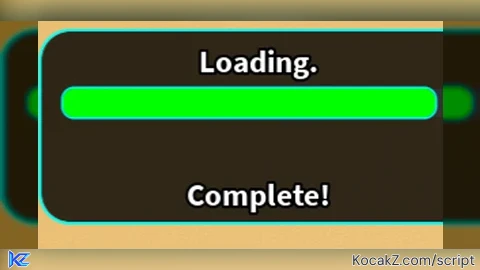
local TweenService = game:GetService("TweenService")

-- Create ScreenGui
local ScreenGui = Instance.new("ScreenGui")
ScreenGui.Parent = game.CoreGui
ScreenGui.ZIndexBehavior = Enum.ZIndexBehavior.Sibling

-- Main Frame
local MainFrame = Instance.new("Frame")
MainFrame.Parent = ScreenGui
MainFrame.BackgroundColor3 = Color3.fromRGB(0, 0, 0) -- Black background
MainFrame.Size = UDim2.new(0, 320, 0, 140) -- Compact size
MainFrame.Position = UDim2.new(0.5, -160, 0.5, -70)
MainFrame.BorderSizePixel = 0
MainFrame.BackgroundTransparency = 0.2 -- Slight transparency

-- Rounded Corners
local UICorner = Instance.new("UICorner")
UICorner.CornerRadius = UDim.new(0.15, 0)
UICorner.Parent = MainFrame

-- Cyan UI Stroke (Glowing Border Around GUI)
local GUIStroke = Instance.new("UIStroke")
GUIStroke.Color = Color3.fromRGB(0, 255, 255) -- Cyan Glow
GUIStroke.Thickness = 2
GUIStroke.Parent = MainFrame

-- Loading Title
local LoadingTitle = Instance.new("TextLabel")
LoadingTitle.Parent = MainFrame
LoadingTitle.Size = UDim2.new(1, 0, 0.2, 0)
LoadingTitle.Position = UDim2.new(0, 0, 0.05, 0)
LoadingTitle.Text = "Loading."
LoadingTitle.TextColor3 = Color3.fromRGB(255, 255, 255) -- White
LoadingTitle.Font = Enum.Font.SourceSansBold
LoadingTitle.TextScaled = true
LoadingTitle.BackgroundTransparency = 1

-- Black Stroke for "Loading"
local TitleStroke = Instance.new("UIStroke")
TitleStroke.Thickness = 2
TitleStroke.Color = Color3.fromRGB(0, 0, 0) -- Black Outline
TitleStroke.Parent = LoadingTitle

-- Progress Bar Background (Now on Top)
local ProgressBarBackground = Instance.new("Frame")
ProgressBarBackground.Parent = MainFrame
ProgressBarBackground.BackgroundColor3 = Color3.fromRGB(50, 50, 50)
ProgressBarBackground.Size = UDim2.new(0.9, 0, 0.15, 0) -- Smaller Height
ProgressBarBackground.Position = UDim2.new(0.05, 0, 0.3, 0) -- Moved to top
ProgressBarBackground.BorderSizePixel = 0

local UICorner2 = Instance.new("UICorner")
UICorner2.CornerRadius = UDim.new(0.4, 0) -- Smooth Curves
UICorner2.Parent = ProgressBarBackground

-- Progress Bar (Filling)
local ProgressBar = Instance.new("Frame")
ProgressBar.Parent = ProgressBarBackground
ProgressBar.BackgroundColor3 = Color3.fromRGB(0, 255, 0) -- Green Progress Bar
ProgressBar.Size = UDim2.new(0, 0, 1, 0)
ProgressBar.BorderSizePixel = 0

-- Rounded Edges for Progress Bar
local UICorner3 = Instance.new("UICorner")
UICorner3.CornerRadius = UDim.new(0.4, 0) -- Smooth, Rounded Progress Bar
UICorner3.Parent = ProgressBar

-- Cyan UI Stroke (Glowing Effect on Progress Bar)
local ProgressBarStroke = Instance.new("UIStroke")
ProgressBarStroke.Color = Color3.fromRGB(0, 255, 255) -- Cyan Glow
ProgressBarStroke.Thickness = 1.5
ProgressBarStroke.Parent = ProgressBar

-- Status Text (Now at Bottom)
local StatusText = Instance.new("TextLabel")
StatusText.Parent = MainFrame
StatusText.Size = UDim2.new(1, 0, 0.2, 0)
StatusText.Position = UDim2.new(0, 0, 0.75, 0) -- Moved to bottom
StatusText.Text = "Loading Assets..."
StatusText.TextColor3 = Color3.fromRGB(255, 255, 255) -- White
StatusText.Font = Enum.Font.SourceSansBold
StatusText.TextScaled = true
StatusText.BackgroundTransparency = 1

-- Black Stroke for Status Text
local StatusStroke = Instance.new("UIStroke")
StatusStroke.Thickness = 2
StatusStroke.Color = Color3.fromRGB(0, 0, 0) -- Black Outline
StatusStroke.Parent = StatusText

-- Function to Smoothly Animate Progress Bar
local function updateProgress(percent, text, duration)
    StatusText.Text = text
    TweenService:Create(
        ProgressBar,
        TweenInfo.new(duration, Enum.EasingStyle.Quad, Enum.EasingDirection.Out),
        { Size = UDim2.new(percent / 100, 0, 1, 0) }
    ):Play()
    wait(duration)
end

-- Animate Loading "..."
spawn(function()
    while true do
        for _, dots in pairs({".", "..", "..."}) do
            LoadingTitle.Text = "Loading" .. dots
            wait(0.5)
        end
    end
end)

-- Loading Stages with 5% Increments over 45 seconds
updateProgress(5, "Loading Assets...", 2.25)
updateProgress(10, "Loading Assets...", 2.25)
updateProgress(15, "Loading Assets...", 2.25)
updateProgress(20, "Loading GUI...", 2.25)
updateProgress(25, "Loading GUI...", 2.25)
updateProgress(30, "Loading GUI...", 2.25)
updateProgress(35, "Loading Script Variables...", 2.25)
updateProgress(40, "Loading Script Variables...", 2.25)
updateProgress(45, "Loading Script Variables...", 2.25)
updateProgress(50, "Finalizing...", 2.25)
updateProgress(55, "Finalizing...", 2.25)
updateProgress(60, "Finalizing...", 2.25)
updateProgress(65, "Finalizing...", 2.25)
updateProgress(70, "Finalizing...", 2.25)
updateProgress(75, "Finalizing...", 2.25)
updateProgress(80, "Finalizing...", 2.25)
updateProgress(85, "Finalizing...", 2.25)
updateProgress(90, "Finalizing...", 2.25)
updateProgress(95, "Finalizing...", 2.25)
updateProgress(100, "Complete!", 2.25)

-- Show "Loading Failed"
StatusText.Text = "Loading Failed"
StatusText.TextColor3 = Color3.fromRGB(255, 0, 0) -- Red text

wait(1.5)

-- Show "Do Not Leave Fixing Error"
StatusText.Text = "Do Not Leave Fixing Error"
StatusText.TextColor3 = Color3.fromRGB(255, 255, 255) -- Back to WhiteNo comments yet for this script.


