

KeylessUniversal
-- Create the ScreenGui
local screenGui = Instance.new("ScreenGui")
screenGui.Parent = game.Players.LocalPlayer:WaitForChild("PlayerGui")
screenGui.Name = "JumpPowerGui"

-- Create the Frame
local frame = Instance.new("Frame")
frame.Parent = screenGui
frame.BackgroundColor3 = Color3.new(1, 1, 1)
frame.Size = UDim2.new(0, 300, 0, 250) -- Increased height to accommodate the label
frame.Position = UDim2.new(0.5, -150, 0.5, -125)
frame.Active = true -- Make frame draggable

-- Enable dragging of the Frame
local UIS = game:GetService("UserInputService")
local dragging
local dragInput
local dragStart
local startPos

local function update(input)
    local delta = input.Position - dragStart
    frame.Position = UDim2.new(startPos.X.Scale, startPos.X.Offset + delta.X, startPos.Y.Scale, startPos.Y.Offset + delta.Y)
end

frame.InputBegan:Connect(function(input)
    if input.UserInputType == Enum.UserInputType.MouseButton1 or input.UserInputType == Enum.UserInputType.Touch then
        dragging = true
        dragStart = input.Position
        startPos = frame.Position

        input.Changed:Connect(function()
            if input.UserInputState == Enum.UserInputState.End then
                dragging = false
            end
        end)
    end
end)

frame.InputChanged:Connect(function(input)
    if input.UserInputType == Enum.UserInputType.MouseMovement or input.UserInputType == Enum.UserInputType.Touch then
        dragInput = input
    end
end)

UIS.InputChanged:Connect(function(input)
    if input == dragInput and dragging then
        update(input)
    end
end)

-- Create the TextBox
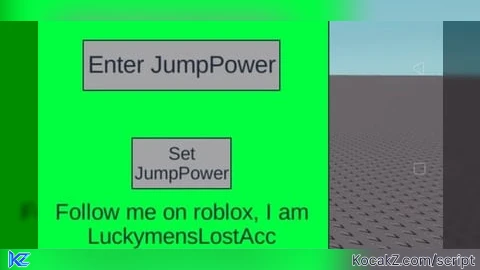
local textBox = Instance.new("TextBox")
textBox.Parent = frame
textBox.Size = UDim2.new(0, 200, 0, 50)
textBox.Position = UDim2.new(0.5, -100, 0.2, -25)
textBox.Text = "Enter JumpPower"
textBox.TextSize = 18
textBox.TextScaled = true -- Scale the text to fit within the box
textBox.ClearTextOnFocus = true

-- Create the TextButton
local button = Instance.new("TextButton")
button.Parent = frame
button.Size = UDim2.new(0, 100, 0, 50)
button.Position = UDim2.new(0.5, -50, 0.6, -25)
button.Text = "Set JumpPower"
button.TextSize = 18
button.TextScaled = true -- Scale the text to fit within the button

-- Create the Label
local label = Instance.new("TextLabel")
label.Parent = frame
label.Size = UDim2.new(0, 280, 0, 50)
label.Position = UDim2.new(0.5, -140, 0.85, -25)
label.Text = "Follow me on roblox, I am LuckymensLostAcc"
label.TextSize = 18
label.TextScaled = true -- Scale the text to fit within the label
label.BackgroundTransparency = 1 -- Make the background transparent

-- Rainbow Background Coroutine
local function rainbowBackground()
    local hue = 0
    while true do
        hue = hue + 1 / 360
        if hue > 1 then
            hue = 0
        end
        frame.BackgroundColor3 = Color3.fromHSV(hue, 1, 1)
        wait(0.1)
    end
end

-- Start the Rainbow Background Coroutine
coroutine.wrap(rainbowBackground)()

-- Function to set JumpPower
local function setJumpPower()
    local player = game.Players.LocalPlayer
    local character = player.Character or player.CharacterAdded:Wait()
    local humanoid = character:FindFirstChildOfClass("Humanoid")
    local jumpPower = tonumber(textBox.Text)
    if humanoid and jumpPower then
        humanoid.JumpPower = jumpPower
    else
        textBox.Text = "Invalid Input"
    end
end

-- Connect the button to setJumpPower function
button.MouseButton1Click:Connect(setJumpPower)No comments yet for this script.


