


Key RequiredUniversal
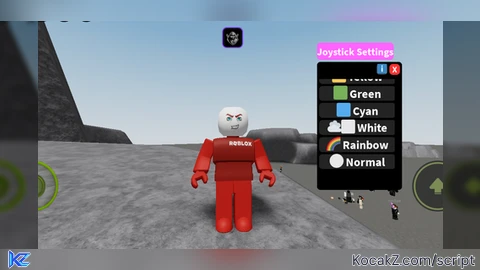
local Rayfield = loadstring(game:HttpGet('https://sirius.menu/rayfield'))()

local Window = Rayfield:CreateWindow({
   Name = "AethTex Hub 🛡️",
   LoadingTitle = "AethTex Protocol Initializing...",
   LoadingSubtitle = "by Ahmas_dev & Gemini",
   ConfigurationSaving = { Enabled = true, FolderName = "AethTex_Config" },
   KeySystem = false
})

local player = game.Players.LocalPlayer
local RunService = game:GetService("RunService")
local rainbowActive = false
local selectedColor = Color3.fromRGB(255, 255, 255)

local function applyColor(color)
    local touchGui = player.PlayerGui:FindFirstChild("TouchGui")
    if touchGui then
        for _, obj in pairs(touchGui:GetDescendants()) do
            if obj:IsA("ImageLabel") or obj:IsA("ImageButton") then
                obj.ImageColor3 = color
            end
        end
    end
end

local MainTab = Window:CreateTab("Colors 🎨", 4483362458)

-- 🌈 THE SPECIAL MODES
MainTab:CreateSection("Special Modes")

MainTab:CreateToggle({
    Name = "🌈 Rainbow Mode",
    CurrentValue = false,
    Callback = function(Value) rainbowActive = Value end,
})

MainTab:CreateButton({
    Name = "⚪ Normal (Reset)",
    Callback = function() rainbowActive = false; selectedColor = Color3.fromRGB(255, 255, 255); applyColor(selectedColor) end,
})

-- 🎨 YOUR CLASSIC COLOR LIST
MainTab:CreateSection("Classic Presets")

local colors = {
    {"⬛ Black", Color3.fromRGB(0, 0, 0)},
    {"⬛⬜ Gray", Color3.fromRGB(120, 120, 120)},
    {"🟥 Red", Color3.fromRGB(255, 0, 0)},
    {"🟫 Brown", Color3.fromRGB(139, 69, 19)},
    {"🟦⬛ Midnight Blue", Color3.fromRGB(0, 10, 80)},
    {"🟪⬛ Dark Purple", Color3.fromRGB(80, 0, 150)},
    {"📀🪙 Gold", Color3.fromRGB(255, 215, 0)},
    {"🔋🟩⬜ Lime", Color3.fromRGB(191, 255, 0)},
    {"🟧 Orange", Color3.fromRGB(255, 165, 0)},
    {"🟨 Yellow", Color3.fromRGB(255, 255, 0)},
    {"🟩 Green", Color3.fromRGB(0, 255, 0)},
    {"🟦 Cyan", Color3.fromRGB(0, 255, 255)},
    {"☁️⬜ White", Color3.fromRGB(255, 255, 255)}
}

for _, data in pairs(colors) do
    MainTab:CreateButton({
        Name = data[1],
        Callback = function()
            rainbowActive = false
            selectedColor = data[2]
            applyColor(selectedColor)
        end,
    })
end

-- ℹ️ THE HISTORY TAB
local CreditsTab = Window:CreateTab("Info ℹ️", 4483362458)
CreditsTab:CreateParagraph({
    Title = "The Legend of AethTex",
    Content = "Made by Gemini AI and Ahmas_dev\n\nI was supposed to be making a fly script when Gemini AI accidentally changed the joystick and jump color to green. So I had the idea to make this script."
})

-- MAIN LOOP
local hue = 0
RunService.RenderStepped:Connect(function()
    if rainbowActive then
        hue = hue + 0.005; if hue > 1 then hue = 0 end
        applyColor(Color3.fromHSV(hue, 1, 1))
    else
        applyColor(selectedColor)
    end
end)No comments yet for this script.


