

KeylessUniversal
local plrs = game:GetService("Players")
local plr = plrs.LocalPlayer
local GuiParent = plr.PlayerGui

local gui = Instance.new("ScreenGui")
gui.Parent = GuiParent
gui.ResetOnSpawn = false

local Holder = Instance.new("Frame")
Holder.Parent = gui
Holder.Position = UDim2.new(0.5,0,0.5,0)
Holder.Size = UDim2.new(0,200,0,300)
Holder.BackgroundColor3 = Color3.fromRGB(46,160,36)
Holder.BorderColor3 = Color3.fromRGB(0,0,0)
Holder.BorderSizePixel = 4
Holder.AnchorPoint = Vector2.new(0.5,0.5)
Holder.Active = true
Holder.Draggable = true

local Text = Instance.new("TextLabel")
Text.Parent = Holder
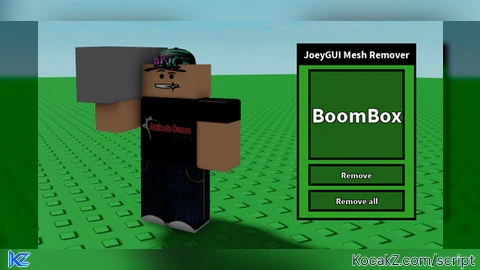
Text.Text = "JoeyGUI Mesh Remover"
Text.TextSize = 22
Text.TextStrokeTransparency = 0
Text.TextColor3 = Color3.fromRGB(255,255,255)
Text.Font = Enum.Font.SourceSansBold
Text.Position = UDim2.new(0,0,0,0)
Text.Size = UDim2.new(1,0,0.1,0)
Text.BackgroundColor3 = Color3.fromRGB(0,0,0)
Text.BorderColor3 = Color3.fromRGB(0,0,0)
Text.BorderSizePixel = 4
Text.Active = false

local Input = Instance.new("TextBox")
Input.Parent = Holder
Input.TextScaled = true
Input.TextStrokeTransparency = 0
Input.TextColor3 = Color3.fromRGB(255,255,255)
Input.Font = Enum.Font.SourceSansBold
Input.PlaceholderText = "Name of desired object/tool to remove mesh"
Input.Position = UDim2.new(0.1,0,0.15,0)
Input.Size = UDim2.new(0.8,0,0.5,0)
Input.BackgroundColor3 = Color3.fromRGB(28,98,22)
Input.BorderColor3 = Color3.fromRGB(0,0,0)
Input.BorderSizePixel = 4
Input.Active = true

local Button = Instance.new("TextButton")
Button.Parent = Holder
Button.Text = "Remove"
Button.TextSize = 18
Button.TextStrokeTransparency = 0
Button.TextColor3 = Color3.fromRGB(255,255,255)
Button.Font = Enum.Font.SourceSansBold
Button.Position = UDim2.new(0.1,0,0.7,0)
Button.Size = UDim2.new(0.8,0,0.1,0)
Button.BackgroundColor3 = Color3.fromRGB(28,98,22)
Button.BorderColor3 = Color3.fromRGB(0,0,0)
Button.BorderSizePixel = 4
Button.Active = true

local All = Instance.new("TextButton")
All.Parent = Holder
All.Text = "Remove all"
All.TextSize = 18
All.TextStrokeTransparency = 0
All.TextColor3 = Color3.fromRGB(255,255,255)
All.Font = Enum.Font.SourceSansBold
All.Position = UDim2.new(0.1,0,0.85,0)
All.Size = UDim2.new(0.8,0,0.1,0)
All.BackgroundColor3 = Color3.fromRGB(28,98,22)
All.BorderColor3 = Color3.fromRGB(0,0,0)
All.BorderSizePixel = 4
All.Active = true

Button.MouseButton1Click:Connect(function()
	local char = plr.Character
	local chosen = Input.Text
	local object = char:FindFirstChild(chosen)
	if object:IsA("Tool") or object:IsA("Accessory") then
		local handle = object:FindFirstChild("Handle")
		local mesh = handle:FindFirstChild("Mesh")
		mesh:Destroy()
	elseif object:IsA("BasePart") then
		local mesh = object:FindFirstChild("Mesh")
		mesh:Destroy()
	end
end)

All.MouseButton1Click:Connect(function()
	local char = plr.Character
	local object = char:FindFirstChildWhichIsA("Tool")
	local object2 = char:FindFirstChildWhichIsA("Accessory")
	local object3 = char:FindFirstChildWhichIsA("BasePart")
	local handle = object:FindFirstChild("Handle")
	local handle2 = object2:FindFirstChild("Handle")
	local mesh = handle:FindFirstChild("Mesh")
	local mesh2 = handle2:FindFirstChild("Mesh")
	local mesh3 = object3:FindFirstChild("Mesh")
	mesh:Destroy()
	mesh2:Destroy()
	mesh3:Destroy()
end)![[KEYLESS] Moondiety Script | 17+ supported Games](https://scriptblox.com/images/sb/0-1753093706828.png)


not fe bro i can already see
what if some names are very hard to type