
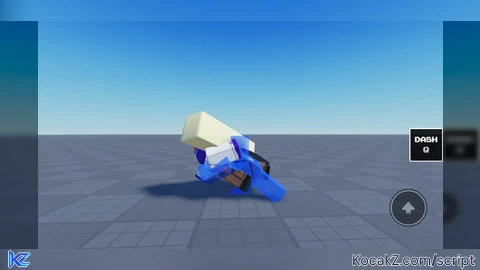

-- Jarona Delta Dash Script + On-Screen Control Button + Help Menu Panel
-- Binds to 'Q' on PC, features an on-screen Dash Button, and an interactive Help UI.

local UserInputService = game:GetService("UserInputService")
local Players = game:GetService("Players")
local TweenService = game:GetService("TweenService")
local Debris = game:GetService("Debris")
local CoreGui = game:GetService("CoreGui")

local player = Players.LocalPlayer
local character = player.Character or player.CharacterAdded:Wait()
local rootPart = character:WaitForChild("HumanoidRootPart")
local humanoid = character:WaitForChild("Humanoid")

-- Dash Configuration Settings
local DASH_SPEED = 110
local DASH_DURATION = 0.25
local COOLDOWN = 1.0
local TrailColor = Color3.fromRGB(0, 100, 255)

local onCooldown = false

-- 1. Create the Main UI Container
local JaronaGui = Instance.new("ScreenGui")
JaronaGui.Name = "JaronaSystemUI"
JaronaGui.ResetOnSpawn = false

if syn and syn.protect_gui then
    syn.protect_gui(JaronaGui)
    JaronaGui.Parent = CoreGui
else
    JaronaGui.Parent = CoreGui
end

-- 2. Create the On-Screen Dash Button
local DashButton = Instance.new("TextButton")
DashButton.Name = "DashButton"
DashButton.Size = UDim2.new(0, 85, 0, 85)
DashButton.Position = UDim2.new(0.85, 0, 0.7, 0)
DashButton.BackgroundColor3 = Color3.fromRGB(15, 15, 20)
DashButton.BorderSizePixel = 2
DashButton.BorderColor3 = Color3.fromRGB(255, 255, 255)
DashButton.Text = "DASH\nQ"
DashButton.TextColor3 = Color3.fromRGB(255, 255, 255)
DashButton.Font = Enum.Font.Code
DashButton.TextSize = 18
DashButton.Parent = JaronaGui

local ButtonCorner = Instance.new("UICorner")
ButtonCorner.CornerRadius = UDim.new(0, 12)
ButtonCorner.Parent = DashButton

-- 3. Create the "?" Help Launcher Button
local HelpButton = Instance.new("TextButton")
HelpButton.Name = "HelpButton"
HelpButton.Size = UDim2.new(0, 35, 0, 35)
HelpButton.Position = UDim2.new(0.85, 25, 0.7, -45) -- Placed neatly right above the dash pad
HelpButton.BackgroundColor3 = Color3.fromRGB(30, 30, 35)
HelpButton.BorderSizePixel = 1
HelpButton.BorderColor3 = Color3.fromRGB(255, 255, 255)
HelpButton.Text = "?"
HelpButton.TextColor3 = Color3.fromRGB(255, 255, 255)
HelpButton.Font = Enum.Font.GothamBold
HelpButton.TextSize = 16
HelpButton.Parent = JaronaGui

local HelpCorner = Instance.new("UICorner")
HelpCorner.CornerRadius = UDim.new(0, 8)
HelpCorner.Parent = HelpButton

-- 4. Create the Hidden Deltarune Help Panel
local HelpPanel = Instance.new("Frame")
HelpPanel.Name = "HelpPanel"
HelpPanel.Size = UDim2.new(0, 320, 0, 240)
HelpPanel.Position = UDim2.new(0.5, -160, 0.5, -120) -- perfectly centered
HelpPanel.BackgroundColor3 = Color3.fromRGB(10, 10, 15)
HelpPanel.BorderSizePixel = 2
HelpPanel.BorderColor3 = Color3.fromRGB(255, 255, 255)
HelpPanel.Visible = false -- Starts hidden hidden until toggled
HelpPanel.Active = true
HelpPanel.Draggable = true
HelpPanel.Parent = JaronaGui

local PanelCorner = Instance.new("UICorner")
PanelCorner.CornerRadius = UDim.new(0, 10)
PanelCorner.Parent = HelpPanel

-- Help Panel Title
local HelpTitle = Instance.new("TextLabel")
HelpTitle.Size = UDim2.new(1, 0, 0, 35)
HelpTitle.BackgroundTransparency = 1
HelpTitle.Text = "★ JARONA SYSTEM HELP ★"
HelpTitle.TextColor3 = Color3.fromRGB(255, 215, 0)
HelpTitle.Font = Enum.Font.Code
HelpTitle.TextSize = 16
HelpTitle.Parent = HelpPanel

-- Help Content/Controls Info Text
local HelpContent = Instance.new("TextLabel")
HelpContent.Size = UDim2.new(1, -20, 1, -80)
HelpContent.Position = UDim2.new(0, 10, 0, 40)
HelpContent.BackgroundTransparency = 1
HelpContent.TextXAlignment = Enum.TextXAlignment.Left
HelpContent.TextYAlignment = Enum.TextYAlignment.Top
HelpContent.TextColor3 = Color3.fromRGB(240, 240, 240)
HelpContent.Font = Enum.Font.SourceSans
HelpContent.TextSize = 16
HelpContent.Text = [[
[ CONTROLS ]
• PC / Keyboard: Press 'Q' to execute.
• Mobile / Tablet: Tap the on-screen 'DASH' button.

[ CURRENT ENGINE STATS ]
• Dash Velocity Speed: ]] .. DASH_SPEED .. [[ power
• Slip Window Duration: ]] .. DASH_DURATION .. [[s
• Cooldown Rate: ]] .. COOLDOWN .. [[s

[ CREDIT ]
• Jarona Deltarune Chapter 5 Meme Replication
]]
HelpContent.Parent = HelpPanel

-- Panel Dismiss Close Button
local CloseHelp = Instance.new("TextButton")
CloseHelp.Size = UDim2.new(0, 100, 0, 30)
CloseHelp.Position = UDim2.new(0.5, -50, 1, -40)
CloseHelp.BackgroundColor3 = Color3.fromRGB(180, 40, 40)
CloseHelp.BorderSizePixel = 0
CloseHelp.Text = "Close"
CloseHelp.TextColor3 = Color3.fromRGB(255, 255, 255)
CloseHelp.Font = Enum.Font.GothamBold
CloseHelp.TextSize = 14
CloseHelp.Parent = HelpPanel

local CloseCorner = Instance.new("UICorner")
CloseCorner.CornerRadius = UDim.new(0, 6)
CloseCorner.Parent = CloseHelp


-- 5. Core Visual Effects Functions (Trails)
local function spawnTrailClone(bodyPart)
    if not bodyPart:IsA("BasePart") then return end

    local clone = bodyPart:Clone()
    clone.Anchored = true
    clone.CanCollide = false
    clone.Material = Enum.Material.Neon
    clone.Color = TrailColor
    clone.Transparency = 0.4

    for _, child in ipairs(clone:GetChildren()) do
        if not child:IsA("SpecialMesh") then
            child:Destroy()
        end
    end

    clone.Parent = workspace

    local fadeTween = TweenService:Create(clone, TweenInfo.new(DASH_DURATION, Enum.EasingStyle.Linear), {
        Transparency = 1,
        Size = clone.Size * 0.9
    })

    fadeTween:Play()
    Debris:AddItem(clone, DASH_DURATION)
end

-- 6. Core Dash Mechanics Engine
local function performJaronaDash()
    if onCooldown or humanoid.Health <= 0 then return end
    onCooldown = true

    DashButton.BackgroundColor3 = Color3.fromRGB(180, 40, 40)
    DashButton.Text = "CD"

    local moveDirection = humanoid.MoveDirection
    if moveDirection.Magnitude == 0 then
        moveDirection = rootPart.CFrame.LookVector
    end

    local bodyVelocity = Instance.new("BodyVelocity")
    bodyVelocity.MaxForce = Vector3.new(100000, 100000, 100000)
    bodyVelocity.Velocity = moveDirection.Unit * DASH_SPEED
    bodyVelocity.Parent = rootPart

    local bodyGyro = Instance.new("BodyGyro")
    bodyGyro.MaxTorque = Vector3.new(100000, 100000, 100000)
    bodyGyro.CFrame = rootPart.CFrame * CFrame.Angles(math.rad(-65), 0, 0)
    bodyGyro.D = 100
    bodyGyro.P = 10000
    bodyGyro.Parent = rootPart

    local trailActive = true
    task.spawn(function()
        while trailActive do
            for _, limb in ipairs(character:GetChildren()) do
                if limb:IsA("BasePart") and limb.Name ~= "HumanoidRootPart" then
                    spawnTrailClone(limb)
                end
            end
            task.wait(0.05)
        end
    end)

    task.wait(DASH_DURATION)
    bodyVelocity:Destroy()
    bodyGyro:Destroy()
    trailActive = false

    task.wait(COOLDOWN)
    DashButton.BackgroundColor3 = Color3.fromRGB(15, 15, 20)
    DashButton.Text = "DASH\nQ"
    onCooldown = false
end

-- 7. Interaction Event Hook Handlers
UserInputService.InputBegan:Connect(function(input, gameProcessed)
    if gameProcessed then return end
    if input.KeyCode == Enum.KeyCode.Q then
        performJaronaDash()
    end
end)

DashButton.MouseButton1Click:Connect(function()
    performJaronaDash()
end)

-- Help Panel Open/Close Toggle Handlers
HelpButton.MouseButton1Click:Connect(function()
    HelpPanel.Visible = not HelpPanel.Visible
end)

CloseHelp.MouseButton1Click:Connect(function()
    HelpPanel.Visible = false
end)

-- Character Auto-Rehook Stability Controller
player.CharacterAdded:Connect(function(newCharacter)
    character = newCharacter
    rootPart = character:WaitForChild("HumanoidRootPart")
    humanoid = character:WaitForChild("Humanoid")
end)
How to Execute Universal Script – Jarona!
Step 1: Copy Code: Click the Copy Code button in the viewer above to grab the clean Lua loadstring.
Step 2: Launch Executor: Open a compatible, unpatched executor. If you need one, check our Roblox Executors Directory.
Step 3: Join Experience: Launch Roblox and join Universal Script.
Step 4: Attach & Run: Attach/inject your executor into the Roblox process, paste the code into the script tab, and press Execute.
Features & Information
Script Changelog (1)
Community Comments (0)
No comments yet for this script.
Frequently Asked Questions
How do I execute Universal Script – Jarona! in Roblox?
To run Universal Script – Jarona!, copy the Lua loadstring from the code viewer above, launch Roblox and join Universal Script, attach a working executor (such as Potassium, Solara, or Delta from our Executors directory), paste the code into your executor console, and click Execute.
Is Universal Script – Jarona! keyless or does it require an access key?
Universal Script – Jarona! requires an access key. You can retrieve the official key directly using the Get Script Key link provided above.
Is Universal Script – Jarona! currently safe and working?
This script is active and operational. Always test scripts using a secondary (alt) Roblox account to safeguard your main profile against anti-cheat bans.


![Ez Hub [Open Source] [150+ games] - Verified script for Universal Script](https://media.kocakz.me/b74a9ac15370ba766b2fa9531f17c9dad2c0befb2b951693ae723e4c7d2c3fb6.webp)


![[KEYLESS] Moondiety Script | 20+ supported Games - Verified script for Universal Script](https://media.kocakz.me/6834c33a36c9fbe66afae4c6754c2b80386ce636b2f972464a95866f4b6a42eb.webp)



