

Key RequiredUniversal
-- Modern Custom Menu (complete) --
-- Put this LocalScript into StarterGui

local Players = game:GetService("Players")
local TweenService = game:GetService("TweenService")
local UserInputService = game:GetService("UserInputService")
local LocalPlayer = Players.LocalPlayer

-- Root GUI
local gui = Instance.new("ScreenGui")
gui.Name = "ModernCustomMenu"
gui.ResetOnSpawn = false
gui.Parent = LocalPlayer:WaitForChild("PlayerGui")

-- ---------- Reopen floating button (iOS style) ----------
local reopenBtn = Instance.new("ImageButton")
reopenBtn.Name = "ReopenButton"
reopenBtn.Size = UDim2.new(0, 56, 0, 56)
reopenBtn.AnchorPoint = Vector2.new(1, 1)
reopenBtn.Position = UDim2.new(1, -28, 1, -28) -- bottom-right corner with margin
reopenBtn.BackgroundTransparency = 0
reopenBtn.BackgroundColor3 = Color3.fromRGB(255,255,255)
reopenBtn.BackgroundTransparency = 0.9 -- subtle
reopenBtn.Image = "" -- empty image; we'll use plain round button
reopenBtn.Visible = false
reopenBtn.Parent = gui
local reopenCorner = Instance.new("UICorner", reopenBtn)
reopenCorner.CornerRadius = UDim.new(1, 0)

-- small shadow under button
local reopenShadow = Instance.new("ImageLabel")
reopenShadow.Name = "Shadow"
reopenShadow.Size = UDim2.new(1, 20, 1, 20)
reopenShadow.Position = UDim2.new(0, -10, 0, -10)
reopenShadow.BackgroundTransparency = 1
reopenShadow.Image = "rbxassetid://5028857084" -- common shadow asset
reopenShadow.ImageColor3 = Color3.new(0,0,0)
reopenShadow.ImageTransparency = 0.65
reopenShadow.ScaleType = Enum.ScaleType.Slice
reopenShadow.SliceCenter = Rect.new(24,24,276,276)
reopenShadow.ZIndex = 0
reopenShadow.Parent = reopenBtn

local reopenIcon = Instance.new("TextLabel")
reopenIcon.Size = UDim2.new(1,0,1,0)
reopenIcon.BackgroundTransparency = 1
reopenIcon.Text = "≡"
reopenIcon.Font = Enum.Font.GothamBold
reopenIcon.TextSize = 24
reopenIcon.TextColor3 = Color3.fromRGB(30,30,40)
reopenIcon.Parent = reopenBtn

-- ---------- Main menu container ----------
local mainFrame = Instance.new("Frame")
mainFrame.Name = "MainFrame"
mainFrame.Size = UDim2.new(0, 360, 0, 520)
mainFrame.Position = UDim2.new(0.5, -180, 0.5, -260)
mainFrame.AnchorPoint = Vector2.new(0,0)
mainFrame.BackgroundColor3 = Color3.fromRGB(28,30,38)
mainFrame.BackgroundTransparency = 0
mainFrame.BorderSizePixel = 0
mainFrame.Parent = gui
local mainCorner = Instance.new("UICorner", mainFrame)
mainCorner.CornerRadius = UDim.new(0, 16)

-- outer shadow
local mainShadow = Instance.new("ImageLabel", mainFrame)
mainShadow.Name = "Shadow"
mainShadow.Size = UDim2.new(1, 40, 1, 40)
mainShadow.Position = UDim2.new(0, -20, 0, -20)
mainShadow.BackgroundTransparency = 1
mainShadow.Image = "rbxassetid://5028857084"
mainShadow.ImageColor3 = Color3.new(0,0,0)
mainShadow.ImageTransparency = 0.45
mainShadow.ScaleType = Enum.ScaleType.Slice
mainShadow.SliceCenter = Rect.new(24,24,276,276)
mainShadow.ZIndex = 0

-- top bar
local titleBar = Instance.new("Frame", mainFrame)
titleBar.Size = UDim2.new(1, 0, 0, 56)
titleBar.Position = UDim2.new(0, 0, 0, 0)
titleBar.BackgroundTransparency = 1

local titleLabel = Instance.new("TextLabel", titleBar)
titleLabel.Size = UDim2.new(1, -72, 1, 0)
titleLabel.Position = UDim2.new(0, 16, 0, 0)
titleLabel.BackgroundTransparency = 1
titleLabel.Font = Enum.Font.GothamBold
titleLabel.TextSize = 20
titleLabel.TextXAlignment = Enum.TextXAlignment.Left
titleLabel.TextColor3 = Color3.fromRGB(230,235,255)
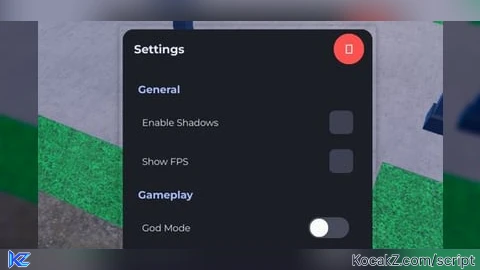
titleLabel.Text = "Settings"

local closeBtn = Instance.new("ImageButton", titleBar)
closeBtn.Size = UDim2.new(0, 44, 0, 44)
closeBtn.Position = UDim2.new(1, -56, 0.5, -22)
closeBtn.BackgroundTransparency = 0
closeBtn.Image = ""
closeBtn.BackgroundColor3 = Color3.fromRGB(255,80,80)
closeBtn.AutoButtonColor = false
local closeCorner = Instance.new("UICorner", closeBtn)
closeCorner.CornerRadius = UDim.new(1, 0)
local closeX = Instance.new("TextLabel", closeBtn)
closeX.Size = UDim2.new(1,0,1,0)
closeX.BackgroundTransparency = 1
closeX.Text = "✕"
closeX.Font = Enum.Font.GothamBold
closeX.TextSize = 22
closeX.TextColor3 = Color3.fromRGB(255,255,255)

-- content area (scrolling)
local scrollFrame = Instance.new("ScrollingFrame", mainFrame)
scrollFrame.Name = "ScrollArea"
scrollFrame.Size = UDim2.new(1, -32, 1, -96)
scrollFrame.Position = UDim2.new(0,16,0,72)
scrollFrame.BackgroundTransparency = 1
scrollFrame.BorderSizePixel = 0
scrollFrame.ScrollBarThickness = 8
scrollFrame.CanvasSize = UDim2.new(0,0,0,0)
local uiList = Instance.new("UIListLayout", scrollFrame)
uiList.Padding = UDim.new(0, 12)
uiList.HorizontalAlignment = Enum.HorizontalAlignment.Left
uiList.SortOrder = Enum.SortOrder.LayoutOrder

-- update canvas size when contents change
uiList:GetPropertyChangedSignal("AbsoluteContentSize"):Connect(function()
    scrollFrame.CanvasSize = UDim2.new(0, 0, 0, uiList.AbsoluteContentSize.Y + 12)
end)

-- small decorative divider
local function createDivider()
    local d = Instance.new("Frame", scrollFrame)
    d.Size = UDim2.new(1, 0, 0, 8)
    d.BackgroundTransparency = 1
    local line = Instance.new("Frame", d)
    line.Size = UDim2.new(1, -40, 0, 2)
    line.Position = UDim2.new(0, 20, 0.5, -1)
    line.AnchorPoint = Vector2.new(0,0.5)
    line.BackgroundColor3 = Color3.fromRGB(55,60,80)
    line.BorderSizePixel = 0
    local lineCorner = Instance.new("UICorner", line)
    lineCorner.CornerRadius = UDim.new(1,0)
end

-- ---------- UI factory functions ----------
local function createSection(titleText)
    local container = Instance.new("Frame", scrollFrame)
    container.Size = UDim2.new(1, 0, 0, 28)
    container.BackgroundTransparency = 1
    local lbl = Instance.new("TextLabel", container)
    lbl.Size = UDim2.new(1, 0, 1, 0)
    lbl.BackgroundTransparency = 1
    lbl.Font = Enum.Font.GothamBold
    lbl.TextSize = 18
    lbl.Text = titleText
    lbl.TextColor3 = Color3.fromRGB(170,190,255)
    lbl.TextXAlignment = Enum.TextXAlignment.Left
    lbl.Position = UDim2.new(0, 6, 0, 0)
end

-- modern checkbox (toggle with checkmark)
local function createCheckbox(text, initial)
    initial = initial or false
    local row = Instance.new("Frame", scrollFrame)
    row.Size = UDim2.new(1, 0, 0, 44)
    row.BackgroundTransparency = 1

    local label = Instance.new("TextLabel", row)
    label.Size = UDim2.new(0.74, 0, 1, 0)
    label.Position = UDim2.new(0, 12, 0, 0)
    label.BackgroundTransparency = 1
    label.Font = Enum.Font.Gotham
    label.TextSize = 16
    label.Text = text
    label.TextColor3 = Color3.fromRGB(235,235,240)
    label.TextXAlignment = Enum.TextXAlignment.Left

    local box = Instance.new("ImageButton", row)
    box.Size = UDim2.new(0, 34, 0, 34)
    box.Position = UDim2.new(1, -46, 0.5, -17)
    box.BackgroundTransparency = 0
    box.AutoButtonColor = false
    box.BackgroundColor3 = Color3.fromRGB(60,64,80)
    box.Image = ""
    local boxCorner = Instance.new("UICorner", box)
    boxCorner.CornerRadius = UDim.new(0,8)

    local mark = Instance.new("TextLabel", box)
    mark.Size = UDim2.new(1,0,1,0)
    mark.BackgroundTransparency = 1
    mark.Font = Enum.Font.GothamBold
    mark.TextSize = 18
    mark.TextColor3 = Color3.fromRGB(255,255,255)
    mark.Text = initial and "✔" or ""
    mark.TextTransparency = initial and 0 or 1

    local state = initial
    local function setState(v)
        state = v
        if state then
            TweenService:Create(box, TweenInfo.new(0.18), {BackgroundColor3 = Color3.fromRGB(0,180,140)}):Play()
            mark.Text = "✔"
            TweenService:Create(mark, TweenInfo.new(0.18), {TextTransparency = 0}):Play()
        else
            TweenService:Create(box, TweenInfo.new(0.18), {BackgroundColor3 = Color3.fromRGB(60,64,80)}):Play()
            TweenService:Create(mark, TweenInfo.new(0.18), {TextTransparency = 1}):Play()
        end
    end

    box.MouseButton1Click:Connect(function()
        setState(not state)
    end)

    -- hover glow effect
    box.MouseEnter:Connect(function()
        TweenService:Create(box, TweenInfo.new(0.12), {BackgroundColor3 = state and Color3.fromRGB(0,200,150) or Color3.fromRGB(80,85,100)}):Play()
    end)
    box.MouseLeave:Connect(function()
        TweenService:Create(box, TweenInfo.new(0.12), {BackgroundColor3 = state and Color3.fromRGB(0,180,140) or Color3.fromRGB(60,64,80)}):Play()
    end)

    return {
        get = function() return state end,
        set = setState
    }
end

-- modern toggle (iOS-like)
local function createToggle(text, initial)
    initial = initial or false
    local row = Instance.new("Frame", scrollFrame)
    row.Size = UDim2.new(1, 0, 0, 44)
    row.BackgroundTransparency = 1

    local label = Instance.new("TextLabel", row)
    label.Size = UDim2.new(0.66, 0, 1, 0)
    label.Position = UDim2.new(0, 12, 0, 0)
    label.BackgroundTransparency = 1
    label.Font = Enum.Font.Gotham
    label.TextSize = 16
    label.Text = text
    label.TextColor3 = Color3.fromRGB(235,235,240)
    label.TextXAlignment = Enum.TextXAlignment.Left

    local togg = Instance.new("Frame", row)
    togg.Size = UDim2.new(0, 58, 0, 30)
    togg.Position = UDim2.new(1, -76, 0.5, -15)
    togg.BackgroundColor3 = initial and Color3.fromRGB(0,180,140) or Color3.fromRGB(70,75,90)
    togg.BorderSizePixel = 0
    local toggCorner = Instance.new("UICorner", togg)
    toggCorner.CornerRadius = UDim.new(1,0)

    local knob = Instance.new("Frame", togg)
    knob.Size = UDim2.new(0, 26, 0, 26)
    knob.Position = initial and UDim2.new(1, -28, 0.5, -13) or UDim2.new(0, 2, 0.5, -13)
    knob.BackgroundColor3 = Color3.fromRGB(250,250,250)
    local knobCorner = Instance.new("UICorner", knob)
    knobCorner.CornerRadius = UDim.new(1,0)

    local state = initial

    local function setState(s, instant)
        state = s
        if instant then
            knob.Position = state and UDim2.new(1, -28, 0.5, -13) or UDim2.new(0, 2, 0.5, -13)
            togg.BackgroundColor3 = state and Color3.fromRGB(0,180,140) or Color3.fromRGB(70,75,90)
        else
            TweenService:Create(knob, TweenInfo.new(0.18), {Position = state and UDim2.new(1, -28, 0.5, -13) or UDim2.new(0, 2, 0.5, -13)}):Play()
            TweenService:Create(togg, TweenInfo.new(0.18), {BackgroundColor3 = state and Color3.fromRGB(0,180,140) or Color3.fromRGB(70,75,90)}):Play()
        end
    end

    togg.InputBegan:Connect(function(input)
        if input.UserInputType == Enum.UserInputType.MouseButton1 or input.UserInputType == Enum.UserInputType.Touch then
            setState(not state)
        end
    end)

    -- visual hover
    togg.InputBegan:Connect(function(inp)
        if inp.UserInputType == Enum.UserInputType.MouseMovement then
            -- no-op for mouse movement on frame; use MouseEnter/Leave on a button if needed
        end
    end)

    return {
        get = function() return state end,
        set = setState
    }
end

-- slider (drag knob or click bar)
local function createSlider(text, minVal, maxVal, defaultVal)
    minVal = minVal or 0
    maxVal = maxVal or 100
    defaultVal = defaultVal or minVal

    local row = Instance.new("Frame", scrollFrame)
    row.Size = UDim2.new(1, 0, 0, 56)
    row.BackgroundTransparency = 1

    local label = Instance.new("TextLabel", row)
    label.Size = UDim2.new(1, 0, 0, 20)
    label.Position = UDim2.new(0,12,0,0)
    label.BackgroundTransparency = 1
    label.Font = Enum.Font.Gotham
    label.TextSize = 15
    label.TextXAlignment = Enum.TextXAlignment.Left
    label.TextColor3 = Color3.fromRGB(230,230,235)
    label.Text = text .. ": " .. tostring(defaultVal)

    local bar = Instance.new("Frame", row)
    bar.Size = UDim2.new(1, -24, 0, 8)
    bar.Position = UDim2.new(0,12,0,32)
    bar.BackgroundColor3 = Color3.fromRGB(60,64,80)
    bar.BorderSizePixel = 0
    local barCorner = Instance.new("UICorner", bar)
    barCorner.CornerRadius = UDim.new(1,0)

    local fill = Instance.new("Frame", bar)
    local startScale = (defaultVal - minVal) / (maxVal - minVal)
    fill.Size = UDim2.new(startScale, 0, 1, 0)
    fill.BackgroundColor3 = Color3.fromRGB(0,170,255)
    local fillCorner = Instance.new("UICorner", fill)
    fillCorner.CornerRadius = UDim.new(1,0)

    local knob = Instance.new("Frame", bar)
    knob.Size = UDim2.new(0, 20, 0, 20)
    knob.Position = UDim2.new(startScale, -10, 0.5, -10)
    knob.BackgroundColor3 = Color3.fromRGB(250,250,250)
    knob.BorderSizePixel = 0
    local knobCorner = Instance.new("UICorner", knob)
    knobCorner.CornerRadius = UDim.new(1,0)

    local dragging = false
    local currentValue = defaultVal

    local function updateFromInput(inputPosX)
        local barX = bar.AbsolutePosition.X
        local barW = bar.AbsoluteSize.X
        local t = math.clamp((inputPosX - barX) / barW, 0, 1)
        fill.Size = UDim2.new(t, 0, 1, 0)
        knob.Position = UDim2.new(t, -10, 0.5, -10)
        local value = math.floor(minVal + (maxVal - minVal) * t + 0.5)
        currentValue = value
        label.Text = text .. ": " .. tostring(value)
    end

    knob.InputBegan:Connect(function(input)
        if input.UserInputType == Enum.UserInputType.MouseButton1 or input.UserInputType == Enum.UserInputType.Touch then
            dragging = true
        end
    end)
    knob.InputEnded:Connect(function(input)
        if input.UserInputType == Enum.UserInputType.MouseButton1 or input.UserInputType == Enum.UserInputType.Touch then
            dragging = false
        end
    end)

    -- clicking/touching the bar moves knob
    bar.InputBegan:Connect(function(input)
        if input.UserInputType == Enum.UserInputType.MouseButton1 or input.UserInputType == Enum.UserInputType.Touch then
            updateFromInput(input.Position.X)
            dragging = true
            -- end drag when touch/mouse released
            input.Changed:Connect(function()
                if input.UserInputState == Enum.UserInputState.End then
                    dragging = false
                end
            end)
        end
    end)

    UserInputService.InputChanged:Connect(function(input)
        if dragging and (input.UserInputType == Enum.UserInputType.MouseMovement or input.UserInputType == Enum.UserInputType.Touch) then
            updateFromInput(input.Position.X)
        end
    end)

    return {
        get = function() return currentValue end,
        set = function(v)
            local t = math.clamp((v - minVal) / (maxVal - minVal), 0, 1)
            fill.Size = UDim2.new(t, 0, 1, 0)
            knob.Position = UDim2.new(t, -10, 0.5, -10)
            currentValue = math.floor(v + 0.5)
            label.Text = text .. ": " .. tostring(currentValue)
        end
    }
end

-- ---------- Build example menu (sections + controls) ----------
createSection("General")
local ch1 = createCheckbox("Enable Shadows", true)
local ch2 = createCheckbox("Show FPS", false)

createSection("Gameplay")
local t1 = createToggle("God Mode", false)
local t2 = createToggle("Auto-Run", false)

createSection("Audio / Visual")
local vol = createSlider("Volume", 0, 100, 50)
local bright = createSlider("Brightness", 0, 200, 100)

createDivider()
createSection("Advanced")
local ch3 = createCheckbox("Developer Tools", false)
local t3 = createToggle("Verbose Logs", false)

-- ensure canvas size set initially
wait(0.01)
scrollFrame.CanvasSize = UDim2.new(0, 0, 0, uiList.AbsoluteContentSize.Y + 12)

-- ---------- Dragging (titleBar) ----------
local dragging = false
local dragInput, dragStart, startPos

local function updateDrag(input)
    local delta = input.Position - dragStart
    mainFrame.Position = UDim2.new(
        startPos.X.Scale,
        startPos.X.Offset + delta.X,
        startPos.Y.Scale,
        startPos.Y.Offset + delta.Y
    )
end

titleBar.InputBegan:Connect(function(input)
    if input.UserInputType == Enum.UserInputType.MouseButton1 or input.UserInputType == Enum.UserInputType.Touch then
        dragging = true
        dragStart = input.Position
        startPos = mainFrame.Position
        input.Changed:Connect(function()
            if input.UserInputState == Enum.UserInputState.End then
                dragging = false
            end
        end)
    end
end)

titleBar.InputChanged:Connect(function(input)
    if input.UserInputType == Enum.UserInputType.MouseMovement or input.UserInputType == Enum.UserInputType.Touch then
        dragInput = input
    end
end)

UserInputService.InputChanged:Connect(function(input)
    if dragging and input == dragInput then
        updateDrag(input)
    end
end)

-- ---------- Close / Reopen logic ----------
closeBtn.MouseButton1Click:Connect(function()
    -- close visually (shrink), then hide and show reopen button
    TweenService:Create(mainFrame, TweenInfo.new(0.22, Enum.EasingStyle.Quad), {Size = UDim2.new(0, 0, 0, 0)}):Play()
    wait(0.22)
    mainFrame.Visible = false
    reopenBtn.Visible = true
    -- small appear animation for reopen
    reopenBtn.Size = UDim2.new(0, 0, 0, 0)
    reopenBtn.Visible = true
    TweenService:Create(reopenBtn, TweenInfo.new(0.18, Enum.EasingStyle.Back), {Size = UDim2.new(0,56,0,56)}):Play()
end)

reopenBtn.MouseButton1Click:Connect(function()
    reopenBtn.Visible = false
    mainFrame.Visible = true
    mainFrame.Size = UDim2.new(0, 0, 0, 0)
    TweenService:Create(mainFrame, TweenInfo.new(0.22, Enum.EasingStyle.Quad), {Size = UDim2.new(0, 360, 0, 520)}):Play()
end)

-- initial open animation
mainFrame.Size = UDim2.new(0, 0, 0, 0)
TweenService:Create(mainFrame, TweenInfo.new(0.28, Enum.EasingStyle.Back, Enum.EasingDirection.Out), {Size = UDim2.new(0, 360, 0, 520)}):Play()

-- Optional: make reopenBtn draggable small bit? (left as fixed bottom-right for simplicity)

-- === END ===


You should make discord server and post guis in discord
how does this look like ios exactly?
@xbcq_1490 toggle style, checkbox style, style icon and more