
Key Required VerifiedUniversal
-- LocalScript inside StarterPlayerScripts
local player = game.Players.LocalPlayer
local uis = game:GetService("UserInputService")

-- GUI
local gui = Instance.new("ScreenGui", player:WaitForChild("PlayerGui"))
gui.Name = "AutoTriggerGui"
gui.ResetOnSpawn = false

-- Main Frame
local frame = Instance.new("Frame", gui)
frame.Size = UDim2.new(0, 220, 0, 100)
frame.Position = UDim2.new(0, 20, 0, 20)
frame.BackgroundColor3 = Color3.fromRGB(35, 35, 35)
frame.BorderSizePixel = 0
Instance.new("UICorner", frame).CornerRadius = UDim.new(0, 10)

-- Close Button (X)
local closeBtn = Instance.new("TextButton", frame)
closeBtn.Size = UDim2.new(0, 25, 0, 25)
closeBtn.Position = UDim2.new(0, 0, 0, 0)
closeBtn.BackgroundColor3 = Color3.fromRGB(200, 0, 0)
closeBtn.Text = "X"
closeBtn.TextColor3 = Color3.fromRGB(255, 255, 255)
closeBtn.Font = Enum.Font.GothamBold
closeBtn.TextSize = 14
Instance.new("UICorner", closeBtn).CornerRadius = UDim.new(0, 5)

closeBtn.MouseButton1Click:Connect(function()
    gui:Destroy()
end)

-- Title Bar (drag handle)
local titleBar = Instance.new("TextLabel", frame)
titleBar.Size = UDim2.new(1, -25, 0, 25) -- leave space for X button
titleBar.Position = UDim2.new(0, 25, 0, 0)
titleBar.BackgroundColor3 = Color3.fromRGB(50, 50, 50)
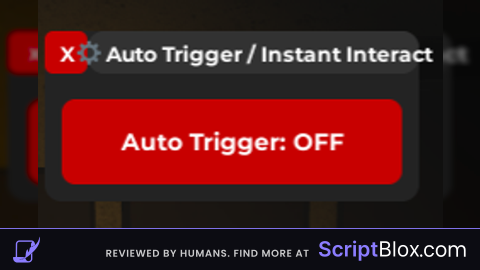
titleBar.Text = "⚙ Auto Trigger / Instant Interact"
titleBar.TextColor3 = Color3.fromRGB(255, 255, 255)
titleBar.Font = Enum.Font.GothamBold
titleBar.TextSize = 14
Instance.new("UICorner", titleBar).CornerRadius = UDim.new(0, 10)

-- Toggle Button
local button = Instance.new("TextButton", frame)
button.Size = UDim2.new(1, -20, 0, 50)
button.Position = UDim2.new(0, 10, 0, 40)
button.Text = "Auto Trigger: OFF"
button.BackgroundColor3 = Color3.fromRGB(200, 0, 0)
button.TextColor3 = Color3.fromRGB(255, 255, 255)
button.Font = Enum.Font.GothamBold
button.TextSize = 16
Instance.new("UICorner", button).CornerRadius = UDim.new(0, 8)

-- Toggle logic
local enabled = false
button.MouseButton1Click:Connect(function()
    enabled = not enabled
    button.Text = "Auto Trigger: " .. (enabled and "ON" or "OFF")
    button.BackgroundColor3 = enabled and Color3.fromRGB(0, 200, 0) or Color3.fromRGB(200, 0, 0)
end)

-- Auto-trigger setup
local function setupPrompt(prompt)
    if prompt:IsA("ProximityPrompt") then
        -- Always instant (no hold)
        prompt.HoldDuration = 0
        prompt.RequiresLineOfSight = false

        -- Auto-trigger when enabled
        prompt.PromptShown:Connect(function()
            if enabled then
                prompt:InputHoldBegin()
                prompt:InputHoldEnd()
            end
        end)
    end
end

-- Apply to all prompts (existing + new)
for _, obj in ipairs(workspace:GetDescendants()) do setupPrompt(obj) end
workspace.DescendantAdded:Connect(setupPrompt)

-- Dragging HUD (title bar only)
local dragging, dragStart, startPos, dragInput
local function update(input)
    local delta = input.Position - dragStart
    frame.Position = UDim2.new(startPos.X.Scale, startPos.X.Offset + delta.X, startPos.Y.Scale, startPos.Y.Offset + delta.Y)
end

titleBar.InputBegan:Connect(function(input)
    if input.UserInputType == Enum.UserInputType.MouseButton1 then
        dragging, dragStart, startPos = true, input.Position, frame.Position
        input.Changed:Connect(function()
            if input.UserInputState == Enum.UserInputState.End then dragging = false end
        end)
    end
end)

titleBar.InputChanged:Connect(function(input)
    if input.UserInputType == Enum.UserInputType.MouseMovement then dragInput = input end
end)

uis.InputChanged:Connect(function(input)
    if input == dragInput and dragging then update(input) end
end)No comments yet for this script.