loadstring(game:HttpGet("https://pastefy.app/umyAPqUu/raw"))()
Features & Information
Core HUD Features
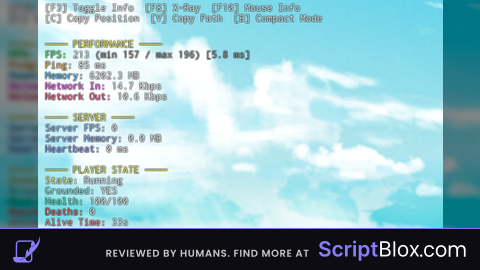
Geometry Dash–style on-screen debug HUD
Toggleable visibility (F3)
Compact mode and full mode switch
RichText formatting with section headers
Monospaced font optimized for readability
Non-resetting GUI (persists on respawn)
Performance Monitoring
Real-time FPS counter
Average frame time (ms)
FPS minimum and maximum tracking (last interval)
Client memory usage (MB)
Network incoming bandwidth (Kbps)
Network outgoing bandwidth (Kbps)
Session uptime tracking
Server Diagnostics
Estimated server FPS
Server memory usage
Server heartbeat time (ms)
Player count and max players
Player State & Gameplay
Humanoid state detection (Running, Jumping, Falling, etc.)
Grounded state detection (Humanoid state + raycast fallback)
Current health and max health
Death counter
Alive time since last respawn
WalkSpeed and JumpPower display
Movement & Physics
Real horizontal velocity using AssemblyLinearVelocity
Smoothed velocity calculation via rolling average
Exact world position (X, Y, Z)
Gravity value from Workspace
Input Monitoring
Real-time movement key detection
W, A, S, D
Space
Shift
Control
Clean input display (movement-only focus)
Multiplayer Awareness
Nearest player detection
Distance to nearest player (studs)
Directional indicator (N, NE, E, etc.)
Real-time updates while players move
Mouse & World Inspection
Toggleable mouse inspection mode (F10)
Mouse target detection
Target name, class, material
Target size and world position
Full instance path display
Separate mouse info panel
Highlight applied to hovered parts
Beam rendered from player to mouse target
X-Ray Mode
Toggleable X-Ray mode (F8)
Highlight rendering on all other players
World geometry transparency override
Original transparency preservation and restoration
Automatic handling for players joining mid-session
Utility Tools
Copy player position to clipboard (C)
Copy mouse target instance path to clipboard (V)
On-screen copy confirmation notification
Executor-compatible clipboard handling
System & Device Info
Platform detection (PC, Console, Mobile)
Graphics quality level
Screen resolution detection
Camera Field of View (FOV)
Time of day from Lighting
Game & Account Info
Place ID display
Job ID display
User ID display
Account age in days
Stability & Safety
Extensive use of protected calls (pcall)
Graceful handling of missing characters or components
Automatic cleanup of temporary instances
Safe toggling of all optional systems
Input Controls Summary
F3: Toggle HUD visibility
F8: Toggle X-Ray mode
F10: Toggle mouse inspection
B: Toggle compact mode
C: Copy player position
V: Copy mouse target path
Credits to whom they are due
#SABUBULEX#ROBLOX#UNIVERSAL#LABEL#GUI



for your own fps, just press shift+f5 on roblox.
@PomPomSaturin 9th mod av seen yippe
useful script
If only it had mobile support, also uuhhh should i be concerned that its obfuscated?