
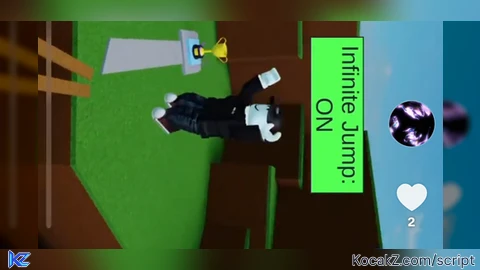

local Players = game:GetService("Players")
local UserInputService = game:GetService("UserInputService")
local player = Players.LocalPlayer
local infiniteJump = false
-- GUI
local gui = Instance.new("ScreenGui")
gui.Name = "InfiniteJumpGui"
gui.ResetOnSpawn = false
gui.Parent = player:WaitForChild("PlayerGui")
-- Main Button
local button = Instance.new("TextButton")
button.Size = UDim2.new(0, 200, 0, 60)
button.Position = UDim2.new(0.5, -100, 0, 20) -- top center
button.Text = "Infinite Jump: OFF"
button.TextScaled = true
button.Font = Enum.Font.GothamBold
button.TextColor3 = Color3.fromRGB(255, 255, 255)
button.BackgroundTransparency = 0
button.BackgroundColor3 = Color3.fromRGB(255, 0, 150)
button.BorderSizePixel = 0
button.Parent = gui
-- Rounded corners
local corner = Instance.new("UICorner")
corner.CornerRadius = UDim.new(0, 15)
corner.Parent = button
-- Gradient
local gradient = Instance.new("UIGradient")
gradient.Color = ColorSequence.new{
ColorSequenceKeypoint.new(0, Color3.fromRGB(255, 0, 150)),
ColorSequenceKeypoint.new(1, Color3.fromRGB(255, 150, 0))
}
gradient.Rotation = 45
gradient.Parent = button
-- Shadow
local shadow = Instance.new("ImageLabel")
shadow.BackgroundTransparency = 1
shadow.Size = UDim2.new(1, 10, 1, 10)
shadow.Position = UDim2.new(0, -5, 0, -5)
shadow.Image = "rbxassetid://6014261999" -- shadow image
shadow.ImageColor3 = Color3.fromRGB(0, 0, 0)
shadow.ImageTransparency = 0.5
shadow.ScaleType = Enum.ScaleType.Slice
shadow.SliceCenter = Rect.new(10,10,118,118)
shadow.Parent = button
-- Button click
button.MouseButton1Click:Connect(function()
infiniteJump = not infiniteJump
if infiniteJump then
button.Text = "Infinite Jump: ON"
else
button.Text = "Infinite Jump: OFF"
end
end)
-- Infinite jump logic
UserInputService.JumpRequest:Connect(function()
if infiniteJump then
local character = player.Character
if character then
local humanoid = character:FindFirstChildOfClass("Humanoid")
if humanoid then
humanoid:ChangeState(Enum.HumanoidStateType.Jumping)
end
end
end
end)
How to Execute Universal Script – Infinite jump
Step 1: Copy Code: Click the Copy Code button in the viewer above to grab the clean Lua loadstring.
Step 2: Launch Executor: Open a compatible, unpatched executor. If you need one, check our Roblox Executors Directory.
Step 3: Join Experience: Launch Roblox and join Universal Script.
Step 4: Attach & Run: Attach/inject your executor into the Roblox process, paste the code into the script tab, and press Execute.
Features & Information
Script Changelog (1)
Community Comments (0)
No comments yet for this script.
Frequently Asked Questions
How do I execute Universal Script – Infinite jump in Roblox?
To run Universal Script – Infinite jump, copy the Lua loadstring from the code viewer above, launch Roblox and join Universal Script, attach a working executor (such as Potassium, Solara, or Delta from our Executors directory), paste the code into your executor console, and click Execute.
Is Universal Script – Infinite jump keyless or does it require an access key?
Universal Script – Infinite jump requires an access key. You can retrieve the official key directly using the Get Script Key link provided above.
Is Universal Script – Infinite jump currently safe and working?
This script is active and operational. Always test scripts using a secondary (alt) Roblox account to safeguard your main profile against anti-cheat bans.


![Ez Hub [Open Source] [150+ games] - Verified script for Universal Script](https://media.kocakz.me/b74a9ac15370ba766b2fa9531f17c9dad2c0befb2b951693ae723e4c7d2c3fb6.webp)


![[KEYLESS] Moondiety Script | 20+ supported Games - Verified script for Universal Script](https://media.kocakz.me/6834c33a36c9fbe66afae4c6754c2b80386ce636b2f972464a95866f4b6a42eb.webp)



