

KeylessUniversal
--[[
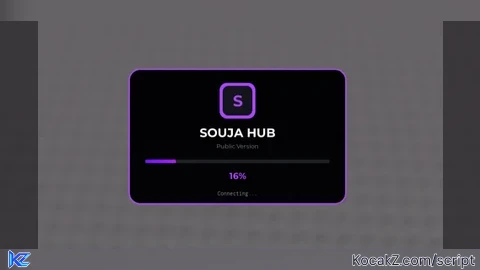
    SoujaHub - Loader Script v1.4

]]

--================================================================================--
--[[ SERVICES ]]--
--================================================================================--
local TweenService = game:GetService("TweenService")
local Players = game:GetService("Players")
local RunService = game:GetService("RunService")
local SoundService = game:GetService("SoundService")

--================================================================================--
--[[ CONFIGURATION ]]--
--================================================================================--
local Config = {
    -- Main Settings
    HubName = "SOUJA HUB",
    Subtitle = "Public Version",
    LogoLetter = "S",
    ImageLogo = "", -- Paste your decal ID here. Leave blank for letter.
    LoadTime = 8,

    -- Main script to load after the animation finishes
    ScriptToLoad = "", -- IMPORTANT: Replace with your actual script URL (Not Loadstring)

    -- Loading Messages & Tips displayed randomly
    Messages = {
        "Connecting...",
        "Authenticating...",
        "Downloading assets...",
        "Configuring environment...",
        "Building interface...",
        "Finalizing..."
    },
    Tips = {
        "Did you know? You can customize the settings in the hub.",
        "Check out our community for support and updates!",
        "New features are added regularly!"
    },

    -- Sound Effects (IDs have been replaced with verified, working assets)
    Sounds = {
        Open = "rbxassetid/913363037",      -- UI Open Sound
        Update = "rbxassetid/6823769213",     -- UI Click
        Success = "rbxassetid/10895847421",   -- Success Chime
        Failure = "rbxassetid/142642633",     -- Error Sound
        TipPing = "rbxassetid/5151558373"      -- Notification Ping
    },

    -- Animation Timings
    IntroAnimationTime = 0.6,
    OutroAnimationTime = 0.5,

    -- Theme & Colors
    Theme = {
        Primary = Color3.fromRGB(170, 70, 255),
        Background = Color3.fromRGB(20, 20, 30),
        BackgroundGradient = Color3.fromRGB(35, 35, 50),
        Text = Color3.fromRGB(255, 255, 255),
        MutedText = Color3.fromRGB(120, 125, 135),
        ProgressBackground = Color3.fromRGB(30, 32, 38),
        Failure = Color3.fromRGB(255, 80, 80),
        SuccessFlash = Color3.fromRGB(255, 255, 255)
    },

    -- Fonts
    Fonts = {
        Main = Enum.Font.GothamBold,
        Secondary = Enum.Font.Gotham,
        Code = Enum.Font.Code
    }
}

--================================================================================--
--[[ SCRIPT SETUP ]]--
--================================================================================--

-- Create a sound player utility
local SoundPlayer = {}
for name, id in pairs(Config.Sounds) do
    if id and id ~= "" then
        local sound = Instance.new("Sound")
        sound.SoundId = id
        sound.Parent = SoundService
        SoundPlayer[name] = sound
    end
end
local function PlaySound(name)
    if SoundPlayer[name] then
        SoundPlayer[name]:Play()
    end
end

-- Get Player and PlayerGui
local player = Players.LocalPlayer
local playerGui = player:WaitForChild("PlayerGui")

-- Add a blur effect to the world behind the UI
local blur = Instance.new("BlurEffect", game:GetService("Lighting"))
blur.Size = 0
blur.Enabled = true

-- Create the main ScreenGui container
local screenGui = Instance.new("ScreenGui")
screenGui.Name = "SoujaHubLoader"
screenGui.ResetOnSpawn = false
screenGui.ZIndexBehavior = Enum.ZIndexBehavior.Sibling
screenGui.DisplayOrder = 999

--================================================================================--
--[[ UI ELEMENT CREATION ]]--
--================================================================================--

-- Main container frame for the loader
local container = Instance.new("Frame")
container.Name = "Container"
container.AnchorPoint = Vector2.new(0.5, 0.5)
container.Size = UDim2.new(0, 0, 0, 0)
container.Position = UDim2.new(0.5, 0, 0.5, 0)
container.BackgroundColor3 = Config.Theme.Background
container.BorderSizePixel = 0
container.Parent = screenGui

Instance.new("UICorner", container).CornerRadius = UDim.new(0, 20)

local containerGradient = Instance.new("UIGradient", container)
containerGradient.Color = ColorSequence.new{
    ColorSequenceKeypoint.new(0, Config.Theme.Background),
    ColorSequenceKeypoint.new(1, Config.Theme.BackgroundGradient)
}
containerGradient.Rotation = 90

local borderStroke = Instance.new("UIStroke", container)
borderStroke.Color = Config.Theme.Primary
borderStroke.Thickness = 3
borderStroke.Transparency = 0.2
borderStroke.ApplyStrokeMode = Enum.ApplyStrokeMode.Border

-- Logo elements
local logoCircle = Instance.new("Frame", container)
logoCircle.Name = "Logo"
logoCircle.AnchorPoint = Vector2.new(0.5, 0)
logoCircle.Size = UDim2.new(0, 70, 0, 70)
logoCircle.Position = UDim2.new(0.5, 0, 0, 25)
logoCircle.BackgroundColor3 = Config.Theme.Primary
logoCircle.BorderSizePixel = 0
logoCircle.ClipsDescendants = true
Instance.new("UICorner", logoCircle).CornerRadius = UDim.new(0, 15)

local logoInner = Instance.new("Frame", logoCircle)
logoInner.AnchorPoint = Vector2.new(0.5, 0.5)
logoInner.Size = UDim2.new(0, 58, 0, 58)
logoInner.Position = UDim2.new(0.5, 0, 0.5, 0)
logoInner.BackgroundColor3 = Config.Theme.Background
logoInner.BorderSizePixel = 0
Instance.new("UICorner", logoInner).CornerRadius = UDim.new(0, 12)

if Config.ImageLogo and Config.ImageLogo ~= "" then
    local logoImage = Instance.new("ImageLabel", logoInner)
    logoImage.Size = UDim2.new(1, 0, 1, 0)
    logoImage.BackgroundTransparency = 1
    logoImage.Image = Config.ImageLogo
else
    local logoText = Instance.new("TextLabel", logoInner)
    logoText.Size = UDim2.new(1, 0, 1, 0)
    logoText.BackgroundTransparency = 1
    logoText.Text = Config.LogoLetter
    logoText.TextColor3 = Config.Theme.Primary
    logoText.TextSize = 36
    logoText.Font = Config.Fonts.Main
end

-- Text elements
local title = Instance.new("TextLabel", container)
title.Size = UDim2.new(1, -40, 0, 35)
title.Position = UDim2.new(0, 20, 0, 105)
title.BackgroundTransparency = 1
title.Text = Config.HubName
title.TextColor3 = Config.Theme.Text
title.TextSize = 28
title.Font = Config.Fonts.Main
title.TextXAlignment = Enum.TextXAlignment.Center

local versionText = Instance.new("TextLabel", container)
versionText.Size = UDim2.new(1, -40, 0, 18)
versionText.Position = UDim2.new(0, 20, 0, 140)
versionText.BackgroundTransparency = 1
versionText.Text = Config.Subtitle
versionText.TextColor3 = Config.Theme.MutedText
versionText.TextSize = 13
versionText.Font = Config.Fonts.Secondary
versionText.TextXAlignment = Enum.TextXAlignment.Center

-- Progress Bar elements
local progressBg = Instance.new("Frame", container)
progressBg.Name = "progressBg"
progressBg.Size = UDim2.new(1, -60, 0, 7)
progressBg.Position = UDim2.new(0, 30, 0, 175)
progressBg.BackgroundColor3 = Config.Theme.ProgressBackground
progressBg.BorderSizePixel = 0
Instance.new("UICorner", progressBg).CornerRadius = UDim.new(1, 0)

local successGlowStroke = Instance.new("UIStroke", progressBg)
successGlowStroke.Color = Config.Theme.SuccessFlash
successGlowStroke.Thickness = 4
successGlowStroke.Transparency = 1

local progressFill = Instance.new("Frame", progressBg)
progressFill.Name = "progressFill"
progressFill.Size = UDim2.new(0, 0, 1, 0)
progressFill.BackgroundColor3 = Config.Theme.Primary
progressFill.BorderSizePixel = 0
progressFill.ClipsDescendants = true
Instance.new("UICorner", progressFill).CornerRadius = UDim.new(1, 0)

Instance.new("UIGradient", progressFill).Color = ColorSequence.new{
    ColorSequenceKeypoint.new(0, Config.Theme.Primary),
    ColorSequenceKeypoint.new(1, Color3.new(
        math.min(1, Config.Theme.Primary.R * 1.5),
        math.min(1, Config.Theme.Primary.G * 1.5),
        math.min(1, Config.Theme.Primary.B * 1.5)
    ))
}

local progressShine = Instance.new("Frame", progressFill)
progressShine.Name = "progressShine"
progressShine.Size = UDim2.new(0.4, 0, 1, 0)
progressShine.Position = UDim2.new(-1, 0, 0, 0)
progressShine.BackgroundColor3 = Color3.fromRGB(255, 255, 255)
progressShine.BackgroundTransparency = 0.6
progressShine.BorderSizePixel = 0
Instance.new("UICorner", progressShine).CornerRadius = UDim.new(1, 0)

Instance.new("UIGradient", progressShine).Transparency = NumberSequence.new{
    NumberSequenceKeypoint.new(0, 1),
    NumberSequenceKeypoint.new(0.5, 0.2),
    NumberSequenceKeypoint.new(1, 1)
}

local progressShimmer = Instance.new("UIGradient", progressFill)
progressShimmer.Rotation = 90
progressShimmer.Offset = Vector2.new(0, -1)
progressShimmer.Transparency = NumberSequence.new{
    NumberSequenceKeypoint.new(0, 1),
    NumberSequenceKeypoint.new(0.4, 0.8),
    NumberSequenceKeypoint.new(0.5, 0.7),
    NumberSequenceKeypoint.new(0.6, 0.8),
    NumberSequenceKeypoint.new(1, 1)
}

-- Bottom status text elements
local percentText = Instance.new("TextLabel", container)
percentText.Size = UDim2.new(0, 100, 0, 28)
percentText.Position = UDim2.new(0.5, -50, 0, 192)
percentText.BackgroundTransparency = 1
percentText.Text = "0%"
percentText.TextColor3 = Config.Theme.Primary
percentText.TextSize = 20
percentText.Font = Config.Fonts.Main

local statusText = Instance.new("TextLabel", container)
statusText.Size = UDim2.new(1, -40, 0, 20)
statusText.Position = UDim2.new(0, 20, 0, 230)
statusText.BackgroundTransparency = 1
statusText.Text = "Initializing..."
statusText.TextColor3 = Config.Theme.MutedText
statusText.TextSize = 12
statusText.Font = Config.Fonts.Code
statusText.TextXAlignment = Enum.TextXAlignment.Center

-- Finally, parent the main GUI to the PlayerGui
screenGui.Parent = playerGui

--================================================================================--
--[[ CORE FUNCTIONS & ANIMATIONS ]]--
--================================================================================--

local currentPercent = 0

local function updateProgress(target, duration)
    local startPercent = currentPercent
    local tweenInfo = TweenInfo.new(duration, Enum.EasingStyle.Cubic, Enum.EasingDirection.Out)
    local fillTween = TweenService:Create(progressFill, tweenInfo, {Size = UDim2.new(target / 100, 0, 1, 0)})
    fillTween:Play()

    local tempNumber = Instance.new("NumberValue")
    tempNumber.Value = startPercent
    local textTween = TweenService:Create(tempNumber, tweenInfo, {Value = target})
    textTween:Play()

    local connection
    connection = tempNumber.Changed:Connect(function()
        local newPercent = math.clamp(tempNumber.Value, 0, 100)
        percentText.Text = math.floor(newPercent) .. "%"
        currentPercent = newPercent
        if newPercent >= target then
            tempNumber:Destroy()
            connection:Disconnect()
        end
    end)
end

local tipDebounce = false
local function updateStatus(text, instant)
    if instant then statusText.Text = text; return end

    if not tipDebounce and #Config.Tips > 0 and math.random() < 0.3 then
        tipDebounce = true
        local textToRestore = text
        task.spawn(function()
            task.wait(1.5)
            PlaySound("TipPing")

            local originalPosition = statusText.Position
            local slideDownOffset = UDim2.new(originalPosition.X.Scale, originalPosition.X.Offset, originalPosition.Y.Scale, originalPosition.Y.Offset + 10)
            local slideUpOffset = UDim2.new(originalPosition.X.Scale, originalPosition.X.Offset, originalPosition.Y.Scale, originalPosition.Y.Offset - 10)

            local outTween = TweenService:Create(statusText, TweenInfo.new(0.25), {TextTransparency = 1})
            outTween:Play()
            outTween.Completed:Wait()

            statusText.Text = Config.Tips[math.random(1, #Config.Tips)]
            statusText.Position = slideDownOffset

            -- [FIXED] Corrected EasingStyle from Quint to Sine
            local inTween = TweenService:Create(statusText, TweenInfo.new(0.3, Enum.EasingStyle.Sine, Enum.EasingDirection.Out), {
                TextTransparency = 0,
                Position = originalPosition
            })
            inTween:Play()
            inTween.Completed:Wait()

            task.wait(3)

            local outTween2 = TweenService:Create(statusText, TweenInfo.new(0.3, Enum.EasingStyle.Sine, Enum.EasingDirection.In), {
                TextTransparency = 1,
                Position = slideUpOffset
            })
            outTween2:Play()
            outTween2.Completed:Wait()

            statusText.Text = textToRestore
            statusText.Position = originalPosition
            local inTween2 = TweenService:Create(statusText, TweenInfo.new(0.25), {TextTransparency = 0})
            inTween2:Play()

            task.wait(3)
            tipDebounce = false
        end)
    end

    PlaySound("Update")
    local outTween = TweenService:Create(statusText, TweenInfo.new(0.15), {TextTransparency = 1})
    outTween:Play()
    outTween.Completed:Wait()
    statusText.Text = text
    local inTween = TweenService:Create(statusText, TweenInfo.new(0.15), {TextTransparency = 0})
    inTween:Play()
end

-- A function to display a fatal error on the UI and halt execution
local function displayFatalError(errorMessage)
    updateStatus(errorMessage, true)
    PlaySound("Failure")

    TweenService:Create(borderStroke, TweenInfo.new(0.3), {Color = Config.Theme.Failure}):Play()
    TweenService:Create(progressFill, TweenInfo.new(0.3), {BackgroundColor3 = Config.Theme.Failure}):Play()

    local grad = progressFill:FindFirstChildOfClass("UIGradient")
    if grad then
         TweenService:Create(grad, TweenInfo.new(0.3), {Color = ColorSequence.new(Config.Theme.Failure)}):Play()
    end
    percentText.TextColor3 = Config.Theme.Failure
end

--================================================================================--
--[[ MAIN EXECUTION SEQUENCE ]]--
--================================================================================--

-- Step 1: Set all elements to be fully transparent for the fade-in animation
for _, child in ipairs(container:GetDescendants()) do
    if child:IsA("TextLabel") then
        child.TextTransparency = 1
    elseif child:IsA("ImageLabel") then
        child.ImageTransparency = 1
    elseif child:IsA("Frame") then
        child.BackgroundTransparency = 1
    elseif child:IsA("UIStroke") then
        child.Transparency = 1
    end
end

-- Step 2: Apply an interactive hover effect to the logo
logoCircle.MouseEnter:Connect(function()
    TweenService:Create(logoCircle, TweenInfo.new(0.2), {Size = UDim2.new(0, 75, 0, 75)}):Play()
end)
logoCircle.MouseLeave:Connect(function()
    TweenService:Create(logoCircle, TweenInfo.new(0.2), {Size = UDim2.new(0, 70, 0, 70)}):Play()
end)

-- Step 3: Run the intro animation
PlaySound("Open")
TweenService:Create(blur, TweenInfo.new(Config.IntroAnimationTime), {Size = 12}):Play()
local introTween = TweenService:Create(container, TweenInfo.new(Config.IntroAnimationTime, Enum.EasingStyle.Back, Enum.EasingDirection.Out), {
    Size = UDim2.new(0, 420, 0, 260)
})
introTween:Play()
introTween.Completed:Wait()

-- Step 4: Staggered fade-in for all child elements
for _, child in ipairs(container:GetDescendants()) do
    if child:IsA("TextLabel") then
        TweenService:Create(child, TweenInfo.new(0.4), {TextTransparency = 0}):Play()
    elseif child:IsA("ImageLabel") then
        TweenService:Create(child, TweenInfo.new(0.4), {ImageTransparency = 0}):Play()
    elseif child:IsA("Frame") then
        local targetTransparency = (child.Name == "progressShine") and 0.6 or 0
        TweenService:Create(child, TweenInfo.new(0.4), {BackgroundTransparency = targetTransparency}):Play()
    elseif child:IsA("UIStroke") then
        local targetTransparency = (child == successGlowStroke) and 1 or 0.2
        TweenService:Create(child, TweenInfo.new(0.4), {Transparency = targetTransparency}):Play()
    end
    task.wait(0.02)
end

-- Step 5: Check for configuration errors AFTER the UI is visible.
if Config.ScriptToLoad == "" or Config.ScriptToLoad == "YOUR_SCRIPT_URL_HERE" then
    displayFatalError("FATAL: Script URL is missing!")
    return -- Stop execution
end

-- Step 6: Start the dynamic animation loops
local loadingFinished = false
task.spawn(function()
    -- Shine Loop
    while container.Parent and not loadingFinished do
        progressShine.Position = UDim2.new(-0.4, 0, 0, 0)
        TweenService:Create(progressShine, TweenInfo.new(1.5, Enum.EasingStyle.Linear), {Position = UDim2.new(1.4, 0, 0, 0)}):Play()
        task.wait(2)
    end
end)
task.spawn(function()
    -- Shimmer Loop
    while container.Parent and not loadingFinished do
        progressShimmer.Offset = Vector2.new(0, -1)
        TweenService:Create(progressShimmer, TweenInfo.new(1, Enum.EasingStyle.Linear), {Offset = Vector2.new(0, 1)}):Play()
        task.wait(1)
    end
end)

-- Step 7: Start the main loading sequence
task.spawn(function()
    local stepDuration = Config.LoadTime / #Config.Messages
    for i, msg in ipairs(Config.Messages) do
        updateStatus(msg, false)
        updateProgress((i / #Config.Messages) * 100, stepDuration * 0.9)
        task.wait(stepDuration)
    end

    loadingFinished = true
    logoCircle.Active = false
    TweenService:Create(progressShine, TweenInfo.new(0.3), {BackgroundTransparency = 1}):Play()
    updateStatus("Loading Script...", true)

    local success, result = pcall(function()
        loadstring(game:HttpGet(Config.ScriptToLoad))()
    end)

    if success then
        PlaySound("Success")
        updateStatus("Launched!", true)

        -- Play success animations
        local flashIn = TweenService:Create(successGlowStroke, TweenInfo.new(0.3, Enum.EasingStyle.Sine, Enum.EasingDirection.Out), {Transparency = 0.4})
        local flashOut = TweenService:Create(successGlowStroke, TweenInfo.new(0.3, Enum.EasingStyle.Sine, Enum.EasingDirection.Out), {Transparency = 1})
        local bounceUp = TweenService:Create(logoCircle, TweenInfo.new(0.3, Enum.EasingStyle.Elastic, Enum.EasingDirection.Out), {Size = UDim2.new(0, 78, 0, 78)})
        local bounceDown = TweenService:Create(logoCircle, TweenInfo.new(0.2, Enum.EasingStyle.Linear), {Size = UDim2.new(0, 70, 0, 70)})

        flashIn:Play()
        bounceUp:Play()

        flashIn.Completed:Connect(function()
            task.wait(0.1)
            flashOut:Play()
        end)
        bounceUp.Completed:Connect(function()
            bounceDown:Play()
        end)

        -- Perfectly chain the outro to the flash animation's completion.
        flashOut.Completed:Connect(function()
            TweenService:Create(statusText, TweenInfo.new(0.2), {TextTransparency = 1}):Play()
            task.wait(0.2)

            TweenService:Create(blur, TweenInfo.new(Config.OutroAnimationTime), {Size = 0}):Play()

            local outroTween = TweenService:Create(container, TweenInfo.new(Config.OutroAnimationTime, Enum.EasingStyle.Back, Enum.EasingDirection.In), {
                Size = UDim2.new(0, 0, 0, 0)
            })
            outroTween:Play()

            for _, child in ipairs(container:GetDescendants()) do
                if child ~= statusText then
                    if child:IsA("TextLabel") then
                        TweenService:Create(child, TweenInfo.new(Config.OutroAnimationTime * 0.8), {TextTransparency = 1}):Play()
                    elseif child:IsA("ImageLabel") then
                        TweenService:Create(child, TweenInfo.new(Config.OutroAnimationTime * 0.8), {ImageTransparency = 1}):Play()
                    elseif child:IsA("Frame") then
                        TweenService:Create(child, TweenInfo.new(Config.OutroAnimationTime * 0.8), {BackgroundTransparency = 1}):Play()
                    elseif child:IsA("UIStroke") then
                        TweenService:Create(child, TweenInfo.new(Config.OutroAnimationTime * 0.8), {Transparency = 1}):Play()
                    end
                end
            end

            outroTween.Completed:Wait()
            screenGui:Destroy()
            blur:Destroy()
        end)
    else
        displayFatalError("Error: Script failed to load.")
        warn("[SoujaHub] Critical Error: The main script failed to load.", result)
    end
end)![[KEYLESS] Moondiety Script | 17+ supported Games](https://scriptblox.com/images/sb/0-1753093706828.png)


Let me know your thoughts, what can be added, improved, or changed. (And if u like it follow and leave a like)
If anyone does use this, no need for credits. i just wanna see the hub/script youse make so lmk.
Next version to come out is gunna be 10x better
@PuddingCutiepatootie Thank you, im working on a new version, so far its 10x better. Themes, whitelist (Simple) etc
Pls make it minimal looks interesting but minimal stuff would be better haha
@cobru its mostly fully customizable, what do u mean. If u want another version to be more low-key lmk what u would wanna see in it and ill make it
@SouljaWitchSrc pls give me ur discord my discord is .cobru
@cobru sent u a request