

KeylessUniversal
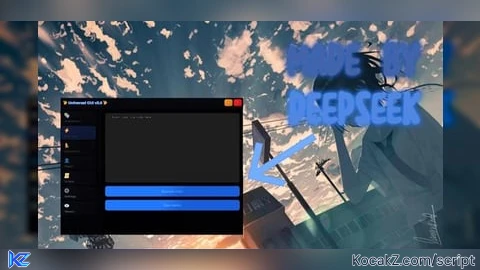
--[[ # was made by DEEPSEEK - prompted by "skondoooo92"
# Discord server is: "https://discord.gg/4THYgrRQd3"
# Join our server for more updates and information]]--
loadstring(game:HttpGet("https://raw.githubusercontent.com/ProphecySkondo/Misc/refs/heads/main/watermark.lua"))()
local Players = game:GetService("Players")
local TweenService = game:GetService("TweenService")
local UserInputService = game:GetService("UserInputService")
local HttpService = game:GetService("HttpService")
local RunService = game:GetService("RunService")
local Lighting = game:GetService("Lighting")
local ReplicatedStorage = game:GetService("ReplicatedStorage")
local LocalPlayer = Players.LocalPlayer
local PlayerGui = LocalPlayer:WaitForChild("PlayerGui")
local Mouse = LocalPlayer:GetMouse()
-- Advanced Features
local espEnabled = false
local spinEnabled = false
local customCursorEnabled = false
local espConnections = {}
local spinConnection = nil
local cursorGui = nil
-- Custom Cursor System
local function createCustomCursor()
if cursorGui then
cursorGui:Destroy()
end
cursorGui = Instance.new("ScreenGui")
cursorGui.Name = "CustomCursor"
cursorGui.Parent = PlayerGui
cursorGui.IgnoreGuiInset = true
cursorGui.ResetOnSpawn = false
local cursor = Instance.new("Frame")
cursor.Name = "Cursor"
cursor.Parent = cursorGui
cursor.Size = UDim2.new(0, 20, 0, 20)
cursor.BackgroundColor3 = Color3.fromRGB(255, 255, 255)
cursor.BorderSizePixel = 0
cursor.AnchorPoint = Vector2.new(0.5, 0.5)
local cursorCorner = Instance.new("UICorner")
cursorCorner.CornerRadius = UDim.new(1, 0)
cursorCorner.Parent = cursor
-- Glow effect
local glow = Instance.new("Frame")
glow.Name = "Glow"
glow.Parent = cursor
glow.Size = UDim2.new(1.5, 0, 1.5, 0)
glow.Position = UDim2.new(0.5, 0, 0.5, 0)
glow.AnchorPoint = Vector2.new(0.5, 0.5)
glow.BackgroundColor3 = Color3.fromRGB(255, 255, 255)
glow.BackgroundTransparency = 0.7
glow.BorderSizePixel = 0
glow.ZIndex = -1
local glowCorner = Instance.new("UICorner")
glowCorner.CornerRadius = UDim.new(1, 0)
glowCorner.Parent = glow
-- Pulsing animation
local pulseInfo = TweenInfo.new(1, Enum.EasingStyle.Sine, Enum.EasingDirection.InOut, -1, true)
local pulseTween = TweenService:Create(glow, pulseInfo, {
Size = UDim2.new(2, 0, 2, 0),
BackgroundTransparency = 0.9
})
pulseTween:Play()
-- Update cursor position
local updateConnection
updateConnection = RunService.Heartbeat:Connect(function()
if not customCursorEnabled or not cursorGui or not cursorGui.Parent then
if updateConnection then
updateConnection:Disconnect()
end
return
end
local mousePos = UserInputService:GetMouseLocation()
cursor.Position = UDim2.new(0, mousePos.X, 0, mousePos.Y)
end)
return cursorGui
end
local function enableCustomCursor()
customCursorEnabled = true
Mouse.Icon = "rbxasset://textures/Blank.png"
createCustomCursor()
end
local function disableCustomCursor()
customCursorEnabled = false
Mouse.Icon = ""
if cursorGui then
cursorGui:Destroy()
cursorGui = nil
end
end
-- ESP System
local function createESP(player)
if player == LocalPlayer then return end
local character = player.Character
if not character then return end
local humanoidRootPart = character:FindFirstChild("HumanoidRootPart")
if not humanoidRootPart then return end
-- Create ESP GUI
local espGui = Instance.new("BillboardGui")
espGui.Name = "ESP_" .. player.Name
espGui.Parent = humanoidRootPart
espGui.Size = UDim2.new(0, 200, 0, 50)
espGui.StudsOffset = Vector3.new(0, 3, 0)
espGui.AlwaysOnTop = true
-- Background frame with gradient
local frame = Instance.new("Frame")
frame.Parent = espGui
frame.Size = UDim2.new(1, 0, 1, 0)
frame.BackgroundTransparency = 0.3
frame.BorderSizePixel = 0
local frameCorner = Instance.new("UICorner")
frameCorner.CornerRadius = UDim.new(0, 8)
frameCorner.Parent = frame
local gradient = Instance.new("UIGradient")
gradient.Parent = frame
gradient.Color = ColorSequence.new{
ColorSequenceKeypoint.new(0, Color3.fromRGB(255, 100, 100)),
ColorSequenceKeypoint.new(1, Color3.fromRGB(100, 100, 255))
}
gradient.Rotation = 45
-- Player name
local nameLabel = Instance.new("TextLabel")
nameLabel.Parent = frame
nameLabel.Size = UDim2.new(1, 0, 0.6, 0)
nameLabel.BackgroundTransparency = 1
nameLabel.Text = player.Name
nameLabel.TextColor3 = Color3.fromRGB(255, 255, 255)
nameLabel.TextScaled = true
nameLabel.Font = Enum.Font.GothamBold
nameLabel.TextStrokeTransparency = 0
nameLabel.TextStrokeColor3 = Color3.fromRGB(0, 0, 0)
-- Distance label
local distanceLabel = Instance.new("TextLabel")
distanceLabel.Parent = frame
distanceLabel.Size = UDim2.new(1, 0, 0.4, 0)
distanceLabel.Position = UDim2.new(0, 0, 0.6, 0)
distanceLabel.BackgroundTransparency = 1
distanceLabel.Text = "0 studs"
distanceLabel.TextColor3 = Color3.fromRGB(200, 200, 200)
distanceLabel.TextScaled = true
distanceLabel.Font = Enum.Font.Gotham
distanceLabel.TextStrokeTransparency = 0
distanceLabel.TextStrokeColor3 = Color3.fromRGB(0, 0, 0)
-- Highlight effect
local highlight = Instance.new("Highlight")
highlight.Parent = character
highlight.FillColor = Color3.fromRGB(255, 100, 100)
highlight.FillTransparency = 0.7
highlight.OutlineColor = Color3.fromRGB(255, 255, 255)
highlight.OutlineTransparency = 0
-- Update distance
local updateConnection
updateConnection = RunService.Heartbeat:Connect(function()
if not espEnabled or not player.Character or not LocalPlayer.Character then
if updateConnection then
updateConnection:Disconnect()
end
if espGui then espGui:Destroy() end
if highlight then highlight:Destroy() end
return
end
local localHRP = LocalPlayer.Character:FindFirstChild("HumanoidRootPart")
local playerHRP = player.Character:FindFirstChild("HumanoidRootPart")
if localHRP and playerHRP then
local distance = math.floor((localHRP.Position - playerHRP.Position).Magnitude)
distanceLabel.Text = distance .. " studs"
-- Color based on distance
local ratio = math.clamp(distance / 100, 0, 1)
local color = Color3.new(1 - ratio, ratio, 0)
highlight.FillColor = color
end
end)
espConnections[player] = {updateConnection, espGui, highlight}
end
local function enableESP()
espEnabled = true
-- Create ESP for existing players
for _, player in pairs(Players:GetPlayers()) do
createESP(player)
end
-- Handle new players
espConnections.playerAdded = Players.PlayerAdded:Connect(createESP)
-- Handle player leaving
espConnections.playerRemoving = Players.PlayerRemoving:Connect(function(player)
if espConnections[player] then
local connection, gui, highlight = unpack(espConnections[player])
if connection then connection:Disconnect() end
if gui then gui:Destroy() end
if highlight then highlight:Destroy() end
espConnections[player] = nil
end
end)
-- Handle character respawning
espConnections.characterAdded = {}
for _, player in pairs(Players:GetPlayers()) do
espConnections.characterAdded[player] = player.CharacterAdded:Connect(function()
wait(1)
createESP(player)
end)
end
end
local function disableESP()
espEnabled = false
-- Clean up all ESP connections and GUIs
for player, data in pairs(espConnections) do
if type(data) == "table" and #data == 3 then
local connection, gui, highlight = unpack(data)
if connection then connection:Disconnect() end
if gui then gui:Destroy() end
if highlight then highlight:Destroy() end
elseif type(data) == "userdata" and data.Disconnect then
data:Disconnect()
end
end
-- Clean up character added connections
if espConnections.characterAdded then
for _, connection in pairs(espConnections.characterAdded) do
if connection then connection:Disconnect() end
end
end
espConnections = {}
end
-- Spin System
local function enableSpin()
if spinConnection then return end
spinEnabled = true
local character = LocalPlayer.Character
if not character then return end
local humanoidRootPart = character:FindFirstChild("HumanoidRootPart")
if not humanoidRootPart then return end
local bodyAngularVelocity = Instance.new("BodyAngularVelocity")
bodyAngularVelocity.AngularVelocity = Vector3.new(0, 20, 0)
bodyAngularVelocity.MaxTorque = Vector3.new(0, math.huge, 0)
bodyAngularVelocity.Parent = humanoidRootPart
spinConnection = bodyAngularVelocity
end
local function disableSpin()
spinEnabled = false
if spinConnection then
spinConnection:Destroy()
spinConnection = nil
end
end
-- Custom Idle Animation System
local customIdleAnimationId = "113584944257171"
local idleAnimationTrack = nil
local idleAnimationObject = nil
local originalIdleAnimation = nil
local isCustomIdleEnabled = false
local idleConnection = nil
local animationLoadWait = 0.5 -- Wait time for animation to fully load
-- Function to format animation ID properly
local function formatAnimationId(id)
-- Remove any existing prefixes
local cleanId = tostring(id):gsub("rbxassetid://", ""):gsub("rbxasset://", ""):gsub("http://www.roblox.com/asset/?id=", "")
-- Ensure it's just numbers
cleanId = cleanId:match("%d+") or cleanId
-- Return with proper prefix
return "rbxassetid://" .. cleanId
end
-- Idle Animation Functions
local function setupCustomIdleAnimation()
local character = LocalPlayer.Character
if not character then
warn("No character found for animation setup")
return false
end
local humanoid = character:FindFirstChild("Humanoid")
if not humanoid then
warn("No humanoid found for animation setup")
return false
end
-- Clean up existing animation objects
if idleAnimationTrack then
pcall(function() idleAnimationTrack:Stop() end)
pcall(function() idleAnimationTrack:Destroy() end)
idleAnimationTrack = nil
end
if idleAnimationObject then
pcall(function() idleAnimationObject:Destroy() end)
end
-- Create custom idle animation with proper ID formatting
idleAnimationObject = Instance.new("Animation")
local formattedId = formatAnimationId(customIdleAnimationId)
idleAnimationObject.AnimationId = formattedId
idleAnimationObject.Name = "CustomIdleAnimation"
-- Parent the animation to ensure it doesn't get garbage collected
idleAnimationObject.Parent = character
print("Attempting to load animation with ID: " .. formattedId)
-- Load the animation with error handling
local success, result = pcall(function()
return humanoid:LoadAnimation(idleAnimationObject)
end)
if success and result then
idleAnimationTrack = result
idleAnimationTrack.Looped = true
idleAnimationTrack.Priority = Enum.AnimationPriority.Idle
-- Wait for animation to fully load
wait(animationLoadWait)
-- Verify the track is still valid
if idleAnimationTrack and idleAnimationTrack.Length then
print("Animation loaded successfully! Length: " .. tostring(idleAnimationTrack.Length))
-- Find and store original idle animation
local animate = character:FindFirstChild("Animate")
if animate then
local idle = animate:FindFirstChild("idle")
if idle then
originalIdleAnimation = idle:FindFirstChild("Animation1") or idle:FindFirstChild("Animation2")
end
end
return true
else
warn("Animation track became invalid after loading")
return false
end
else
warn("Failed to load animation: " .. tostring(result))
warn("Make sure the animation ID '" .. customIdleAnimationId .. "' is correct and the animation exists")
warn("Also ensure the animation is set to public or you own it")
-- Clean up failed animation object
if idleAnimationObject then
pcall(function() idleAnimationObject:Destroy() end)
idleAnimationObject = nil
end
return false
end
end
local function enableCustomIdle()
if not isCustomIdleEnabled then
local success = setupCustomIdleAnimation()
if not success then
warn("Failed to enable custom idle animation - setup failed")
return false
end
isCustomIdleEnabled = true
-- Monitor character state
idleConnection = RunService.Heartbeat:Connect(function()
local character = LocalPlayer.Character
if not character then return end
local humanoid = character:FindFirstChild("Humanoid")
if not humanoid then return end
-- Check if character is idle (not moving)
if humanoid.MoveDirection.Magnitude < 0.1 and humanoid:GetState() ~= Enum.HumanoidStateType.Jumping then
if idleAnimationTrack then
-- Verify animation track is still valid
local isValid = pcall(function() return idleAnimationTrack.IsPlaying end)
if isValid and not idleAnimationTrack.IsPlaying then
-- Stop default idle animations
for _, track in pairs(humanoid:GetPlayingAnimationTracks()) do
if track.Animation and track.Animation.AnimationId:find("idle") then
pcall(function() track:Stop() end)
end
end
-- Play custom idle animation with error handling
local playSuccess, playError = pcall(function()
idleAnimationTrack:Play()
end)
if not playSuccess then
warn("Failed to play idle animation: " .. tostring(playError))
-- Try to reload the animation
print("Attempting to reload animation...")
setupCustomIdleAnimation()
end
elseif not isValid then
warn("Animation track became invalid, reloading...")
setupCustomIdleAnimation()
end
end
else
if idleAnimationTrack then
local isValid = pcall(function() return idleAnimationTrack.IsPlaying end)
if isValid and idleAnimationTrack.IsPlaying then
local stopSuccess, stopError = pcall(function()
idleAnimationTrack:Stop()
end)
if not stopSuccess then
warn("Failed to stop idle animation: " .. tostring(stopError))
end
end
end
end
end)
return true
end
return false
end
local function disableCustomIdle()
if isCustomIdleEnabled then
isCustomIdleEnabled = false
if idleConnection then
idleConnection:Disconnect()
idleConnection = nil
end
if idleAnimationTrack then
pcall(function() idleAnimationTrack:Stop() end)
pcall(function() idleAnimationTrack:Destroy() end)
idleAnimationTrack = nil
end
if idleAnimationObject then
pcall(function() idleAnimationObject:Destroy() end)
idleAnimationObject = nil
end
print("Custom idle animation disabled and cleaned up")
end
end
-- Character respawn handling
LocalPlayer.CharacterAdded:Connect(function()
if isCustomIdleEnabled then
wait(2) -- Wait for character to fully load
local success = setupCustomIdleAnimation()
if not success then
warn("Failed to reload animation after respawn")
else
print("Animation reloaded successfully after respawn")
end
end
end)
-- Main GUI Creation with Smooth Entrance Animation
local ScreenGui = Instance.new("ScreenGui")
local MainFrame = Instance.new("Frame")
local TopBar = Instance.new("Frame")
local Title = Instance.new("TextLabel")
local CloseButton = Instance.new("TextButton")
local MinimizeButton = Instance.new("TextButton")
local TabContainer = Instance.new("Frame")
local ContentFrame = Instance.new("Frame")
-- Tab System
local tabs = {}
local currentTab = nil
local allGuiElements = {} -- For transparency control
-- GUI Properties
ScreenGui.Name = "UniversalGUI_v3"
ScreenGui.Parent = PlayerGui
ScreenGui.ZIndexBehavior = Enum.ZIndexBehavior.Sibling
ScreenGui.ResetOnSpawn = false
-- Main Frame with Gradient
MainFrame.Name = "MainFrame"
MainFrame.Parent = ScreenGui
MainFrame.BackgroundColor3 = Color3.fromRGB(15, 15, 15)
MainFrame.BorderSizePixel = 0
MainFrame.Position = UDim2.new(0.5, -400, 1.5, 0) -- Start off-screen
MainFrame.Size = UDim2.new(0, 800, 0, 600)
MainFrame.Active = true
MainFrame.Draggable = true
MainFrame.BackgroundTransparency = 0
local MainFrameCorner = Instance.new("UICorner")
MainFrameCorner.CornerRadius = UDim.new(0, 16)
MainFrameCorner.Parent = MainFrame
-- Main Frame Gradient
local MainFrameGradient = Instance.new("UIGradient")
MainFrameGradient.Parent = MainFrame
MainFrameGradient.Color = ColorSequence.new{
ColorSequenceKeypoint.new(0, Color3.fromRGB(25, 25, 35)),
ColorSequenceKeypoint.new(0.5, Color3.fromRGB(15, 15, 25)),
ColorSequenceKeypoint.new(1, Color3.fromRGB(20, 20, 30))
}
MainFrameGradient.Rotation = 45
-- Glow Effect
local MainFrameStroke = Instance.new("UIStroke")
MainFrameStroke.Parent = MainFrame
MainFrameStroke.Color = Color3.fromRGB(100, 150, 255)
MainFrameStroke.Thickness = 2
MainFrameStroke.Transparency = 0.5
-- Add to transparency control
table.insert(allGuiElements, MainFrame)
-- Top Bar with Gradient
TopBar.Name = "TopBar"
TopBar.Parent = MainFrame
TopBar.BackgroundColor3 = Color3.fromRGB(40, 40, 50)
TopBar.BorderSizePixel = 0
TopBar.Size = UDim2.new(1, 0, 0, 50)
local TopBarCorner = Instance.new("UICorner")
TopBarCorner.CornerRadius = UDim.new(0, 16)
TopBarCorner.Parent = TopBar
local TopBarGradient = Instance.new("UIGradient")
TopBarGradient.Parent = TopBar
TopBarGradient.Color = ColorSequence.new{
ColorSequenceKeypoint.new(0, Color3.fromRGB(60, 60, 80)),
ColorSequenceKeypoint.new(1, Color3.fromRGB(40, 40, 60))
}
TopBarGradient.Rotation = 90
-- Top Bar Glow
local TopBarStroke = Instance.new("UIStroke")
TopBarStroke.Parent = TopBar
TopBarStroke.Color = Color3.fromRGB(150, 100, 255)
TopBarStroke.Thickness = 1
TopBarStroke.Transparency = 0.7
table.insert(allGuiElements, TopBar)
-- Title with Gradient Text Effect
Title.Name = "Title"
Title.Parent = TopBar
Title.BackgroundTransparency = 1
Title.Position = UDim2.new(0, 20, 0, 0)
Title.Size = UDim2.new(0, 300, 1, 0)
Title.Font = Enum.Font.GothamBold
Title.Text = "✨ Universal GUI v3.0 ✨"
Title.TextColor3 = Color3.fromRGB(255, 255, 255)
Title.TextSize = 18
Title.TextXAlignment = Enum.TextXAlignment.Left
Title.TextStrokeTransparency = 0
Title.TextStrokeColor3 = Color3.fromRGB(100, 150, 255)
-- Animated title color
spawn(function()
while Title and Title.Parent do
local colorTween = TweenService:Create(Title, TweenInfo.new(2, Enum.EasingStyle.Sine, Enum.EasingDirection.InOut), {
TextColor3 = Color3.fromRGB(150, 200, 255)
})
colorTween:Play()
colorTween.Completed:Wait()
local colorTween2 = TweenService:Create(Title, TweenInfo.new(2, Enum.EasingStyle.Sine, Enum.EasingDirection.InOut), {
TextColor3 = Color3.fromRGB(255, 150, 200)
})
colorTween2:Play()
colorTween2.Completed:Wait()
end
end)
-- Close Button with Gradient
CloseButton.Name = "CloseButton"
CloseButton.Parent = TopBar
CloseButton.BackgroundColor3 = Color3.fromRGB(255, 85, 85)
CloseButton.BorderSizePixel = 0
CloseButton.Position = UDim2.new(1, -45, 0, 10)
CloseButton.Size = UDim2.new(0, 35, 0, 30)
CloseButton.Font = Enum.Font.GothamBold
CloseButton.Text = "✕"
CloseButton.TextColor3 = Color3.fromRGB(255, 255, 255)
CloseButton.TextSize = 16
local CloseButtonCorner = Instance.new("UICorner")
CloseButtonCorner.CornerRadius = UDim.new(0, 8)
CloseButtonCorner.Parent = CloseButton
local CloseButtonGradient = Instance.new("UIGradient")
CloseButtonGradient.Parent = CloseButton
CloseButtonGradient.Color = ColorSequence.new{
ColorSequenceKeypoint.new(0, Color3.fromRGB(255, 100, 100)),
ColorSequenceKeypoint.new(1, Color3.fromRGB(200, 50, 50))
}
CloseButtonGradient.Rotation = 45
local CloseButtonStroke = Instance.new("UIStroke")
CloseButtonStroke.Parent = CloseButton
CloseButtonStroke.Color = Color3.fromRGB(255, 150, 150)
CloseButtonStroke.Thickness = 1
CloseButtonStroke.Transparency = 0.5
-- Minimize Button with Gradient
MinimizeButton.Name = "MinimizeButton"
MinimizeButton.Parent = TopBar
MinimizeButton.BackgroundColor3 = Color3.fromRGB(255, 195, 85)
MinimizeButton.BorderSizePixel = 0
MinimizeButton.Position = UDim2.new(1, -85, 0, 10)
MinimizeButton.Size = UDim2.new(0, 35, 0, 30)
MinimizeButton.Font = Enum.Font.GothamBold
MinimizeButton.Text = "−"
MinimizeButton.TextColor3 = Color3.fromRGB(255, 255, 255)
MinimizeButton.TextSize = 18
local MinimizeButtonCorner = Instance.new("UICorner")
MinimizeButtonCorner.CornerRadius = UDim.new(0, 8)
MinimizeButtonCorner.Parent = MinimizeButton
local MinimizeButtonGradient = Instance.new("UIGradient")
MinimizeButtonGradient.Parent = MinimizeButton
MinimizeButtonGradient.Color = ColorSequence.new{
ColorSequenceKeypoint.new(0, Color3.fromRGB(255, 200, 100)),
ColorSequenceKeypoint.new(1, Color3.fromRGB(200, 150, 50))
}
MinimizeButtonGradient.Rotation = 45
local MinimizeButtonStroke = Instance.new("UIStroke")
MinimizeButtonStroke.Parent = MinimizeButton
MinimizeButtonStroke.Color = Color3.fromRGB(255, 220, 150)
MinimizeButtonStroke.Thickness = 1
MinimizeButtonStroke.Transparency = 0.5
table.insert(allGuiElements, CloseButton)
table.insert(allGuiElements, MinimizeButton)
-- Tab Container with Gradient
TabContainer.Name = "TabContainer"
TabContainer.Parent = MainFrame
TabContainer.BackgroundColor3 = Color3.fromRGB(30, 30, 40)
TabContainer.BorderSizePixel = 0
TabContainer.Position = UDim2.new(0, 0, 0, 50)
TabContainer.Size = UDim2.new(0, 180, 1, -50)
local TabContainerCorner = Instance.new("UICorner")
TabContainerCorner.CornerRadius = UDim.new(0, 12)
TabContainerCorner.Parent = TabContainer
local TabContainerGradient = Instance.new("UIGradient")
TabContainerGradient.Parent = TabContainer
TabContainerGradient.Color = ColorSequence.new{
ColorSequenceKeypoint.new(0, Color3.fromRGB(35, 35, 50)),
ColorSequenceKeypoint.new(1, Color3.fromRGB(25, 25, 35))
}
TabContainerGradient.Rotation = 90
local TabContainerStroke = Instance.new("UIStroke")
TabContainerStroke.Parent = TabContainer
TabContainerStroke.Color = Color3.fromRGB(80, 80, 120)
TabContainerStroke.Thickness = 1
TabContainerStroke.Transparency = 0.7
-- Content Frame with Gradient
ContentFrame.Name = "ContentFrame"
ContentFrame.Parent = MainFrame
ContentFrame.BackgroundColor3 = Color3.fromRGB(20, 20, 30)
ContentFrame.BorderSizePixel = 0
ContentFrame.Position = UDim2.new(0, 180, 0, 50)
ContentFrame.Size = UDim2.new(1, -180, 1, -50)
local ContentFrameCorner = Instance.new("UICorner")
ContentFrameCorner.CornerRadius = UDim.new(0, 12)
ContentFrameCorner.Parent = ContentFrame
local ContentFrameGradient = Instance.new("UIGradient")
ContentFrameGradient.Parent = ContentFrame
ContentFrameGradient.Color = ColorSequence.new{
ColorSequenceKeypoint.new(0, Color3.fromRGB(25, 25, 40)),
ColorSequenceKeypoint.new(1, Color3.fromRGB(15, 15, 25))
}
ContentFrameGradient.Rotation = 135
local ContentFrameStroke = Instance.new("UIStroke")
ContentFrameStroke.Parent = ContentFrame
ContentFrameStroke.Color = Color3.fromRGB(60, 80, 120)
ContentFrameStroke.Thickness = 1
ContentFrameStroke.Transparency = 0.8
table.insert(allGuiElements, TabContainer)
table.insert(allGuiElements, ContentFrame)
-- Tab Creation Function with Enhanced Styling
local function createTab(name, icon)
local tabButton = Instance.new("TextButton")
local tabIcon = Instance.new("TextLabel")
local tabContent = Instance.new("ScrollingFrame")
-- Tab Button with Gradient
tabButton.Name = name .. "Tab"
tabButton.Parent = TabContainer
tabButton.BackgroundColor3 = Color3.fromRGB(45, 45, 60)
tabButton.BorderSizePixel = 0
tabButton.Size = UDim2.new(1, -10, 0, 60)
tabButton.Font = Enum.Font.Gotham
tabButton.Text = ""
tabButton.TextColor3 = Color3.fromRGB(200, 200, 200)
tabButton.TextSize = 14
local tabButtonCorner = Instance.new("UICorner")
tabButtonCorner.CornerRadius = UDim.new(0, 12)
tabButtonCorner.Parent = tabButton
local tabButtonGradient = Instance.new("UIGradient")
tabButtonGradient.Parent = tabButton
tabButtonGradient.Color = ColorSequence.new{
ColorSequenceKeypoint.new(0, Color3.fromRGB(50, 50, 70)),
ColorSequenceKeypoint.new(1, Color3.fromRGB(35, 35, 50))
}
tabButtonGradient.Rotation = 45
local tabButtonStroke = Instance.new("UIStroke")
tabButtonStroke.Parent = tabButton
tabButtonStroke.Color = Color3.fromRGB(80, 100, 150)
tabButtonStroke.Thickness = 1
tabButtonStroke.Transparency = 0.8
table.insert(allGuiElements, tabButton)
-- Tab Icon with Glow Effect
tabIcon.Name = "Icon"
tabIcon.Parent = tabButton
tabIcon.BackgroundTransparency = 1
tabIcon.Position = UDim2.new(0, 15, 0, 8)
tabIcon.Size = UDim2.new(0, 35, 0, 25)
tabIcon.Font = Enum.Font.GothamBold
tabIcon.Text = icon
tabIcon.TextColor3 = Color3.fromRGB(200, 200, 220)
tabIcon.TextSize = 20
tabIcon.TextXAlignment = Enum.TextXAlignment.Left
tabIcon.TextStrokeTransparency = 0
tabIcon.TextStrokeColor3 = Color3.fromRGB(100, 150, 255)
-- Tab Name with Better Styling
local tabName = Instance.new("TextLabel")
tabName.Name = "TabName"
tabName.Parent = tabButton
tabName.BackgroundTransparency = 1
tabName.Position = UDim2.new(0, 15, 0, 35)
tabName.Size = UDim2.new(1, -30, 0, 20)
tabName.Font = Enum.Font.GothamSemibold
tabName.Text = name
tabName.TextColor3 = Color3.fromRGB(220, 220, 240)
tabName.TextSize = 13
tabName.TextXAlignment = Enum.TextXAlignment.Left
tabName.TextStrokeTransparency = 0.5
tabName.TextStrokeColor3 = Color3.fromRGB(0, 0, 0)
-- Tab Content with Better Scrolling
tabContent.Name = name .. "Content"
tabContent.Parent = ContentFrame
tabContent.BackgroundTransparency = 1
tabContent.BorderSizePixel = 0
tabContent.Size = UDim2.new(1, 0, 1, 0)
tabContent.ScrollBarThickness = 8
tabContent.ScrollBarImageColor3 = Color3.fromRGB(150, 150, 200)
tabContent.ScrollBarImageTransparency = 0.3
tabContent.Visible = false
tabContent.ScrollingDirection = Enum.ScrollingDirection.Y
tabContent.ElasticBehavior = Enum.ElasticBehavior.WhenScrollable
local contentLayout = Instance.new("UIListLayout")
contentLayout.Parent = tabContent
contentLayout.Padding = UDim.new(0, 15)
contentLayout.SortOrder = Enum.SortOrder.LayoutOrder
contentLayout.FillDirection = Enum.FillDirection.Vertical
local contentPadding = Instance.new("UIPadding")
contentPadding.Parent = tabContent
contentPadding.PaddingTop = UDim.new(0, 20)
contentPadding.PaddingBottom = UDim.new(0, 20)
contentPadding.PaddingLeft = UDim.new(0, 20)
contentPadding.PaddingRight = UDim.new(0, 20)
-- Tab functionality with smooth animations
tabButton.MouseButton1Click:Connect(function()
switchTab(name)
end)
-- Hover effects
tabButton.MouseEnter:Connect(function()
if currentTab ~= name then
tabButtonGradient.Color = ColorSequence.new{
ColorSequenceKeypoint.new(0, Color3.fromRGB(70, 70, 90)),
ColorSequenceKeypoint.new(1, Color3.fromRGB(55, 55, 75))
}
local strokeTween = TweenService:Create(tabButtonStroke, TweenInfo.new(0.3, Enum.EasingStyle.Quad), {
Transparency = 0.3
})
strokeTween:Play()
end
end)
tabButton.MouseLeave:Connect(function()
if currentTab ~= name then
tabButtonGradient.Color = ColorSequence.new{
ColorSequenceKeypoint.new(0, Color3.fromRGB(50, 50, 70)),
ColorSequenceKeypoint.new(1, Color3.fromRGB(35, 35, 50))
}
local strokeTween = TweenService:Create(tabButtonStroke, TweenInfo.new(0.3, Enum.EasingStyle.Quad), {
Transparency = 0.8
})
strokeTween:Play()
end
end)
tabs[name] = {
button = tabButton,
content = tabContent,
icon = tabIcon,
name = tabName
}
return tabContent
end
-- Switch Tab Function with Smooth Animations
function switchTab(tabName)
for name, tab in pairs(tabs) do
if name == tabName then
-- Active tab styling
local activeGradient = tab.button:FindFirstChild("UIGradient")
if activeGradient then
activeGradient.Color = ColorSequence.new{
ColorSequenceKeypoint.new(0, Color3.fromRGB(100, 150, 255)),
ColorSequenceKeypoint.new(1, Color3.fromRGB(80, 120, 200))
}
end
local activeStroke = tab.button:FindFirstChild("UIStroke")
if activeStroke then
local strokeTween = TweenService:Create(activeStroke, TweenInfo.new(0.4, Enum.EasingStyle.Quad), {
Color = Color3.fromRGB(150, 200, 255),
Transparency = 0
})
strokeTween:Play()
end
-- Content fade in
tab.content.Visible = true
tab.content.ScrollBarImageTransparency = 1
tab.content.ScrollBarImageTransparency = 0.3
-- Icon and text colors
local iconTween = TweenService:Create(tab.icon, TweenInfo.new(0.3, Enum.EasingStyle.Quad), {
TextColor3 = Color3.fromRGB(150, 200, 255)
})
iconTween:Play()
local nameTween = TweenService:Create(tab.name, TweenInfo.new(0.3, Enum.EasingStyle.Quad), {
TextColor3 = Color3.fromRGB(255, 255, 255)
})
nameTween:Play()
currentTab = name
else
-- Inactive tab styling
local inactiveGradient = tab.button:FindFirstChild("UIGradient")
if inactiveGradient then
inactiveGradient.Color = ColorSequence.new{
ColorSequenceKeypoint.new(0, Color3.fromRGB(50, 50, 70)),
ColorSequenceKeypoint.new(1, Color3.fromRGB(35, 35, 50))
}
end
local inactiveStroke = tab.button:FindFirstChild("UIStroke")
if inactiveStroke then
local strokeTween = TweenService:Create(inactiveStroke, TweenInfo.new(0.4, Enum.EasingStyle.Quad), {
Color = Color3.fromRGB(80, 100, 150),
Transparency = 0.8
})
strokeTween:Play()
end
-- Content fade out
if tab.content.Visible then
tab.content.Visible = false
end
-- Icon and text colors
local iconTween = TweenService:Create(tab.icon, TweenInfo.new(0.3, Enum.EasingStyle.Quad), {
TextColor3 = Color3.fromRGB(200, 200, 220)
})
iconTween:Play()
local nameTween = TweenService:Create(tab.name, TweenInfo.new(0.3, Enum.EasingStyle.Quad), {
TextColor3 = Color3.fromRGB(220, 220, 240)
})
nameTween:Play()
end
end
end
-- Create UI Elements Function with Enhanced Styling
local function createButton(parent, text, callback)
local button = Instance.new("TextButton")
button.Parent = parent
button.BackgroundColor3 = Color3.fromRGB(85, 170, 255)
button.BorderSizePixel = 0
button.Size = UDim2.new(1, 0, 0, 45)
button.Font = Enum.Font.GothamSemibold
button.Text = text
button.TextColor3 = Color3.fromRGB(255, 255, 255)
button.TextSize = 15
button.TextStrokeTransparency = 0.5
button.TextStrokeColor3 = Color3.fromRGB(0, 0, 0)
local buttonCorner = Instance.new("UICorner")
buttonCorner.CornerRadius = UDim.new(0, 10)
buttonCorner.Parent = button
local buttonGradient = Instance.new("UIGradient")
buttonGradient.Parent = button
buttonGradient.Color = ColorSequence.new{
ColorSequenceKeypoint.new(0, Color3.fromRGB(100, 180, 255)),
ColorSequenceKeypoint.new(1, Color3.fromRGB(70, 140, 220))
}
buttonGradient.Rotation = 45
local buttonStroke = Instance.new("UIStroke")
buttonStroke.Parent = button
buttonStroke.Color = Color3.fromRGB(150, 200, 255)
buttonStroke.Thickness = 1
buttonStroke.Transparency = 0.5
table.insert(allGuiElements, button)
button.MouseButton1Click:Connect(callback)
-- Enhanced hover effects
button.MouseEnter:Connect(function()
buttonGradient.Color = ColorSequence.new{
ColorSequenceKeypoint.new(0, Color3.fromRGB(120, 200, 255)),
ColorSequenceKeypoint.new(1, Color3.fromRGB(90, 160, 240))
}
local strokeTween = TweenService:Create(buttonStroke, TweenInfo.new(0.3, Enum.EasingStyle.Quad), {
Transparency = 0.2
})
strokeTween:Play()
local scaleTween = TweenService:Create(button, TweenInfo.new(0.2, Enum.EasingStyle.Quad), {
Size = UDim2.new(1, 0, 0, 48)
})
scaleTween:Play()
end)
button.MouseLeave:Connect(function()
buttonGradient.Color = ColorSequence.new{
ColorSequenceKeypoint.new(0, Color3.fromRGB(100, 180, 255)),
ColorSequenceKeypoint.new(1, Color3.fromRGB(70, 140, 220))
}
local strokeTween = TweenService:Create(buttonStroke, TweenInfo.new(0.3, Enum.EasingStyle.Quad), {
Transparency = 0.5
})
strokeTween:Play()
local scaleTween = TweenService:Create(button, TweenInfo.new(0.2, Enum.EasingStyle.Quad), {
Size = UDim2.new(1, 0, 0, 45)
})
scaleTween:Play()
end)
return button
end
local function createToggleButton(parent, text, defaultState, callback)
local button = Instance.new("TextButton")
button.Parent = parent
button.BackgroundColor3 = defaultState and Color3.fromRGB(85, 255, 85) or Color3.fromRGB(255, 85, 85)
button.BorderSizePixel = 0
button.Size = UDim2.new(1, 0, 0, 45)
button.Font = Enum.Font.GothamSemibold
button.Text = text .. (defaultState and " ✓ ON" or " ✗ OFF")
button.TextColor3 = Color3.fromRGB(255, 255, 255)
button.TextSize = 15
button.TextStrokeTransparency = 0.5
button.TextStrokeColor3 = Color3.fromRGB(0, 0, 0)
local buttonCorner = Instance.new("UICorner")
buttonCorner.CornerRadius = UDim.new(0, 10)
buttonCorner.Parent = button
local buttonGradient = Instance.new("UIGradient")
buttonGradient.Parent = button
buttonGradient.Rotation = 45
local buttonStroke = Instance.new("UIStroke")
buttonStroke.Parent = button
buttonStroke.Thickness = 1
buttonStroke.Transparency = 0.5
local isToggled = defaultState
local function updateToggleStyle()
if isToggled then
buttonGradient.Color = ColorSequence.new{
ColorSequenceKeypoint.new(0, Color3.fromRGB(100, 255, 100)),
ColorSequenceKeypoint.new(1, Color3.fromRGB(70, 200, 70))
}
buttonStroke.Color = Color3.fromRGB(150, 255, 150)
else
buttonGradient.Color = ColorSequence.new{
ColorSequenceKeypoint.new(0, Color3.fromRGB(255, 100, 100)),
ColorSequenceKeypoint.new(1, Color3.fromRGB(200, 70, 70))
}
buttonStroke.Color = Color3.fromRGB(255, 150, 150)
end
end
updateToggleStyle()
table.insert(allGuiElements, button)
button.MouseButton1Click:Connect(function()
isToggled = not isToggled
button.Text = text .. (isToggled and " ✓ ON" or " ✗ OFF")
-- Smooth toggle animation
local toggleTween = TweenService:Create(button, TweenInfo.new(0.3, Enum.EasingStyle.Quad), {
Size = UDim2.new(1, 0, 0, 48)
})
toggleTween:Play()
toggleTween.Completed:Connect(function()
local returnTween = TweenService:Create(button, TweenInfo.new(0.2, Enum.EasingStyle.Quad), {
Size = UDim2.new(1, 0, 0, 45)
})
returnTween:Play()
end)
updateToggleStyle()
callback(isToggled)
end)
-- Hover effects
button.MouseEnter:Connect(function()
local scaleTween = TweenService:Create(button, TweenInfo.new(0.2, Enum.EasingStyle.Quad), {
Size = UDim2.new(1, 0, 0, 48)
})
scaleTween:Play()
local strokeTween = TweenService:Create(buttonStroke, TweenInfo.new(0.3, Enum.EasingStyle.Quad), {
Transparency = 0.2
})
strokeTween:Play()
end)
button.MouseLeave:Connect(function()
local scaleTween = TweenService:Create(button, TweenInfo.new(0.2, Enum.EasingStyle.Quad), {
Size = UDim2.new(1, 0, 0, 45)
})
scaleTween:Play()
local strokeTween = TweenService:Create(buttonStroke, TweenInfo.new(0.3, Enum.EasingStyle.Quad), {
Transparency = 0.5
})
strokeTween:Play()
end)
return button
end
local function createSlider(parent, text, min, max, default, callback)
local sliderFrame = Instance.new("Frame")
sliderFrame.Parent = parent
sliderFrame.BackgroundColor3 = Color3.fromRGB(40, 40, 40)
sliderFrame.BorderSizePixel = 0
sliderFrame.Size = UDim2.new(1, 0, 0, 60)
local sliderCorner = Instance.new("UICorner")
sliderCorner.CornerRadius = UDim.new(0, 8)
sliderCorner.Parent = sliderFrame
local sliderLabel = Instance.new("TextLabel")
sliderLabel.Parent = sliderFrame
sliderLabel.BackgroundTransparency = 1
sliderLabel.Position = UDim2.new(0, 10, 0, 5)
sliderLabel.Size = UDim2.new(1, -20, 0, 20)
sliderLabel.Font = Enum.Font.Gotham
sliderLabel.Text = text .. ": " .. default
sliderLabel.TextColor3 = Color3.fromRGB(255, 255, 255)
sliderLabel.TextSize = 12
sliderLabel.TextXAlignment = Enum.TextXAlignment.Left
local sliderBar = Instance.new("Frame")
sliderBar.Parent = sliderFrame
sliderBar.BackgroundColor3 = Color3.fromRGB(60, 60, 60)
sliderBar.BorderSizePixel = 0
sliderBar.Position = UDim2.new(0, 10, 0, 30)
sliderBar.Size = UDim2.new(1, -20, 0, 20)
local sliderBarCorner = Instance.new("UICorner")
sliderBarCorner.CornerRadius = UDim.new(0, 10)
sliderBarCorner.Parent = sliderBar
local sliderFill = Instance.new("Frame")
sliderFill.Parent = sliderBar
sliderFill.BackgroundColor3 = Color3.fromRGB(85, 170, 255)
sliderFill.BorderSizePixel = 0
sliderFill.Size = UDim2.new((default - min) / (max - min), 0, 1, 0)
local sliderFillCorner = Instance.new("UICorner")
sliderFillCorner.CornerRadius = UDim.new(0, 10)
sliderFillCorner.Parent = sliderFill
local sliderButton = Instance.new("TextButton")
sliderButton.Parent = sliderBar
sliderButton.BackgroundColor3 = Color3.fromRGB(255, 255, 255)
sliderButton.BorderSizePixel = 0
sliderButton.Position = UDim2.new((default - min) / (max - min), -10, 0.5, -10)
sliderButton.Size = UDim2.new(0, 20, 0, 20)
sliderButton.Text = ""
local sliderButtonCorner = Instance.new("UICorner")
sliderButtonCorner.CornerRadius = UDim.new(1, 0)
sliderButtonCorner.Parent = sliderButton
local dragging = false
local currentValue = default
sliderButton.MouseButton1Down:Connect(function()
dragging = true
end)
UserInputService.InputEnded:Connect(function(input)
if input.UserInputType == Enum.UserInputType.MouseButton1 then
dragging = false
end
end)
UserInputService.InputChanged:Connect(function(input)
if dragging and input.UserInputType == Enum.UserInputType.MouseMovement then
local mouse = UserInputService:GetMouseLocation()
local relativePos = math.clamp((mouse.X - sliderBar.AbsolutePosition.X) / sliderBar.AbsoluteSize.X, 0, 1)
currentValue = math.floor(min + (max - min) * relativePos)
sliderButton.Position = UDim2.new(relativePos, -10, 0.5, -10)
sliderFill.Size = UDim2.new(relativePos, 0, 1, 0)
sliderLabel.Text = text .. ": " .. currentValue
if callback then
callback(currentValue)
end
end
end)
return sliderFrame
end
local function createTextBox(parent, placeholder, callback)
local textBox = Instance.new("TextBox")
textBox.Parent = parent
textBox.BackgroundColor3 = Color3.fromRGB(40, 40, 40)
textBox.BorderSizePixel = 0
textBox.Size = UDim2.new(1, 0, 0, 35)
textBox.Font = Enum.Font.Gotham
textBox.PlaceholderText = placeholder
textBox.Text = ""
textBox.TextColor3 = Color3.fromRGB(255, 255, 255)
textBox.TextSize = 14
textBox.TextXAlignment = Enum.TextXAlignment.Left
local textBoxCorner = Instance.new("UICorner")
textBoxCorner.CornerRadius = UDim.new(0, 6)
textBoxCorner.Parent = textBox
local textBoxPadding = Instance.new("UIPadding")
textBoxPadding.Parent = textBox
textBoxPadding.PaddingLeft = UDim.new(0, 10)
textBoxPadding.PaddingRight = UDim.new(0, 10)
if callback then
textBox.FocusLost:Connect(function()
callback(textBox.Text)
end)
end
return textBox
end
-- Create Tabs with New Features
local executorTab = createTab("Executor", "⚡")
local scriptsTab = createTab("Scripts", "📜")
local animationsTab = createTab("Animations", "🎭")
local visualsTab = createTab("Visuals", "👁️")
local movementTab = createTab("Movement", "🏃")
local settingsTab = createTab("Settings", "⚙️")
local playerTab = createTab("Player", "👤")
-- Executor Tab Content
local codeEditor = Instance.new("TextBox")
codeEditor.Parent = executorTab
codeEditor.BackgroundColor3 = Color3.fromRGB(30, 30, 30)
codeEditor.BorderSizePixel = 0
codeEditor.Size = UDim2.new(1, 0, 0, 300)
codeEditor.Font = Enum.Font.Code
codeEditor.PlaceholderText = "-- Enter your Lua code here..."
codeEditor.Text = ""
codeEditor.TextColor3 = Color3.fromRGB(255, 255, 255)
codeEditor.TextSize = 14
codeEditor.TextXAlignment = Enum.TextXAlignment.Left
codeEditor.TextYAlignment = Enum.TextYAlignment.Top
codeEditor.MultiLine = true
codeEditor.ClearTextOnFocus = false
local codeEditorCorner = Instance.new("UICorner")
codeEditorCorner.CornerRadius = UDim.new(0, 8)
codeEditorCorner.Parent = codeEditor
local codeEditorPadding = Instance.new("UIPadding")
codeEditorPadding.Parent = codeEditor
codeEditorPadding.PaddingTop = UDim.new(0, 10)
codeEditorPadding.PaddingBottom = UDim.new(0, 10)
codeEditorPadding.PaddingLeft = UDim.new(0, 10)
codeEditorPadding.PaddingRight = UDim.new(0, 10)
createButton(executorTab, "Execute Code", function()
local code = codeEditor.Text
if code and code ~= "" then
local success, error = pcall(function()
loadstring(code)()
end)
if not success then
warn("Execution Error: " .. tostring(error))
end
end
end)
createButton(executorTab, "Clear Editor", function()
codeEditor.Text = ""
end)
-- Scripts Tab Content
local universalScripts = {
{name = "Infinite Jump", code = [[
local Players = game:GetService("Players")
local UserInputService = game:GetService("UserInputService")
local player = Players.LocalPlayer
UserInputService.JumpRequest:Connect(function()
if player.Character and player.Character:FindFirstChild("Humanoid") then
player.Character.Humanoid:ChangeState(Enum.HumanoidStateType.Jumping)
end
end)
]]},
{name = "Speed Boost", code = [[
local Players = game:GetService("Players")
local player = Players.LocalPlayer
if player.Character and player.Character:FindFirstChild("Humanoid") then
player.Character.Humanoid.WalkSpeed = 50
end
]]},
{name = "Fly Script", code = [[
local Players = game:GetService("Players")
local UserInputService = game:GetService("UserInputService")
local player = Players.LocalPlayer
local flying = false
local speed = 50
local function fly()
local character = player.Character
if not character or not character:FindFirstChild("HumanoidRootPart") then return end
local bodyVelocity = Instance.new("BodyVelocity")
bodyVelocity.MaxForce = Vector3.new(4000, 4000, 4000)
bodyVelocity.Velocity = Vector3.new(0, 0, 0)
bodyVelocity.Parent = character.HumanoidRootPart
flying = true
while flying do
local camera = workspace.CurrentCamera
local moveVector = Vector3.new(0, 0, 0)
if UserInputService:IsKeyDown(Enum.KeyCode.W) then
moveVector = moveVector + camera.CFrame.LookVector
end
if UserInputService:IsKeyDown(Enum.KeyCode.S) then
moveVector = moveVector - camera.CFrame.LookVector
end
if UserInputService:IsKeyDown(Enum.KeyCode.A) then
moveVector = moveVector - camera.CFrame.RightVector
end
if UserInputService:IsKeyDown(Enum.KeyCode.D) then
moveVector = moveVector + camera.CFrame.RightVector
end
if UserInputService:IsKeyDown(Enum.KeyCode.Space) then
moveVector = moveVector + Vector3.new(0, 1, 0)
end
if UserInputService:IsKeyDown(Enum.KeyCode.LeftShift) then
moveVector = moveVector - Vector3.new(0, 1, 0)
end
bodyVelocity.Velocity = moveVector * speed
wait()
end
bodyVelocity:Destroy()
end
UserInputService.InputBegan:Connect(function(input, gameProcessed)
if gameProcessed then return end
if input.KeyCode == Enum.KeyCode.F then
if flying then
flying = false
else
fly()
end
end
end)
]]},
{name = "Noclip", code = [[
local Players = game:GetService("Players")
local RunService = game:GetService("RunService")
local player = Players.LocalPlayer
local noclipping = false
local function noclip()
noclipping = not noclipping
if noclipping then
local connection
connection = RunService.Stepped:Connect(function()
if not noclipping then
connection:Disconnect()
return
end
local character = player.Character
if character then
for _, part in pairs(character:GetDescendants()) do
if part:IsA("BasePart") and part.CanCollide then
part.CanCollide = false
end
end
end
end)
end
end
noclip()
]]}
}
for _, script in ipairs(universalScripts) do
createButton(scriptsTab, script.name, function()
loadstring(script.code)()
end)
end
-- Animations Tab Content
local animationIdBox = createTextBox(animationsTab, "Enter Animation ID (numbers only)", function(text)
if text and text ~= "" then
-- Clean the input to ensure it's just numbers
local cleanId = text:gsub("rbxassetid://", ""):gsub("rbxasset://", ""):gsub("http://www.roblox.com/asset/?id=", "")
cleanId = cleanId:match("%d+") or cleanId
if cleanId and cleanId ~= "" then
customIdleAnimationId = cleanId
print("Animation ID updated to: " .. customIdleAnimationId)
if isCustomIdleEnabled then
disableCustomIdle()
local success = enableCustomIdle()
if success then
print("Animation reloaded successfully!")
else
print("Failed to reload animation with new ID")
end
end
else
warn("Invalid animation ID format. Please enter numbers only.")
end
end
end)
-- Set default animation ID
animationIdBox.Text = "113584944257171"
createToggleButton(animationsTab, "Custom Idle Animation", false, function(enabled)
if enabled then
local success = enableCustomIdle()
if success then
print("Custom idle animation enabled!")
else
print("Failed to enable custom idle animation!")
end
else
disableCustomIdle()
print("Custom idle animation disabled!")
end
end)
createButton(animationsTab, "Play Animation Once", function()
local character = LocalPlayer.Character
if not character then
warn("No character found")
return
end
local humanoid = character:FindFirstChild("Humanoid")
if not humanoid then
warn("No humanoid found")
return
end
local animation = Instance.new("Animation")
local formattedId = formatAnimationId(customIdleAnimationId)
animation.AnimationId = formattedId
animation.Name = "TestAnimation"
-- Parent to character to prevent garbage collection
animation.Parent = character
print("Testing animation with ID: " .. formattedId)
local success, result = pcall(function()
return humanoid:LoadAnimation(animation)
end)
if success and result then
local animTrack = result
-- Wait for animation to load
wait(animationLoadWait)
-- Verify track is valid
local isValid = pcall(function() return animTrack.Length end)
if isValid then
print("Animation loaded successfully! Length: " .. tostring(animTrack.Length or "Unknown"))
local playSuccess, playError = pcall(function()
animTrack:Play()
end)
if playSuccess then
print("Animation is now playing!")
-- Set up cleanup
local cleanupConnection
cleanupConnection = animTrack.Ended:Connect(function()
print("Test animation ended")
pcall(function() animTrack:Destroy() end)
pcall(function() animation:Destroy() end)
if cleanupConnection then
cleanupConnection:Disconnect()
end
end)
-- Auto-cleanup after 15 seconds if animation doesn't end
spawn(function()
wait(15)
if animTrack then
print("Auto-cleaning up test animation")
pcall(function() animTrack:Stop() end)
pcall(function() animTrack:Destroy() end)
pcall(function() animation:Destroy() end)
if cleanupConnection then
cleanupConnection:Disconnect()
end
end
end)
else
warn("Failed to play animation: " .. tostring(playError))
pcall(function() animTrack:Destroy() end)
pcall(function() animation:Destroy() end)
end
else
warn("Animation track is invalid after loading")
pcall(function() animTrack:Destroy() end)
pcall(function() animation:Destroy() end)
end
else
warn("Failed to load test animation: " .. tostring(result))
warn("Please check if the animation ID is correct and accessible")
pcall(function() animation:Destroy() end)
end
end)
createButton(animationsTab, "Stop All Animations", function()
local character = LocalPlayer.Character
if not character then
warn("No character found")
return
end
local humanoid = character:FindFirstChild("Humanoid")
if not humanoid then
warn("No humanoid found")
return
end
local tracks = humanoid:GetPlayingAnimationTracks()
print("Stopping " .. #tracks .. " animation(s)")
for _, track in pairs(tracks) do
pcall(function()
print("Stopping: " .. (track.Animation and track.Animation.Name or "Unknown"))
track:Stop()
end)
end
print("All animations stopped")
end)
createButton(animationsTab, "Debug Animation Status", function()
local character = LocalPlayer.Character
if not character then
print("❌ No character found")
return
end
local humanoid = character:FindFirstChild("Humanoid")
if not humanoid then
print("❌ No humanoid found")
return
end
print("🔍 Animation Debug Info:")
print("Custom Animation ID: " .. customIdleAnimationId)
print("Formatted ID: " .. formatAnimationId(customIdleAnimationId))
print("Custom Idle Enabled: " .. tostring(isCustomIdleEnabled))
if idleAnimationTrack then
local isValid = pcall(function() return idleAnimationTrack.IsPlaying end)
if isValid then
print("✅ Idle Track Valid - Playing: " .. tostring(idleAnimationTrack.IsPlaying))
print("Track Length: " .. tostring(idleAnimationTrack.Length or "Unknown"))
else
print("❌ Idle Track Invalid")
end
else
print("❌ No idle animation track loaded")
end
if idleAnimationObject then
print("✅ Animation Object Exists: " .. idleAnimationObject.AnimationId)
else
print("❌ No animation object")
end
local tracks = humanoid:GetPlayingAnimationTracks()
print("Currently Playing " .. #tracks .. " animation(s):")
for i, track in pairs(tracks) do
local name = track.Animation and track.Animation.Name or "Unknown"
local id = track.Animation and track.Animation.AnimationId or "Unknown"
print(" " .. i .. ". " .. name .. " (" .. id .. ")")
end
end)
-- Visuals Tab Content
createToggleButton(visualsTab, "ESP Players", false, function(enabled)
if enabled then
enableESP()
print("ESP enabled!")
else
disableESP()
print("ESP disabled!")
end
end)
createToggleButton(visualsTab, "Custom Cursor", false, function(enabled)
if enabled then
enableCustomCursor()
print("Custom cursor enabled!")
else
disableCustomCursor()
print("Custom cursor disabled!")
end
end)
createButton(visualsTab, "Fullbright", function()
Lighting.Brightness = 2
Lighting.ClockTime = 14
Lighting.FogEnd = 100000
Lighting.GlobalShadows = false
Lighting.OutdoorAmbient = Color3.fromRGB(128, 128, 128)
print("Fullbright enabled!")
end)
-- Movement Tab Content
createToggleButton(movementTab, "Character Spin", false, function(enabled)
if enabled then
enableSpin()
print("Character spin enabled!")
else
disableSpin()
print("Character spin disabled!")
end
end)
createButton(movementTab, "Teleport to Spawn", function()
local character = LocalPlayer.Character
if character and character:FindFirstChild("HumanoidRootPart") then
character.HumanoidRootPart.CFrame = CFrame.new(0, 50, 0)
print("Teleported to spawn!")
end
end)
-- Settings Tab Content with Fixed Transparency
createSlider(settingsTab, "GUI Transparency", 0, 90, 0, function(value)
local transparency = value / 100
-- Apply transparency to all GUI elements
for _, element in pairs(allGuiElements) do
if element and element.Parent then
local currentTransparency = element.BackgroundTransparency
element.BackgroundTransparency = math.min(0.95, transparency + (currentTransparency * 0.1))
-- Handle gradients
local gradient = element:FindFirstChild("UIGradient")
if gradient then
-- UIGradient transparency uses NumberSequence, not a single number
gradient.Transparency = NumberSequence.new{
NumberSequenceKeypoint.new(0, transparency),
NumberSequenceKeypoint.new(1, transparency)
}
end
-- Handle strokes
local stroke = element:FindFirstChild("UIStroke")
if stroke then
stroke.Transparency = math.min(0.95, transparency + 0.3)
end
end
end
-- Special handling for main frame
MainFrame.BackgroundTransparency = transparency
TopBar.BackgroundTransparency = transparency
TabContainer.BackgroundTransparency = transparency
ContentFrame.BackgroundTransparency = transparency
end)
createSlider(settingsTab, "Animation Speed", 1, 10, 5, function(value)
if idleAnimationTrack then
idleAnimationTrack:AdjustSpeed(value / 5)
end
end)
createButton(settingsTab, "Reset GUI Position", function()
MainFrame.Position = UDim2.new(0.5, -400, 0.5, -300)
end)
-- Player Tab Content
createSlider(playerTab, "Walk Speed", 16, 100, 16, function(value)
local player = Players.LocalPlayer
if player.Character and player.Character:FindFirstChild("Humanoid") then
player.Character.Humanoid.WalkSpeed = value
end
end)
createSlider(playerTab, "Jump Power", 50, 200, 50, function(value)
local player = Players.LocalPlayer
if player.Character and player.Character:FindFirstChild("Humanoid") then
player.Character.Humanoid.JumpPower = value
end
end)
createButton(playerTab, "Reset Character", function()
local player = Players.LocalPlayer
if player.Character then
player.Character:BreakJoints()
end
end)
-- Tab Layout
local tabLayout = Instance.new("UIListLayout")
tabLayout.Parent = TabContainer
tabLayout.Padding = UDim.new(0, 5)
tabLayout.SortOrder = Enum.SortOrder.LayoutOrder
local tabPadding = Instance.new("UIPadding")
tabPadding.Parent = TabContainer
tabPadding.PaddingTop = UDim.new(0, 10)
tabPadding.PaddingBottom = UDim.new(0, 10)
tabPadding.PaddingLeft = UDim.new(0, 10)
tabPadding.PaddingRight = UDim.new(0, 10)
-- Button Functionality
CloseButton.MouseButton1Click:Connect(function()
disableCustomIdle() -- Clean up before closing
ScreenGui:Destroy()
end)
local minimized = false
MinimizeButton.MouseButton1Click:Connect(function()
minimized = not minimized
if minimized then
TweenService:Create(MainFrame, TweenInfo.new(0.3), {Size = UDim2.new(0, 800, 0, 40)}):Play()
TabContainer.Visible = false
ContentFrame.Visible = false
else
TweenService:Create(MainFrame, TweenInfo.new(0.3), {Size = UDim2.new(0, 800, 0, 600)}):Play()
TabContainer.Visible = true
ContentFrame.Visible = true
end
end)
-- Smooth Entrance Animation
local function playEntranceAnimation()
-- Start with GUI off-screen and transparent
MainFrame.Position = UDim2.new(0.5, -400, 1.5, 0)
MainFrame.Size = UDim2.new(0, 600, 0, 400)
MainFrame.BackgroundTransparency = 1
TopBar.BackgroundTransparency = 1
TabContainer.BackgroundTransparency = 1
ContentFrame.BackgroundTransparency = 1
-- Entrance animation sequence
local entranceTween1 = TweenService:Create(MainFrame, TweenInfo.new(0.8, Enum.EasingStyle.Back, Enum.EasingDirection.Out), {
Position = UDim2.new(0.5, -400, 0.5, -300),
BackgroundTransparency = 0
})
local topBarTween = TweenService:Create(TopBar, TweenInfo.new(0.8, Enum.EasingStyle.Back, Enum.EasingDirection.Out), {
BackgroundTransparency = 0
})
local tabContainerTween = TweenService:Create(TabContainer, TweenInfo.new(0.8, Enum.EasingStyle.Back, Enum.EasingDirection.Out), {
BackgroundTransparency = 0
})
local contentFrameTween = TweenService:Create(ContentFrame, TweenInfo.new(0.8, Enum.EasingStyle.Back, Enum.EasingDirection.Out), {
BackgroundTransparency = 0
})
local sizeTween = TweenService:Create(MainFrame, TweenInfo.new(0.6, Enum.EasingStyle.Quad, Enum.EasingDirection.Out), {
Size = UDim2.new(0, 800, 0, 600)
})
entranceTween1:Play()
topBarTween:Play()
tabContainerTween:Play()
contentFrameTween:Play()
wait(0.3)
sizeTween:Play()
-- Animate tabs appearing one by one
local tabDelay = 0
for _, tab in pairs(tabs) do
spawn(function()
wait(tabDelay)
tab.button.BackgroundTransparency = 1
tab.button.Size = UDim2.new(1, -10, 0, 0)
tab.icon.TextTransparency = 1
tab.name.TextTransparency = 1
local tabTween = TweenService:Create(tab.button, TweenInfo.new(0.4, Enum.EasingStyle.Back, Enum.EasingDirection.Out), {
Size = UDim2.new(1, -10, 0, 60),
BackgroundTransparency = 0
})
local iconTween = TweenService:Create(tab.icon, TweenInfo.new(0.4, Enum.EasingStyle.Back, Enum.EasingDirection.Out), {
TextTransparency = 0
})
local nameTween = TweenService:Create(tab.name, TweenInfo.new(0.4, Enum.EasingStyle.Back, Enum.EasingDirection.Out), {
TextTransparency = 0.5
})
tabTween:Play()
iconTween:Play()
nameTween:Play()
end)
tabDelay = tabDelay + 0.1
end
-- Glow effect animation
spawn(function()
while MainFrame and MainFrame.Parent do
local glowTween = TweenService:Create(MainFrameStroke, TweenInfo.new(2, Enum.EasingStyle.Sine, Enum.EasingDirection.InOut), {
Color = Color3.fromRGB(150, 100, 255)
})
glowTween:Play()
glowTween.Completed:Wait()
local glowTween2 = TweenService:Create(MainFrameStroke, TweenInfo.new(2, Enum.EasingStyle.Sine, Enum.EasingDirection.InOut), {
Color = Color3.fromRGB(100, 150, 255)
})
glowTween2:Play()
glowTween2.Completed:Wait()
end
end)
end
-- Initialize with first tab
switchTab("Executor")
-- Auto-resize content
for _, tab in pairs(tabs) do
tab.content.ChildAdded:Connect(function()
wait() -- Wait for layout to update
tab.content.CanvasSize = UDim2.new(0, 0, 0, tab.content.UIListLayout.AbsoluteContentSize.Y + 40)
end)
end
-- Play entrance animation
spawn(playEntranceAnimation)
-- Success messages
print("🎉 Universal GUI v3.0 - Advanced Edition loaded successfully!")
print("✨ Features: Custom Cursor, ESP, Spin, Enhanced Animations, Gradients")
print("🎭 Your custom idle animation ID: 113584944257171")
print("📋 Available tabs: Executor, Scripts, Animations, Visuals, Movement, Settings, Player")
print("🚀 Enjoy the enhanced experience!")No comments yet for this script.


