

Key Required VerifiedUniversal
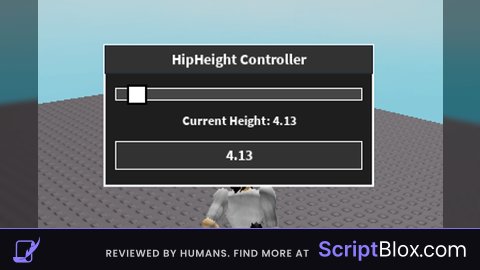
local Players = game:GetService("Players")
local UserInputService = game:GetService("UserInputService")
local LocalPlayer = Players.LocalPlayer
local Character = LocalPlayer.Character or LocalPlayer.CharacterAdded:Wait()
local Humanoid = Character:FindFirstChildOfClass("Humanoid")

if not Humanoid then
    warn("Humanoid not found!")
    return
end

-- GUI Creation
local ScreenGui = Instance.new("ScreenGui")
ScreenGui.Name = "HipHeightController"
ScreenGui.Parent = game:GetService("CoreGui")

local Frame = Instance.new("Frame")
Frame.Size = UDim2.new(0, 250, 0, 130)
Frame.Position = UDim2.new(0.5, -125, 0.75, 0)
Frame.BackgroundColor3 = Color3.fromRGB(30, 30, 30)
Frame.BorderSizePixel = 2
Frame.BorderColor3 = Color3.fromRGB(255, 255, 255)
Frame.Parent = ScreenGui
Frame.Active = true

local Title = Instance.new("TextLabel")
Title.Text = "HipHeight Controller"
Title.Size = UDim2.new(1, 0, 0, 25)
Title.BackgroundColor3 = Color3.fromRGB(50, 50, 50)
Title.TextColor3 = Color3.fromRGB(255, 255, 255)
Title.Font = Enum.Font.SourceSansBold
Title.TextSize = 16
Title.Parent = Frame

local SliderBar = Instance.new("Frame")
SliderBar.Size = UDim2.new(1, -20, 0, 10)
SliderBar.Position = UDim2.new(0, 10, 0, 40)
SliderBar.BackgroundColor3 = Color3.fromRGB(70, 70, 70)
SliderBar.BorderSizePixel = 1
SliderBar.BorderColor3 = Color3.fromRGB(255, 255, 255)
SliderBar.Parent = Frame

local SliderButton = Instance.new("Frame")
SliderButton.Size = UDim2.new(0, 15, 0, 15)
SliderButton.Position = UDim2.new(0.5, -7, 0, -2)
SliderButton.BackgroundColor3 = Color3.fromRGB(255, 255, 255)
SliderButton.BorderSizePixel = 2
SliderButton.BorderColor3 = Color3.fromRGB(0, 0, 0)
SliderButton.Parent = SliderBar

local HeightLabel = Instance.new("TextLabel")
HeightLabel.Size = UDim2.new(1, 0, 0, 20)
HeightLabel.Position = UDim2.new(0, 0, 0, 60)
HeightLabel.BackgroundTransparency = 1
HeightLabel.TextColor3 = Color3.fromRGB(255, 255, 255)
HeightLabel.Font = Enum.Font.SourceSansBold
HeightLabel.TextSize = 14
HeightLabel.Text = "Current Height: " .. string.format("%.2f", Humanoid.HipHeight)
HeightLabel.Parent = Frame

local InputBox = Instance.new("TextBox")
InputBox.Size = UDim2.new(1, -20, 0, 25)
InputBox.Position = UDim2.new(0, 10, 0, 90)
InputBox.BackgroundColor3 = Color3.fromRGB(50, 50, 50)
InputBox.BorderSizePixel = 1
InputBox.BorderColor3 = Color3.fromRGB(255, 255, 255)
InputBox.TextColor3 = Color3.fromRGB(255, 255, 255)
InputBox.Font = Enum.Font.SourceSansBold
InputBox.TextSize = 16
InputBox.Text = tostring(Humanoid.HipHeight)
InputBox.ClearTextOnFocus = false
InputBox.Parent = Frame

-- Adjust HipHeight based on slider
local MinHeight, MaxHeight = 0, 50
local DraggingSlider = false
local DraggingFrame = false
local DragStart, StartPos

local function UpdateHipHeight(xPosition)
    local RelativePosition = (xPosition - SliderBar.AbsolutePosition.X) / SliderBar.AbsoluteSize.X
    RelativePosition = math.clamp(RelativePosition, 0, 1)

    local NewHeight = MinHeight + (MaxHeight - MinHeight) * RelativePosition
    Humanoid.HipHeight = NewHeight
    HeightLabel.Text = "Current Height: " .. string.format("%.2f", NewHeight)
    InputBox.Text = string.format("%.2f", NewHeight)

    SliderButton.Position = UDim2.new(RelativePosition, -7, 0, -2)
end

-- Slider Control (Independent of Frame Dragging)
SliderButton.InputBegan:Connect(function(input)
    if input.UserInputType == Enum.UserInputType.MouseButton1 then
        DraggingSlider = true
    end
end)

UserInputService.InputEnded:Connect(function(input)
    if input.UserInputType == Enum.UserInputType.MouseButton1 then
        DraggingSlider = false
    end
end)

UserInputService.InputChanged:Connect(function(input)
    if DraggingSlider and input.UserInputType == Enum.UserInputType.MouseMovement then
        UpdateHipHeight(input.Position.X)
    end
end)

-- TextBox Input for Custom Height
InputBox.FocusLost:Connect(function(enterPressed)
    if enterPressed then
        local NewHeight = tonumber(InputBox.Text)
        if NewHeight then
            Humanoid.HipHeight = NewHeight
            HeightLabel.Text = "Current Height: " .. string.format("%.2f", NewHeight)

            -- Adjust slider position if within limits
            if NewHeight >= MinHeight and NewHeight <= MaxHeight then
                local RelativePosition = (NewHeight - MinHeight) / (MaxHeight - MinHeight)
                SliderButton.Position = UDim2.new(RelativePosition, -7, 0, -2)
            end
        else
            InputBox.Text = tostring(Humanoid.HipHeight) -- Reset invalid input
        end
    end
end)

-- GUI Dragging (Independent of Slider)
Frame.InputBegan:Connect(function(input)
    if input.UserInputType == Enum.UserInputType.MouseButton1 and not DraggingSlider then
        DraggingFrame = true
        DragStart = input.Position
        StartPos = Frame.Position
        input.Changed:Connect(function()
            if input.UserInputState == Enum.UserInputState.End then
                DraggingFrame = false
            end
        end)
    end
end)

UserInputService.InputChanged:Connect(function(input)
    if DraggingFrame and input.UserInputType == Enum.UserInputType.MouseMovement then
        local Delta = input.Position - DragStart
        Frame.Position = UDim2.new(StartPos.X.Scale, StartPos.X.Offset + Delta.X, StartPos.Y.Scale, StartPos.Y.Offset + Delta.Y)
    end
end)

-- Button to Hide/Unhide GUI (For Mobile Players)
local DeviceType = UserInputService.TouchEnabled and "Mobile" or "PC"

if DeviceType == "Mobile" then
    local ToggleButton = Instance.new("TextButton")
    ToggleButton.Size = UDim2.new(0, 50, 0, 50)
    ToggleButton.Position = UDim2.new(0, 10, 0.5, -25)
    ToggleButton.BackgroundColor3 = Color3.fromRGB(0, 255, 0)
    ToggleButton.Text = "Show/Hide"
    ToggleButton.TextColor3 = Color3.fromRGB(255, 255, 255)
    ToggleButton.Font = Enum.Font.SourceSansBold
    ToggleButton.TextSize = 16
    ToggleButton.Parent = ScreenGui

    ToggleButton.MouseButton1Click:Connect(function()
        Frame.Visible = not Frame.Visible
    end)
end

-- Keybind to Hide/Unhide GUI (For PC Players)
if DeviceType == "PC" then
    UserInputService.InputBegan:Connect(function(input, gameProcessed)
        if gameProcessed then return end
        if input.KeyCode == Enum.KeyCode.X then
            Frame.Visible = not Frame.Visible
        end
    end)
end

Hi there I hope you’re doing well. Tried that in drill to earth core, It’s not working. Bottom part of interface is also cut off as it is too low