

KeylessUniversal
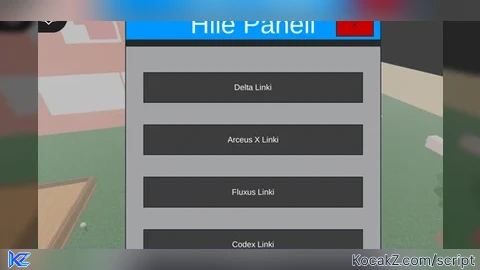
local Players = game:GetService("Players")
local player = Players.LocalPlayer
local playerGui = player:FindFirstChild("PlayerGui")
local UserInputService = game:GetService("UserInputService")
local HttpService = game:GetService("HttpService")

-- GUI oluştur
local screenGui = Instance.new("ScreenGui")
screenGui.Parent = playerGui

-- Ana çerçeve
local frame = Instance.new("Frame")
frame.Size = UDim2.new(0, 350, 0, 400)
frame.Position = UDim2.new(0.5, -175, 0.5, -200)
frame.BackgroundColor3 = Color3.fromRGB(40, 40, 40)
frame.Parent = screenGui

-- Başlık
local titleLabel = Instance.new("TextLabel")
titleLabel.Size = UDim2.new(1, 0, 0, 40)
titleLabel.BackgroundColor3 = Color3.fromRGB(0, 150, 255)
titleLabel.TextColor3 = Color3.fromRGB(255, 255, 255)
titleLabel.TextScaled = true
titleLabel.Text = "Hile Paneli"
titleLabel.Parent = frame

-- Kapatma Butonu
local closeButton = Instance.new("TextButton")
closeButton.Size = UDim2.new(0, 50, 0, 30)
closeButton.Position = UDim2.new(1, -60, 0, 5)
closeButton.BackgroundColor3 = Color3.fromRGB(200, 0, 0)
closeButton.Text = "X"
closeButton.Parent = frame

-- Kaydırılabilir çerçeve
local scrollingFrame = Instance.new("ScrollingFrame")
scrollingFrame.Size = UDim2.new(1, 0, 1, -50)
scrollingFrame.Position = UDim2.new(0, 0, 0, 50)
scrollingFrame.CanvasSize = UDim2.new(0, 0, 1.8, 0)
scrollingFrame.ScrollBarThickness = 10
scrollingFrame.Parent = frame

-- Sonuç etiketi (tıklanan butonun çıktısını gösterecek)
local resultLabel = Instance.new("TextLabel")
resultLabel.Size = UDim2.new(1, -20, 0, 50)
resultLabel.Position = UDim2.new(0.5, -150, 0.75, 0)
resultLabel.BackgroundColor3 = Color3.fromRGB(255, 255, 255)
resultLabel.TextColor3 = Color3.fromRGB(0, 0, 0)
resultLabel.TextScaled = true
resultLabel.Text = "Sonuç burada görünecek"
resultLabel.Parent = scrollingFrame

-- Kopyalama butonu
local copyButton = Instance.new("TextButton")
copyButton.Size = UDim2.new(0, 200, 0, 40)
copyButton.Position = UDim2.new(0.5, -100, 0.85, 0)
copyButton.BackgroundColor3 = Color3.fromRGB(100, 200, 100)
copyButton.TextColor3 = Color3.fromRGB(255, 255, 255)
copyButton.Text = "Linki Kopyala"
copyButton.Visible = false -- Başlangıçta gizli
copyButton.Parent = scrollingFrame

-- Buton oluşturma fonksiyonu
local function createButton(text, position, link)
    local button = Instance.new("TextButton")
    button.Size = UDim2.new(0, 300, 0, 40)
    button.Position = UDim2.new(0.5, -150, position, 0)
    button.BackgroundColor3 = Color3.fromRGB(60, 60, 60)
    button.TextColor3 = Color3.fromRGB(255, 255, 255)
    button.Text = text
    button.Parent = scrollingFrame

    -- Tıklanınca yazıyı değiştirme ve kopyalama butonunu açma
    button.MouseButton1Click:Connect(function()
        resultLabel.Text = "Link: " .. link
        copyButton.Visible = true
        copyButton.MouseButton1Click:Connect(function()
            setclipboard(link) -- Linki panoya kopyalar
            copyButton.Text = "Kopyalandı!"
            wait(1)
            copyButton.Text = "Linki Kopyala"
        end)
    end)
end

-- Butonları ekleyelim
createButton("Delta Linki", 0.05, "https://delta-executor.com/deltaexploit/")
createButton("Arceus X Linki", 0.15, "https://arceusx.com/#google_vignette")
createButton("Fluxus Linki", 0.25, "https://fluxus.mobi/")
createButton("Codex Linki", 0.35, "https://www.codex.lol/")
createButton("Hydrogen Linki", 0.45, "https://hydrogenexec.com/")
createButton("Synapse Linki", 0.55, "https://synapsex.co/")

-- Kapatma butonu işlevi
closeButton.MouseButton1Click:Connect(function()
    screenGui:Destroy()
end)No comments yet for this script.


