


KeylessUniversal
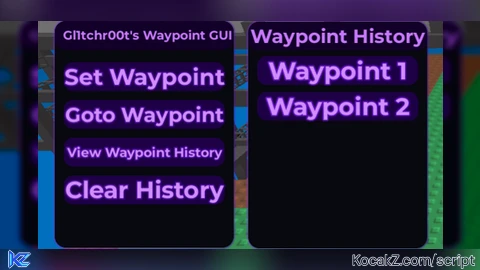
-- Services
local Players = game:GetService("Players")
local UIS = game:GetService("UserInputService")
local TweenService = game:GetService("TweenService")
local player = Players.LocalPlayer

-- Variables
local waypoint = nil
local waypointHistory = {}

-- Create ScreenGui
local ScreenGui = Instance.new("ScreenGui")
ScreenGui.Name = "Gl1tchr00tWaypointGUI"
ScreenGui.ResetOnSpawn = false
ScreenGui.Parent = game:GetService("CoreGui")

---------------------------------------------------
-- UTILITY FUNCTIONS
---------------------------------------------------
local function addCorner(obj, radius)
	local c = Instance.new("UICorner")
	c.CornerRadius = UDim.new(0, radius)
	c.Parent = obj
end

local function addGlow(obj)
	local stroke = Instance.new("UIStroke")
	stroke.Color = Color3.fromRGB(170, 80, 255)
	stroke.Thickness = 2
	stroke.Transparency = 0.2
	stroke.Parent = obj

	local gradient = Instance.new("UIGradient")
	gradient.Color = ColorSequence.new({
		ColorSequenceKeypoint.new(0, Color3.fromRGB(200, 100, 255)),
		ColorSequenceKeypoint.new(1, Color3.fromRGB(120, 0, 200))
	})
	gradient.Parent = stroke

	-- Pulse animation
	task.spawn(function()
		while obj.Parent do
			TweenService:Create(stroke, TweenInfo.new(1.5, Enum.EasingStyle.Sine, Enum.EasingDirection.InOut), {Transparency = 0.6}):Play()
			task.wait(1.5)
			TweenService:Create(stroke, TweenInfo.new(1.5, Enum.EasingStyle.Sine, Enum.EasingDirection.InOut), {Transparency = 0.2}):Play()
			task.wait(1.5)
		end
	end)
end

local function makeDraggable(frame, dragHandle)
	local dragging, dragStart, startPos

	dragHandle.InputBegan:Connect(function(input)
		if input.UserInputType == Enum.UserInputType.MouseButton1 then
			dragging = true
			dragStart = input.Position
			startPos = frame.Position

			input.Changed:Connect(function()
				if input.UserInputState == Enum.UserInputState.End then
					dragging = false
				end
			end)
		end
	end)

	dragHandle.InputChanged:Connect(function(input)
		if input.UserInputType == Enum.UserInputType.MouseMovement and dragging then
			local delta = input.Position - dragStart
			frame.Position = UDim2.new(
				startPos.X.Scale,
				startPos.X.Offset + delta.X,
				startPos.Y.Scale,
				startPos.Y.Offset + delta.Y
			)
		end
	end)
end

---------------------------------------------------
-- MAIN FRAME
---------------------------------------------------
local MainFrame = Instance.new("Frame")
MainFrame.Size = UDim2.new(0, 260, 0, 330)
MainFrame.Position = UDim2.new(0.05, 0, 0.2, 0)
MainFrame.BackgroundColor3 = Color3.fromRGB(8, 8, 15)
MainFrame.BorderSizePixel = 0
MainFrame.Parent = ScreenGui
MainFrame.Visible = true
addCorner(MainFrame, 16)
addGlow(MainFrame)

-- Title Bar
local TitleBar = Instance.new("Frame")
TitleBar.Size = UDim2.new(1, 0, 0, 42)
TitleBar.BackgroundColor3 = Color3.fromRGB(18, 0, 40)
TitleBar.BorderSizePixel = 0
TitleBar.Parent = MainFrame
addCorner(TitleBar, 16)

local TitleLabel = Instance.new("TextLabel")
TitleLabel.Size = UDim2.new(1, -10, 1, 0)
TitleLabel.Position = UDim2.new(0, 10, 0, 0)
TitleLabel.BackgroundTransparency = 1
TitleLabel.Text = "Gl1tchr00t's Waypoint GUI"
TitleLabel.TextColor3 = Color3.fromRGB(200, 120, 255)
TitleLabel.TextScaled = true
TitleLabel.Font = Enum.Font.GothamBold
TitleLabel.Parent = TitleBar

makeDraggable(MainFrame, TitleBar)

---------------------------------------------------
-- BUTTON CREATOR
---------------------------------------------------
local function createButton(text, yPos)
	local btn = Instance.new("TextButton")
	btn.Size = UDim2.new(0.9, 0, 0, 42)
	btn.Position = UDim2.new(0.05, 0, 0, yPos)
	btn.BackgroundColor3 = Color3.fromRGB(30, 0, 70)
	btn.Text = text
	btn.TextColor3 = Color3.fromRGB(210, 140, 255)
	btn.TextScaled = true
	btn.Font = Enum.Font.GothamBold
	btn.BorderSizePixel = 0
	btn.Parent = MainFrame
	addCorner(btn, 14)
	addGlow(btn)

	-- Hover animation
	btn.MouseEnter:Connect(function()
		TweenService:Create(btn, TweenInfo.new(0.15), {BackgroundColor3 = Color3.fromRGB(60, 0, 120)}):Play()
	end)
	btn.MouseLeave:Connect(function()
		TweenService:Create(btn, TweenInfo.new(0.15), {BackgroundColor3 = Color3.fromRGB(30, 0, 70)}):Play()
	end)

	return btn
end

-- Buttons
local SetWaypointBtn = createButton("Set Waypoint", 60)
local GotoWaypointBtn = createButton("Goto Waypoint", 115)
local ViewHistoryBtn = createButton("View Waypoint History", 170)
local ClearHistoryBtn = createButton("Clear History", 225)

---------------------------------------------------
-- HISTORY FRAME
---------------------------------------------------
local HistoryFrame = Instance.new("Frame")
HistoryFrame.Size = UDim2.new(0, 260, 0, 330)
HistoryFrame.Position = UDim2.new(0.37, 0, 0.2, 0)
HistoryFrame.BackgroundColor3 = Color3.fromRGB(8, 8, 15)
HistoryFrame.BorderSizePixel = 0
HistoryFrame.Parent = ScreenGui
HistoryFrame.Visible = false
addCorner(HistoryFrame, 16)
addGlow(HistoryFrame)

local HistoryTitle = Instance.new("TextLabel")
HistoryTitle.Size = UDim2.new(1, 0, 0, 42)
HistoryTitle.BackgroundColor3 = Color3.fromRGB(18, 0, 40)
HistoryTitle.BorderSizePixel = 0
HistoryTitle.Text = "Waypoint History"
HistoryTitle.TextColor3 = Color3.fromRGB(200, 120, 255)
HistoryTitle.TextScaled = true
HistoryTitle.Font = Enum.Font.GothamBold
HistoryTitle.Parent = HistoryFrame
addCorner(HistoryTitle, 16)

makeDraggable(HistoryFrame, HistoryTitle)

local HistoryList = Instance.new("Frame")
HistoryList.Size = UDim2.new(1, 0, 1, -50)
HistoryList.Position = UDim2.new(0, 0, 0, 50)
HistoryList.BackgroundTransparency = 1
HistoryList.Parent = HistoryFrame

local UIListLayout = Instance.new("UIListLayout", HistoryList)
UIListLayout.Padding = UDim.new(0, 10)
UIListLayout.HorizontalAlignment = Enum.HorizontalAlignment.Center

local function createHistoryButton(text)
	local btn = Instance.new("TextButton")
	btn.Size = UDim2.new(0.9, 0, 0, 42)
	btn.BackgroundColor3 = Color3.fromRGB(30, 0, 70)
	btn.Text = text
	btn.TextColor3 = Color3.fromRGB(210, 140, 255)
	btn.TextScaled = true
	btn.Font = Enum.Font.GothamBold
	btn.BorderSizePixel = 0
	btn.Parent = HistoryList
	addCorner(btn, 14)
	addGlow(btn)

	btn.MouseEnter:Connect(function()
		TweenService:Create(btn, TweenInfo.new(0.15), {BackgroundColor3 = Color3.fromRGB(60, 0, 120)}):Play()
	end)
	btn.MouseLeave:Connect(function()
		TweenService:Create(btn, TweenInfo.new(0.15), {BackgroundColor3 = Color3.fromRGB(30, 0, 70)}):Play()
	end)

	return btn
end

---------------------------------------------------
-- FUNCTIONS
---------------------------------------------------
local function refreshHistory()
	for _, child in ipairs(HistoryList:GetChildren()) do
		if child:IsA("TextButton") then
			child:Destroy()
		end
	end

	for i, pos in ipairs(waypointHistory) do
		local btn = createHistoryButton("Waypoint " .. i)
		btn.MouseButton1Click:Connect(function()
			local char = player.Character
			if char and char:FindFirstChild("HumanoidRootPart") then
				char.HumanoidRootPart.CFrame = CFrame.new(pos)
			end
		end)
	end
end

---------------------------------------------------
-- BUTTON LOGIC
---------------------------------------------------
SetWaypointBtn.MouseButton1Click:Connect(function()
	local char = player.Character
	if char and char:FindFirstChild("HumanoidRootPart") then
		waypoint = char.HumanoidRootPart.Position
		table.insert(waypointHistory, waypoint)
	end
end)

GotoWaypointBtn.MouseButton1Click:Connect(function()
	if waypoint then
		local char = player.Character
		if char and char:FindFirstChild("HumanoidRootPart") then
			char.HumanoidRootPart.CFrame = CFrame.new(waypoint)
		end
	end
end)

ViewHistoryBtn.MouseButton1Click:Connect(function()
	if HistoryFrame.Visible then
		TweenService:Create(HistoryFrame, TweenInfo.new(0.25, Enum.EasingStyle.Quad, Enum.EasingDirection.Out), {Position = HistoryFrame.Position + UDim2.new(0.05, 0, 0, 0)}):Play()
		task.wait(0.25)
		HistoryFrame.Visible = false
	else
		HistoryFrame.Position = UDim2.new(0.42, 0, 0.2, 0)
		HistoryFrame.Visible = true
		TweenService:Create(HistoryFrame, TweenInfo.new(0.25, Enum.EasingStyle.Quad, Enum.EasingDirection.Out), {Position = UDim2.new(0.37, 0, 0.2, 0)}):Play()
		refreshHistory()
	end
end)

ClearHistoryBtn.MouseButton1Click:Connect(function()
	waypointHistory = {}
	refreshHistory()
end)

---------------------------------------------------
-- TOGGLE BUTTON (BOTTOM)
---------------------------------------------------
local ToggleBtn = Instance.new("TextButton")
ToggleBtn.Size = UDim2.new(0, 60, 0, 40)
ToggleBtn.Position = UDim2.new(0.02, 0, 0.9, 0)
ToggleBtn.BackgroundColor3 = Color3.fromRGB(30, 0, 70)
ToggleBtn.Text = "WP"
ToggleBtn.TextColor3 = Color3.fromRGB(210, 140, 255)
ToggleBtn.TextScaled = true
ToggleBtn.Font = Enum.Font.GothamBold
ToggleBtn.BorderSizePixel = 0
ToggleBtn.Parent = ScreenGui
addCorner(ToggleBtn, 14)
addGlow(ToggleBtn)

ToggleBtn.MouseButton1Click:Connect(function()
	if MainFrame.Visible then
		TweenService:Create(MainFrame, TweenInfo.new(0.25, Enum.EasingStyle.Quad, Enum.EasingDirection.Out), {Position = MainFrame.Position + UDim2.new(0, 0, 0.1, 0)}):Play()
		task.wait(0.25)
		MainFrame.Visible = false
		HistoryFrame.Visible = false
	else
		MainFrame.Position = UDim2.new(0.05, 0, 0.3, 0)
		MainFrame.Visible = true
		TweenService:Create(MainFrame, TweenInfo.new(0.25, Enum.EasingStyle.Quad, Enum.EasingDirection.Out), {Position = UDim2.new(0.05, 0, 0.2, 0)}):Play()
	end
end)


Works great