


KeylessUniversal
--// Services
local Players = game:GetService("Players")
local player = Players.LocalPlayer

--// CONFIG
local LOADSTRING_URL = "https://link-hub.net/1405076/4dRn8P7YoIPv" -- NEW LINK APPLIED HERE

--// Helper: Copy to Clipboard function
local function copyToClipboard(text)
    if setclipboard then
        setclipboard(text)
        return true
    elseif toclipboard then
        toclipboard(text)
        return true
    else
        return false
    end
end

--// GUI Setup
local ScreenGui = Instance.new("ScreenGui")
ScreenGui.Name = "LoadstringGUI_Final"
ScreenGui.ResetOnSpawn = false
ScreenGui.Parent = player:WaitForChild("PlayerGui")

--// 1. MAIN DRAGGABLE GUI
local MainFrame = Instance.new("Frame")
MainFrame.Size = UDim2.new(0, 250, 0, 100)
MainFrame.Position = UDim2.new(0.5, -125, 0.5, -50)
MainFrame.BackgroundColor3 = Color3.fromRGB(25, 25, 35)
MainFrame.BorderSizePixel = 0
MainFrame.Active = true
MainFrame.Draggable = true
MainFrame.Parent = ScreenGui

local frameCorner = Instance.new("UICorner")
frameCorner.CornerRadius = UDim.new(0, 10)
frameCorner.Parent = MainFrame

--// 2. CLOSE BUTTON (X)
local XButton = Instance.new("TextButton")
XButton.Size = UDim2.new(0, 20, 0, 20)
XButton.Position = UDim2.new(1, -25, 0, 5)
XButton.Text = "X"
XButton.Font = Enum.Font.SourceSansBold
XButton.TextSize = 18
XButton.TextColor3 = Color3.fromRGB(255, 255, 255)
XButton.BackgroundColor3 = Color3.fromRGB(200, 50, 50)
XButton.BorderSizePixel = 0
XButton.Parent = MainFrame

local xCorner = Instance.new("UICorner")
xCorner.CornerRadius = UDim.new(0, 5)
xCorner.Parent = XButton

--// 3. COPY BUTTON (Adjusted Position/Size)
local CopyButton = Instance.new("TextButton")
CopyButton.Name = "GetLoadstringScript"
CopyButton.Size = UDim2.new(0.65, 0, 0, 40) -- Fixed 40px height
CopyButton.AnchorPoint = Vector2.new(0.5, 0.5)
CopyButton.Position = UDim2.new(0.5, 0, 0.3, 0) -- Shifted further up
CopyButton.Text = "Get loadstring script"
CopyButton.Font = Enum.Font.SourceSansBold
CopyButton.TextSize = 16
CopyButton.TextColor3 = Color3.fromRGB(255, 255, 255)
CopyButton.BackgroundColor3 = Color3.fromRGB(80, 160, 255)
CopyButton.BorderSizePixel = 0
CopyButton.Parent = MainFrame

local buttonCorner = Instance.new("UICorner")
buttonCorner.CornerRadius = UDim.new(0, 8)
buttonCorner.Parent = CopyButton

--// 4. KEY SYSTEM TITLE (NEW)
local KeySystemTitle = Instance.new("TextLabel")
KeySystemTitle.Name = "KeySystemTitle"
KeySystemTitle.Size = UDim2.new(1, 0, 0, 15) -- 15px height
KeySystemTitle.Position = UDim2.new(0, 0, 0.58, 0) -- Positioned below button
KeySystemTitle.Text = "KEY SYSTEM"
KeySystemTitle.Font = Enum.Font.SourceSansBold
KeySystemTitle.TextSize = 14
KeySystemTitle.TextColor3 = Color3.fromRGB(150, 150, 150) -- Subdued color
KeySystemTitle.BackgroundTransparency = 1
KeySystemTitle.Parent = MainFrame

--// 5. FEEDBACK TEXT LABEL (Adjusted Position)
local FeedbackLabel = Instance.new("TextLabel")
FeedbackLabel.Name = "FeedbackLabel"
FeedbackLabel.Size = UDim2.new(1, 0, 0, 20)
FeedbackLabel.Position = UDim2.new(0, 0, 0.78, 0) -- Shifted down
FeedbackLabel.Text = ""
FeedbackLabel.Font = Enum.Font.SourceSans
FeedbackLabel.TextSize = 14
FeedbackLabel.TextColor3 = Color3.fromRGB(200, 200, 200)
FeedbackLabel.BackgroundTransparency = 1
FeedbackLabel.Parent = MainFrame

--// 6. CONFIRMATION GUI (Non-Draggable, Centered, Starts Hidden)
local ConfirmFrame = Instance.new("Frame")
ConfirmFrame.Name = "ConfirmFrame"
ConfirmFrame.Size = UDim2.new(0, 300, 0, 100)
ConfirmFrame.Position = UDim2.new(0.5, 0, 0.5, 0)
ConfirmFrame.AnchorPoint = Vector2.new(0.5, 0.5)
ConfirmFrame.BackgroundColor3 = Color3.fromRGB(40, 40, 55)
ConfirmFrame.BorderSizePixel = 0
ConfirmFrame.Visible = false
ConfirmFrame.Active = true
ConfirmFrame.Draggable = false
ConfirmFrame.Parent = ScreenGui

local confirmCorner = Instance.new("UICorner")
confirmCorner.CornerRadius = UDim.new(0, 10)
confirmCorner.Parent = ConfirmFrame

local ConfirmLabel = Instance.new("TextLabel")
ConfirmLabel.Size = UDim2.new(1, 0, 0.4, 0)
ConfirmLabel.Position = UDim2.new(0, 0, 0, 0)
ConfirmLabel.Text = "You sure you want to unload the GUI?"
ConfirmLabel.Font = Enum.Font.SourceSansBold
ConfirmLabel.TextSize = 16
ConfirmLabel.TextColor3 = Color3.fromRGB(255, 255, 255)
ConfirmLabel.BackgroundTransparency = 1
ConfirmLabel.Parent = ConfirmFrame

local YesButton = Instance.new("TextButton")
YesButton.Size = UDim2.new(0.4, 0, 0.35, 0)
YesButton.Position = UDim2.new(0.05, 0, 0.55, 0)
YesButton.Text = "Yes"
YesButton.Font = Enum.Font.SourceSansBold
YesButton.TextSize = 14
YesButton.TextColor3 = Color3.fromRGB(255, 255, 255)
YesButton.BackgroundColor3 = Color3.fromRGB(50, 180, 50)
YesButton.Parent = ConfirmFrame

local NoButton = Instance.new("TextButton")
NoButton.Size = UDim2.new(0.4, 0, 0.35, 0)
NoButton.Position = UDim2.new(0.55, 0, 0.55, 0)
NoButton.Text = "No"
NoButton.Font = Enum.Font.SourceSansBold
NoButton.TextSize = 14
NoButton.TextColor3 = Color3.fromRGB(255, 255, 255)
NoButton.BackgroundColor3 = Color3.fromRGB(150, 150, 150)
NoButton.Parent = ConfirmFrame

--// 7. LOGIC CONNECTIONS

-- Copy Button Logic
CopyButton.MouseButton1Click:Connect(function()
    local success = copyToClipboard(LOADSTRING_URL)

    if success then
        CopyButton.Text = "Copied! ✅"
        CopyButton.BackgroundColor3 = Color3.fromRGB(90, 200, 120)
        FeedbackLabel.Text = "Put the copied link in your Browser"
    else
        CopyButton.Text = "Copy Failed! ❌"
        CopyButton.BackgroundColor3 = Color3.fromRGB(220, 90, 90)
        FeedbackLabel.Text = "Copy failed. Check your executor."
    end

    task.wait(2)
    -- Reset
    CopyButton.Text = "Get loadstring script"
    CopyButton.BackgroundColor3 = Color3.fromRGB(80, 160, 255)
    FeedbackLabel.Text = ""
end)

-- X Button Logic (Open Confirmation)
XButton.MouseButton1Click:Connect(function()
    ConfirmFrame.Visible = true
end)

-- Yes Button Logic (Unload/Delete both GUIs)
YesButton.MouseButton1Click:Connect(function()
    ScreenGui:Destroy()
end)

-- No Button Logic (Close Confirmation)
NoButton.MouseButton1Click:Connect(function()
    ConfirmFrame.Visible = false
end)


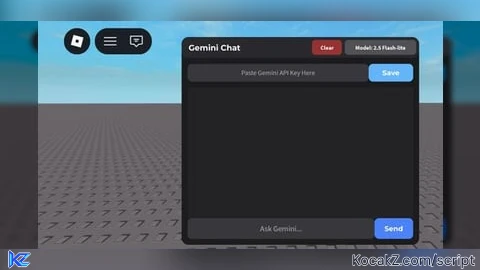
This is *py ahh Chatgpt, actually make scripts, if you're mobile go to GUI Creator [Beta] in roblox
@PlayerZN Thanks for your feedback!
Actually is powered by Gemini
@PlayerZN Also thx for the GUI Creator [Beta] game recommendation, I rlly wanted to make my own GUI
where is the api
@SG_Grave Search a tutorial on how to get your own Gemini API Key, It's simple.
What Is This For?
@Mm2XDeathHub Ask AI scripts.
make a chat gpt using chat gpt
@Kirill73384 No, that's expensive, sorry.
W
Working?
@Mm2XDeathHub Yea, It is still WIP (Work In Progress) but it is working perfectly fine.