


KeylessUniversal
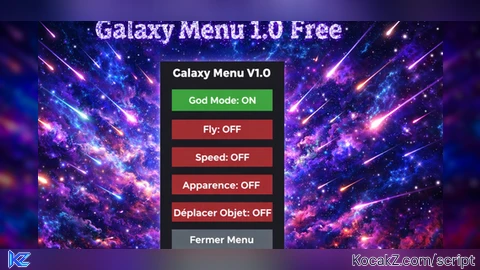
local Players = game:GetService("Players")
local RunService = game:GetService("RunService")
local UserInputService = game:GetService("UserInputService")
local player = Players.LocalPlayer
local playerGui = player:WaitForChild("PlayerGui")
local camera = workspace.CurrentCamera

-- Création interface principale
local screenGui = Instance.new("ScreenGui", playerGui)
screenGui.Name = "GalaxyMenuV1"

local frame = Instance.new("Frame", screenGui)
frame.Size = UDim2.new(0, 220, 0, 440)
frame.Position = UDim2.new(0, 50, 0, 50)
frame.BackgroundColor3 = Color3.fromRGB(30, 30, 30)
frame.BorderSizePixel = 0

-- Titre
local titleLabel = Instance.new("TextLabel", frame)
titleLabel.Size = UDim2.new(0, 200, 0, 40)
titleLabel.Position = UDim2.new(0, 10, 0, 10)
titleLabel.BackgroundTransparency = 1
titleLabel.Font = Enum.Font.GothamBlack
titleLabel.TextSize = 24
titleLabel.TextColor3 = Color3.fromRGB(255, 255, 255)
titleLabel.Text = "Galaxy Menu V.1.0"
titleLabel.TextStrokeColor3 = Color3.new(0,0,0)
titleLabel.TextStrokeTransparency = 0.5
titleLabel.TextXAlignment = Enum.TextXAlignment.Center
titleLabel.TextYAlignment = Enum.TextYAlignment.Center

local function createButton(text, y)
    local btn = Instance.new("TextButton", frame)
    btn.Size = UDim2.new(0, 200, 0, 40)
    btn.Position = UDim2.new(0, 10, 0, y)
    btn.BackgroundColor3 = Color3.fromRGB(180, 50, 50)
    btn.TextColor3 = Color3.new(1, 1, 1)
    btn.Font = Enum.Font.GothamBold
    btn.TextSize = 20
    btn.Text = text .. ": OFF"
    btn.AutoButtonColor = true
    return btn
end

-- États
local god = false
local fly = false
local speedEnabled = false
local moveObjEnabled = false

local normalWalkSpeed = 16
local boostedWalkSpeed = 50

-- Fonction God Mode basique
local function setGodMode(state)
    god = state
    local char = player.Character
    if not char then return end
    local hum = char:FindFirstChildOfClass("Humanoid")
    if not hum then return end
    if god then
        hum.MaxHealth = math.huge
        hum.Health = math.huge
        hum.HealthChanged:Connect(function()
            if hum.Health < hum.MaxHealth then
                hum.Health = hum.MaxHealth
            end
        end)
    else
        hum.MaxHealth = 100
        if hum.Health > 100 then hum.Health = 100 end
    end
end

-- Fly simpliste fonctionnel
local bodyVelocity
local bodyGyro

local moveVec = Vector3.new(0,0,0)
local speedFly = 50

local keys = {
    W = false,
    A = false,
    S = false,
    D = false,
    Space = false,
    LeftControl = false
}

local function updateMoveVector(rootCFrame)
    local direction = Vector3.new(0,0,0)
    if keys.W then direction = direction + rootCFrame.LookVector end
    if keys.S then direction = direction - rootCFrame.LookVector end
    if keys.A then direction = direction - rootCFrame.RightVector end
    if keys.D then direction = direction + rootCFrame.RightVector end
    if keys.Space then direction = direction + Vector3.new(0,1,0) end
    if keys.LeftControl then direction = direction - Vector3.new(0,1,0) end
    if direction.Magnitude > 0 then
        moveVec = direction.Unit * speedFly
    else
        moveVec = Vector3.new(0,0,0)
    end
end

local inputBeganConnFly, inputEndedConnFly, heartbeatConnFly

local function toggleFly()
    local char = player.Character
    if not char then return end
    local root = char:FindFirstChild("HumanoidRootPart")
    local hum = char:FindFirstChildOfClass("Humanoid")
    if not root or not hum then return end

    if fly then
        if bodyVelocity then bodyVelocity:Destroy() bodyVelocity = nil end
        if bodyGyro then bodyGyro:Destroy() bodyGyro = nil end
        if inputBeganConnFly then inputBeganConnFly:Disconnect() inputBeganConnFly = nil end
        if inputEndedConnFly then inputEndedConnFly:Disconnect() inputEndedConnFly = nil end
        if heartbeatConnFly then heartbeatConnFly:Disconnect() heartbeatConnFly = nil end
        hum.PlatformStand = false
        fly = false
        return
    end

    bodyVelocity = Instance.new("BodyVelocity")
    bodyVelocity.MaxForce = Vector3.new(1e5, 1e5, 1e5)
    bodyVelocity.Velocity = Vector3.new(0,0,0)
    bodyVelocity.Parent = root

    bodyGyro = Instance.new("BodyGyro")
    bodyGyro.MaxTorque = Vector3.new(1e5,1e5,1e5)
    bodyGyro.CFrame = root.CFrame
    bodyGyro.Parent = root

    hum.PlatformStand = true
    fly = true

    inputBeganConnFly = UserInputService.InputBegan:Connect(function(input, gp)
        if gp then return end
        local key = input.KeyCode.Name
        if keys[key] ~= nil then
            keys[key] = true
            updateMoveVector(root.CFrame)
        end
    end)

    inputEndedConnFly = UserInputService.InputEnded:Connect(function(input, gp)
        if gp then return end
        local key = input.KeyCode.Name
        if keys[key] ~= nil then
            keys[key] = false
            updateMoveVector(root.CFrame)
        end
    end)

    heartbeatConnFly = RunService.Heartbeat:Connect(function()
        if not fly or not bodyVelocity or not bodyGyro or not root.Parent then
            heartbeatConnFly:Disconnect()
            inputBeganConnFly:Disconnect()
            inputEndedConnFly:Disconnect()
            return
        end
        bodyVelocity.Velocity = moveVec
        bodyGyro.CFrame = workspace.CurrentCamera.CFrame
    end)
end

-- Fonction Speed
local function toggleSpeed()
    speedEnabled = not speedEnabled
    local char = player.Character
    if not char then return end
    local hum = char:FindFirstChildOfClass("Humanoid")
    if not hum then return end
    if speedEnabled then
        hum.WalkSpeed = boostedWalkSpeed
    else
        hum.WalkSpeed = normalWalkSpeed
    end
end

-- Fonction changement couleur de peau via BodyColors
local function changeSkinColor(color)
    local character = player.Character
    if not character then return end
    local bodyColors = character:FindFirstChildOfClass("BodyColors")
    if not bodyColors then
        bodyColors = Instance.new("BodyColors")
        bodyColors.Parent = character
    end

    bodyColors.HeadColor = BrickColor.new(color)
    bodyColors.LeftArmColor = BrickColor.new(color)
    bodyColors.RightArmColor = BrickColor.new(color)
    bodyColors.LeftLegColor = BrickColor.new(color)
    bodyColors.RightLegColor = BrickColor.new(color)
    bodyColors.TorsoColor = BrickColor.new(color)
end

-- Fonctionnalité Déplacer Objet
local selectedPart = nil
local dragging = false

local function toggleMoveMode()
    moveObjEnabled = not moveObjEnabled
    if not moveObjEnabled and selectedPart then
        selectedPart.Anchored = false
        selectedPart = nil
        dragging = false
    end
end

UserInputService.InputBegan:Connect(function(input, gameProcessed)
    if gameProcessed then return end
    if moveObjEnabled and input.UserInputType == Enum.UserInputType.MouseButton1 then
        local mousePos = UserInputService:GetMouseLocation()
        local ray = camera:ScreenPointToRay(mousePos.X, mousePos.Y)
        local raycastParams = RaycastParams.new()
        raycastParams.FilterDescendantsInstances = {player.Character}
        raycastParams.FilterType = Enum.RaycastFilterType.Blacklist
        local raycastResult = workspace:Raycast(ray.Origin, ray.Direction * 500, raycastParams)
        if raycastResult and raycastResult.Instance and raycastResult.Instance:IsA("BasePart") then
            selectedPart = raycastResult.Instance
            dragging = true
            selectedPart.Anchored = true
        end
    end
end)

UserInputService.InputEnded:Connect(function(input, gameProcessed)
    if gameProcessed then return end
    if moveObjEnabled and input.UserInputType == Enum.UserInputType.MouseButton1 then
        if dragging and selectedPart then
            selectedPart.Anchored = false
            selectedPart = nil
            dragging = false
        end
    end
end)

RunService.RenderStepped:Connect(function()
    if dragging and selectedPart then
        local mousePos = UserInputService:GetMouseLocation()
        local ray = camera:ScreenPointToRay(mousePos.X, mousePos.Y)
        local raycastParams = RaycastParams.new()
        raycastParams.FilterDescendantsInstances = {player.Character, selectedPart}
        raycastParams.FilterType = Enum.RaycastFilterType.Blacklist
        local raycastResult = workspace:Raycast(ray.Origin, ray.Direction * 1000, raycastParams)

        if raycastResult then
            local pos = raycastResult.Position
            selectedPart.Position = pos + Vector3.new(0, selectedPart.Size.Y/2, 0)
        end
    end
end)

-- Création boutons principaux
local godBtn = createButton("God Mode", 60)
local flyBtn = createButton("Fly", 120)
local speedBtn = createButton("Speed", 180)
local apparenceBtn = Instance.new("TextButton", frame)
apparenceBtn.Size = UDim2.new(0, 200, 0, 40)
apparenceBtn.Position = UDim2.new(0, 10, 0, 240)
apparenceBtn.BackgroundColor3 = Color3.fromRGB(180, 50, 50)
apparenceBtn.TextColor3 = Color3.new(1,1,1)
apparenceBtn.Font = Enum.Font.GothamBold
apparenceBtn.TextSize = 20
apparenceBtn.Text = "Apparence: OFF"

local moveObjBtn = createButton("Déplacer Objet", 300)

local closeBtn = Instance.new("TextButton", frame)
closeBtn.Size = UDim2.new(0, 200, 0, 40)
closeBtn.Position = UDim2.new(0, 10, 0, 360)
closeBtn.BackgroundColor3 = Color3.fromRGB(100, 100, 100)
closeBtn.TextColor3 = Color3.new(1,1,1)
closeBtn.Font = Enum.Font.GothamBold
closeBtn.TextSize = 20
closeBtn.Text = "Fermer Menu"

local function updateBtn(btn, state)
    if state then
        btn.BackgroundColor3 = Color3.fromRGB(50, 180, 50)
        btn.Text = btn.Text:gsub("OFF", "ON")
    else
        btn.BackgroundColor3 = Color3.fromRGB(180, 50, 50)
        btn.Text = btn.Text:gsub("ON", "OFF")
    end
end

-- Fenêtre Apparence
local apparenceOpen = false
local apparenceGui = nil

local function createApparenceWindow()
    local gui = Instance.new("ScreenGui", playerGui)
    gui.Name = "ApparenceWindow"

    local frame = Instance.new("Frame", gui)
    frame.Size = UDim2.new(0, 300, 0, 350)
    frame.Position = UDim2.new(0, 280, 0, 50)
    frame.BackgroundColor3 = Color3.fromRGB(40, 40, 40)
    frame.BorderSizePixel = 0

    local title = Instance.new("TextLabel", frame)
    title.Size = UDim2.new(1, 0, 0, 40)
    title.Position = UDim2.new(0, 0, 0, 0)
    title.BackgroundTransparency = 1
    title.Font = Enum.Font.GothamBold
    title.TextSize = 22
    title.TextColor3 = Color3.fromRGB(255, 255, 255)
    title.Text = "Apparence"
    title.TextXAlignment = Enum.TextXAlignment.Center
    title.TextYAlignment = Enum.TextYAlignment.Center

    -- Couleurs de peau proposées
    local skinColors = {
        {name = "Clair", color = Color3.fromRGB(255, 224, 189)},
        {name = "Moyen", color = Color3.fromRGB(198, 134, 66)},
        {name = "Foncé", color = Color3.fromRGB(101, 67, 33)},
        {name = "Vert", color = Color3.fromRGB(0, 255, 0)},
        {name = "Bleu", color = Color3.fromRGB(0, 128, 255)},
        {name = "Rouge", color = Color3.fromRGB(255, 0, 0)},
        {name = "Jaune", color = Color3.fromRGB(255, 255, 0)},
        {name = "Violet", color = Color3.fromRGB(128, 0, 128)},
    }

    for i, skin in ipairs(skinColors) do
        local btn = Instance.new("TextButton", frame)
        btn.Size = UDim2.new(0, 130, 0, 40)
        btn.Position = UDim2.new(0, 10 + ((i-1)%2)*140, 0, 50 + math.floor((i-1)/2)*50)
        btn.BackgroundColor3 = skin.color
        btn.Text = skin.name
        btn.TextColor3 = Color3.new(0,0,0)
        btn.Font = Enum.Font.GothamBold
        btn.TextSize = 18
        btn.AutoButtonColor = true

        btn.MouseButton1Click:Connect(function()
            changeSkinColor(skin.color)
        end)
    end

    local closeBtn = Instance.new("TextButton", frame)
    closeBtn.Size = UDim2.new(0, 100, 0, 40)
    closeBtn.Position = UDim2.new(0.5, -50, 1, -50)
    closeBtn.BackgroundColor3 = Color3.fromRGB(180, 50, 50)
    closeBtn.TextColor3 = Color3.new(1,1,1)
    closeBtn.Font = Enum.Font.GothamBold
    closeBtn.TextSize = 20
    closeBtn.Text = "Fermer"

    closeBtn.MouseButton1Click:Connect(function()
        gui:Destroy()
        apparenceOpen = false
        updateBtn(apparenceBtn, false)
    end)

    return gui
end

-- Gestion boutons
apparenceBtn.MouseButton1Click:Connect(function()
    if apparenceOpen then
        if apparenceGui then
            apparenceGui:Destroy()
            apparenceGui = nil
        end
        apparenceOpen = false
        updateBtn(apparenceBtn, false)
    else
        apparenceGui = createApparenceWindow()
        apparenceOpen = true
        updateBtn(apparenceBtn, true)
    end
end)

godBtn.MouseButton1Click:Connect(function()
    setGodMode(not god)
    updateBtn(godBtn, god)
end)

flyBtn.MouseButton1Click:Connect(function()
    toggleFly()
    updateBtn(flyBtn, fly)
end)

speedBtn.MouseButton1Click:Connect(function()
    toggleSpeed()
    updateBtn(speedBtn, speedEnabled)
end)

moveObjBtn.MouseButton1Click:Connect(function()
    toggleMoveMode()
    updateBtn(moveObjBtn, moveObjEnabled)
end)

closeBtn.MouseButton1Click:Connect(function()
    if apparenceGui then
        apparenceGui:Destroy()
    end
    screenGui:Destroy()
end)


scammm!
@04i0oc6x2 yeah
@04i0oc6x2 yeah lol
god mode works! i cant reset
Ai from Gemini, U from France?????