

KeylessUniversal
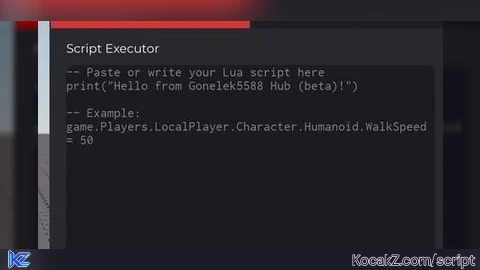
-- Gonelek5588 Hub (beta) - RED THEME
-- Clean UI inspired by Delta Executor
-- Fixed for mobile (touch) support on toggles
-- Fully working toggle + script executor

local Players = game:GetService("Players")
local UserInputService = game:GetService("UserInputService")

local player = Players.LocalPlayer
local playerGui = player:WaitForChild("PlayerGui")

-- Colors (RED theme - Delta inspired but red)
local COLORS = {
    mainBg = Color3.fromRGB(18, 18, 22),
    titleBg = Color3.fromRGB(12, 12, 16),
    accent = Color3.fromRGB(220, 50, 50),      -- RED accent
    accentGreen = Color3.fromRGB(0, 200, 120),
    buttonDark = Color3.fromRGB(30, 30, 35),
    textWhite = Color3.fromRGB(245, 245, 245),
    textGray = Color3.fromRGB(180, 180, 180),
    inputBg = Color3.fromRGB(28, 28, 32),
    outputBg = Color3.fromRGB(22, 22, 26),
}

-- Create ScreenGui
local screenGui = Instance.new("ScreenGui")
screenGui.Name = "Gonelek5588Hub"
screenGui.ResetOnSpawn = false
screenGui.ZIndexBehavior = Enum.ZIndexBehavior.Sibling
screenGui.Parent = playerGui

-- Main Window
local mainFrame = Instance.new("Frame")
mainFrame.Name = "MainFrame"
mainFrame.Size = UDim2.new(0, 380, 0, 520)
mainFrame.Position = UDim2.new(0.5, -190, 0.5, -260)
mainFrame.BackgroundColor3 = COLORS.mainBg
mainFrame.BorderSizePixel = 0
mainFrame.Active = true
mainFrame.Draggable = true
mainFrame.Parent = screenGui

local mainCorner = Instance.new("UICorner")
mainCorner.CornerRadius = UDim.new(0, 12)
mainCorner.Parent = mainFrame

-- Subtle outer border
local border = Instance.new("Frame")
border.Size = UDim2.new(1, 2, 1, 2)
border.Position = UDim2.new(0, -1, 0, -1)
border.BackgroundColor3 = Color3.fromRGB(40, 40, 45)
border.BorderSizePixel = 0
border.ZIndex = -1
border.Parent = mainFrame

local borderCorner = Instance.new("UICorner")
borderCorner.CornerRadius = UDim.new(0, 12)
borderCorner.Parent = border

-- Title Bar
local titleBar = Instance.new("Frame")
titleBar.Size = UDim2.new(1, 0, 0, 42)
titleBar.BackgroundColor3 = COLORS.titleBg
titleBar.BorderSizePixel = 0
titleBar.Parent = mainFrame

local titleCorner = Instance.new("UICorner")
titleCorner.CornerRadius = UDim.new(0, 12)
titleCorner.Parent = titleBar

local titleFix = Instance.new("Frame")
titleFix.Size = UDim2.new(1, 0, 0, 10)
titleFix.Position = UDim2.new(0, 0, 1, -10)
titleFix.BackgroundColor3 = COLORS.titleBg
titleFix.BorderSizePixel = 0
titleFix.Parent = titleBar

local titleLabel = Instance.new("TextLabel")
titleLabel.Text = "Gonelek5588 Hub"
titleLabel.Size = UDim2.new(0.65, 0, 1, 0)
titleLabel.Position = UDim2.new(0, 18, 0, 0)
titleLabel.BackgroundTransparency = 1
titleLabel.TextColor3 = COLORS.textWhite
titleLabel.Font = Enum.Font.GothamBold
titleLabel.TextSize = 16
titleLabel.TextXAlignment = Enum.TextXAlignment.Left
titleLabel.Parent = titleBar

-- Beta badge (now red)
local betaLabel = Instance.new("TextLabel")
betaLabel.Text = "BETA"
betaLabel.Size = UDim2.new(0, 42, 0, 17)
betaLabel.Position = UDim2.new(0.65, 8, 0.5, -8)
betaLabel.BackgroundColor3 = COLORS.accent
betaLabel.TextColor3 = Color3.fromRGB(255, 255, 255)
betaLabel.Font = Enum.Font.GothamBold
betaLabel.TextSize = 9
betaLabel.TextXAlignment = Enum.TextXAlignment.Center
betaLabel.Parent = titleBar

local betaCorner = Instance.new("UICorner")
betaCorner.CornerRadius = UDim.new(0, 4)
betaCorner.Parent = betaLabel

-- Close button
local closeBtn = Instance.new("TextButton")
closeBtn.Text = "×"
closeBtn.Size = UDim2.new(0, 32, 0, 32)
closeBtn.Position = UDim2.new(1, -38, 0, 5)
closeBtn.BackgroundTransparency = 1
closeBtn.TextColor3 = COLORS.textGray
closeBtn.Font = Enum.Font.GothamBold
closeBtn.TextSize = 24
closeBtn.Parent = titleBar

closeBtn.MouseButton1Click:Connect(function()
    mainFrame.Visible = false
end)

-- Tab Bar
local tabBar = Instance.new("Frame")
tabBar.Size = UDim2.new(1, 0, 0, 38)
tabBar.Position = UDim2.new(0, 0, 0, 42)
tabBar.BackgroundColor3 = Color3.fromRGB(15, 15, 18)
tabBar.BorderSizePixel = 0
tabBar.Parent = mainFrame

local executorTab = Instance.new("TextButton")
executorTab.Name = "ExecutorTab"
executorTab.Text = "Executor"
executorTab.Size = UDim2.new(0.5, 0, 1, 0)
executorTab.BackgroundColor3 = COLORS.accent
executorTab.TextColor3 = COLORS.textWhite
executorTab.Font = Enum.Font.GothamBold
executorTab.TextSize = 13
executorTab.Parent = tabBar

local featuresTab = Instance.new("TextButton")
featuresTab.Name = "FeaturesTab"
featuresTab.Text = "Features"
featuresTab.Size = UDim2.new(0.5, 0, 1, 0)
featuresTab.Position = UDim2.new(0.5, 0, 0, 0)
featuresTab.BackgroundColor3 = COLORS.buttonDark
featuresTab.TextColor3 = COLORS.textGray
featuresTab.Font = Enum.Font.GothamBold
featuresTab.TextSize = 13
featuresTab.Parent = tabBar

-- Content Frames
local executorFrame = Instance.new("Frame")
executorFrame.Name = "ExecutorFrame"
executorFrame.Size = UDim2.new(1, 0, 1, -80)
executorFrame.Position = UDim2.new(0, 0, 0, 80)
executorFrame.BackgroundTransparency = 1
executorFrame.Visible = true
executorFrame.Parent = mainFrame

local featuresFrame = Instance.new("Frame")
featuresFrame.Name = "FeaturesFrame"
featuresFrame.Size = UDim2.new(1, 0, 1, -80)
featuresFrame.Position = UDim2.new(0, 0, 0, 80)
featuresFrame.BackgroundTransparency = 1
featuresFrame.Visible = false
featuresFrame.Parent = mainFrame

-- Tab switching
local function switchTab(tab)
    if tab == "executor" then
        executorFrame.Visible = true
        featuresFrame.Visible = false
        executorTab.BackgroundColor3 = COLORS.accent
        executorTab.TextColor3 = COLORS.textWhite
        featuresTab.BackgroundColor3 = COLORS.buttonDark
        featuresTab.TextColor3 = COLORS.textGray
    else
        executorFrame.Visible = false
        featuresFrame.Visible = true
        executorTab.BackgroundColor3 = COLORS.buttonDark
        executorTab.TextColor3 = COLORS.textGray
        featuresTab.BackgroundColor3 = COLORS.accent
        featuresTab.TextColor3 = COLORS.textWhite
    end
end

executorTab.MouseButton1Click:Connect(function()
    switchTab("executor")
end)

featuresTab.MouseButton1Click:Connect(function()
    switchTab("features")
end)

-- ==================== EXECUTOR TAB ====================
local execTitle = Instance.new("TextLabel")
execTitle.Text = "Script Executor"
execTitle.Size = UDim2.new(1, -30, 0, 22)
execTitle.Position = UDim2.new(0, 15, 0, 8)
execTitle.BackgroundTransparency = 1
execTitle.TextColor3 = COLORS.textWhite
execTitle.Font = Enum.Font.Gotham
execTitle.TextSize = 14
execTitle.TextXAlignment = Enum.TextXAlignment.Left
execTitle.Parent = executorFrame

local codeBox = Instance.new("TextBox")
codeBox.PlaceholderText = "-- Paste or write your Lua script here\nprint(\"Hello from Gonelek5588 Hub (beta)!\")\n\n-- Example: game.Players.LocalPlayer.Character.Humanoid.WalkSpeed = 50"
codeBox.Size = UDim2.new(1, -30, 0, 220)
codeBox.Position = UDim2.new(0, 15, 0, 35)
codeBox.BackgroundColor3 = COLORS.inputBg
codeBox.TextColor3 = COLORS.textWhite
codeBox.Font = Enum.Font.Code
codeBox.TextSize = 13
codeBox.MultiLine = true
codeBox.ClearTextOnFocus = false
codeBox.TextWrapped = true
codeBox.TextXAlignment = Enum.TextXAlignment.Left
codeBox.TextYAlignment = Enum.TextYAlignment.Top
codeBox.Parent = executorFrame

local codeCorner = Instance.new("UICorner")
codeCorner.CornerRadius = UDim.new(0, 8)
codeCorner.Parent = codeBox

local btnRow = Instance.new("Frame")
btnRow.Size = UDim2.new(1, -30, 0, 36)
btnRow.Position = UDim2.new(0, 15, 0, 265)
btnRow.BackgroundTransparency = 1
btnRow.Parent = executorFrame

local execBtn = Instance.new("TextButton")
execBtn.Text = "EXECUTE"
execBtn.Size = UDim2.new(0.48, 0, 1, 0)
execBtn.BackgroundColor3 = COLORS.accent
execBtn.TextColor3 = COLORS.textWhite
execBtn.Font = Enum.Font.GothamBold
execBtn.TextSize = 13
execBtn.Parent = btnRow

local execCorner = Instance.new("UICorner")
execCorner.CornerRadius = UDim.new(0, 6)
execCorner.Parent = execBtn

local clearBtn = Instance.new("TextButton")
clearBtn.Text = "CLEAR"
clearBtn.Size = UDim2.new(0.48, 0, 1, 0)
clearBtn.Position = UDim2.new(0.52, 0, 0, 0)
clearBtn.BackgroundColor3 = COLORS.buttonDark
clearBtn.TextColor3 = COLORS.textWhite
clearBtn.Font = Enum.Font.GothamBold
clearBtn.TextSize = 13
clearBtn.Parent = btnRow

local clearCorner = Instance.new("UICorner")
clearCorner.CornerRadius = UDim.new(0, 6)
clearCorner.Parent = clearBtn

local outputFrame = Instance.new("Frame")
outputFrame.Size = UDim2.new(1, -30, 0, 55)
outputFrame.Position = UDim2.new(0, 15, 0, 310)
outputFrame.BackgroundColor3 = COLORS.outputBg
outputFrame.BorderSizePixel = 0
outputFrame.Parent = executorFrame

local outputCorner = Instance.new("UICorner")
outputCorner.CornerRadius = UDim.new(0, 6)
outputCorner.Parent = outputFrame

local outputLabel = Instance.new("TextLabel")
outputLabel.Size = UDim2.new(1, -10, 1, -6)
outputLabel.Position = UDim2.new(0, 5, 0, 3)
outputLabel.BackgroundTransparency = 1
outputLabel.TextColor3 = COLORS.textGray
outputLabel.Font = Enum.Font.Gotham
outputLabel.TextSize = 12
outputLabel.TextWrapped = true
outputLabel.TextXAlignment = Enum.TextXAlignment.Left
outputLabel.TextYAlignment = Enum.TextYAlignment.Top
outputLabel.Text = "Ready. Paste your script and press EXECUTE."
outputLabel.Parent = outputFrame

-- Execute logic
execBtn.MouseButton1Click:Connect(function()
    local code = codeBox.Text
    if code == "" or code:match("^%s*$") then
        outputLabel.Text = "⚠ Please enter some code to execute."
        outputLabel.TextColor3 = Color3.fromRGB(255, 180, 80)
        return
    end

    local success, result = pcall(function()
        return loadstring(code)()
    end)

    if success then
        outputLabel.Text = "✓ Script executed successfully!"
        outputLabel.TextColor3 = COLORS.accentGreen
    else
        outputLabel.Text = "✗ Error: " .. tostring(result)
        outputLabel.TextColor3 = Color3.fromRGB(255, 90, 90)
    end
end)

clearBtn.MouseButton1Click:Connect(function()
    codeBox.Text = ""
    outputLabel.Text = "Ready. Paste your script and press EXECUTE."
    outputLabel.TextColor3 = COLORS.textGray
end)

-- ==================== FEATURES TAB ====================
local featTitle = Instance.new("TextLabel")
featTitle.Text = "Features"
featTitle.Size = UDim2.new(1, -30, 0, 22)
featTitle.Position = UDim2.new(0, 15, 0, 8)
featTitle.BackgroundTransparency = 1
featTitle.TextColor3 = COLORS.textWhite
featTitle.Font = Enum.Font.Gotham
featTitle.TextSize = 14
featTitle.TextXAlignment = Enum.TextXAlignment.Left
featTitle.Parent = featuresFrame

local featDesc = Instance.new("TextLabel")
featDesc.Text = "Toggle features for your private tests. Toggles now work on mobile too!"
featDesc.Size = UDim2.new(1, -30, 0, 32)
featDesc.Position = UDim2.new(0, 15, 0, 32)
featDesc.BackgroundTransparency = 1
featDesc.TextColor3 = COLORS.textGray
featDesc.Font = Enum.Font.Gotham
featDesc.TextSize = 11
featDesc.TextWrapped = true
featDesc.TextXAlignment = Enum.TextXAlignment.Left
featDesc.Parent = featuresFrame

-- Toggle 1 - Main Feature (now TextButton for mobile support)
local toggle1Label = Instance.new("TextLabel")
toggle1Label.Text = "Main Test Feature"
toggle1Label.Size = UDim2.new(1, -30, 0, 18)
toggle1Label.Position = UDim2.new(0, 15, 0, 72)
toggle1Label.BackgroundTransparency = 1
toggle1Label.TextColor3 = COLORS.textWhite
toggle1Label.Font = Enum.Font.Gotham
toggle1Label.TextSize = 12
toggle1Label.TextXAlignment = Enum.TextXAlignment.Left
toggle1Label.Parent = featuresFrame

local toggleContainer = Instance.new("TextButton")
toggleContainer.Text = ""
toggleContainer.AutoButtonColor = false
toggleContainer.Size = UDim2.new(0, 52, 0, 26)
toggleContainer.Position = UDim2.new(0, 15, 0, 95)
toggleContainer.BackgroundColor3 = Color3.fromRGB(55, 55, 60)
toggleContainer.BorderSizePixel = 0
toggleContainer.Parent = featuresFrame

local toggleContainerCorner = Instance.new("UICorner")
toggleContainerCorner.CornerRadius = UDim.new(1, 0)
toggleContainerCorner.Parent = toggleContainer

local toggleCircle = Instance.new("Frame")
toggleCircle.Size = UDim2.new(0, 20, 0, 20)
toggleCircle.Position = UDim2.new(0, 3, 0, 3)
toggleCircle.BackgroundColor3 = Color3.fromRGB(200, 200, 200)
toggleCircle.BorderSizePixel = 0
toggleCircle.Parent = toggleContainer

local toggleCircleCorner = Instance.new("UICorner")
toggleCircleCorner.CornerRadius = UDim.new(1, 0)
toggleCircleCorner.Parent = toggleCircle

local toggleStatus = Instance.new("TextLabel")
toggleStatus.Text = "OFF"
toggleStatus.Size = UDim2.new(0, 50, 0, 26)
toggleStatus.Position = UDim2.new(0, 75, 0, 95)
toggleStatus.BackgroundTransparency = 1
toggleStatus.TextColor3 = COLORS.textGray
toggleStatus.Font = Enum.Font.GothamBold
toggleStatus.TextSize = 12
toggleStatus.TextXAlignment = Enum.TextXAlignment.Left
toggleStatus.Parent = featuresFrame

local isToggled = false

local function updateToggle()
    if isToggled then
        toggleCircle:TweenPosition(UDim2.new(0, 29, 0, 3), "Out", "Quad", 0.12, true)
        toggleCircle.BackgroundColor3 = COLORS.accentGreen
        toggleContainer.BackgroundColor3 = Color3.fromRGB(30, 80, 55)
        toggleStatus.Text = "ON"
        toggleStatus.TextColor3 = COLORS.accentGreen

        -- >>> EDIT THIS PART TO CUSTOMIZE WHAT THE TOGGLE DOES <<<
        print("[Gonelek5588 Hub] Main feature ENABLED")
        -- Examples:
        -- local char = player.Character
        -- if char and char:FindFirstChild("Humanoid") then
        --     char.Humanoid.WalkSpeed = 60
        --     char.Humanoid.JumpPower = 120
        -- end
    else
        toggleCircle:TweenPosition(UDim2.new(0, 3, 0, 3), "Out", "Quad", 0.12, true)
        toggleCircle.BackgroundColor3 = Color3.fromRGB(200, 200, 200)
        toggleContainer.BackgroundColor3 = Color3.fromRGB(55, 55, 60)
        toggleStatus.Text = "OFF"
        toggleStatus.TextColor3 = COLORS.textGray

        -- >>> EDIT THIS PART TO CUSTOMIZE WHAT THE TOGGLE DOES <<<
        print("[Gonelek5588 Hub] Main feature DISABLED")
        -- local char = player.Character
        -- if char and char:FindFirstChild("Humanoid") then
        --     char.Humanoid.WalkSpeed = 16
        --     char.Humanoid.JumpPower = 50
        -- end
    end
end

-- FIXED: MouseButton1Click works on both PC and mobile
toggleContainer.MouseButton1Click:Connect(function()
    isToggled = not isToggled
    updateToggle()
end)

-- Second toggle (example)
local toggle2Label = Instance.new("TextLabel")
toggle2Label.Text = "Extra Test Toggle"
toggle2Label.Size = UDim2.new(1, -30, 0, 18)
toggle2Label.Position = UDim2.new(0, 15, 0, 140)
toggle2Label.BackgroundTransparency = 1
toggle2Label.TextColor3 = COLORS.textWhite
toggle2Label.Font = Enum.Font.Gotham
toggle2Label.TextSize = 12
toggle2Label.TextXAlignment = Enum.TextXAlignment.Left
toggle2Label.Parent = featuresFrame

local toggle2Container = Instance.new("TextButton")
toggle2Container.Text = ""
toggle2Container.AutoButtonColor = false
toggle2Container.Size = UDim2.new(0, 52, 0, 26)
toggle2Container.Position = UDim2.new(0, 15, 0, 163)
toggle2Container.BackgroundColor3 = Color3.fromRGB(55, 55, 60)
toggle2Container.BorderSizePixel = 0
toggle2Container.Parent = featuresFrame

local t2Corner = Instance.new("UICorner")
t2Corner.CornerRadius = UDim.new(1, 0)
t2Corner.Parent = toggle2Container

local t2Circle = Instance.new("Frame")
t2Circle.Size = UDim2.new(0, 20, 0, 20)
t2Circle.Position = UDim2.new(0, 3, 0, 3)
t2Circle.BackgroundColor3 = Color3.fromRGB(200, 200, 200)
t2Circle.BorderSizePixel = 0
t2Circle.Parent = toggle2Container

local t2cCorner = Instance.new("UICorner")
t2cCorner.CornerRadius = UDim.new(1, 0)
t2cCorner.Parent = t2Circle

local t2Status = Instance.new("TextLabel")
t2Status.Text = "OFF"
t2Status.Size = UDim2.new(0, 50, 0, 26)
t2Status.Position = UDim2.new(0, 75, 0, 163)
t2Status.BackgroundTransparency = 1
t2Status.TextColor3 = COLORS.textGray
t2Status.Font = Enum.Font.GothamBold
t2Status.TextSize = 12
t2Status.TextXAlignment = Enum.TextXAlignment.Left
t2Status.Parent = featuresFrame

local t2Enabled = false

toggle2Container.MouseButton1Click:Connect(function()
    t2Enabled = not t2Enabled
    if t2Enabled then
        t2Circle:TweenPosition(UDim2.new(0, 29, 0, 3), "Out", "Quad", 0.12, true)
        t2Circle.BackgroundColor3 = COLORS.accent
        toggle2Container.BackgroundColor3 = Color3.fromRGB(25, 60, 95)
        t2Status.Text = "ON"
        t2Status.TextColor3 = COLORS.accent
        print("[Gonelek5588 Hub] Extra toggle ENABLED - customize this one too!")
    else
        t2Circle:TweenPosition(UDim2.new(0, 3, 0, 3), "Out", "Quad", 0.12, true)
        t2Circle.BackgroundColor3 = Color3.fromRGB(200, 200, 200)
        toggle2Container.BackgroundColor3 = Color3.fromRGB(55, 55, 60)
        t2Status.Text = "OFF"
        t2Status.TextColor3 = COLORS.textGray
        print("[Gonelek5588 Hub] Extra toggle DISABLED")
    end
end)

-- Insert key to toggle UI
UserInputService.InputBegan:Connect(function(input, processed)
    if processed then return end
    if input.KeyCode == Enum.KeyCode.Insert then
        mainFrame.Visible = not mainFrame.Visible
    end
end)

-- Startup
updateToggle()
switchTab("executor")

print("[Gonelek5588 Hub (beta) - RED] Loaded successfully!")
print("Toggles now work on mobile! Press INSERT to show/hide the UI.")No comments yet for this script.


