


KeylessUniversal
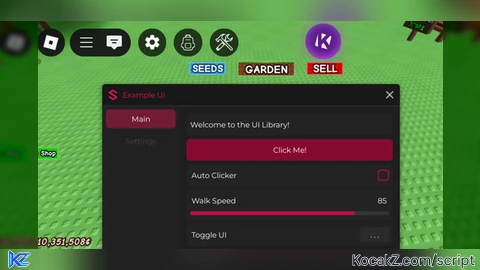
-- Load the UI library
local Library = loadstring(game:HttpGet('https://gist.githubusercontent.com/MjContiga1/6e2c779299e9bf3d3f9edb5bff97b2fb/raw/29b9f1cc215ad4e583271d1ad229f34c921553a8/Lib%2520ui%2520test.lua'))()

-- Create main window
local window = Library:Window('Example UI')

-- Create tabs
local mainTab = window:Tab('Main')
local settingsTab = window:Tab('Settings')

-- Main Tab Elements
mainTab:Label("Welcome to the UI Library!")

-- Button
mainTab:Button('Click Me!', function()
    print("Button clicked!")
end)

-- Toggle
mainTab:Toggle('Auto Clicker', false, function(state)
    print("Auto Clicker is now:", state and "ON" or "OFF")
end)

-- Slider
mainTab:Slider("Walk Speed", 16, 100, 16, function(value)
    print("Walk Speed set to:", value)
    game.Players.LocalPlayer.Character.Humanoid.WalkSpeed = value
end)

-- Keybind
mainTab:Keybind("Toggle UI", Enum.KeyCode.RightShift, function(key)
    print("Key pressed:", key.Name)
end)

-- Single-select dropdown
local singleDropdown = mainTab:Dropdown("Select Weapon", {"Sword", "Gun", "Knife"}, function(selected)
    print("Selected weapon:", selected)
end)

-- Multi-select dropdown
local multiDropdown = mainTab:Dropdown("Select Features", {"ESP", "Aimbot", "Speed", "Jump"}, function(selected)
    print("Selected features:", table.concat(selected, ", "))
end, true) -- true enables multi-select

-- Button to refresh dropdowns
mainTab:Button('Refresh Dropdowns', function()
    singleDropdown:RefreshDropdown({"New Sword", "New Gun", "New Knife"})
    multiDropdown:RefreshDropdown({"New ESP", "New Aimbot", "New Speed", "New Jump", "New Feature"})
end)

-- Settings Tab
settingsTab:Label("UI Settings")
settingsTab:Toggle('Dark Mode', true, function(state)
    print("Dark Mode:", state)
end)


Cool
You recreate it?
@VantaXock yes bro
@VantaXock freely to modified the whole code bro if has bugs and you can add some other things you want
isn't this ui already being out like a long time ago when sentinel executor is still a thing?
@Dexemox mjcontega recreate it
Good job bro recreate Kavo Ui