
KeylessUniversal
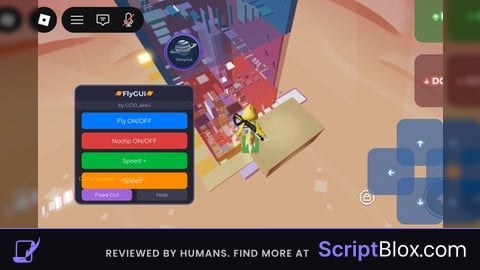
-- AK.GUI - FlyGUI機能(タッチ操作専用・ジョイスティックなし)
local Players = game:GetService("Players")
local UserInputService = game:GetService("UserInputService")
local SoundService = game:GetService("SoundService")
local RunService = game:GetService("RunService")
local TweenService = game:GetService("TweenService")

local player = Players.LocalPlayer
local playerGui = player:WaitForChild("PlayerGui")

-- 音声アセットID
local START_SOUND_ID = "1837769261" -- スクリプト読み込み時の音声
local BUTTON_SOUND_ID = "115916891254154" -- ボタン操作時の音声

-- 音声再生関数
local function playSound(soundId)
    local sound = Instance.new("Sound")
    sound.SoundId = "rbxassetid://" .. soundId
    sound.Parent = SoundService
    sound:Play()

    sound.Ended:Connect(function()
        sound:Destroy()
    end)
end

-- スクリプト読み込み時の音声再生
playSound(START_SOUND_ID)

-- vfly変数
local flying = false
local noclip = false
local flySpeed = 50
local bodyVelocity
local bodyGyro
local flyConnection

-- タッチコントロール変数
local touchControls = {
    forward = false,
    backward = false,
    left = false,
    right = false,
    up = false,
    down = false
}

-- vfly機能
local function startFly()
    if flying then return end

    local character = player.Character or player.CharacterAdded:Wait()
    local humanoid = character:WaitForChild("Humanoid")
    humanoid.PlatformStand = true

    -- BodyVelocityとBodyGyroを作成
    bodyVelocity = Instance.new("BodyVelocity")
    bodyVelocity.Velocity = Vector3.new(0, 0, 0)
    bodyVelocity.MaxForce = Vector3.new(4000, 4000, 4000)
    bodyVelocity.Parent = character:FindFirstChild("HumanoidRootPart") or character:WaitForChild("HumanoidRootPart")

    bodyGyro = Instance.new("BodyGyro")
    bodyGyro.MaxTorque = Vector3.new(50000, 50000, 50000)
    bodyGyro.P = 1000
    bodyGyro.D = 50
    bodyGyro.Parent = character:FindFirstChild("HumanoidRootPart") or character:WaitForChild("HumanoidRootPart")

    flying = true

    -- 移動UIを表示
    if touchControlGui then
        touchControlGui.Enabled = true
    end

    -- 飛行ループ
    flyConnection = RunService.Heartbeat:Connect(function()
        if not flying or not character:FindFirstChild("HumanoidRootPart") then
            if flyConnection then
                flyConnection:Disconnect()
            end
            return
        end

        local rootPart = character.HumanoidRootPart
        local camera = workspace.CurrentCamera

        -- カメラの方向に基づいて移動
        bodyGyro.CFrame = camera.CFrame

        local moveDirection = Vector3.new(0, 0, 0)

        -- タッチ入力による移動
        if touchControls.forward then
            moveDirection = moveDirection + camera.CFrame.LookVector
        end
        if touchControls.backward then
            moveDirection = moveDirection - camera.CFrame.LookVector
        end
        if touchControls.left then
            moveDirection = moveDirection - camera.CFrame.RightVector
        end
        if touchControls.right then
            moveDirection = moveDirection + camera.CFrame.RightVector
        end
        if touchControls.up then
            moveDirection = moveDirection + Vector3.new(0, 1, 0)
        end
        if touchControls.down then
            moveDirection = moveDirection - Vector3.new(0, 1, 0)
        end

        -- 速度を適用
        if moveDirection.Magnitude > 0 then
            moveDirection = moveDirection.Unit * flySpeed
        end

        bodyVelocity.Velocity = moveDirection

        -- noclip処理
        if noclip then
            for _, part in pairs(character:GetDescendants()) do
                if part:IsA("BasePart") then
                    part.CanCollide = false
                end
            end
        end
    end)
end

local function stopFly()
    flying = false

    if flyConnection then
        flyConnection:Disconnect()
    end

    -- 移動UIを非表示
    if touchControlGui then
        touchControlGui.Enabled = false
    end

    local character = player.Character
    if character then
        local humanoid = character:FindFirstChild("Humanoid")
        if humanoid then
            humanoid.PlatformStand = false
        end

        local rootPart = character:FindFirstChild("HumanoidRootPart")
        if rootPart then
            if bodyVelocity and bodyVelocity.Parent then
                bodyVelocity:Destroy()
            end
            if bodyGyro and bodyGyro.Parent then
                bodyGyro:Destroy()
            end
        end
    end
end

local function toggleFly()
    if flying then
        stopFly()
        return "❌ Fly OFF"
    else
        startFly()
        return "✅ Fly ON"
    end
end

local function toggleNoclip()
    noclip = not noclip

    -- キャラクターのコリジョンを設定
    local character = player.Character
    if character then
        for _, part in pairs(character:GetDescendants()) do
            if part:IsA("BasePart") then
                part.CanCollide = not noclip
            end
        end
    end

    return noclip and "✅ Noclip ON" or "❌ Noclip OFF"
end

local function changeFlySpeed(amount)
    flySpeed = math.max(1, math.min(200, flySpeed + amount))
    return "Speed: " .. flySpeed
end

-- GUI作成
local screenGui = Instance.new("ScreenGui")
screenGui.Name = "FlyGUI"
screenGui.ResetOnSpawn = false
screenGui.ZIndexBehavior = Enum.ZIndexBehavior.Sibling
screenGui.Parent = playerGui

-- メインフレーム
local mainFrame = Instance.new("Frame")
mainFrame.Name = "MainFrame"
mainFrame.Size = UDim2.new(0, 200, 0, 200)
mainFrame.Position = UDim2.new(0, 10, 0, 10)
mainFrame.BackgroundColor3 = Color3.fromRGB(30, 30, 40)
mainFrame.BorderSizePixel = 0
mainFrame.BackgroundTransparency = 0.05
mainFrame.Parent = screenGui

-- 角丸
local corner = Instance.new("UICorner")
corner.CornerRadius = UDim.new(0, 10)
corner.Parent = mainFrame

-- ボーダー
local border = Instance.new("UIStroke")
border.Color = Color3.fromRGB(80, 80, 120)
border.Thickness = 2
border.Parent = mainFrame

-- タイトル
local title = Instance.new("TextLabel")
title.Name = "Title"
title.Size = UDim2.new(1, 0, 0, 25)
title.Position = UDim2.new(0, 0, 0, 0)
title.BackgroundColor3 = Color3.fromRGB(40, 40, 60)
title.TextColor3 = Color3.fromRGB(220, 220, 255)
title.Text = "🪐FlyGUI🪐"
title.Font = Enum.Font.GothamBold
title.TextSize = 14
title.Parent = mainFrame

local titleCorner = Instance.new("UICorner")
titleCorner.CornerRadius = UDim.new(0, 10)
titleCorner.Parent = title

-- 作者表示
local authorLabel = Instance.new("TextLabel")
authorLabel.Name = "AuthorLabel"
authorLabel.Size = UDim2.new(1, 0, 0, 15)
authorLabel.Position = UDim2.new(0, 0, 0, 25)
authorLabel.BackgroundColor3 = Color3.fromRGB(50, 50, 70)
authorLabel.TextColor3 = Color3.fromRGB(180, 180, 220)
authorLabel.Text = "by GOD_akkii"
authorLabel.Font = Enum.Font.Gotham
authorLabel.TextSize = 10
authorLabel.Parent = mainFrame

local authorCorner = Instance.new("UICorner")
authorCorner.CornerRadius = UDim.new(0, 5)
authorCorner.Parent = authorLabel

-- コントロールボタンコンテナ
local controlContainer = Instance.new("Frame")
controlContainer.Name = "ControlContainer"
controlContainer.Size = UDim2.new(1, -20, 0, 20)
controlContainer.Position = UDim2.new(0, 10, 1, -25)
controlContainer.BackgroundTransparency = 1
controlContainer.Parent = mainFrame

-- コントロールボタンのレイアウト
local controlLayout = Instance.new("UIGridLayout")
controlLayout.CellSize = UDim2.new(0.5, -4, 1, 0)
controlLayout.CellPadding = UDim2.new(0, 8, 0, 0)
controlLayout.HorizontalAlignment = Enum.HorizontalAlignment.Center
controlLayout.Parent = controlContainer

-- Hideボタン
local toggleButton = Instance.new("TextButton")
toggleButton.Name = "ToggleButton"
toggleButton.Size = UDim2.new(1, 0, 1, 0)
toggleButton.BackgroundColor3 = Color3.fromRGB(60, 60, 80)
toggleButton.TextColor3 = Color3.fromRGB(200, 200, 255)
toggleButton.Text = "Hide"
toggleButton.Font = Enum.Font.Gotham
toggleButton.TextSize = 10
toggleButton.Parent = controlContainer

local toggleCorner = Instance.new("UICorner")
toggleCorner.CornerRadius = UDim.new(0, 6)
toggleCorner.Parent = toggleButton

-- Pinボタン
local pinButton = Instance.new("TextButton")
pinButton.Name = "PinButton"
pinButton.Size = UDim2.new(1, 0, 1, 0)
pinButton.BackgroundColor3 = Color3.fromRGB(160, 100, 220)
pinButton.TextColor3 = Color3.fromRGB(255, 255, 255)
pinButton.Text = "Fixed GUI"
pinButton.Font = Enum.Font.Gotham
pinButton.TextSize = 10
pinButton.Parent = controlContainer

local pinCorner = Instance.new("UICorner")
pinCorner.CornerRadius = UDim.new(0, 6)
pinCorner.Parent = pinButton

-- ボタンコンテナ
local buttonContainer = Instance.new("Frame")
buttonContainer.Name = "ButtonContainer"
buttonContainer.Size = UDim2.new(1, -20, 1, -85)
buttonContainer.Position = UDim2.new(0, 10, 0, 45)
buttonContainer.BackgroundTransparency = 1
buttonContainer.Visible = true
buttonContainer.Parent = mainFrame

-- ボタンレイアウト
local layout = Instance.new("UIListLayout")
layout.Padding = UDim.new(0, 6)
layout.HorizontalAlignment = Enum.HorizontalAlignment.Center
layout.VerticalAlignment = Enum.VerticalAlignment.Top
layout.Parent = buttonContainer

-- ボタン作成関数
function createButton(text, color)
    local button = Instance.new("TextButton")
    button.Name = text .. "Button"
    button.Size = UDim2.new(1, 0, 0, 28)
    button.BackgroundColor3 = color
    button.TextColor3 = Color3.fromRGB(255, 255, 255)
    button.Text = text
    button.Font = Enum.Font.Gotham
    button.TextSize = 12
    button.AutoButtonColor = true

    local buttonCorner = Instance.new("UICorner")
    buttonCorner.CornerRadius = UDim.new(0, 6)
    buttonCorner.Parent = button

    return button
end

-- Flyボタン
local flyButton = createButton("Fly ON/OFF", Color3.fromRGB(0, 120, 255))
flyButton.Parent = buttonContainer

-- Speed Upボタン
local speedUpButton = createButton("Speed +", Color3.fromRGB(0, 180, 60))
speedUpButton.Parent = buttonContainer

-- Speed Downボタン
local speedDownButton = createButton("Speed -", Color3.fromRGB(255, 140, 0))
speedDownButton.Parent = buttonContainer

-- Noclipボタン
local noclipButton = createButton("Noclip ON/OFF", Color3.fromRGB(220, 60, 60))
noclipButton.Parent = buttonContainer

-- ステータス表示
local statusLabel = Instance.new("TextLabel")
statusLabel.Name = "StatusLabel"
statusLabel.Size = UDim2.new(1, -10, 0, 15)
statusLabel.Position = UDim2.new(0, 5, 1, -50)
statusLabel.BackgroundTransparency = 1
statusLabel.TextColor3 = Color3.fromRGB(180, 180, 220)
statusLabel.Text = "Ready - Speed: " .. flySpeed
statusLabel.Font = Enum.Font.Gotham
statusLabel.TextSize = 10
statusLabel.TextXAlignment = Enum.TextXAlignment.Left
statusLabel.Parent = mainFrame

-- タッチコントロールGUI(右側)
touchControlGui = Instance.new("ScreenGui")
touchControlGui.Name = "TouchControlGUI"
touchControlGui.ResetOnSpawn = false
touchControlGui.ZIndexBehavior = Enum.ZIndexBehavior.Sibling
touchControlGui.Enabled = false -- 初期状態では非表示
touchControlGui.Parent = playerGui

-- 方向ボタンコンテナ
local directionControlContainer = Instance.new("Frame")
directionControlContainer.Name = "DirectionControlContainer"
directionControlContainer.Size = UDim2.new(0, 180, 0, 180)
directionControlContainer.Position = UDim2.new(1, -190, 1, -190)
directionControlContainer.BackgroundTransparency = 1
directionControlContainer.Parent = touchControlGui

-- 前進ボタン
local forwardButton = Instance.new("TextButton")
forwardButton.Name = "ForwardButton"
forwardButton.Size = UDim2.new(0, 80, 0, 80)
forwardButton.Position = UDim2.new(0.5, -40, 0, 0)
forwardButton.BackgroundColor3 = Color3.fromRGB(60, 100, 160)
forwardButton.BackgroundTransparency = 0.3
forwardButton.TextColor3 = Color3.fromRGB(255, 255, 255)
forwardButton.Text = "↑"
forwardButton.Font = Enum.Font.GothamBold
forwardButton.TextSize = 24
forwardButton.Parent = directionControlContainer

local forwardButtonCorner = Instance.new("UICorner")
forwardButtonCorner.CornerRadius = UDim.new(0, 15)
forwardButtonCorner.Parent = forwardButton

local forwardButtonStroke = Instance.new("UIStroke")
forwardButtonStroke.Color = Color3.fromRGB(100, 140, 200)
forwardButtonStroke.Thickness = 3
forwardButtonStroke.Parent = forwardButton

-- 後退ボタン
local backwardButton = Instance.new("TextButton")
backwardButton.Name = "BackwardButton"
backwardButton.Size = UDim2.new(0, 80, 0, 80)
backwardButton.Position = UDim2.new(0.5, -40, 1, -80)
backwardButton.BackgroundColor3 = Color3.fromRGB(60, 100, 160)
backwardButton.BackgroundTransparency = 0.3
backwardButton.TextColor3 = Color3.fromRGB(255, 255, 255)
backwardButton.Text = "↓"
backwardButton.Font = Enum.Font.GothamBold
backwardButton.TextSize = 24
backwardButton.Parent = directionControlContainer

local backwardButtonCorner = Instance.new("UICorner")
backwardButtonCorner.CornerRadius = UDim.new(0, 15)
backwardButtonCorner.Parent = backwardButton

local backwardButtonStroke = Instance.new("UIStroke")
backwardButtonStroke.Color = Color3.fromRGB(100, 140, 200)
backwardButtonStroke.Thickness = 3
backwardButtonStroke.Parent = backwardButton

-- 左ボタン
local leftButton = Instance.new("TextButton")
leftButton.Name = "LeftButton"
leftButton.Size = UDim2.new(0, 80, 0, 80)
leftButton.Position = UDim2.new(0, 0, 0.5, -40)
leftButton.BackgroundColor3 = Color3.fromRGB(60, 100, 160)
leftButton.BackgroundTransparency = 0.3
leftButton.TextColor3 = Color3.fromRGB(255, 255, 255)
leftButton.Text = "←"
leftButton.Font = Enum.Font.GothamBold
leftButton.TextSize = 24
leftButton.Parent = directionControlContainer

local leftButtonCorner = Instance.new("UICorner")
leftButtonCorner.CornerRadius = UDim.new(0, 15)
leftButtonCorner.Parent = leftButton

local leftButtonStroke = Instance.new("UIStroke")
leftButtonStroke.Color = Color3.fromRGB(100, 140, 200)
leftButtonStroke.Thickness = 3
leftButtonStroke.Parent = leftButton

-- 右ボタン
local rightButton = Instance.new("TextButton")
rightButton.Name = "RightButton"
rightButton.Size = UDim2.new(0, 80, 0, 80)
rightButton.Position = UDim2.new(1, -80, 0.5, -40)
rightButton.BackgroundColor3 = Color3.fromRGB(60, 100, 160)
rightButton.BackgroundTransparency = 0.3
rightButton.TextColor3 = Color3.fromRGB(255, 255, 255)
rightButton.Text = "→"
rightButton.Font = Enum.Font.GothamBold
rightButton.TextSize = 24
rightButton.Parent = directionControlContainer

local rightButtonCorner = Instance.new("UICorner")
rightButtonCorner.CornerRadius = UDim.new(0, 15)
rightButtonCorner.Parent = rightButton

local rightButtonStroke = Instance.new("UIStroke")
rightButtonStroke.Color = Color3.fromRGB(100, 140, 200)
rightButtonStroke.Thickness = 3
rightButtonStroke.Parent = rightButton

-- 上下移動ボタンコンテナ
local verticalControlContainer = Instance.new("Frame")
verticalControlContainer.Name = "VerticalControlContainer"
verticalControlContainer.Size = UDim2.new(0, 100, 0, 200)
verticalControlContainer.Position = UDim2.new(1, -110, 1, -410)
verticalControlContainer.BackgroundTransparency = 1
verticalControlContainer.Parent = touchControlGui

-- 上昇ボタン
local upButton = Instance.new("TextButton")
upButton.Name = "UpButton"
upButton.Size = UDim2.new(1, 0, 0, 90)
upButton.Position = UDim2.new(0, 0, 0, 0)
upButton.BackgroundColor3 = Color3.fromRGB(60, 120, 60)
upButton.BackgroundTransparency = 0.3
upButton.TextColor3 = Color3.fromRGB(255, 255, 255)
upButton.Text = "↑ UP"
upButton.Font = Enum.Font.GothamBold
upButton.TextSize = 18
upButton.Parent = verticalControlContainer

local upButtonCorner = Instance.new("UICorner")
upButtonCorner.CornerRadius = UDim.new(0, 15)
upButtonCorner.Parent = upButton

local upButtonStroke = Instance.new("UIStroke")
upButtonStroke.Color = Color3.fromRGB(100, 200, 100)
upButtonStroke.Thickness = 3
upButtonStroke.Parent = upButton

-- 下降ボタン
local downButton = Instance.new("TextButton")
downButton.Name = "DownButton"
downButton.Size = UDim2.new(1, 0, 0, 90)
downButton.Position = UDim2.new(0, 0, 1, -90)
downButton.BackgroundColor3 = Color3.fromRGB(120, 60, 60)
downButton.BackgroundTransparency = 0.3
downButton.TextColor3 = Color3.fromRGB(255, 255, 255)
downButton.Text = "↓ DOWN"
downButton.Font = Enum.Font.GothamBold
downButton.TextSize = 18
downButton.Parent = verticalControlContainer

local downButtonCorner = Instance.new("UICorner")
downButtonCorner.CornerRadius = UDim.new(0, 15)
downButtonCorner.Parent = downButton

local downButtonStroke = Instance.new("UIStroke")
downButtonStroke.Color = Color3.fromRGB(200, 100, 100)
downButtonStroke.Thickness = 3
downButtonStroke.Parent = downButton

-- GUI固定状態の変数
local isGUIPinned = false

-- GUI固定/解除関数
local function toggleGUIPin()
    isGUIPinned = not isGUIPinned

    if isGUIPinned then
        pinButton.Text = "Unpin GUI"
        pinButton.BackgroundColor3 = Color3.fromRGB(120, 80, 180)
        statusLabel.Text = "GUI Fixed - Speed: " .. flySpeed
        statusLabel.TextColor3 = Color3.fromRGB(180, 140, 255)
    else
        pinButton.Text = "Fixed GUI"
        pinButton.BackgroundColor3 = Color3.fromRGB(160, 100, 220)
        statusLabel.Text = "GUI Unpinned - Speed: " .. flySpeed
        statusLabel.TextColor3 = Color3.fromRGB(180, 180, 220)
    end

    return true, isGUIPinned and "✅ GUI Fixed" or "✅ GUI Unpinned"
end

-- グローバルなタッチ音声関数
local function handleGUITouch()
    playSound(BUTTON_SOUND_ID)
end

-- ボタン機能接続(音声再生を統合)
flyButton.MouseButton1Click:Connect(function()
    handleGUITouch()
    local message = toggleFly()
    statusLabel.Text = message .. " - Speed: " .. flySpeed
    statusLabel.TextColor3 = flying and Color3.fromRGB(100, 255, 100) or Color3.fromRGB(255, 100, 100)
end)

speedUpButton.MouseButton1Click:Connect(function()
    handleGUITouch()
    local message = changeFlySpeed(10)
    statusLabel.Text = message
    statusLabel.TextColor3 = Color3.fromRGB(255, 200, 100)
end)

speedDownButton.MouseButton1Click:Connect(function()
    handleGUITouch()
    local message = changeFlySpeed(-10)
    statusLabel.Text = message
    statusLabel.TextColor3 = Color3.fromRGB(255, 200, 100)
end)

noclipButton.MouseButton1Click:Connect(function()
    handleGUITouch()
    local message = toggleNoclip()
    statusLabel.Text = message .. " - Speed: " .. flySpeed
    statusLabel.TextColor3 = noclip and Color3.fromRGB(100, 255, 100) or Color3.fromRGB(255, 100, 100)
end)

-- GUI固定ボタン
pinButton.MouseButton1Click:Connect(function()
    handleGUITouch()
    local success, message = toggleGUIPin()
    statusLabel.Text = message .. " - Speed: " .. flySpeed
    statusLabel.TextColor3 = Color3.fromRGB(180, 140, 255)
end)

-- トグル機能
toggleButton.MouseButton1Click:Connect(function()
    handleGUITouch()
    if buttonContainer.Visible then
        buttonContainer.Visible = false
        mainFrame.Size = UDim2.new(0, 200, 0, 65)
        toggleButton.Text = "Show"
        statusLabel.Text = "GUI Hidden"
    else
        buttonContainer.Visible = true
        mainFrame.Size = UDim2.new(0, 200, 0, 200)
        toggleButton.Text = "Hide"
        statusLabel.Text = isGUIPinned and "GUI Fixed - Speed: " .. flySpeed or "GUI Unpinned - Speed: " .. flySpeed
    end
end)

-- ドラッグ機能(タッチ専用)
local dragging = false
local dragStart, startPos

local function handleDragStart(input)
    if not isGUIPinned and input.UserInputType == Enum.UserInputType.Touch then
        dragging = true
        dragStart = input.Position
        startPos = mainFrame.Position

        input.Changed:Connect(function()
            if input.UserInputState == Enum.UserInputState.End then
                dragging = false
            end
        end)
    end
end

local function handleDrag(input)
    if dragging and not isGUIPinned and input.UserInputType == Enum.UserInputType.Touch then
        local delta = input.Position - dragStart
        mainFrame.Position = UDim2.new(
            startPos.X.Scale,
            startPos.X.Offset + delta.X,
            startPos.Y.Scale,
            startPos.Y.Offset + delta.Y
        )
    end
end

-- タッチ入力(GUIドラッグ)
title.InputBegan:Connect(function(input)
    if input.UserInputType == Enum.UserInputType.Touch then
        handleDragStart(input)
        handleGUITouch() -- ドラッグ開始時にも音を鳴らす
    end
end)

title.InputChanged:Connect(function(input)
    if input.UserInputType == Enum.UserInputType.Touch then
        handleDrag(input)
    end
end)

-- タッチボタン操作関数
local function setupTouchButton(button, controlName)
    button.InputBegan:Connect(function(input)
        if input.UserInputType == Enum.UserInputType.Touch then
            touchControls[controlName] = true
            handleGUITouch() -- 移動ボタンタッチ時にも音を鳴らす

            -- 視覚的フィードバック
            local tween = TweenService:Create(button, TweenInfo.new(0.1), {
                BackgroundTransparency = 0.1,
                BackgroundColor3 = button.BackgroundColor3 * 1.2
            })
            tween:Play()
        end
    end)

    button.InputEnded:Connect(function(input)
        if input.UserInputType == Enum.UserInputType.Touch then
            touchControls[controlName] = false

            -- 視覚的フィードバック
            local tween = TweenService:Create(button, TweenInfo.new(0.1), {
                BackgroundTransparency = 0.3,
                BackgroundColor3 = button.BackgroundColor3 / 1.2
            })
            tween:Play()
        end
    end)
end

-- 方向ボタンを設定
setupTouchButton(forwardButton, "forward")
setupTouchButton(backwardButton, "backward")
setupTouchButton(leftButton, "left")
setupTouchButton(rightButton, "right")

-- 上下ボタンを設定
setupTouchButton(upButton, "up")
setupTouchButton(downButton, "down")

-- 操作方法表示
print("🪐 FlyGUI loaded successfully!")
print("📍 GUI is in top-left corner")
print("🔊 Sound effects enabled")
print("👆 Touch controls only")
print("📱 Touch Controls:")
print("   - Arrow Buttons: Directional movement")
print("   - Up/Down Buttons: Vertical movement")
print("⚡ Current Speed: " .. flySpeed)

-- スクリプト終了時に飛行を停止
game:GetService("Players").PlayerRemoving:Connect(function(leavingPlayer)
    if leavingPlayer == player then
        stopFly()
    end
end)
I used akkii's! The completion level is super high!!! But can I just say one thing? Operating the buttons on this script is pretty tough/difficult!!?