

KeylessUniversal
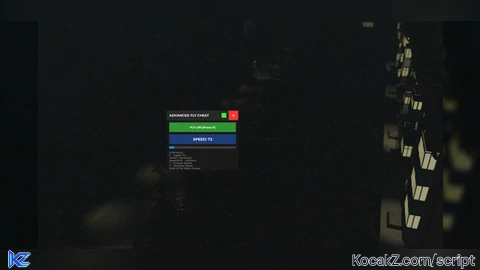
-- Advanced Fly Cheat with Speed Control
-- Activate with P, Speed Up with Y, Slow Down with Z

local Players = game:GetService("Players")
local Player = Players.LocalPlayer
local Character = Player.Character or Player.CharacterAdded:Wait()
local Humanoid = Character:WaitForChild("Humanoid")
local RootPart = Character:WaitForChild("HumanoidRootPart")

local UserInputService = game:GetService("UserInputService")
local RunService = game:GetService("RunService")

-- Fly Settings
local FlyEnabled = false
local FlySpeed = 50
local MinSpeed = 1
local MaxSpeed = 1000
local SpeedIncrement = 10
local SpeedMultiplier = 1.0
local AccelerationRate = 2.0  -- How fast speed increases when holding keys

-- Physics objects
local FlyBodyVelocity, FlyBodyGyro
local moveDirection = Vector3.new(0, 0, 0)

-- Speed change tracking
local speedUpHeld = false
local slowDownHeld = false
local holdStartTime = 0
local holdAcceleration = 1.0

-- Create GUI
local ScreenGui = Instance.new("ScreenGui")
ScreenGui.Name = "AdvancedFlyGUI"
ScreenGui.Parent = game.CoreGui
ScreenGui.ZIndexBehavior = Enum.ZIndexBehavior.Sibling

local MainFrame = Instance.new("Frame")
MainFrame.Name = "MainFrame"
MainFrame.Size = UDim2.new(0, 300, 0, 250)
MainFrame.Position = UDim2.new(0.5, -150, 0.5, -125)
MainFrame.BackgroundColor3 = Color3.fromRGB(25, 25, 25)
MainFrame.BorderSizePixel = 0
MainFrame.Active = true
MainFrame.Draggable = true
MainFrame.Parent = ScreenGui

-- Title Bar
local TitleBar = Instance.new("Frame")
TitleBar.Name = "TitleBar"
TitleBar.Size = UDim2.new(1, 0, 0, 40)
TitleBar.Position = UDim2.new(0, 0, 0, 0)
TitleBar.BackgroundColor3 = Color3.fromRGB(40, 40, 40)
TitleBar.Parent = MainFrame

local Title = Instance.new("TextLabel")
Title.Name = "Title"
Title.Size = UDim2.new(1, -60, 1, 0)
Title.Position = UDim2.new(0, 10, 0, 0)
Title.BackgroundTransparency = 1
Title.Text = "ADVANCED FLY CHEAT"
Title.TextColor3 = Color3.fromRGB(255, 255, 255)
Title.Font = Enum.Font.GothamBold
Title.TextSize = 16
Title.TextXAlignment = Enum.TextXAlignment.Left
Title.Parent = TitleBar

local CloseButton = Instance.new("TextButton")
CloseButton.Name = "CloseButton"
CloseButton.Size = UDim2.new(0, 40, 0, 40)
CloseButton.Position = UDim2.new(1, -40, 0, 0)
CloseButton.BackgroundColor3 = Color3.fromRGB(255, 50, 50)
CloseButton.Text = "X"
CloseButton.TextColor3 = Color3.fromRGB(255, 255, 255)
CloseButton.Font = Enum.Font.GothamBold
CloseButton.TextSize = 16
CloseButton.Parent = TitleBar

CloseButton.MouseButton1Click:Connect(function()
    ScreenGui:Destroy()
    if FlyEnabled then
        toggleFly()
    end
end)

-- Status Indicator
local StatusIndicator = Instance.new("Frame")
StatusIndicator.Name = "StatusIndicator"
StatusIndicator.Size = UDim2.new(0, 20, 0, 20)
StatusIndicator.Position = UDim2.new(1, -70, 0.5, -10)
StatusIndicator.BackgroundColor3 = Color3.fromRGB(255, 50, 50)
StatusIndicator.BorderSizePixel = 0
StatusIndicator.Parent = TitleBar

local StatusLabel = Instance.new("TextLabel")
StatusLabel.Name = "StatusLabel"
StatusLabel.Size = UDim2.new(1, -20, 0, 40)
StatusLabel.Position = UDim2.new(0, 10, 0, 50)
StatusLabel.BackgroundColor3 = Color3.fromRGB(40, 40, 40)
StatusLabel.Text = "FLY: OFF (Press P)"
StatusLabel.TextColor3 = Color3.fromRGB(255, 255, 255)
StatusLabel.Font = Enum.Font.GothamBold
StatusLabel.TextSize = 14
StatusLabel.Parent = MainFrame

-- Speed Display
local SpeedDisplay = Instance.new("TextLabel")
SpeedDisplay.Name = "SpeedDisplay"
SpeedDisplay.Size = UDim2.new(1, -20, 0, 40)
SpeedDisplay.Position = UDim2.new(0, 10, 0, 100)
SpeedDisplay.BackgroundColor3 = Color3.fromRGB(30, 60, 120)
SpeedDisplay.Text = "SPEED: " .. FlySpeed
SpeedDisplay.TextColor3 = Color3.fromRGB(255, 255, 255)
SpeedDisplay.Font = Enum.Font.GothamBold
SpeedDisplay.TextSize = 18
SpeedDisplay.Parent = MainFrame

-- Speed Bar
local SpeedBar = Instance.new("Frame")
SpeedBar.Name = "SpeedBar"
SpeedBar.Size = UDim2.new(1, -20, 0, 10)
SpeedBar.Position = UDim2.new(0, 10, 0, 150)
SpeedBar.BackgroundColor3 = Color3.fromRGB(60, 60, 60)
SpeedBar.BorderSizePixel = 0
SpeedBar.Parent = MainFrame

local SpeedFill = Instance.new("Frame")
SpeedFill.Name = "SpeedFill"
SpeedFill.Size = UDim2.new((FlySpeed - MinSpeed) / (MaxSpeed - MinSpeed), 0, 1, 0)
SpeedFill.Position = UDim2.new(0, 0, 0, 0)
SpeedFill.BackgroundColor3 = Color3.fromRGB(0, 150, 255)
SpeedFill.BorderSizePixel = 0
SpeedFill.Parent = SpeedBar

-- Controls Info
local ControlsInfo = Instance.new("TextLabel")
ControlsInfo.Name = "ControlsInfo"
ControlsInfo.Size = UDim2.new(1, -20, 0, 80)
ControlsInfo.Position = UDim2.new(0, 10, 0, 170)
ControlsInfo.BackgroundTransparency = 1
ControlsInfo.Text = "CONTROLS:\nP - Toggle Fly\nWASD - Movement\nSpace/Shift - Up/Down\nY - Increase Speed\nZ - Decrease Speed\nHold Y/Z for faster change"
ControlsInfo.TextColor3 = Color3.fromRGB(200, 200, 200)
ControlsInfo.Font = Enum.Font.Gotham
ControlsInfo.TextSize = 11
ControlsInfo.TextXAlignment = Enum.TextXAlignment.Left
ControlsInfo.TextYAlignment = Enum.TextYAlignment.Top
ControlsInfo.Parent = MainFrame

-- Function to update speed display
local function updateSpeedDisplay()
    SpeedDisplay.Text = "SPEED: " .. math.floor(FlySpeed)
    local fillRatio = (FlySpeed - MinSpeed) / (MaxSpeed - MinSpeed)
    SpeedFill.Size = UDim2.new(fillRatio, 0, 1, 0)

    -- Change color based on speed
    if FlySpeed > 500 then
        SpeedDisplay.BackgroundColor3 = Color3.fromRGB(180, 0, 0)
        SpeedFill.BackgroundColor3 = Color3.fromRGB(255, 50, 50)
    elseif FlySpeed > 250 then
        SpeedDisplay.BackgroundColor3 = Color3.fromRGB(180, 100, 0)
        SpeedFill.BackgroundColor3 = Color3.fromRGB(255, 150, 0)
    elseif FlySpeed > 100 then
        SpeedDisplay.BackgroundColor3 = Color3.fromRGB(180, 180, 0)
        SpeedFill.BackgroundColor3 = Color3.fromRGB(255, 255, 0)
    else
        SpeedDisplay.BackgroundColor3 = Color3.fromRGB(30, 60, 120)
        SpeedFill.BackgroundColor3 = Color3.fromRGB(0, 150, 255)
    end
end

-- Function to toggle fly
local function toggleFly()
    FlyEnabled = not FlyEnabled

    if FlyEnabled then
        -- Create physics objects
        FlyBodyVelocity = Instance.new("BodyVelocity")
        FlyBodyVelocity.Velocity = Vector3.new(0, 0, 0)
        FlyBodyVelocity.MaxForce = Vector3.new(100000, 100000, 100000)
        FlyBodyVelocity.P = 100000
        FlyBodyVelocity.Parent = RootPart

        FlyBodyGyro = Instance.new("BodyGyro")
        FlyBodyGyro.MaxTorque = Vector3.new(100000, 100000, 100000)
        FlyBodyGyro.P = 100000
        FlyBodyGyro.D = 1000
        FlyBodyGyro.Parent = RootPart

        Humanoid.PlatformStand = true
        StatusLabel.Text = "FLY: ON (Press P)"
        StatusLabel.BackgroundColor3 = Color3.fromRGB(50, 150, 50)
        StatusIndicator.BackgroundColor3 = Color3.fromRGB(50, 255, 50)

        -- Create speed particles effect
        local speedEffect = Instance.new("ParticleEmitter")
        speedEffect.Name = "SpeedEffect"
        speedEffect.Color = ColorSequence.new(Color3.fromRGB(0, 150, 255))
        speedEffect.Size = NumberSequence.new(0.5)
        speedEffect.Transparency = NumberSequence.new(0.5)
        speedEffect.Lifetime = NumberRange.new(0.5)
        speedEffect.Rate = 50
        speedEffect.Speed = NumberRange.new(5)
        speedEffect.VelocitySpread = 180
        speedEffect.Parent = RootPart

    else
        -- Remove physics objects
        if FlyBodyVelocity then
            FlyBodyVelocity:Destroy()
            FlyBodyVelocity = nil
        end

        if FlyBodyGyro then
            FlyBodyGyro:Destroy()
            FlyBodyGyro = nil
        end

        Humanoid.PlatformStand = false
        StatusLabel.Text = "FLY: OFF (Press P)"
        StatusLabel.BackgroundColor3 = Color3.fromRGB(40, 40, 40)
        StatusIndicator.BackgroundColor3 = Color3.fromRGB(255, 50, 50)

        -- Remove particles
        if RootPart:FindFirstChild("SpeedEffect") then
            RootPart.SpeedEffect:Destroy()
        end
    end
end

-- Input handling for movement
UserInputService.InputBegan:Connect(function(input, gameProcessed)
    if gameProcessed or not FlyEnabled then return end

    if input.KeyCode == Enum.KeyCode.W then
        moveDirection = moveDirection + Vector3.new(0, 0, -1)
    elseif input.KeyCode == Enum.KeyCode.S then
        moveDirection = moveDirection + Vector3.new(0, 0, 1)
    elseif input.KeyCode == Enum.KeyCode.A then
        moveDirection = moveDirection + Vector3.new(-1, 0, 0)
    elseif input.KeyCode == Enum.KeyCode.D then
        moveDirection = moveDirection + Vector3.new(1, 0, 0)
    elseif input.KeyCode == Enum.KeyCode.Y then
        speedUpHeld = true
        holdStartTime = tick()
    elseif input.KeyCode == Enum.KeyCode.Z then
        slowDownHeld = true
        holdStartTime = tick()
    end
end)

UserInputService.InputEnded:Connect(function(input, gameProcessed)
    if gameProcessed or not FlyEnabled then return end

    if input.KeyCode == Enum.KeyCode.W then
        moveDirection = moveDirection - Vector3.new(0, 0, -1)
    elseif input.KeyCode == Enum.KeyCode.S then
        moveDirection = moveDirection - Vector3.new(0, 0, 1)
    elseif input.KeyCode == Enum.KeyCode.A then
        moveDirection = moveDirection - Vector3.new(-1, 0, 0)
    elseif input.KeyCode == Enum.KeyCode.D then
        moveDirection = moveDirection - Vector3.new(1, 0, 0)
    elseif input.KeyCode == Enum.KeyCode.Y then
        speedUpHeld = false
        holdAcceleration = 1.0
    elseif input.KeyCode == Enum.KeyCode.Z then
        slowDownHeld = false
        holdAcceleration = 1.0
    end
end)

-- Toggle fly with P (works even when GUI is closed)
UserInputService.InputBegan:Connect(function(input, gameProcessed)
    if gameProcessed then return end

    if input.KeyCode == Enum.KeyCode.P then
        toggleFly()
    end
end)

-- Speed control function
local function adjustSpeed(deltaTime)
    if not FlyEnabled then return end

    -- Calculate acceleration based on hold time
    if speedUpHeld or slowDownHeld then
        local holdDuration = tick() - holdStartTime
        holdAcceleration = 1.0 + (holdDuration * AccelerationRate)
    end

    -- Adjust speed
    if speedUpHeld then
        FlySpeed = math.min(FlySpeed + (SpeedIncrement * holdAcceleration * deltaTime * 60), MaxSpeed)
        updateSpeedDisplay()
    elseif slowDownHeld then
        FlySpeed = math.max(FlySpeed - (SpeedIncrement * holdAcceleration * deltaTime * 60), MinSpeed)
        updateSpeedDisplay()
    end

    -- Update particle effect based on speed
    if FlyEnabled and RootPart:FindFirstChild("SpeedEffect") then
        local effect = RootPart.SpeedEffect

        -- Adjust particle properties based on speed
        effect.Rate = math.min(50 + (FlySpeed * 0.5), 500)
        effect.Speed = NumberRange.new(math.min(5 + (FlySpeed * 0.1), 50))

        -- Change color based on speed
        if FlySpeed > 500 then
            effect.Color = ColorSequence.new(Color3.fromRGB(255, 50, 50))
        elseif FlySpeed > 250 then
            effect.Color = ColorSequence.new(Color3.fromRGB(255, 150, 0))
        elseif FlySpeed > 100 then
            effect.Color = ColorSequence.new(Color3.fromRGB(255, 255, 0))
        else
            effect.Color = ColorSequence.new(Color3.fromRGB(0, 150, 255))
        end
    end
end

-- Main fly loop
RunService.Heartbeat:Connect(function(deltaTime)
    -- Adjust speed based on held keys
    adjustSpeed(deltaTime)

    -- Handle flying movement
    if FlyEnabled and FlyBodyVelocity and FlyBodyGyro then
        -- Update gyro to match camera
        FlyBodyGyro.CFrame = workspace.CurrentCamera.CFrame

        -- Get camera vectors
        local camera = workspace.CurrentCamera
        local lookVector = camera.CFrame.LookVector
        local rightVector = camera.CFrame.RightVector

        -- Calculate movement vector
        local move = Vector3.new(0, 0, 0)

        if moveDirection.Z < 0 then
            move = move + lookVector
        elseif moveDirection.Z > 0 then
            move = move - lookVector
        end

        if moveDirection.X < 0 then
            move = move - rightVector
        elseif moveDirection.X > 0 then
            move = move + rightVector
        end

        -- Vertical movement
        if UserInputService:IsKeyDown(Enum.KeyCode.Space) then
            move = move + Vector3.new(0, 1, 0)
        elseif UserInputService:IsKeyDown(Enum.KeyCode.LeftShift) then
            move = move + Vector3.new(0, -1, 0)
        end

        -- Apply speed
        if move.Magnitude > 0 then
            move = move.Unit * FlySpeed
        end

        -- Apply velocity
        FlyBodyVelocity.Velocity = move

        -- Visual speed lines at high speeds
        if FlySpeed > 300 then
            if not workspace.CurrentCamera:FindFirstChild("SpeedLines") then
                local speedLines = Instance.new("DepthOfFieldEffect")
                speedLines.Name = "SpeedLines"
                speedLines.FarIntensity = 0.5
                speedLines.FocusDistance = 50
                speedLines.InFocusRadius = 30
                speedLines.NearIntensity = 0.5
                speedLines.Parent = workspace.CurrentCamera
            end
        else
            if workspace.CurrentCamera:FindFirstChild("SpeedLines") then
                workspace.CurrentCamera.SpeedLines:Destroy()
            end
        end
    end
end)

-- Auto-cleanup
game:GetService("Players").PlayerRemoving:Connect(function(player)
    if player == Player then
        ScreenGui:Destroy()
        if FlyEnabled then
            toggleFly()
        end
    end
end)

-- Initialize
updateSpeedDisplay()

print("========================================")
print("Advanced Fly Cheat Loaded!")
print("Controls:")
print("P - Toggle Fly")
print("WASD - Movement")
print("Space/Shift - Up/Down")
print("Y - Increase Speed (hold for faster)")
print("Z - Decrease Speed (hold for faster)")
print("Max Speed: 1000")
print("========================================")No comments yet for this script.


