

KeylessUniversal
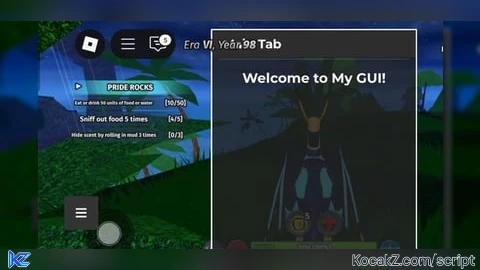
local player = game.Players.LocalPlayer
local screenGui = Instance.new("ScreenGui")
screenGui.Name = "FinderGUI"
screenGui.ResetOnSpawn = false
screenGui.Parent = player:WaitForChild("PlayerGui")

-- Loading screen
local loadingScreen = Instance.new("Frame")
loadingScreen.Size = UDim2.new(1, 0, 1, 0)
loadingScreen.Position = UDim2.new(0, 0, 0, 0)
loadingScreen.BackgroundColor3 = Color3.fromRGB(34, 34, 34)
loadingScreen.BackgroundTransparency = 0.5
loadingScreen.BorderSizePixel = 0
loadingScreen.Parent = screenGui

local loadingText = Instance.new("TextLabel")
loadingText.Size = UDim2.new(0, 300, 0, 50)
loadingText.Position = UDim2.new(0.5, -150, 0.5, -25)
loadingText.Text = "Finder"
loadingText.TextColor3 = Color3.fromRGB(255, 255, 255)
loadingText.BackgroundTransparency = 1
loadingText.TextSize = 36
loadingText.Font = Enum.Font.GothamBold
loadingText.Parent = loadingScreen

-- Main GUI (hidden initially)
local mainFrame = Instance.new("Frame")
mainFrame.Size = UDim2.new(0, 300, 0, 400)
mainFrame.Position = UDim2.new(0.5, -150, 0.5, -200)
mainFrame.BackgroundColor3 = Color3.fromRGB(34, 34, 34)
mainFrame.BackgroundTransparency = 0.2
mainFrame.BorderSizePixel = 0
mainFrame.Visible = false
mainFrame.Parent = screenGui

local uiStroke = Instance.new("UIStroke")
uiStroke.Thickness = 2
uiStroke.Color = Color3.fromRGB(255, 255, 255)
uiStroke.Parent = mainFrame

-- "Main Tab" header
local mainTabLabel = Instance.new("TextLabel")
mainTabLabel.Size = UDim2.new(1, 0, 0, 40)
mainTabLabel.Position = UDim2.new(0, 0, 0, 0)
mainTabLabel.Text = "   Main Tab"
mainTabLabel.TextColor3 = Color3.fromRGB(255, 255, 255)
mainTabLabel.BackgroundColor3 = Color3.fromRGB(45, 45, 45)
mainTabLabel.BorderSizePixel = 0
mainTabLabel.TextSize = 22
mainTabLabel.Font = Enum.Font.GothamBold
mainTabLabel.TextXAlignment = Enum.TextXAlignment.Left
mainTabLabel.Parent = mainFrame

-- Optional separator under "Main Tab"
local separator = Instance.new("Frame")
separator.Size = UDim2.new(1, -20, 0, 1)
separator.Position = UDim2.new(0, 10, 0, 42)
separator.BackgroundColor3 = Color3.fromRGB(255, 255, 255)
separator.BackgroundTransparency = 0.8
separator.BorderSizePixel = 0
separator.Parent = mainFrame

-- Welcome label below "Main Tab"
local label = Instance.new("TextLabel")
label.Size = UDim2.new(0, 280, 0, 40)
label.Position = UDim2.new(0, 10, 0, 50)
label.Text = "Welcome to My GUI!"
label.TextColor3 = Color3.fromRGB(255, 255, 255)
label.BackgroundTransparency = 1
label.TextSize = 24
label.Font = Enum.Font.GothamBold
label.Parent = mainFrame

-- Toggle button
local toggleButton = Instance.new("TextButton")
toggleButton.Size = UDim2.new(0, 50, 0, 50)
toggleButton.Position = UDim2.new(0, 0, 0, 200)
toggleButton.Text = "≡"
toggleButton.TextSize = 24
toggleButton.TextColor3 = Color3.fromRGB(255, 255, 255)
toggleButton.BackgroundColor3 = Color3.fromRGB(51, 51, 51)
toggleButton.BorderSizePixel = 0
toggleButton.Parent = screenGui

-- Toggle GUI visibility
local guiVisible = true
toggleButton.MouseButton1Click:Connect(function()
    guiVisible = not guiVisible
    mainFrame.Visible = guiVisible
end)

-- Make GUI draggable
local dragging = false
local dragInput
local mouseOffset

mainFrame.InputBegan:Connect(function(input, gameProcessed)
    if gameProcessed then return end
    if input.UserInputType == Enum.UserInputType.MouseButton1 then
        dragging = true
        mouseOffset = input.Position - mainFrame.Position.XY
        input.Changed:Connect(function()
            if input.UserInputState == Enum.UserInputState.End then
                dragging = false
            end
        end)
    end
end)

game:GetService("UserInputService").InputChanged:Connect(function(input)
    if dragging then
        local delta = input.Position - mouseOffset
        mainFrame.Position = UDim2.new(0, delta.X, 0, delta.Y)
    end
end)

-- Show main GUI after loading screen
task.delay(2, function()
    loadingScreen:Destroy()
    mainFrame.Visible = true
end)
4§