PHONE IS NOT SUPPORTED (Probably)
ONLY FOR LOOSE OBJECTS
⚠️ CREDITS & WARNING: Original concept and base script by @Im_Patrick (Do not steal his work!). Modified, enhanced, and coded by 0404040404G80002 (Description from AI).
This is a highly advanced Object Manipulation Hub. It doesn't just let you move parts; it lets you BECOME the parts, create deadly AOE Auras, and even uses Roblox's AI Pathfinding to make objects hunt you down perfectly. Perfect for trolling, exploring, or dominating physics-based games!
🔥 MAIN FEATURES:
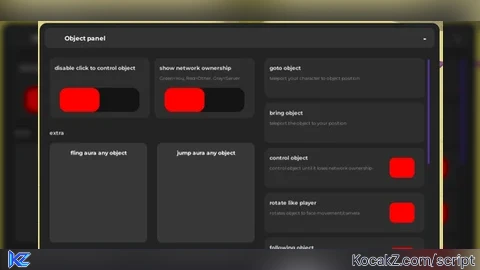
👻 Prop Possession (Control Object): Click on any unanchored object to become it! Your real body turns into a ghost (NoClip/Invisible), the camera attaches to the object, and you can control the object using WASD and Space to jump. Press Q to exit.
🌪️ Fling & Jump AURAS: Turn yourself into a walking disaster! Automatically applies extreme spinning (Fling) or bouncing (Jump) physics to ALL unanchored parts within a 25-stud radius around you.
🧠 Smart AI Follow (PathfindingService): This is NOT a basic follow script. It calculates actual paths, avoids walls, navigates around obstacles, and forces the object to jump over gaps to reach you!
📡 Network Ownership ESP: See exactly who controls the physics of every part on the map.
🟢 Green = You control it.
🔴 Red = Another player controls it.
⚪ Gray = Server controls it.
🔪 Fling on Touch (Blender Mode): Gives the selected object insane rotational velocity. If anyone touches it, they will be shredded and flung into the void!
🔄 Rotate Like Player: Makes the object dynamically face the direction it is moving or where your camera is looking, making it feel like a real character.
🛠️ UTILITY & TROLLING TOOLS:
Select System: Simply click on any unanchored part to select it (adds a clean white Highlight).
Goto / Bring: Instantly teleport yourself to the object, or teleport the object to your face.
Punish Object: Send any annoying object to the absolute void (Y: 999999).
Object Jump State: Force the selected object to hop into the air on command.
⚙️ UI & QUALITY OF LIFE:
Modern Draggable GUI: Clean, dark-themed UI with smooth minimize/maximize animations (- button).
Disable Click-to-Select: Prevents you from accidentally clicking and selecting parts while you are busy controlling something else.
🎮 CONTROLS:
[ Left Click ] - Select an unanchored part.
[ WASD + Space ] - Move and jump while possessing an object.
[ Q ] - Stop possessing the object and return to your body.