

KeylessUniversal
-- AK.GUI - 最小限のGUI機能と音声
local Players = game:GetService("Players")
local UserInputService = game:GetService("UserInputService")
local SoundService = game:GetService("SoundService")
local TweenService = game:GetService("TweenService")

local player = Players.LocalPlayer
local playerGui = player:WaitForChild("PlayerGui")

-- 音声アセットID
local START_SOUND_ID = "1837769261"      -- スクリプト読み込み時の音声
local BUTTON_SOUND_ID = "115916891254154"  -- ボタン操作時の音声

-- 音声再生関数
local function playSound(soundId)
    local sound = Instance.new("Sound")
    sound.SoundId = "rbxassetid://" .. soundId
    sound.Parent = SoundService
    sound:Play()

    sound.Ended:Connect(function()
        sound:Destroy()
    end)
end

-- スクリプト読み込み時の音声再生
playSound(START_SOUND_ID)

-- GUI作成
local screenGui = Instance.new("ScreenGui")
screenGui.Name = "AK_GUI"
screenGui.ResetOnSpawn = false
screenGui.ZIndexBehavior = Enum.ZIndexBehavior.Sibling
screenGui.Parent = playerGui

-- メインフレーム
local mainFrame = Instance.new("Frame")
mainFrame.Name = "MainFrame"
mainFrame.Size = UDim2.new(0, 320, 0, 350)
mainFrame.Position = UDim2.new(0, 10, 0, 10)
mainFrame.BackgroundColor3 = Color3.fromRGB(30, 30, 40)
mainFrame.BorderSizePixel = 0
mainFrame.BackgroundTransparency = 0.05
mainFrame.Parent = screenGui

-- 角丸
local corner = Instance.new("UICorner")
corner.CornerRadius = UDim.new(0, 10)
corner.Parent = mainFrame

-- ボーダー
local border = Instance.new("UIStroke")
border.Color = Color3.fromRGB(80, 80, 120)
border.Thickness = 2
border.Parent = mainFrame

-- タイトル
local title = Instance.new("TextLabel")
title.Name = "Title"
title.Size = UDim2.new(1, 0, 0, 30)
title.Position = UDim2.new(0, 0, 0, 0)
title.BackgroundColor3 = Color3.fromRGB(40, 40, 60)
title.TextColor3 = Color3.fromRGB(220, 220, 255)
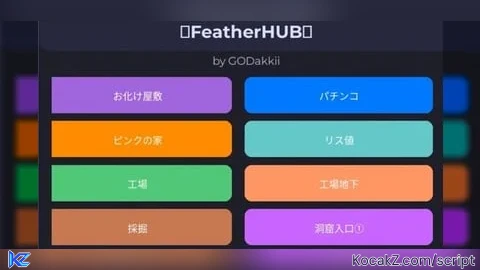
title.Text = "🪽FeatherHUB🪽"
title.Font = Enum.Font.GothamBold
title.TextSize = 16
title.Parent = mainFrame

local titleCorner = Instance.new("UICorner")
titleCorner.CornerRadius = UDim.new(0, 10)
titleCorner.Parent = title

-- クレジット
local credit = Instance.new("TextLabel")
credit.Name = "Credit"
credit.Size = UDim2.new(1, 0, 0, 15)
credit.Position = UDim2.new(0, 0, 0, 30)
credit.BackgroundTransparency = 1
credit.TextColor3 = Color3.fromRGB(180, 180, 220)
credit.Text = "by GODakkii"
credit.Font = Enum.Font.Gotham
credit.TextSize = 10
credit.Parent = mainFrame

-- コントロールボタンコンテナ
local controlContainer = Instance.new("Frame")
controlContainer.Name = "ControlContainer"
controlContainer.Size = UDim2.new(1, -20, 0, 20)
controlContainer.Position = UDim2.new(0, 10, 1, -25)
controlContainer.BackgroundTransparency = 1
controlContainer.Parent = mainFrame

-- コントロールボタンのレイアウト
local controlLayout = Instance.new("UIGridLayout")
controlLayout.CellSize = UDim2.new(0.5, -4, 1, 0)
controlLayout.CellPadding = UDim2.new(0, 8, 0, 0)
controlLayout.HorizontalAlignment = Enum.HorizontalAlignment.Center
controlLayout.Parent = controlContainer

-- Hideボタン
local toggleButton = Instance.new("TextButton")
toggleButton.Name = "ToggleButton"
toggleButton.Size = UDim2.new(1, 0, 1, 0)
toggleButton.BackgroundColor3 = Color3.fromRGB(60, 60, 80)
toggleButton.TextColor3 = Color3.fromRGB(200, 200, 255)
toggleButton.Text = "Hide"
toggleButton.Font = Enum.Font.Gotham
toggleButton.TextSize = 10
toggleButton.Parent = controlContainer

local toggleCorner = Instance.new("UICorner")
toggleCorner.CornerRadius = UDim.new(0, 6)
toggleCorner.Parent = toggleButton

-- Pinボタン
local pinButton = Instance.new("TextButton")
pinButton.Name = "PinButton"
pinButton.Size = UDim2.new(1, 0, 1, 0)
pinButton.BackgroundColor3 = Color3.fromRGB(160, 100, 220)
pinButton.TextColor3 = Color3.fromRGB(255, 255, 255)
pinButton.Text = "Fixed GUI"
pinButton.Font = Enum.Font.Gotham
pinButton.TextSize = 10
pinButton.Parent = controlContainer

local pinCorner = Instance.new("UICorner")
pinCorner.CornerRadius = UDim.new(0, 6)
pinCorner.Parent = pinButton

-- ボタンコンテナ
local buttonContainer = Instance.new("Frame")
buttonContainer.Name = "ButtonContainer"
buttonContainer.Size = UDim2.new(1, -20, 1, -80)
buttonContainer.Position = UDim2.new(0, 10, 0, 50)
buttonContainer.BackgroundTransparency = 1
buttonContainer.Visible = true
buttonContainer.Parent = mainFrame

-- スクロールフレーム
local scrollFrame = Instance.new("ScrollingFrame")
scrollFrame.Name = "ScrollFrame"
scrollFrame.Size = UDim2.new(1, 0, 1, 0)
scrollFrame.Position = UDim2.new(0, 0, 0, 0)
scrollFrame.BackgroundTransparency = 1
scrollFrame.BorderSizePixel = 0
scrollFrame.ScrollBarThickness = 6
scrollFrame.ScrollBarImageColor3 = Color3.fromRGB(80, 80, 120)
scrollFrame.CanvasSize = UDim2.new(0, 0, 0, 0)
scrollFrame.Parent = buttonContainer

-- 2列グリッドレイアウト
local gridLayout = Instance.new("UIGridLayout")
gridLayout.CellSize = UDim2.new(0.5, -5, 0, 28)
gridLayout.CellPadding = UDim2.new(0, 10, 0, 6)
gridLayout.HorizontalAlignment = Enum.HorizontalAlignment.Center
gridLayout.StartCorner = Enum.StartCorner.TopLeft
gridLayout.Parent = scrollFrame

-- レイアウト更新
gridLayout:GetPropertyChangedSignal("AbsoluteContentSize"):Connect(function()
    scrollFrame.CanvasSize = UDim2.new(0, 0, 0, gridLayout.AbsoluteContentSize.Y)
end)

-- テレポート関数
local function teleportTo(position)
    local character = player.Character
    if character and character:FindFirstChild("HumanoidRootPart") then
        character.HumanoidRootPart.CFrame = CFrame.new(position)
        return true
    end
    return false
end

-- ボタン作成関数
function createButton(text, color, position)
    local button = Instance.new("TextButton")
    button.Name = text .. "Button"
    button.Size = UDim2.new(1, 0, 1, 0)
    button.BackgroundColor3 = color
    button.TextColor3 = Color3.fromRGB(255, 255, 255)
    button.Text = text
    button.Font = Enum.Font.Gotham
    button.TextSize = 11
    button.AutoButtonColor = true

    local buttonCorner = Instance.new("UICorner")
    buttonCorner.CornerRadius = UDim.new(0, 6)
    buttonCorner.Parent = button

    -- ボタンクリックイベント
    button.MouseButton1Click:Connect(function()
        playSound(BUTTON_SOUND_ID)
        local success = teleportTo(position)
        if success then
            statusLabel.Text = "✅ " .. text
            statusLabel.TextColor3 = Color3.fromRGB(100, 255, 100)
        else
            statusLabel.Text = "❌ Teleport Failed"
            statusLabel.TextColor3 = Color3.fromRGB(255, 100, 100)
        end
    end)

    return button
end

-- テレポート座標の定義
local teleportLocations = {
    {"パチンコ", Vector3.new(56.27, -5.89, -112.15)},
    {"青い家", Vector3.new(499.19, 83.34, -345.48)},
    {"黄色い家", Vector3.new(549.16, 123.34, -74.13)},
    {"お化け屋敷", Vector3.new(291.96, -7.35, 431.22)},
    {"ピンクの家", Vector3.new(-477.62, -7.35, -146.47)},
    {"緑の家", Vector3.new(-535.74, -7.35, 65.00)},
    {"洞窟入口⑤", Vector3.new(-207.69, -7.35, -574.23)},
    {"洞窟入口④", Vector3.new(57.29, 37.65, 487.17)},
    {"洞窟入口③", Vector3.new(244.06, 1.54, -280.03)},
    {"洞窟入口②", Vector3.new(-7.28, 19.47, -279.02)},
    {"洞窟入口①", Vector3.new(603.58, 45.51, -174.20)},
    {"工場地下", Vector3.new(155.46, 250.70, 331.59)},
    {"工場", Vector3.new(111.33, 347.20, 347.96)},
    {"採掘", Vector3.new(-368.44, -7.35, 257.62)},
    {"緑の施設", Vector3.new(-302.40, 81.65, 323.27)},
    {"貯水塔", Vector3.new(-194.71, 59.78, -418.45)},
    {"リス値", Vector3.new(-0.11, -7.35, -7.88)}
}

-- カラーパレット
local colors = {
    Color3.fromRGB(0, 120, 255),    -- 青
    Color3.fromRGB(0, 180, 60),     -- 緑
    Color3.fromRGB(220, 60, 60),    -- 赤
    Color3.fromRGB(160, 100, 220),  -- 紫
    Color3.fromRGB(255, 140, 0),    -- オレンジ
    Color3.fromRGB(0, 200, 200),    -- シアン
    Color3.fromRGB(255, 100, 200),  -- ピンク
    Color3.fromRGB(200, 200, 50),   -- 黄色
    Color3.fromRGB(100, 200, 100),  -- 明るい緑
    Color3.fromRGB(100, 150, 255),  -- 明るい青
    Color3.fromRGB(200, 100, 255),  -- 明るい紫
    Color3.fromRGB(255, 150, 100),  -- サーモン
    Color3.fromRGB(80, 200, 120),   -- エメラルド
    Color3.fromRGB(200, 120, 80),   -- ブロンズ
    Color3.fromRGB(120, 160, 255),  -- コーンフラワー
    Color3.fromRGB(180, 100, 200),  -- ラベンダー
    Color3.fromRGB(100, 200, 200)   -- ターコイズ
}

-- ボタンを作成
for i, location in ipairs(teleportLocations) do
    local buttonName, position = location[1], location[2]
    local color = colors[i] or Color3.fromRGB(100, 100, 200)  -- デフォルト色
    local button = createButton(buttonName, color, position)
    button.Parent = scrollFrame
end

-- ステータス表示
local statusLabel = Instance.new("TextLabel")
statusLabel.Name = "StatusLabel"
statusLabel.Size = UDim2.new(1, -10, 0, 15)
statusLabel.Position = UDim2.new(0, 5, 1, -50)
statusLabel.BackgroundTransparency = 1
statusLabel.TextColor3 = Color3.fromRGB(180, 180, 220)
statusLabel.Text = "Ready - Unpinned"
statusLabel.Font = Enum.Font.Gotham
statusLabel.TextSize = 10
statusLabel.TextXAlignment = Enum.TextXAlignment.Left
statusLabel.Parent = mainFrame

-- GUI固定状態の変数
local isGUIPinned = false

-- GUI固定/解除関数
local function toggleGUIPin()
    isGUIPinned = not isGUIPinned

    if isGUIPinned then
        pinButton.Text = "Unpin GUI"
        pinButton.BackgroundColor3 = Color3.fromRGB(120, 80, 180)
        statusLabel.Text = "GUI Fixed"
        statusLabel.TextColor3 = Color3.fromRGB(180, 140, 255)
    else
        pinButton.Text = "Fixed GUI"
        pinButton.BackgroundColor3 = Color3.fromRGB(160, 100, 220)
        statusLabel.Text = "GUI Unpinned"
        statusLabel.TextColor3 = Color3.fromRGB(180, 180, 220)
    end

    return true, isGUIPinned and "✅ GUI Fixed" or "✅ GUI Unpinned"
end

-- GUI固定ボタン(音声再生付き)
pinButton.MouseButton1Click:Connect(function()
    playSound(BUTTON_SOUND_ID)
    local success, message = toggleGUIPin()
    statusLabel.Text = message
    statusLabel.TextColor3 = Color3.fromRGB(180, 140, 255)
end)

-- トグル機能(音声再生付き)
toggleButton.MouseButton1Click:Connect(function()
    playSound(BUTTON_SOUND_ID)
    if buttonContainer.Visible then
        buttonContainer.Visible = false
        mainFrame.Size = UDim2.new(0, 320, 0, 60)
        toggleButton.Text = "Show"
        statusLabel.Text = "GUI Hidden"
    else
        buttonContainer.Visible = true
        mainFrame.Size = UDim2.new(0, 320, 0, 350)
        toggleButton.Text = "Hide"
        statusLabel.Text = isGUIPinned and "GUI Fixed" or "GUI Unpinned"
    end
end)

-- ドラッグ機能(マウスとタッチ対応)
local dragging = false
local dragStart, startPos

local function handleDragStart(input)
    if not isGUIPinned then
        dragging = true
        dragStart = input.Position
        startPos = mainFrame.Position

        input.Changed:Connect(function()
            if input.UserInputState == Enum.UserInputState.End then
                dragging = false
            end
        end)
    end
end

local function handleDrag(input)
    if dragging and not isGUIPinned then
        local delta = input.Position - dragStart
        mainFrame.Position = UDim2.new(
            startPos.X.Scale,
            startPos.X.Offset + delta.X,
            startPos.Y.Scale,
            startPos.Y.Offset + delta.Y
        )
    end
end

-- マウス入力
title.InputBegan:Connect(function(input)
    if input.UserInputType == Enum.UserInputType.MouseButton1 then
        handleDragStart(input)
    end
end)

title.InputChanged:Connect(function(input)
    if input.UserInputType == Enum.UserInputType.MouseMovement then
        handleDrag(input)
    end
end)

-- タッチ入力
title.InputBegan:Connect(function(input)
    if input.UserInputType == Enum.UserInputType.Touch then
        handleDragStart(input)
    end
end)

title.InputChanged:Connect(function(input)
    if input.UserInputType == Enum.UserInputType.Touch then
        handleDrag(input)
    end
end)

print("🪽 FeatherHUB loaded successfully!")
print("📍 GUI is in top-left corner")
print("🔊 Sound effects enabled")
print("👆 Touch and drag support")
print("🚀 17 teleport locations available")
print("📱 2-column layout activated")


How to do on mobile
@imaikalanirow Touch✅
@imaikalanirow Come on, you know what I mean!!!
アッキーさんは日本人でした…ちなみにこのスクリプト使いましたが便利でしたありがとうございました