


KeylessUniversal
--[[
    Information:

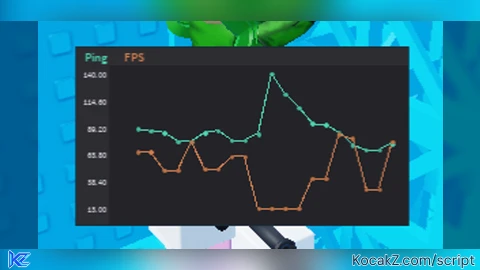
    A graphical representation of your FPS and ping in game.

	Credits:

	https://devforum.roblox.com/t/graph-module-easily-draw-graphs-of-your-data/828982 - GraphModule
]]

-- // Configuration
local UpdateDelay = 0.5 -- // second(s)
local MaxDataPoints = 20

-- // Dependencies
local GraphModule
do
    --[=[

    Docs: https://devforum.roblox.com/t/graph-module-easily-draw-graphs-of-your-data/828982/1

    API:

    function Graph.new(Frame)
        returns a GraphHandler

    GraphHandler.Resolution = The number of points it renders
    GraphHandler.BaselineZero = Whether the bottom of the graph should start at zero (or at the minimum value)
    GraphHandler.Data = The dictionary of data sets
        (Data must be a dictionary of arrays with no holes)

    function GraphHandler.Theme(ThemeDictionary)
        Updates the Colors of the graph

    --]=]

	local TextService = game:GetService("TextService")

	local Graph = {}

	local Theme = {
		Name = "Dark";

		Background = Color3.fromRGB(35,35,40);
		LightBackground = Color3.fromRGB(45,45,50);
		Text = Color3.fromRGB(220,220,230)
	}
	local isDark = true

	local function getKeyColor(name)
		-- Shoutout to Vocksel for the core of this function

		local seed = 0
		for i=1, #name do
			seed = seed + (name:byte(i))
		end
		local rng = Random.new(seed)
		local hue = rng:NextInteger(0,50)/50

		return Color3.fromHSV(hue, isDark and 0.63 or 1, isDark and 0.84 or 0.8)
	end


	function Graph.new(Frame)
		if not Frame then error("Must give graph a frame") end
		local GraphHandler = {Frame = Frame; Resolution = 75;}

		-- Private variables
		local Busy = false

		-- Create the GUIs
		local BaseZIndex = GraphHandler.Frame.ZIndex

		local Background = Instance.new("Frame")
		Background.Name = "Background"
		Background.BackgroundColor3 = Theme.Background
		Background.Size = UDim2.new(1,0,1,0)
		Background.ZIndex = BaseZIndex+1
		Background.Parent = GraphHandler.Frame

		local MarkerBG = Instance.new("Frame")
		MarkerBG.Name = "MarkerBackground"
		MarkerBG.Size = UDim2.new(0.1,0,1,0)
		MarkerBG.BackgroundColor3 = Theme.LightBackground
		MarkerBG.BorderSizePixel = 0
		MarkerBG.ZIndex = BaseZIndex+2
		MarkerBG.Parent = GraphHandler.Frame

		local YMarkers = Instance.new("Frame")
		YMarkers.Name = "Markers"
		YMarkers.Size = UDim2.new(0.1,0,0.85,0)
		YMarkers.Position = UDim2.new(0,0,0.15,0)
		YMarkers.BackgroundTransparency = 1
		YMarkers.BorderSizePixel = 0
		YMarkers.ZIndex = BaseZIndex+2
		YMarkers.Parent = GraphHandler.Frame

		local GraphingFrame = Instance.new("Frame")
		GraphingFrame.Name = "GraphingFrame"
		GraphingFrame.Size = UDim2.new(0.9,0,0.85,0)
		GraphingFrame.Position = UDim2.new(0.1,0,0.15,0)
		GraphingFrame.BackgroundTransparency = 1
		GraphingFrame.ZIndex = BaseZIndex+2
		GraphingFrame.Parent = GraphHandler.Frame

		local KeyNames = Instance.new("Frame")
		KeyNames.Name = "KeyNames"
		KeyNames.Size = UDim2.new(1,0,0.1,0)
		KeyNames.Position = UDim2.new(0,0,0,0)
		KeyNames.BackgroundColor3 = Theme.LightBackground
		KeyNames.BorderSizePixel = 0
		KeyNames.ZIndex = BaseZIndex+2
		KeyNames.Parent = GraphHandler.Frame

		-- Rerender if the frame changes size since our lines will be all wonky
		GraphHandler.Frame:GetPropertyChangedSignal("AbsoluteSize"):Connect(function()
			local Size = GraphHandler.Frame.AbsoluteSize
			wait(0.04)
			if Size == GraphHandler.Frame.AbsoluteSize then
				GraphHandler.Render()
			end
		end)

		function GraphHandler.Theme(newTheme)
			wait()
			-- Make sure we have latest theme data
			Theme = {
				Name = newTheme.Name or "Dark";

				Background = newTheme.Background or Color3.fromRGB(46,46,46);
				LightBackground = newTheme.LightBackground or Color3.fromRGB(70,70,70);
				Text = newTheme.Text or Color3.fromRGB(220,220,230);
			}

			-- Update GUIs
			Background.BackgroundColor3 = Theme.Background
			MarkerBG.BackgroundColor3 = Theme.LightBackground
			KeyNames.BackgroundColor3 = Theme.LightBackground

			-- Redraw graph with new colors
			GraphHandler.Render()
		end

		function GraphHandler.Render()
			-- Validate we have stuff to render
			if not GraphHandler.Frame or not GraphHandler.Data or not GraphHandler.Resolution then
				return
			end

			while Busy do wait(0.1) end
			Busy = true

			-- Clear old graph values
			YMarkers:ClearAllChildren()
			GraphingFrame:ClearAllChildren()
			KeyNames:ClearAllChildren()

			BaseZIndex = GraphHandler.Frame.ZIndex

			Background.ZIndex = BaseZIndex+1
			MarkerBG.ZIndex = BaseZIndex+2
			YMarkers.ZIndex = BaseZIndex+2
			GraphingFrame.ZIndex = BaseZIndex+2
			KeyNames.ZIndex = BaseZIndex+2

			local KeyLayout = Instance.new("UIListLayout")
			KeyLayout.FillDirection = Enum.FillDirection.Horizontal
			KeyLayout.HorizontalAlignment = Enum.HorizontalAlignment.Left
			KeyLayout.VerticalAlignment = Enum.VerticalAlignment.Center
			KeyLayout.Padding = UDim.new(0.01,0)
			KeyLayout.Parent = KeyNames

			local Max, Min = -math.huge,math.huge
			local Range

			-- Calculate our range of values

			for Key, Set in pairs(GraphHandler.Data) do
				local SetAmount = #Set

				for i=1,SetAmount, math.ceil(SetAmount/GraphHandler.Resolution) do
					local SortedChunk = {}
					for x=i,i+math.ceil(SetAmount/GraphHandler.Resolution) do
						SortedChunk[#SortedChunk+1] = Set[x]
					end
					table.sort(SortedChunk)

					local Value = SortedChunk[math.round(#SortedChunk*0.55)]
					if not Value then continue end

					-- Record for our range calc
					Min = math.min(Min, Value)
					Max = math.max(Max, Value)
				end
			end

			if GraphHandler.BaselineZero then
				Min = 0
				Max = Max * 1.75
			end

			Range = Max-Min

			-- Mark our Y axis values along the derived range

			for y=0,1,0.2 do
				local Marker = Instance.new("TextLabel")
				Marker.Name = y
				Marker.Size = UDim2.new(1,0,0.08,0)
				Marker.AnchorPoint = Vector2.new(0,0.5)
				Marker.Position = UDim2.new(0,0,0.9 - (y*0.9),0)
				Marker.Text = string.format("%.2f  ",(Min + (Range*y)))
				Marker.TextXAlignment = Enum.TextXAlignment.Right

				Marker.TextColor3 = Theme.Text
				Marker.Font = Enum.Font.SourceSans
				Marker.BackgroundTransparency = 1
				Marker.TextSize = (GraphHandler.Frame.AbsoluteSize.X*0.03)
				Marker.ZIndex = BaseZIndex+3
				Marker.Parent = YMarkers
			end

			-- Draw the graph at this range
			local KeyColors = {}
			for Key, Set in pairs(GraphHandler.Data) do
				-- Designate a color for this dataset
				KeyColors[Key] = getKeyColor(Key)

				local TextSize = GraphHandler.Frame.AbsoluteSize.Y*0.08
				local Size = TextService:GetTextSize(Key, TextSize, Enum.Font.SourceSansSemibold, KeyNames.AbsoluteSize)
				local KeyMarker = Instance.new("TextLabel")
				KeyMarker.Text = Key
				KeyMarker.TextColor3 = KeyColors[Key]
				KeyMarker.Font = Enum.Font.SourceSansSemibold
				KeyMarker.BackgroundTransparency = 1
				KeyMarker.TextSize = TextSize
				KeyMarker.Size = UDim2.new(0,Size.X+TextSize,1,0)
				KeyMarker.ZIndex = BaseZIndex+3
				KeyMarker.Parent = KeyNames

				-- Graph the set

				local SetAmount = #Set
				local LastPoint

				--print("  "..Key, Set)

				for i=1,SetAmount, math.ceil(SetAmount/GraphHandler.Resolution) do

					local SortedChunk = {}
					for x=i,i+math.ceil(SetAmount/GraphHandler.Resolution) do
						SortedChunk[#SortedChunk+1] = Set[x]
					end
					table.sort(SortedChunk)

					local Value = SortedChunk[math.round(#SortedChunk*0.55)]
					if not Value then continue end

					-- Create the point
					local Point = Instance.new("ImageLabel")
					Point.Name = Key..i
					Point.Position = UDim2.new(0.05+((i/SetAmount)*0.9),0, Range == 0 and 0.9 or 0.9 - (((Value-Min)/Range)*0.9),0)
					Point.AnchorPoint = Vector2.new(0.5,0.5)
					Point.SizeConstraint = Enum.SizeConstraint.RelativeXX
					Point.Size = UDim2.new(math.clamp(0.5/GraphHandler.Resolution, 0.003,0.016),0,math.clamp(0.5/GraphHandler.Resolution, 0.003,0.016),0)

					Point.ImageColor3 = KeyColors[Key]
					Point.BorderSizePixel = 0
					Point.BackgroundTransparency = 1
					Point.Image = "rbxassetid://200182847"
					Point.ZIndex = BaseZIndex+5

					local Label = Instance.new("TextLabel")
					Label.Visible = false
					Label.Text = string.format("%.5f",Value)
					Label.BackgroundColor3 = Theme.LightBackground
					Label.TextColor3 = Theme.Text
					Label.Position = UDim2.new(1,0,0.4,0)
					Label.Font = Enum.Font.Code
					Label.TextSize = (GraphHandler.Frame.AbsoluteSize.X*0.025)
					Label.Size = UDim2.new(0,Label.TextSize * 0.6 * #Label.Text,0,Label.TextSize * 1.1)
					Label.Parent = Point
					Label.ZIndex = BaseZIndex+10

					Point.MouseEnter:Connect(function()
						Label.Visible = true
					end)
					Point.MouseLeave:Connect(function()
						Label.Visible = false
					end)

					-- Create the line
					if LastPoint then
						local Connector = Instance.new("Frame")
						Connector.Name = Key..i.."-"..i-1
						Connector.BackgroundColor3 = KeyColors[Key]
						Connector.BorderSizePixel = 0
						Connector.SizeConstraint = Enum.SizeConstraint.RelativeXX
						Connector.AnchorPoint = Vector2.new(0.5, 0.5)
						Connector.ZIndex = BaseZIndex+4

						local Size = GraphingFrame.AbsoluteSize
						local startX, startY = Point.Position.X.Scale*Size.X, Point.Position.Y.Scale*Size.Y
						local endX, endY = LastPoint.Position.X.Scale*Size.X, LastPoint.Position.Y.Scale*Size.Y

						local Distance = (Vector2.new(startX, startY) - Vector2.new(endX, endY)).Magnitude

						Connector.Size = UDim2.new(0, Distance, math.clamp(0.2/GraphHandler.Resolution, 0.002,0.0035), 0)
						Connector.Position = UDim2.new(0, (startX + endX) / 2, 0, (startY + endY) / 2)
						Connector.Rotation = math.atan2(endY - startY, endX - startX) * (180 / math.pi)

						Connector.Parent = GraphingFrame
					end

					LastPoint = Point
					Point.Parent = GraphingFrame

				end

			end

			Busy = false
		end

		return setmetatable({}, {
			__index = function(t,Key)
				return GraphHandler[Key]
			end;
			__newindex = function(t, Key, Value)
				if Key == "Data" and type(Value) == "table" then
					GraphHandler.Data = Value
					GraphHandler.Render()
				elseif Key == "Resolution" and type(Value) == "number" then
					GraphHandler.Resolution = math.clamp(Value, 3, 500)
					GraphHandler.Render()
				elseif Key == "BaselineZero" and type(Value) == "boolean" then
					GraphHandler.BaselineZero = Value
					GraphHandler.Render()
				end
			end;
		})

	end

	GraphModule = Graph
end

-- // Services
local Players = game:GetService("Players")
local RunService = game:GetService("RunService")
local Stats = game:GetService("Stats")
local UserInputService = game:GetService("UserInputService")

-- // Vars
local LocalPlayer = Players.LocalPlayer
local DataPing = Stats.Network.ServerStatsItem["Data Ping"]
local CurrentFPS = 0
local FPSData = {}
local PingData = {}
local Data = {
	FPS = FPSData,
	Ping = PingData
}

-- // Create the GUI that will hold the data, and protect it
local ScreenGui = Instance.new("ScreenGui")
ScreenGui.ResetOnSpawn = false
local UsingExploit = false
if (syn and syn.protect_gui) then
	syn.protect_gui(ScreenGui)
	ScreenGui.Parent = game:GetService("CoreGui")
	UsingExploit = true
elseif (gethui) then
	ScreenGui.Parent = gethui()
	UsingExploit = true
else
	ScreenGui.Parent = LocalPlayer:WaitForChild("PlayerGui")
end

-- // Configure the container
local Container = Instance.new("Frame")
Container.Parent = ScreenGui
Container.Size = UDim2.new(0.3, 0, 0.2, 0)
Container.Position = UDim2.new(0.01, 0, 0.02, 0)
Container.BackgroundTransparency = 1
Container.Active = true -- // Make sure the frame can capture input

-- =========================================================================================
-- // START: LOGIK BARU UNTUK SERET DAN MUSNAHKAN
-- =========================================================================================

local function MakeDraggable(guiObject)
	local dragging = false
	local dragStart = nil
	local startPos = nil
	local viewportSize = workspace.CurrentCamera.ViewportSize

	-- // Kemas kini saiz viewport jika tetingkap diubah saiz
	workspace.CurrentCamera:GetPropertyChangedSignal("ViewportSize"):Connect(function()
		viewportSize = workspace.CurrentCamera.ViewportSize
	end)

	guiObject.InputBegan:Connect(function(input)
		if input.UserInputType == Enum.UserInputType.MouseButton1 or input.UserInputType == Enum.UserInputType.Touch then
			dragging = true
			dragStart = input.Position
			startPos = guiObject.Position
			input.Changed:Connect(function()
				if input.UserInputState == Enum.UserInputState.End then
					dragging = false
				end
			end)
		end
	end)

	guiObject.InputChanged:Connect(function(input)
		if input.UserInputType == Enum.UserInputType.MouseMovement or input.UserInputType == Enum.UserInputType.Touch then
			if dragging then
				local delta = input.Position - dragStart
				-- // Kira posisi baru hanya menggunakan offset untuk mengelakkan isu penskalaan
				local newPosInOffset = Vector2.new(startPos.X.Offset + delta.X, startPos.Y.Offset + delta.Y)

				-- // Kekalkan GUI dalam sempadan skrin
				local clampedX = math.clamp(newPosInOffset.X, 0, viewportSize.X - guiObject.AbsoluteSize.X)
				local clampedY = math.clamp(newPosInOffset.Y, 0, viewportSize.Y - guiObject.AbsoluteSize.Y)

				-- // Tetapkan posisi menggunakan UDim2.fromOffset untuk ketepatan piksel
				guiObject.Position = UDim2.fromOffset(clampedX, clampedY)
			end
		end
	end)
end

-- // Fungsi untuk memusnahkan GUI apabila kekunci 'X' ditekan
local function SetupDestroyKey()
	UserInputService.InputBegan:Connect(function(input, gameProcessedEvent)
		-- // Jangan musnahkan jika pengguna sedang menaip dalam kotak teks
		if gameProcessedEvent then return end

		if input.KeyCode == Enum.KeyCode.X then
			ScreenGui:Destroy()
		end
	end)
end

-- // Guna pakai fungsi pada 'Container'
MakeDraggable(Container)
SetupDestroyKey()

-- =========================================================================================
-- // END: LOGIK BARU
-- =========================================================================================


-- // Updates the FPS
RunService.RenderStepped:Connect(function(dT)
	CurrentFPS = math.floor(1 / dT)
end)

-- // Calculates the ping
local function GetPing()
	-- // Grab the ping, convert it to a number
	local Ping
	if (UsingExploit) then
		Ping = DataPing:GetValue()
	else
		Ping = LocalPlayer:GetNetworkPing()
	end
	Ping = tonumber(Ping)

	-- // Round it
	return math.round(Ping)
end

-- // Adds an item into an array, removes the first item if the array is too long
local function AddItemToArray(Array, Item)
	if (#Array >= MaxDataPoints) then
		table.remove(Array, 1)
	end

	table.insert(Array, Item)
end

-- // Updates the graph periodically
local GraphHandler
while task.wait(UpdateDelay) do
	-- // Break the loop if the GUI has been destroyed
	if not ScreenGui.Parent then
		break
	end

	-- // Add data into arrays
	AddItemToArray(FPSData, CurrentFPS)
	AddItemToArray(PingData, GetPing())

	-- // Force a render
	if (GraphHandler) then
		GraphHandler.Render()
	else
		-- // Create the graph
		GraphHandler = GraphModule.new(Container)
		GraphHandler.Resolution = MaxDataPoints
		GraphHandler.Data = Data
		continue
	end
end


chatgpt hi
@rocketscript eww chatgpt, that's the worst ai