


Key RequiredUniversal
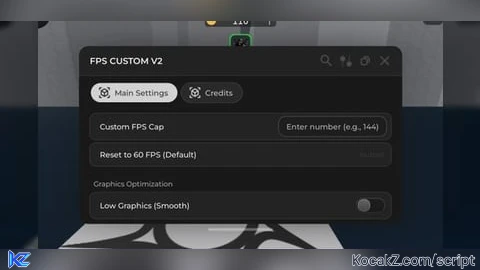
local Rayfield = loadstring(game:HttpGet('https://sirius.menu/rayfield'))()

-- Window Initialization
local Window = Rayfield:CreateWindow({
   Name = "FPS CUSTOM V2",
   LoadingTitle = "Created by Dreamyy",
   LoadingSubtitle = "Optimization & Performance",
   ConfigurationSaving = {
      Enabled = false,
      FolderName = "DreamyyFPS",
      FileName = "Config"
   },
   KeySystem = false
})

local MainTab = Window:CreateTab("Main Settings", 4483362458)

-- Table to store original materials for restoration
local originalMaterials = {}

-- SECTION: FPS CONTROL
MainTab:CreateSection("FPS Settings")

MainTab:CreateInput({
   Name = "Custom FPS Cap",
   PlaceholderText = "Enter number (e.g., 144)",
   RemoveTextAfterFocusLost = false,
   Callback = function(Text)
      local fpsValue = tonumber(Text)
      if fpsValue then
         setfpscap(fpsValue)
         Rayfield:Notify({
            Title = "FPS Updated",
            Content = "FPS limit set to: " .. fpsValue,
            Duration = 2,
         })
      else
         Rayfield:Notify({
            Title = "Invalid Input",
            Content = "Please enter a valid number!",
            Duration = 2,
         })
      end
   end,
})

MainTab:CreateButton({
   Name = "Reset to 60 FPS (Default)",
   Callback = function()
      setfpscap(60)
      Rayfield:Notify({
         Title = "FPS Reset",
         Content = "FPS returned to Roblox standard (60).",
         Duration = 2,
      })
   end,
})

-- SECTION: GRAPHICS
MainTab:CreateSection("Graphics Optimization")

MainTab:CreateToggle({
   Name = "Low Graphics (Smooth)",
   CurrentValue = false,
   Flag = "LowGraph",
   Callback = function(Value)
      if Value then
         -- Disable Shadows
         game.Lighting.GlobalShadows = false
         settings().Rendering.QualityLevel = 1

         -- Convert materials to Plastic for performance
         for _, v in pairs(game:GetDescendants()) do
            if v:IsA("Part") or v:IsA("UnionOperation") or v:IsA("MeshPart") then
               if not originalMaterials[v] then
                  originalMaterials[v] = v.Material
               end
               v.Material = Enum.Material.Plastic
            end
         end

         Rayfield:Notify({
            Title = "Graphics",
            Content = "Low Graphics Active (Shadows OFF, Materials: Plastic)",
            Duration = 2,
         })
      else
         -- Restore Original Materials
         game.Lighting.GlobalShadows = true
         for obj, mat in pairs(originalMaterials) do
            if obj and obj.Parent then
               obj.Material = mat
            end
         end
         table.clear(originalMaterials)

         Rayfield:Notify({
            Title = "Graphics",
            Content = "Visuals restored to original settings.",
            Duration = 2,
         })
      end
   end,
})

-- SECTION: SYSTEM
MainTab:CreateSection("System Management")

MainTab:CreateButton({
   Name = "Unload & Clean Exit",
   Callback = function()
      -- Reset everything before destroying the GUI
      setfpscap(60)
      game.Lighting.GlobalShadows = true

      for obj, mat in pairs(originalMaterials) do
         if obj and obj.Parent then
            obj.Material = mat
         end
      end

      Rayfield:Notify({
         Title = "System",
         Content = "All settings reset. Closing GUI...",
         Duration = 2,
      })

      task.wait(1)
      Rayfield:Destroy()
   end,
})

-- Credits Tab
local CreditTab = Window:CreateTab("Credits", 4483362458)
CreditTab:CreateLabel("FPS CUSTOM V1.5")
CreditTab:CreateLabel("Author: Dreamyy")
CreditTab:CreateParagraph({
    Title = "Developer Note",
    Content = "This script is designed to stay lightweight. Always use the 'Unload' button before switching games to ensure a clean session."
})No comments yet for this script.


