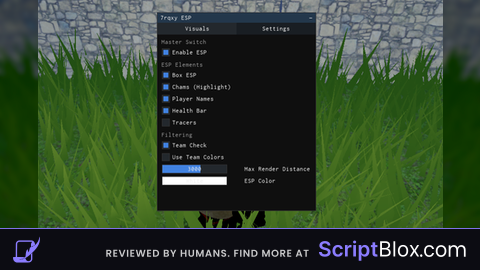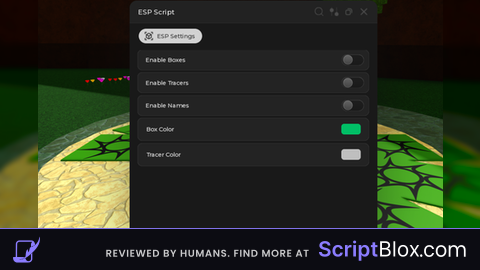
KeylessUniversal
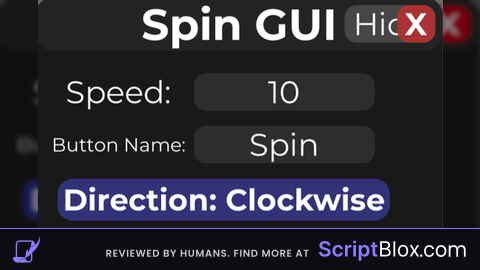
--// Simple Mobile-Friendly Spin GUI
--// Put this LocalScript in StarterPlayerScripts or StarterGui

local Players = game:GetService("Players")
local RunService = game:GetService("RunService")
local UserInputService = game:GetService("UserInputService")

local player = Players.LocalPlayer
local character = player.Character or player.CharacterAdded:Wait()
local humanoidRootPart = character:WaitForChild("HumanoidRootPart")

--========================
-- EDIT HERE
--========================
local spinSpeed = 10                -- default spin speed
local spinButtonText = "Spin"       -- main button name
local guiTitle = "Spin GUI"         -- gui title
local smallButtonText = "Open"      -- hidden button text
local defaultDirection = 1          -- 1 = clockwise, -1 = counterclockwise
local defaultAxis = "Y"             -- Y, X, or Z
--========================

local spinning = false
local spinConnection

local spinDirection = defaultDirection
local spinAxis = defaultAxis

local screenGui = Instance.new("ScreenGui")
screenGui.Name = "SpinGui"
screenGui.ResetOnSpawn = false
screenGui.Parent = player:WaitForChild("PlayerGui")

local mainFrame = Instance.new("Frame")
mainFrame.Size = UDim2.new(0, 270, 0, 260)
mainFrame.Position = UDim2.new(0.5, -135, 0.5, -130)
mainFrame.BackgroundColor3 = Color3.fromRGB(25, 25, 25)
mainFrame.BorderSizePixel = 0
mainFrame.Active = true
mainFrame.Parent = screenGui

local corner = Instance.new("UICorner")
corner.CornerRadius = UDim.new(0, 12)
corner.Parent = mainFrame

local titleBar = Instance.new("TextLabel")
titleBar.Size = UDim2.new(1, 0, 0, 35)
titleBar.BackgroundColor3 = Color3.fromRGB(35, 35, 35)
titleBar.BorderSizePixel = 0
titleBar.Text = guiTitle
titleBar.TextColor3 = Color3.fromRGB(255, 255, 255)
titleBar.TextScaled = true
titleBar.Font = Enum.Font.GothamBold
titleBar.Parent = mainFrame

local titleCorner = Instance.new("UICorner")
titleCorner.CornerRadius = UDim.new(0, 12)
titleCorner.Parent = titleBar

local hideButton = Instance.new("TextButton")
hideButton.Size = UDim2.new(0, 60, 0, 25)
hideButton.Position = UDim2.new(1, -65, 0, 5)
hideButton.BackgroundColor3 = Color3.fromRGB(70, 70, 70)
hideButton.Text = "Hide"
hideButton.TextColor3 = Color3.fromRGB(255, 255, 255)
hideButton.TextScaled = true
hideButton.Font = Enum.Font.Gotham
hideButton.BorderSizePixel = 0
hideButton.Parent = mainFrame

local hideCorner = Instance.new("UICorner")
hideCorner.CornerRadius = UDim.new(0, 8)
hideCorner.Parent = hideButton

local closeButton = Instance.new("TextButton")
closeButton.Size = UDim2.new(0, 25, 0, 25)
closeButton.Position = UDim2.new(1, -30, 0, 5)
closeButton.BackgroundColor3 = Color3.fromRGB(170, 50, 50)
closeButton.Text = "X"
closeButton.TextColor3 = Color3.fromRGB(255, 255, 255)
closeButton.TextScaled = true
closeButton.Font = Enum.Font.GothamBold
closeButton.BorderSizePixel = 0
closeButton.Parent = mainFrame

local closeCorner = Instance.new("UICorner")
closeCorner.CornerRadius = UDim.new(0, 8)
closeCorner.Parent = closeButton

local speedLabel = Instance.new("TextLabel")
speedLabel.Size = UDim2.new(0, 90, 0, 25)
speedLabel.Position = UDim2.new(0, 10, 0, 50)
speedLabel.BackgroundTransparency = 1
speedLabel.Text = "Speed:"
speedLabel.TextColor3 = Color3.fromRGB(255, 255, 255)
speedLabel.TextScaled = true
speedLabel.Font = Enum.Font.Gotham
speedLabel.Parent = mainFrame

local speedBox = Instance.new("TextBox")
speedBox.Size = UDim2.new(0, 120, 0, 25)
speedBox.Position = UDim2.new(0, 105, 0, 50)
speedBox.BackgroundColor3 = Color3.fromRGB(45, 45, 45)
speedBox.Text = tostring(spinSpeed)
speedBox.TextColor3 = Color3.fromRGB(255, 255, 255)
speedBox.TextScaled = true
speedBox.Font = Enum.Font.Gotham
speedBox.BorderSizePixel = 0
speedBox.ClearTextOnFocus = false
speedBox.Parent = mainFrame

local speedCorner = Instance.new("UICorner")
speedCorner.CornerRadius = UDim.new(0, 8)
speedCorner.Parent = speedBox

local nameLabel = Instance.new("TextLabel")
nameLabel.Size = UDim2.new(0, 90, 0, 25)
nameLabel.Position = UDim2.new(0, 10, 0, 85)
nameLabel.BackgroundTransparency = 1
nameLabel.Text = "Button Name:"
nameLabel.TextColor3 = Color3.fromRGB(255, 255, 255)
nameLabel.TextScaled = true
nameLabel.Font = Enum.Font.Gotham
nameLabel.Parent = mainFrame

local nameBox = Instance.new("TextBox")
nameBox.Size = UDim2.new(0, 120, 0, 25)
nameBox.Position = UDim2.new(0, 105, 0, 85)
nameBox.BackgroundColor3 = Color3.fromRGB(45, 45, 45)
nameBox.Text = spinButtonText
nameBox.TextColor3 = Color3.fromRGB(255, 255, 255)
nameBox.TextScaled = true
nameBox.Font = Enum.Font.Gotham
nameBox.BorderSizePixel = 0
nameBox.ClearTextOnFocus = false
nameBox.Parent = mainFrame

local nameCorner = Instance.new("UICorner")
nameCorner.CornerRadius = UDim.new(0, 8)
nameCorner.Parent = nameBox

local directionButton = Instance.new("TextButton")
directionButton.Size = UDim2.new(0, 220, 0, 28)
directionButton.Position = UDim2.new(0, 15, 0, 120)
directionButton.BackgroundColor3 = Color3.fromRGB(50, 50, 120)
directionButton.Text = "Direction: Clockwise"
directionButton.TextColor3 = Color3.fromRGB(255, 255, 255)
directionButton.TextScaled = true
directionButton.Font = Enum.Font.GothamBold
directionButton.BorderSizePixel = 0
directionButton.Parent = mainFrame

local directionCorner = Instance.new("UICorner")
directionCorner.CornerRadius = UDim.new(0, 10)
directionCorner.Parent = directionButton

local axisButton = Instance.new("TextButton")
axisButton.Size = UDim2.new(0, 220, 0, 28)
axisButton.Position = UDim2.new(0, 15, 0, 155)
axisButton.BackgroundColor3 = Color3.fromRGB(120, 80, 40)
axisButton.Text = "Axis: Y"
axisButton.TextColor3 = Color3.fromRGB(255, 255, 255)
axisButton.TextScaled = true
axisButton.Font = Enum.Font.GothamBold
axisButton.BorderSizePixel = 0
axisButton.Parent = mainFrame

local axisCorner = Instance.new("UICorner")
axisCorner.CornerRadius = UDim.new(0, 10)
axisCorner.Parent = axisButton

local applyButton = Instance.new("TextButton")
applyButton.Size = UDim2.new(0, 105, 0, 30)
applyButton.Position = UDim2.new(0, 15, 0, 190)
applyButton.BackgroundColor3 = Color3.fromRGB(50, 120, 50)
applyButton.Text = "Apply"
applyButton.TextColor3 = Color3.fromRGB(255, 255, 255)
applyButton.TextScaled = true
applyButton.Font = Enum.Font.GothamBold
applyButton.BorderSizePixel = 0
applyButton.Parent = mainFrame

local applyCorner = Instance.new("UICorner")
applyCorner.CornerRadius = UDim.new(0, 10)
applyCorner.Parent = applyButton

local spinButton = Instance.new("TextButton")
spinButton.Size = UDim2.new(0, 105, 0, 30)
spinButton.Position = UDim2.new(0, 130, 0, 190)
spinButton.BackgroundColor3 = Color3.fromRGB(50, 120, 50)
spinButton.Text = spinButtonText
spinButton.TextColor3 = Color3.fromRGB(255, 255, 255)
spinButton.TextScaled = true
spinButton.Font = Enum.Font.GothamBold
spinButton.BorderSizePixel = 0
spinButton.Parent = mainFrame

local spinCorner = Instance.new("UICorner")
spinCorner.CornerRadius = UDim.new(0, 10)
spinCorner.Parent = spinButton

local smallButton = Instance.new("TextButton")
smallButton.Size = UDim2.new(0, 70, 0, 30)
smallButton.Position = UDim2.new(0, 10, 0.5, -15)
smallButton.BackgroundColor3 = Color3.fromRGB(35, 35, 35)
smallButton.Text = smallButtonText
smallButton.TextColor3 = Color3.fromRGB(255, 255, 255)
smallButton.TextScaled = true
smallButton.Font = Enum.Font.GothamBold
smallButton.BorderSizePixel = 0
smallButton.Visible = false
smallButton.Active = true
smallButton.Parent = screenGui

local smallCorner = Instance.new("UICorner")
smallCorner.CornerRadius = UDim.new(0, 10)
smallCorner.Parent = smallButton

local function updateCharacter()
	character = player.Character or player.CharacterAdded:Wait()
	humanoidRootPart = character:WaitForChild("HumanoidRootPart")
end

player.CharacterAdded:Connect(function()
	task.wait(1)
	updateCharacter()
end)

local function getSpinCFrame(speed)
	local amount = math.rad(speed) * spinDirection

	if spinAxis == "X" then
		return CFrame.Angles(amount, 0, 0)
	elseif spinAxis == "Z" then
		return CFrame.Angles(0, 0, amount)
	else
		return CFrame.Angles(0, amount, 0)
	end
end

local function startSpin()
	if spinning then return end
	spinning = true

	spinConnection = RunService.RenderStepped:Connect(function()
		if not spinning then return end
		if humanoidRootPart and humanoidRootPart.Parent then
			local speed = tonumber(speedBox.Text) or spinSpeed
			humanoidRootPart.CFrame = humanoidRootPart.CFrame * getSpinCFrame(speed)
		end
	end)
end

local function stopSpin()
	spinning = false
	if spinConnection then
		spinConnection:Disconnect()
		spinConnection = nil
	end
end

directionButton.MouseButton1Click:Connect(function()
	spinDirection = (spinDirection == 1) and -1 or 1
	if spinDirection == 1 then
		directionButton.Text = "Direction: Clockwise"
	else
		directionButton.Text = "Direction: Counterclockwise"
	end
end)

axisButton.MouseButton1Click:Connect(function()
	if spinAxis == "Y" then
		spinAxis = "X"
		axisButton.Text = "Axis: X"
	elseif spinAxis == "X" then
		spinAxis = "Z"
		axisButton.Text = "Axis: Z"
	else
		spinAxis = "Y"
		axisButton.Text = "Axis: Y"
	end
end)

applyButton.MouseButton1Click:Connect(function()
	if nameBox.Text ~= "" then
		spinButton.Text = nameBox.Text
	else
		spinButton.Text = spinButtonText
	end
end)

spinButton.MouseButton1Click:Connect(function()
	if spinning then
		stopSpin()
		spinButton.Text = nameBox.Text ~= "" and nameBox.Text or spinButtonText
		spinButton.BackgroundColor3 = Color3.fromRGB(50, 120, 50)
	else
		spinButton.Text = "Stop"
		spinButton.BackgroundColor3 = Color3.fromRGB(150, 60, 60)
		startSpin()
	end
end)

hideButton.MouseButton1Click:Connect(function()
	mainFrame.Visible = false
	smallButton.Visible = true
end)

smallButton.MouseButton1Click:Connect(function()
	mainFrame.Visible = true
	smallButton.Visible = false
end)

closeButton.MouseButton1Click:Connect(function()
	stopSpin()
	screenGui:Destroy()
end)

-- Draggable for mobile and PC
local function makeDraggable(guiObject)
	local dragging = false
	local dragInput
	local dragStart
	local startPos

	guiObject.InputBegan:Connect(function(input)
		if input.UserInputType == Enum.UserInputType.MouseButton1
			or input.UserInputType == Enum.UserInputType.Touch then
			dragging = true
			dragStart = input.Position
			startPos = guiObject.Position

			input.Changed:Connect(function()
				if input.UserInputState == Enum.UserInputState.End then
					dragging = false
				end
			end)
		end
	end)

	guiObject.InputChanged:Connect(function(input)
		if input.UserInputType == Enum.UserInputType.MouseMovement
			or input.UserInputType == Enum.UserInputType.Touch then
			dragInput = input
		end
	end)

	UserInputService.InputChanged:Connect(function(input)
		if input == dragInput and dragging then
			local delta = input.Position - dragStart
			guiObject.Position = UDim2.new(
				startPos.X.Scale,
				startPos.X.Offset + delta.X,
				startPos.Y.Scale,
				startPos.Y.Offset + delta.Y
			)
		end
	end)
end

makeDraggable(mainFrame)
makeDraggable(smallButton)No comments yet for this script.