

KeylessUniversal
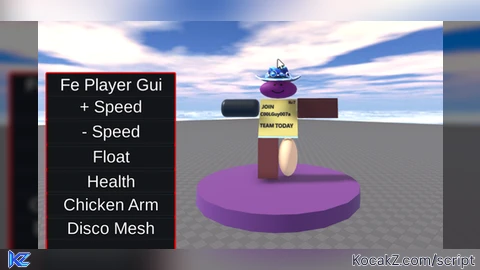
---fe player gui
--By Team c00lGuy007a
wait(0.5)

-- Local Player
local p = game.Players.LocalPlayer

-- Instance Objects
local BasicGui = Instance.new('ScreenGui',p.PlayerGui)
local FrameGui = Instance.new('Frame',BasicGui)
local Button1 = Instance.new('TextButton',FrameGui)
local Button2 = Instance.new('TextButton',FrameGui)
local Button3 = Instance.new('TextButton',FrameGui)
local Button4 = Instance.new('TextButton',FrameGui)
local Button5 = Instance.new('TextButton',FrameGui)
local Button6 = Instance.new('TextButton',FrameGui)
local NameGui = Instance.new('TextLabel',FrameGui)
local UIStroke1 = Instance.new('UIStroke',Button1)
local UIStroke2 = Instance.new('UIStroke',Button2)
local UIStroke3 = Instance.new('UIStroke',Button3)
local UIStroke4 = Instance.new('UIStroke',Button4)
local UIStroke5 = Instance.new('UIStroke',Button5)
local UIStroke6 = Instance.new('UIStroke',Button6)

--Name Objects
BasicGui.Name = "BasicGui"
FrameGui.Name = "FrameGui"
Button1.Name = "Button1"
Button2.Name = "Button2"
Button3.Name = "Button3"
Button4.Name = "Button4"
Button5.Name = "Button5"
Button6.Name = "Button6"
NameGui.Name = "NameGui"

--Object Visible
FrameGui.Visible = true
Button1.Visible = true
Button2.Visible = true
Button3.Visible = true
Button4.Visible = true
Button5.Visible = true
Button6.Visible = true
NameGui.Visible = true

--Background Color
FrameGui.BackgroundColor3 = Color3.new(0.0784314, 0.0823529, 0.0980392)
Button1.BackgroundColor3 = Color3.new(0.0784314, 0.0823529, 0.0980392)
Button2.BackgroundColor3 = Color3.new(0.0784314, 0.0823529, 0.0980392)
Button3.BackgroundColor3 = Color3.new(0.0784314, 0.0823529, 0.0980392)
Button4.BackgroundColor3 = Color3.new(0.0784314, 0.0823529, 0.0980392)
Button5.BackgroundColor3 = Color3.new(0.0784314, 0.0823529, 0.0980392)
Button6.BackgroundColor3 = Color3.new(0.0784314, 0.0823529, 0.0980392)
NameGui.BackgroundColor3 = Color3.new(0.0784314, 0.0823529, 0.0980392)

--Background Transparency
FrameGui.BackgroundTransparency = 0
Button1.BackgroundTransparency = 0
Button2.BackgroundTransparency = 0
Button3.BackgroundTransparency = 0
Button4.BackgroundTransparency = 0
Button5.BackgroundTransparency = 0
Button6.BackgroundTransparency = 0
NameGui.BackgroundTransparency = 0

--Background Size
FrameGui.Size = UDim2.new(0, 250,0, 348)
Button1.Size = UDim2.new(0, 250,0, 43)
Button2.Size = UDim2.new(0, 250,0, 43)
Button3.Size = UDim2.new(0, 250,0, 42)
Button4.Size = UDim2.new(0, 250,0, 40)
Button5.Size = UDim2.new(0, 250,0, 40)
Button6.Size = UDim2.new(0, 250,0, 40)
NameGui.Size = UDim2.new(0, 250,0, 44)

--Background Position
FrameGui.Position = UDim2.new(0.03, 0,0.399, 0)
Button1.Position = UDim2.new(0, 0,0.126, 0)
Button2.Position = UDim2.new(0, 0,0.267, 0)
Button3.Position = UDim2.new(0, 0,0.411, 0)
Button4.Position = UDim2.new(0, 0,0.552, 0)
Button5.Position = UDim2.new(0, 0,0.685, 0)
Button6.Position = UDim2.new(0, 0,0.818, 0)
NameGui.Position = UDim2.new(0, 0,0, 0)

--Object Text Color
Button1.TextColor3 = Color3.new(1, 1, 1)
Button2.TextColor3 = Color3.new(1, 1, 1)
Button3.TextColor3 = Color3.new(1, 1, 1)
Button4.TextColor3 = Color3.new(1, 1, 1)
Button5.TextColor3 = Color3.new(1, 1, 1)
Button6.TextColor3 = Color3.new(1, 1, 1)
NameGui.TextColor3 = Color3.new(1, 1, 1)

--Object Text
Button1.Text = "+ Speed"
Button2.Text = "- Speed"
Button3.Text = "Float"
Button4.Text = "Health"
Button5.Text = "Chicken Arm"
Button6.Text = "Disco Mesh"
NameGui.Text = "Fe Player Gui"

--Object TextSize
Button1.TextSize = 24
Button2.TextSize = 24
Button3.TextSize = 24
Button4.TextSize = 24
Button5.TextSize = 24
Button6.TextSize = 24
NameGui.TextSize = 24

--UIStroke Object
local UIStroke1 = Instance.new("UIStroke")
UIStroke1.Parent = FrameGui
UIStroke1.Thickness = 3
UIStroke1.Color = Color3.new(1, 0, 0)
local UIStroke2 = Instance.new("UIStroke")
UIStroke2.Parent = Button1
UIStroke2.Thickness = 3
UIStroke2.Color = Color3.new(1, 0, 0)
local UIStroke3 = Instance.new("UIStroke")
UIStroke3.Parent = Button2
UIStroke3.Thickness = 3
UIStroke3.Color = Color3.new(1, 0, 0)
local UIStroke4 = Instance.new("UIStroke")
UIStroke4.Parent = Button3
UIStroke4.Thickness = 3
UIStroke4.Color = Color3.new(1, 0, 0)
local UIStroke5 = Instance.new("UIStroke")
UIStroke5.Parent = Button4
UIStroke5.Thickness = 3
UIStroke5.Color = Color3.new(1, 0, 0)
local UIStroke6 = Instance.new("UIStroke")
UIStroke6.Parent = Button5
UIStroke6.Thickness = 3
UIStroke6.Color = Color3.new(1, 0, 0)

--Speed Function
Button1.MouseButton1Down:connect(function()
	game.Players.LocalPlayer.Character.Humanoid.WalkSpeed = game.Players.LocalPlayer.Character.Humanoid.WalkSpeed + 5
end)

--Minus Speed Function
Button2.MouseButton1Down:connect(function()
	game.Players.LocalPlayer.Character.Humanoid.WalkSpeed = game.Players.LocalPlayer.Character.Humanoid.WalkSpeed - 5
end)

--Float Function
Button3.MouseButton1Down:connect(function()
	local name = game.Players.LocalPlayer.Name

	local p = Instance.new("Part")
	p.Parent = workspace
	p.Locked = true
	p.BrickColor = BrickColor.new("White")
	p.BrickColor = BrickColor.new(104)
	p.Size = Vector3.new(8, 1.2, 8)
	p.Anchored = true
	local m = Instance.new("CylinderMesh")
	m.Scale = Vector3.new(1, 0.5, 1)
	m.Parent = p
	while true do
		p.CFrame = CFrame.new(game.Players:findFirstChild(name).Character.Torso.CFrame.x, game.Players:findFirstChild(name).Character.Torso.CFrame.y - 4, game.Players:findFirstChild(name).Character.Torso.CFrame.z)
		wait()
	end
end)

--Health Function
Button4.MouseButton1Down:connect(function()
	game.Players.LocalPlayer.Character.Humanoid.Health = game.Players.LocalPlayer.Character.Humanoid.MaxHealth
end)

--Chicken Arm Function
Button5.MouseButton1Down:connect(function()
	local Chicken = game.Players.LocalPlayer.Name
	game.Workspace[Chicken].Torso["Left Shoulder"].C0 = CFrame.new(-1.5, 0.5, 0) * CFrame.fromEulerAnglesXYZ(0,math.pi/2,0) * CFrame.fromEulerAnglesXYZ(math.pi/2, 0, 0) * CFrame.fromEulerAnglesXYZ(0,-math.pi/2,0)
	game.Workspace[Chicken].Torso["Left Shoulder"].C1 = CFrame.new(0, 0.5, 0)
	game.Workspace[Chicken].Torso["Right Shoulder"].C0 = CFrame.new(1.5, 0.5, 0) * CFrame.fromEulerAnglesXYZ(0,-math.pi/2,0) * CFrame.fromEulerAnglesXYZ(math.pi/2, 0, 0) * CFrame.fromEulerAnglesXYZ(0,-math.pi/2,0)
	game.Workspace[Chicken].Torso["Right Shoulder"].C1 = CFrame.new(0, 0.5, 0)
end)

--Disco Mesh Function
Button6.MouseButton1Down:connect(function()
	--Mesh Disco
	plr = game.Players.LocalPlayer.Name
	meshes = {"Brick","Cylinder","Head","Sphere","Torso","Wedge"}
	h = game.Workspace[plr].Head.Mesh
	t = Instance.new("SpecialMesh",game.Workspace[plr].Torso)
	la = Instance.new("SpecialMesh",game.Workspace[plr]["Left Arm"])
	ra = Instance.new("SpecialMesh",game.Workspace[plr]["Right Arm"])
	ll = Instance.new("SpecialMesh",game.Workspace[plr]["Left Leg"])
	rl = Instance.new("SpecialMesh",game.Workspace[plr]["Right Leg"])
	while true do
		wait(0.1)
		h.MeshType = meshes[math.random(1,#meshes)]
		h.Parent.BrickColor = BrickColor.Random()
		t.MeshType = meshes[math.random(1,#meshes)]
		t.Parent.BrickColor = BrickColor.Random()
		la.MeshType = meshes[math.random(1,#meshes)]
		la.Parent.BrickColor = BrickColor.Random()
		ra.MeshType = meshes[math.random(1,#meshes)]
		ra.Parent.BrickColor = BrickColor.Random()
		ll.MeshType = meshes[math.random(1,#meshes)]
		ll.Parent.BrickColor = BrickColor.Random()
		rl.MeshType = meshes[math.random(1,#meshes)]
		rl.Parent.BrickColor = BrickColor.Random()
	end
end)![[KEYLESS] Moondiety Script | 17+ supported Games](https://scriptblox.com/images/sb/0-1753093706828.png)


What does it even do
FE means client sided by the way