

KeylessUniversal
if _G.a then
    for _, conn in pairs(_G.a) do
        conn:Disconnect()
    end
    _G.a = nil
end

repeat task.wait() until game.Players.LocalPlayer
local player = game.Players.LocalPlayer
local character, humanoid, rootPart
local invisible = false
local parts = {}

local function setupCharacter()
    character = player.Character or player.CharacterAdded:Wait()
    humanoid = character:WaitForChild("Humanoid")
    rootPart = character:WaitForChild("HumanoidRootPart")
    parts = {}
    for _, obj in pairs(character:GetDescendants()) do
        if obj:IsA("BasePart") and obj.Transparency == 0 then
            table.insert(parts, obj)
        end
    end
end

local function createUI()
    local gui = Instance.new("ScreenGui")
    gui.Name = "InvisibleUI"
    gui.ResetOnSpawn = false
    gui.Parent = player:WaitForChild("PlayerGui")

    local frame = Instance.new("Frame")
    frame.Size = UDim2.new(0, 220, 0, 90)
    frame.Position = UDim2.new(0.5, -110, 0.15, 0)
    frame.BackgroundColor3 = Color3.fromRGB(35, 35, 35)
    frame.BorderSizePixel = 2
    frame.Active = true
    frame.Draggable = true
    frame.Parent = gui

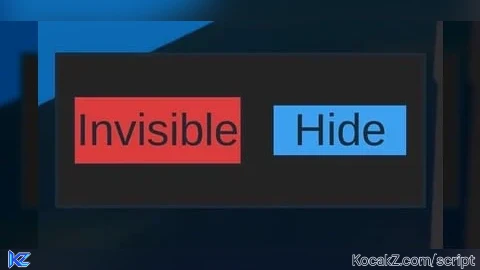
    local invisBtn = Instance.new("TextButton")
    invisBtn.Size = UDim2.new(0, 100, 0, 40)
    invisBtn.Position = UDim2.new(0, 10, 0, 25)
    invisBtn.Text = "Invisible"
    invisBtn.TextScaled = true
    invisBtn.BackgroundColor3 = Color3.fromRGB(220, 60, 60)
    invisBtn.Parent = frame

    local toggleBtn = Instance.new("TextButton")
    toggleBtn.Size = UDim2.new(0, 80, 0, 30)
    toggleBtn.Position = UDim2.new(0, 130, 0, 30)
    toggleBtn.Text = "Hide"
    toggleBtn.TextScaled = true
    toggleBtn.BackgroundColor3 = Color3.fromRGB(60, 160, 240)
    toggleBtn.Parent = frame

    invisBtn.MouseButton1Click:Connect(function()
        invisible = not invisible
        for _, part in pairs(parts) do
            part.Transparency = invisible and 0.5 or 0
        end
    end)

    toggleBtn.MouseButton1Click:Connect(function()
        if toggleBtn.Text == "Hide" then
            -- shrink frame to just show button
            invisBtn.Visible = false
            toggleBtn.Text = "Show"
            frame.Size = UDim2.new(0, 100, 0, 40)
            toggleBtn.Size = UDim2.new(1, 0, 1, 0)
            toggleBtn.Position = UDim2.new(0, 0, 0, 0)
        else
            -- restore full layout
            invisBtn.Visible = true
            toggleBtn.Text = "Hide"
            frame.Size = UDim2.new(0, 220, 0, 90)
            invisBtn.Size = UDim2.new(0, 100, 0, 40)
            invisBtn.Position = UDim2.new(0, 10, 0, 25)
            toggleBtn.Size = UDim2.new(0, 80, 0, 30)
            toggleBtn.Position = UDim2.new(0, 130, 0, 30)
        end
    end)
end

setupCharacter()
createUI()

local connections = {}
connections[1] = player:GetMouse().KeyDown:Connect(function(key)
    if key == "g" then -- still keep the G keybind if desired
        invisible = not invisible
        for _, part in pairs(parts) do
            part.Transparency = invisible and 0.5 or 0
        end
    end
end)

connections[2] = game:GetService("RunService").Heartbeat:Connect(function()
    if invisible then
        local cf = rootPart.CFrame
        local camOffset = humanoid.CameraOffset
        local hidden = cf * CFrame.new(0, -200000, 0)
        rootPart.CFrame = hidden
        humanoid.CameraOffset = hidden:ToObjectSpace(CFrame.new(cf.Position)).Position
        game:GetService("RunService").RenderStepped:Wait()
        rootPart.CFrame = cf
        humanoid.CameraOffset = camOffset
    end
end)

player.CharacterAdded:Connect(function()
    invisible = false
    setupCharacter()
    createUI()
end)

_G.a = connections![[KEYLESS] Moondiety Script | 17+ supported Games](https://scriptblox.com/images/sb/0-1753093706828.png)


Love it!! Works perfectly. This one lets me move😮💨 and don’t let me crash through the ground🤦🏾Great work!!!!! @d4kkota
@RobinsonF Executor issue? Tested on delta just on Brookhaven for me and it works perfect. That or game issue. Either way the description says i only tested it with delta on Brookhaven lol. Get a better exec likely
just tried it and it most definitely no clip you through the ground guy above is lying
@thesenuts not 100% on what ur trying to say but just a fair msg for anyone reading.. I posted in the description that I only tested this script with DELTA on BROOKHAVEN. i made it solely for my trolling purposes. it also works on life together and the original script (see description again) also works on most games so this likely does as well. if it’s not working: ur game just isn’t supported or ur exec doesn’t have a high enough sUNC%. in other various roleplay games i tried it works as well. being p*ive aggressive because you didn’t read the description is beyond me — @RobinsonF
TLDR: read this scripts description before you complain in my comments. don’t be mindless and say it doesn’t work when i warned that it could possibly not if you don’t use on aforementioned tested games / executors
@d4kkota oh gosh totally my fault for not reading the description, I'll keep that in mind, I'm sorry gal keep up the good work!
I tried it on Fish It game and it works! But it clipped me into the void and all objects from the map started disappearing when it was active.
@nexus3rd No worries you deserved it
i executed it but how can i use this
@d4kkota not saying it didnt work i use delta!! i was referring to other invisible mods where it phases you through the ground and makes you fall under the map!! i tried it in FORCE MASTER X where the other mods fails and yours works!!! f****ck nuts.... jumping to conclusion!!!