


Key RequiredUniversal
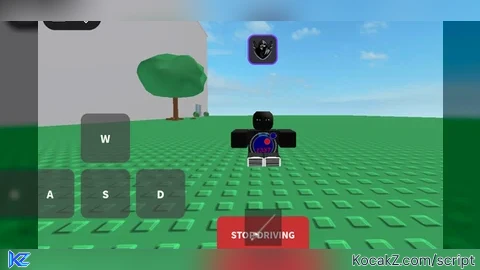
local player = game:GetService("Players").LocalPlayer
local character = player.Character or player.CharacterAdded:Wait()
local humanoid = character:WaitForChild("Humanoid")
local rootPart = character:WaitForChild("HumanoidRootPart")
local userInputService = game:GetService("UserInputService")
local runService = game:GetService("RunService")

local drivingSpeed = 50
local turningSpeed = 3
local isDriving = false
local originalWalkSpeed = 16
local originalJumpPower = 50

local carBase, bodyVelocity, bodyGyro, weld
local currentSpeed = 0
local targetRotation = 0

local keysPressed = {
	W = false,
	A = false,
	S = false,
	D = false
}

local screenGui = Instance.new("ScreenGui")
screenGui.Name = "DrivingGUI"
screenGui.ResetOnSpawn = false
screenGui.ZIndexBehavior = Enum.ZIndexBehavior.Sibling
screenGui.Parent = player:WaitForChild("PlayerGui")

local toggleButton = Instance.new("TextButton")
toggleButton.Size = UDim2.new(0, 150, 0, 60)
toggleButton.Position = UDim2.new(0.5, -75, 0.85, 0)
toggleButton.BackgroundColor3 = Color3.fromRGB(50, 150, 50)
toggleButton.BorderSizePixel = 3
toggleButton.BorderColor3 = Color3.fromRGB(255, 255, 255)
toggleButton.Text = "START DRIVING"
toggleButton.TextColor3 = Color3.fromRGB(255, 255, 255)
toggleButton.TextSize = 20
toggleButton.Font = Enum.Font.SourceSansBold
toggleButton.Modal = true
toggleButton.Active = true
toggleButton.ZIndex = 10
toggleButton.Parent = screenGui

local toggleCorner = Instance.new("UICorner")
toggleCorner.CornerRadius = UDim.new(0, 10)
toggleCorner.Parent = toggleButton

local controlsFrame = Instance.new("Frame")
controlsFrame.Size = UDim2.new(0, 300, 0, 200)
controlsFrame.Position = UDim2.new(0, 20, 1, -220)
controlsFrame.BackgroundTransparency = 1
controlsFrame.Visible = false
controlsFrame.ZIndex = 5
controlsFrame.Parent = screenGui

local function createControlButton(text, position, size)
	local button = Instance.new("TextButton")
	button.Size = size or UDim2.new(0, 80, 0, 80)
	button.Position = position
	button.BackgroundColor3 = Color3.fromRGB(70, 70, 70)
	button.BackgroundTransparency = 0.3
	button.BorderSizePixel = 2
	button.BorderColor3 = Color3.fromRGB(200, 200, 200)
	button.Text = text
	button.TextColor3 = Color3.fromRGB(255, 255, 255)
	button.TextSize = 24
	button.Font = Enum.Font.SourceSansBold
	button.Modal = true
	button.Active = true
	button.ZIndex = 10
	button.Parent = controlsFrame

	local corner = Instance.new("UICorner")
	corner.CornerRadius = UDim.new(0, 12)
	corner.Parent = button

	return button
end

local upButton = createControlButton("W", UDim2.new(0, 110, 0, 0))
local leftButton = createControlButton("A", UDim2.new(0, 20, 0, 90))
local downButton = createControlButton("S", UDim2.new(0, 110, 0, 90))
local rightButton = createControlButton("D", UDim2.new(0, 200, 0, 90))

local function setupMobileButton(button, key)
	local isPressed = false

	button.MouseButton1Down:Connect(function()
		isPressed = true
		keysPressed[key] = true
		button.BackgroundColor3 = Color3.fromRGB(100, 200, 100)
	end)

	button.MouseButton1Up:Connect(function()
		isPressed = false
		keysPressed[key] = false
		button.BackgroundColor3 = Color3.fromRGB(70, 70, 70)
	end)

	button.InputBegan:Connect(function(input)
		if input.UserInputType == Enum.UserInputType.Touch then
			isPressed = true
			keysPressed[key] = true
			button.BackgroundColor3 = Color3.fromRGB(100, 200, 100)
		end
	end)

	button.InputEnded:Connect(function(input)
		if input.UserInputType == Enum.UserInputType.Touch then
			isPressed = false
			keysPressed[key] = false
			button.BackgroundColor3 = Color3.fromRGB(70, 70, 70)
		end
	end)

	button.MouseLeave:Connect(function()
		if isPressed then
			isPressed = false
			keysPressed[key] = false
			button.BackgroundColor3 = Color3.fromRGB(70, 70, 70)
		end
	end)
end

setupMobileButton(upButton, "W")
setupMobileButton(leftButton, "A")
setupMobileButton(downButton, "S")
setupMobileButton(rightButton, "D")

local function createCarBase()
	if carBase then
		pcall(function() carBase:Destroy() end)
	end

	carBase = Instance.new("Part")
	carBase.Name = "CarBase"
	carBase.Size = Vector3.new(6, 1, 10)
	carBase.Transparency = 1
	carBase.CanCollide = false
	carBase.Anchored = false
	carBase.CFrame = rootPart.CFrame
	carBase.Parent = workspace

	bodyVelocity = Instance.new("BodyVelocity")
	bodyVelocity.MaxForce = Vector3.new(100000, 0, 100000)
	bodyVelocity.Velocity = Vector3.new(0, 0, 0)
	bodyVelocity.Parent = carBase

	bodyGyro = Instance.new("BodyGyro")
	bodyGyro.MaxTorque = Vector3.new(0, 100000, 0)
	bodyGyro.P = 10000
	bodyGyro.Parent = carBase

	weld = Instance.new("Weld")
	weld.Part0 = carBase
	weld.Part1 = rootPart
	weld.C0 = CFrame.new(0, 3, 0)
	weld.Parent = carBase

	local yRotation = select(1, rootPart.CFrame:ToEulerAnglesYXZ())
	targetRotation = yRotation
end

local function toggleDriving()
	isDriving = not isDriving

	if isDriving then
		createCarBase()

		task.wait(0.05)

		humanoid.WalkSpeed = 0
		humanoid.JumpPower = 0
		humanoid.Sit = true

		toggleButton.Text = "STOP DRIVING"
		toggleButton.BackgroundColor3 = Color3.fromRGB(200, 50, 50)
		controlsFrame.Visible = true
	else
		if carBase then
			pcall(function() carBase:Destroy() end)
			carBase = nil
		end

		task.wait(0.05)

		humanoid.Sit = false
		humanoid.WalkSpeed = originalWalkSpeed
		humanoid.JumpPower = originalJumpPower

		currentSpeed = 0

		toggleButton.Text = "START DRIVING"
		toggleButton.BackgroundColor3 = Color3.fromRGB(50, 150, 50)
		controlsFrame.Visible = false

		for key, _ in pairs(keysPressed) do
			keysPressed[key] = false
		end

		upButton.BackgroundColor3 = Color3.fromRGB(70, 70, 70)
		leftButton.BackgroundColor3 = Color3.fromRGB(70, 70, 70)
		downButton.BackgroundColor3 = Color3.fromRGB(70, 70, 70)
		rightButton.BackgroundColor3 = Color3.fromRGB(70, 70, 70)
	end
end

toggleButton.Activated:Connect(function()
	toggleDriving()
end)

userInputService.InputBegan:Connect(function(input, gameProcessed)
	if gameProcessed then return end

	if input.KeyCode == Enum.KeyCode.E then
		toggleDriving()
	end

	if input.KeyCode == Enum.KeyCode.W then keysPressed.W = true end
	if input.KeyCode == Enum.KeyCode.A then keysPressed.A = true end
	if input.KeyCode == Enum.KeyCode.S then keysPressed.S = true end
	if input.KeyCode == Enum.KeyCode.D then keysPressed.D = true end
end)

userInputService.InputEnded:Connect(function(input)
	if input.KeyCode == Enum.KeyCode.W then keysPressed.W = false end
	if input.KeyCode == Enum.KeyCode.A then keysPressed.A = false end
	if input.KeyCode == Enum.KeyCode.S then keysPressed.S = false end
	if input.KeyCode == Enum.KeyCode.D then keysPressed.D = false end
end)

local connection = runService.Heartbeat:Connect(function(deltaTime)
	if not isDriving or not carBase or not bodyVelocity or not bodyGyro then return end

	if keysPressed.W then
		currentSpeed = math.min(currentSpeed + 2, drivingSpeed)
	elseif keysPressed.S then
		currentSpeed = math.max(currentSpeed - 2, -drivingSpeed * 0.5)
	else
		if currentSpeed > 0 then
			currentSpeed = math.max(currentSpeed - 1, 0)
		elseif currentSpeed < 0 then
			currentSpeed = math.min(currentSpeed + 1, 0)
		end
	end

	if keysPressed.A then
		targetRotation = targetRotation + turningSpeed * deltaTime
	end
	if keysPressed.D then
		targetRotation = targetRotation - turningSpeed * deltaTime
	end

	bodyGyro.CFrame = CFrame.Angles(0, targetRotation, 0)

	local direction = bodyGyro.CFrame.LookVector
	bodyVelocity.Velocity = direction * currentSpeed

	if carBase and carBase.Parent then
		carBase.CFrame = CFrame.new(carBase.Position.X, carBase.Position.Y, carBase.Position.Z) * CFrame.Angles(0, targetRotation, 0)
	end
end)

player.CharacterAdded:Connect(function(newChar)
	character = newChar
	humanoid = character:WaitForChild("Humanoid")
	rootPart = character:WaitForChild("HumanoidRootPart")

	isDriving = false
	currentSpeed = 0

	if carBase then
		pcall(function() carBase:Destroy() end)
		carBase = nil
	end

	toggleButton.Text = "START DRIVING"
	toggleButton.BackgroundColor3 = Color3.fromRGB(50, 150, 50)
	controlsFrame.Visible = false
end)


you should make it like it slowly accelerates and shows studs per hours
@FraudDeciever Good idea, thanks 👍
Works perfectly on Xeno + funny as hell + no key = 10/10
@RealCalemorer thank you man ❤️
@PizzaScripts OFC!!!! Just rating scripts homie, please keep up the good work ur doing AMAZINGG!!!
@RealCalemorer THANK YOUUUU
This script is good + works r6 and r15 + any games + no key, you can maybe add a little space between the character and the ground? like hipheight in infinite yield.
@Decakistmyriagont that is actually a good idea, thanks!