

Key RequiredUniversal
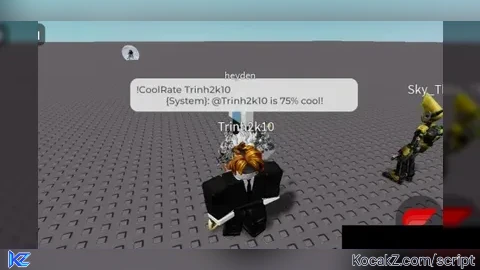
local gui = Instance.new("ScreenGui")
gui.Name = "GazerGui"
gui.Parent = game.CoreGui

--///Made By Gazer_HA///--

local function CoolRate(displayName)
    local player = nil
    displayName = string.lower(displayName)
    for _,plr in ipairs(game.Players:GetPlayers()) do
        local playerNameLower = string.lower(plr.Name)
        local playerDisplayNameLower = string.lower(plr.DisplayName)
        if string.find(playerNameLower, displayName, 1, true) or string.find(playerDisplayNameLower, displayName, 1, true) then
            player = plr
            break
        end
    end

    if player then
        local coolness = math.random(1, 100)
        local output = "!CoolRate " .. player.DisplayName .. "                                                                                                                             {System}: ".."@" .. player.DisplayName .. " is " .. coolness .. "% cool!"
        local A_1 = output
        local A_2 = "All"
        if game:GetService("TextChatService"):FindFirstChild("TextChannels") then
									game:GetService("TextChatService").TextChannels.RBXGeneral:SendAsync(A_1)
									else
							  game:GetService("ReplicatedStorage").DefaultChatSystemChatEvents.SayMessageRequest:FireServer(A_1,A_2)
		  end
    end
end

-- put your mainframe into the screengui that I have made (frame.Parent = gui)

local GazerMain = Instance.new("Frame")
GazerMain.Size = UDim2.new(0.5, 0, 0.5, 0)
GazerMain.Position = UDim2.new(0.5, 0, 0.5, 0)
GazerMain.BackgroundColor3 = Color3.new(1, 1, 1)
GazerMain.BorderColor3 = Color3.new(0, 0, 0)
GazerMain.BorderSizePixel = 1
GazerMain.Active = true
GazerMain.BackgroundTransparency = 0
GazerMain.Draggable = true
GazerMain.Parent = gui


local GazerTitle = Instance.new("TextLabel")
GazerTitle.Size = UDim2.new(1, 0, 0.2, 0)
GazerTitle.Position = UDim2.new(0, 0, 0, 0)
GazerTitle.BackgroundColor3 = Color3.new(0, 0, 0)
GazerTitle.BorderColor3 = Color3.new(0, 0, 0)
GazerTitle.BorderSizePixel = 1
GazerTitle.Text = "Gazer's Cool Rater"
GazerTitle.TextSize = 14
GazerTitle.BackgroundTransparency = 0
GazerTitle.TextColor3 = Color3.new(255, 255, 255)
GazerTitle.Font = Enum.Font.Bodoni
GazerTitle.Parent = GazerMain


local EnterName = Instance.new("TextBox")
EnterName.Size = UDim2.new(0.8, 0, 0.2, 0)
EnterName.Position = UDim2.new(0.1, 0, 0.3, 0)
EnterName.BackgroundColor3 = Color3.new(0, 0, 0)
EnterName.BorderColor3 = Color3.new(0, 0, 0)
EnterName.BorderSizePixel = 1
EnterName.PlaceholderText = "(displayname/username can be shorten)"
EnterName.TextColor3 = Color3.new(255, 255, 255)
EnterName.BackgroundTransparency = 0
EnterName.Font = Enum.Font.Code
EnterName.Text = ""
EnterName.TextSize = 15
EnterName.Parent = GazerMain


local COOLRATE = Instance.new("TextButton")
COOLRATE.Size = UDim2.new(0.3, 0, 0.2, 0)
COOLRATE.Position = UDim2.new(0.35, 0, 0.7, 0)
COOLRATE.BackgroundColor3 = Color3.new(0, 0, 0)
COOLRATE.BorderColor3 = Color3.new(0, 0, 0)
COOLRATE.BorderSizePixel = 1
COOLRATE.Text = "CLICK TO COOLRATE!"
COOLRATE.TextSize = 14
COOLRATE.BackgroundTransparency = 0
COOLRATE.TextColor3 = Color3.new(255, 255, 255)
COOLRATE.Font = Enum.Font.Code
COOLRATE.Parent = GazerMain

COOLRATE.MouseButton1Click:Connect(function()
    local displayName = EnterName.Text
    CoolRate(displayName)
end)


Hi, who can tell me how to write for a player in text chat? Looked in the script there connects to remoteEvent but I tried to connect too but the console tells me that RemoteEvent nil