


KeylessUniversal
--[[
	WARNING: Heads up! This script has not been verified by ScriptBlox. Use at your own risk!
]]
-- FE Fly Script with GUI - Fixed Version
-- Works on Synapse F, Krnl, Fluxus, etc.

local Player = game:GetService("Players").LocalPlayer
local Character = Player.Character or Player.CharacterAdded:Wait()
local Humanoid = Character:WaitForChild("Humanoid")
local RootPart = Character:WaitForChild("HumanoidRootPart")
local Torso = Character:FindFirstChild("Torso") or Character:FindFirstChild("UpperTorso")

-- Services
local UserInputService = game:GetService("UserInputService")
local RunService = game:GetService("RunService")
local CoreGui = game:GetService("CoreGui")

-- Create GUI with CoreGui parent for better compatibility
local ScreenGui = Instance.new("ScreenGui")
if gethui then
    ScreenGui.Parent = gethui()
elseif syn and syn.protect_gui then
    syn.protect_gui(ScreenGui)
    ScreenGui.Parent = CoreGui
else
    ScreenGui.Parent = CoreGui
end

local Frame = Instance.new("Frame")
local Title = Instance.new("TextLabel")
local FlyButton = Instance.new("TextButton")
local SpeedLabel = Instance.new("TextLabel")
local SpeedBox = Instance.new("TextBox")
local CloseButton = Instance.new("TextButton")

ScreenGui.Name = "FlyGUI"
ScreenGui.ZIndexBehavior = Enum.ZIndexBehavior.Sibling

Frame.Name = "MainFrame"
Frame.Parent = ScreenGui
Frame.BackgroundColor3 = Color3.fromRGB(35, 35, 35)
Frame.BorderColor3 = Color3.fromRGB(60, 60, 60)
Frame.BorderSizePixel = 2
Frame.Position = UDim2.new(0.75, 0, 0.3, 0)
Frame.Size = UDim2.new(0, 220, 0, 200)
Frame.Active = true
Frame.Draggable = true

Title.Name = "Title"
Title.Parent = Frame
Title.BackgroundColor3 = Color3.fromRGB(25, 25, 25)
Title.Size = UDim2.new(1, 0, 0, 35)
Title.Font = Enum.Font.GothamBold
Title.Text = "✈️ Fly Hack v4.0"
Title.TextColor3 = Color3.fromRGB(255, 255, 255)
Title.TextSize = 18

FlyButton.Name = "FlyButton"
FlyButton.Parent = Frame
FlyButton.BackgroundColor3 = Color3.fromRGB(40, 40, 40)
FlyButton.Position = UDim2.new(0.1, 0, 0.25, 0)
FlyButton.Size = UDim2.new(0.8, 0, 0, 45)
FlyButton.Font = Enum.Font.GothamBold
FlyButton.Text = "🔄 TOGGLE FLY (F)"
FlyButton.TextColor3 = Color3.fromRGB(255, 255, 255)
FlyButton.TextSize = 16

SpeedLabel.Name = "SpeedLabel"
SpeedLabel.Parent = Frame
SpeedLabel.BackgroundTransparency = 1
SpeedLabel.Position = UDim2.new(0.1, 0, 0.55, 0)
SpeedLabel.Size = UDim2.new(0.8, 0, 0, 20)
SpeedLabel.Font = Enum.Font.Gotham
SpeedLabel.Text = "🚀 Speed:"
SpeedLabel.TextColor3 = Color3.fromRGB(200, 200, 200)
SpeedLabel.TextSize = 14
SpeedLabel.TextXAlignment = Enum.TextXAlignment.Left

SpeedBox.Name = "SpeedBox"
SpeedBox.Parent = Frame
SpeedBox.BackgroundColor3 = Color3.fromRGB(50, 50, 50)
SpeedBox.BorderColor3 = Color3.fromRGB(80, 80, 80)
SpeedBox.Position = UDim2.new(0.1, 0, 0.7, 0)
SpeedBox.Size = UDim2.new(0.8, 0, 0, 30)
SpeedBox.Font = Enum.Font.Gotham
SpeedBox.PlaceholderText = "Default: 50"
SpeedBox.Text = "50"
SpeedBox.TextColor3 = Color3.fromRGB(255, 255, 255)
SpeedBox.TextSize = 14

CloseButton.Name = "CloseButton"
CloseButton.Parent = Frame
CloseButton.BackgroundColor3 = Color3.fromRGB(180, 40, 40)
CloseButton.Position = UDim2.new(0.85, 0, 0.02, 0)
CloseButton.Size = UDim2.new(0, 25, 0, 25)
CloseButton.Font = Enum.Font.GothamBold
CloseButton.Text = "f"
CloseButton.TextColor3 = Color3.fromRGB(255, 255, 255)
CloseButton.TextSize = 18

-- Fly Variables
local Flying = false
local FlySpeed = 50
local BV
local BG

-- Better fly function
local function StartFlying()
    if Flying or not RootPart then return end

    Flying = true
    FlyButton.BackgroundColor3 = Color3.fromRGB(30, 150, 30)
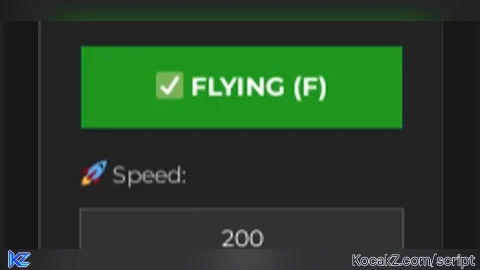
    FlyButton.Text = "✅ FLYING (F)"

    -- Get speed from textbox
    local newSpeed = tonumber(SpeedBox.Text)
    if newSpeed and newSpeed > 0 and newSpeed <= 1000 then
        FlySpeed = newSpeed
    else
        FlySpeed = 50
        SpeedBox.Text = "50"
    end

    -- Enable platform stand
    Humanoid.PlatformStand = true

    -- Create velocity and gyro
    BV = Instance.new("BodyVelocity")
    BV.Name = "FlyBV"
    BV.MaxForce = Vector3.new(40000, 40000, 40000)
    BV.Velocity = Vector3.new(0, 0, 0)
    BV.Parent = RootPart

    BG = Instance.new("BodyGyro")
    BG.Name = "FlyBG"
    BG.MaxTorque = Vector3.new(40000, 40000, 40000)
    BG.P = 10000
    BG.D = 1000
    BG.CFrame = RootPart.CFrame
    BG.Parent = RootPart

    -- Flight control connection
    local connection
    connection = RunService.Heartbeat:Connect(function()
        if not Flying or not BV or not BG or not RootPart then
            connection:Disconnect()
            return
        end

        local camera = workspace.CurrentCamera

        -- Get movement direction
        local moveDir = Vector3.new(0, 0, 0)

        -- Forward/Backward
        if UserInputService:IsKeyDown(Enum.KeyCode.W) then
            moveDir = moveDir + camera.CFrame.LookVector
        end
        if UserInputService:IsKeyDown(Enum.KeyCode.S) then
            moveDir = moveDir - camera.CFrame.LookVector
        end

        -- Left/Right
        if UserInputService:IsKeyDown(Enum.KeyCode.A) then
            moveDir = moveDir - camera.CFrame.RightVector
        end
        if UserInputService:IsKeyDown(Enum.KeyCode.D) then
            moveDir = moveDir + camera.CFrame.RightVector
        end

        -- Up/Down
        if UserInputService:IsKeyDown(Enum.KeyCode.Space) then
            moveDir = moveDir + Vector3.new(0, 1, 0)
        end
        if UserInputService:IsKeyDown(Enum.KeyCode.LeftShift) then
            moveDir = moveDir - Vector3.new(0, 1, 0)
        end

        -- Apply movement
        if moveDir.Magnitude > 0 then
            moveDir = moveDir.Unit * FlySpeed
        end

        BV.Velocity = Vector3.new(moveDir.X, moveDir.Y, moveDir.Z)

        -- Maintain orientation
        BG.CFrame = camera.CFrame
    end)
end

local function StopFlying()
    if not Flying then return end

    Flying = false
    FlyButton.BackgroundColor3 = Color3.fromRGB(40, 40, 40)
    FlyButton.Text = "🔄 TOGGLE FLY (F)"

    -- Remove controls
    if BV then
        BV:Destroy()
        BV = nil
    end

    if BG then
        BG:Destroy()
        BG = nil
    end

    -- Reset humanoid
    if Humanoid then
        Humanoid.PlatformStand = false
    end
end

local function ToggleFly()
    if Flying then
        StopFlying()
    else
        StartFlying()
    end
end

-- Connect GUI Events
FlyButton.MouseButton1Click:Connect(ToggleFly)

CloseButton.MouseButton1Click:Connect(function()
    StopFlying()
    ScreenGui:Destroy()
end)

-- Hotkey (X key)
UserInputService.InputBegan:Connect(function(input, processed)
    if not processed and input.KeyCode == Enum.KeyCode.F then
        ToggleFly()
    end
end)

-- Character respawn handler
Player.CharacterAdded:Connect(function(newChar)
    Character = newChar
    Humanoid = Character:WaitForChild("Humanoid")
    RootPart = Character:WaitForChild("HumanoidRootPart")
    Torso = Character:FindFirstChild("Torso") or Character:FindFirstChild("UpperTorso")

    -- Re-enable fly if it was active
    if Flying then
        Flying = false
        task.wait(0.5) -- Wait for character to load
        StartFlying()
    end
end)

-- Anti-anti-cheat (clean up on death)
Humanoid.Died:Connect(function()
    StopFlying()
end)

print("✅ Fly Hack Loaded Successfully!")
print("📌 Press F to toggle flying")
print("🎮 Controls: WASD + Space/Shift")

-- Instructions popup (optional)
task.spawn(function()
    task.wait(2)
    local Notification = Instance.new("ScreenGui")
    local NotifyFrame = Instance.new("Frame")
    local NotifyText = Instance.new("TextLabel")

    if gethui then
        Notification.Parent = gethui()
    else
        Notification.Parent = CoreGui
    end

    NotifyFrame.Parent = Notification
    NotifyFrame.BackgroundColor3 = Color3.fromRGB(30, 30, 30)
    NotifyFrame.BorderSizePixel = 0
    NotifyFrame.Position = UDim2.new(0.35, 0, 0.8, 0)
    NotifyFrame.Size = UDim2.new(0, 300, 0, 60)

    NotifyText.Parent = NotifyFrame
    NotifyText.BackgroundTransparency = 1
    NotifyText.Size = UDim2.new(1, 0, 1, 0)
    NotifyText.Font = Enum.Font.Gotham
    NotifyText.Text = "Fly Hack Activated!\nPress F to toggle • WASD + Space/Shift to move"
    NotifyText.TextColor3 = Color3.fromRGB(255, 255, 255)
    NotifyText.TextSize = 14

    task.wait(5)
    Notification:Destroy()
end)


crashed my game
@grayson3902
yo turn yo executor off once the script is executed