

KeylessUniversal
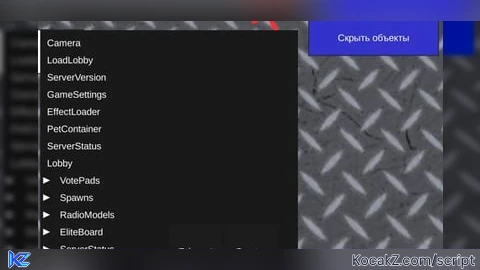
-- LocalScript (StarterGui)
local Players = game:GetService("Players")
local player = Players.LocalPlayer
local gui = player:WaitForChild("PlayerGui")

-- Создание интерфейса
local explorerGui = Instance.new("ScreenGui")
explorerGui.Name = "WorkspaceExplorer"
explorerGui.ResetOnSpawn = false

local button = Instance.new("TextButton")
button.Size = UDim2.new(0, 150, 0, 40)
button.Position = UDim2.new(0, 10, 0, 10)
button.Text = "Показать объекты"
button.BackgroundColor3 = Color3.new(0.2, 0.2, 0.8)
button.TextColor3 = Color3.new(1, 1, 1)
button.Parent = explorerGui

local frame = Instance.new("ScrollingFrame")
frame.Size = UDim2.new(0, 300, 0, 400)
frame.Position = UDim2.new(0, 160, 0, 10)
frame.BackgroundColor3 = Color3.new(0.1, 0.1, 0.1)
frame.BorderSizePixel = 0
frame.ScrollBarThickness = 8
frame.Visible = false
frame.Parent = explorerGui

local expandedObjects = {}
local templateButton = Instance.new("TextButton")
templateButton.Size = UDim2.new(1, -25, 0, 20) -- Изменен размер для стрелки
templateButton.Position = UDim2.new(0, 5, 0, 0)
templateButton.BackgroundTransparency = 1
templateButton.TextColor3 = Color3.new(1, 1, 1)
templateButton.TextXAlignment = Enum.TextXAlignment.Left
templateButton.Visible = false
templateButton.Parent = frame

local dragging = false
local dragStart = nil
local startPos = nil

button.InputBegan:Connect(function(input)
    if input.UserInputType == Enum.UserInputType.MouseButton1 or input.UserInputType == Enum.UserInputType.Touch then
        dragging = true
        dragStart = input.Position
        startPos = button.Position
    end
end)

button.InputChanged:Connect(function(input)
    if dragging and (input.UserInputType == Enum.UserInputType.MouseMovement or input.UserInputType == Enum.UserInputType.Touch) then
        local delta = input.Position - dragStart
        button.Position = UDim2.new(
            startPos.X.Scale,
            startPos.X.Offset + delta.X,
            startPos.Y.Scale,
            startPos.Y.Offset + delta.Y
        )
    end
end)

button.InputEnded:Connect(function(input)
    if input.UserInputType == Enum.UserInputType.MouseButton1 or input.UserInputType == Enum.UserInputType.Touch then
        dragging = false
    end
end)
-- Функция для создания стрелки
local function createArrow(isExpanded)
    local arrow = Instance.new("TextButton") -- Изменено на кнопку
    arrow.Size = UDim2.new(0, 15, 0, 15)
    arrow.Text = isExpanded and "▼" or "▶"
    arrow.TextColor3 = Color3.new(1, 1, 1)
    arrow.BackgroundTransparency = 1
    return arrow
end

local function renderObject(obj, depth, yPosition, parentFrame)
    local hasChildren = #obj:GetChildren() > 0
    local isExpanded = expandedObjects[obj]

    local button = templateButton:Clone()
    button.Text = " " .. obj.Name
    button.Position = UDim2.new(0, 5 + depth * 15, 0, yPosition)
    button.Visible = true

    if hasChildren then
        local arrow = createArrow(isExpanded)
        arrow.Position = UDim2.new(0, -20, 0, 2)
        arrow.Parent = button

        -- Обработчик для стрелки
        arrow.MouseButton1Click:Connect(function()
            expandedObjects[obj] = not isExpanded
            updateObjectList() -- Обновляем список сразу
        end)
    end

    button.MouseButton1Click:Connect(function()
        -- Обработчик клика по всей строке
        if hasChildren then
            expandedObjects[obj] = not isExpanded
            updateObjectList()
        end
    end)

    button.Parent = parentFrame
    yPosition = yPosition + 20

    if hasChildren and isExpanded then
        for _, child in ipairs(obj:GetChildren()) do
            yPosition = renderObject(child, depth + 1, yPosition, parentFrame)
        end
    end

    return yPosition
end

local function updateObjectList()
    -- Сохраняем позицию прокрутки
    local oldScrollPosition = frame.CanvasPosition.Y

    -- Очистка элементов
    for _, child in ipairs(frame:GetChildren()) do
        if child:IsA("TextButton") and child ~= templateButton then
            child:Destroy()
        end
    end

    -- Перерисовка элементов
    local yPosition = 5
    for _, obj in ipairs(workspace:GetChildren()) do
        yPosition = renderObject(obj, 0, yPosition, frame)
    end

    frame.CanvasSize = UDim2.new(0, 0, 0, yPosition + 5)
    -- Восстанавливаем позицию прокрутки
    frame.CanvasPosition = Vector2.new(0, oldScrollPosition)
end

button.MouseButton1Click:Connect(function()
    frame.Visible = not frame.Visible
    if frame.Visible then
        updateObjectList()
        button.Text = "Скрыть объекты"
    else
        button.Text = "Показать объекты"
    end
end)

explorerGui.Parent = gui![[KEYLESS] Moondiety Script | 17+ supported Games](https://scriptblox.com/images/sb/0-1753093706828.png)


SRC🎉🎉
@rhonblox1 kys bot, sybau bot, pls go find gr*
Use ReGui instead 😛 https://github.com/depthso/Dear-ReGui