


KeylessUniversal
-- Powiadomienie
local StarterGui = game:GetService("StarterGui")
StarterGui:SetCore("SendNotification", {
    Title = "Evil Lua";
    Text = "made by XE3";
    Duration = 5;
})

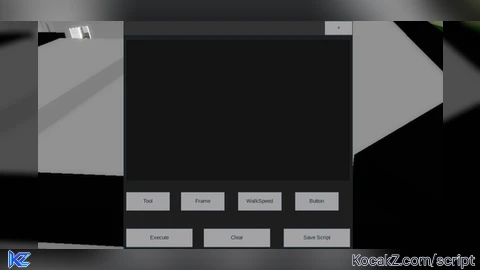
-- Tworzenie głównego GUI
local ScreenGui = Instance.new("ScreenGui")
local MainFrame = Instance.new("Frame")
local TextBox = Instance.new("TextBox")
local ExecuteButton = Instance.new("TextButton")
local ClearButton = Instance.new("TextButton")
local SaveButton = Instance.new("TextButton")
local TabsFrame = Instance.new("Frame")
local AddTabButton = Instance.new("TextButton")

-- Ustawienia ekranu
ScreenGui.Parent = game:GetService("CoreGui")
MainFrame.Parent = ScreenGui
MainFrame.Size = UDim2.new(0, 500, 0, 500)
MainFrame.Position = UDim2.new(0.5, -250, 0.5, -250)
MainFrame.BackgroundColor3 = Color3.fromRGB(30, 30, 30)
MainFrame.Active = true
MainFrame.Draggable = true

-- Zakładki
TabsFrame.Parent = MainFrame
TabsFrame.Size = UDim2.new(1, 0, 0, 30)
TabsFrame.BackgroundColor3 = Color3.fromRGB(50, 50, 50)

-- Dodawanie nowej zakładki
AddTabButton.Parent = TabsFrame
AddTabButton.Size = UDim2.new(0, 60, 1, 0)
AddTabButton.Position = UDim2.new(1, -60, 0, 0)
AddTabButton.Text = "+"
AddTabButton.MouseButton1Click:Connect(function()
    local NewTab = Instance.new("TextButton")
    NewTab.Parent = TabsFrame
    NewTab.Size = UDim2.new(0, 80, 1, 0)
    NewTab.Text = "Tab"
    NewTab.MouseButton1Click:Connect(function()
        TextBox.Text = ""
    end)
end)

-- Pole tekstowe
TextBox.Parent = MainFrame
TextBox.Size = UDim2.new(1, -10, 0.7, -40)
TextBox.Position = UDim2.new(0, 5, 0, 40)
TextBox.BackgroundColor3 = Color3.fromRGB(20, 20, 20)
TextBox.TextColor3 = Color3.fromRGB(255, 255, 255)
TextBox.TextXAlignment = Enum.TextXAlignment.Left
TextBox.TextYAlignment = Enum.TextYAlignment.Top
TextBox.MultiLine = true
TextBox.ClearTextOnFocus = false
TextBox.Text = ""

-- Przycisk Execute
ExecuteButton.Parent = MainFrame
ExecuteButton.Size = UDim2.new(0.3, -5, 0, 40)
ExecuteButton.Position = UDim2.new(0, 5, 1, -45)
ExecuteButton.Text = "Execute"
ExecuteButton.MouseButton1Click:Connect(function()
    loadstring(TextBox.Text)()
end)

-- Przycisk Clear
ClearButton.Parent = MainFrame
ClearButton.Size = UDim2.new(0.3, -5, 0, 40)
ClearButton.Position = UDim2.new(0.35, 0, 1, -45)
ClearButton.Text = "Clear"
ClearButton.MouseButton1Click:Connect(function()
    TextBox.Text = ""
end)

-- Przycisk Save
SaveButton.Parent = MainFrame
SaveButton.Size = UDim2.new(0.3, -5, 0, 40)
SaveButton.Position = UDim2.new(0.7, 0, 1, -45)
SaveButton.Text = "Save Script"
SaveButton.MouseButton1Click:Connect(function()
    writefile("SavedScript.txt", TextBox.Text)
end)

-- Przycisk Tool
local function createButton(name, pos, func)
    local button = Instance.new("TextButton")
    button.Parent = MainFrame
    button.Size = UDim2.new(0.2, -5, 0, 40)
    button.Position = pos
    button.Text = name
    button.MouseButton1Click:Connect(func)
end

createButton("Tool", UDim2.new(0, 5, 0.75, 0), function()
    local tool = Instance.new("Tool")
    tool.Name = "CustomTool"
    tool.Parent = game.Players.LocalPlayer.Backpack
    TextBox.Text = "local tool = Instance.new('Tool')\ntool.Parent = game.Players.LocalPlayer.Backpack"
end)

createButton("Frame", UDim2.new(0.25, 0, 0.75, 0), function()
    local frame = Instance.new("Frame")
    frame.Size = UDim2.new(0, 200, 0, 200)
    frame.BackgroundColor3 = Color3.fromRGB(0, 0, 0)
    frame.Position = UDim2.new(0.5, -100, 0.5, -100)
    frame.Parent = ScreenGui
    TextBox.Text = "local frame = Instance.new('Frame')\nframe.Size = UDim2.new(0, 200, 0, 200)\nframe.Parent = game.CoreGui"
end)

createButton("WalkSpeed", UDim2.new(0.5, 0, 0.75, 0), function()
    game.Players.LocalPlayer.Character.Humanoid.WalkSpeed = 100
    TextBox.Text = "game.Players.LocalPlayer.Character.Humanoid.WalkSpeed = 100"
end)

createButton("Button", UDim2.new(0.75, 0, 0.75, 0), function()
    local button = Instance.new("TextButton")
    button.Size = UDim2.new(0, 100, 0, 50)
    button.Text = "Button"
    button.Position = UDim2.new(0.5, -50, 0.5, -25)
    button.Parent = ScreenGui
    TextBox.Text = "local button = Instance.new('TextButton')\nbutton.Size = UDim2.new(0, 100, 0, 50)\nbutton.Parent = game.CoreGui"
end)![[KEYLESS] Moondiety Script | 17+ supported Games](https://scriptblox.com/images/sb/0-1753093706828.png)


serverside fe?