

KeylessUniversal
--[[
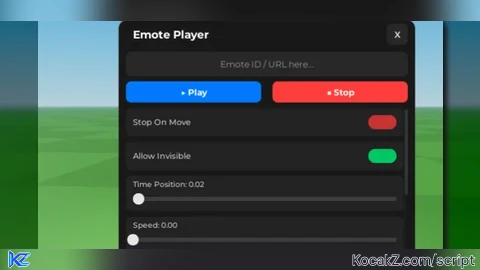
    MODERN EMOTE PLAYER UI - DRAGGABLE & ENHANCED SLIDER VERSION
    Updated:
    1. Dragging restricted to Title Bar.
    2. Slider visuals improved (Round Thumb/Circle).
]]

-- 1. SERVICES & BASIC SETUP
function missing(t, f, fallback)
    if type(f) == t then return f end
    return fallback
end

cloneref = missing("function", cloneref, function(...) return ... end)

local Services = setmetatable({}, {
    __index = function(_, name)
        return cloneref(game:GetService(name))
    end
})

local Players = Services.Players
local RunService = Services.RunService
local UserInputService = Services.UserInputService
local TweenService = Services.TweenService

local player = Players.LocalPlayer
local playerGui = player:WaitForChild("PlayerGui")
local character = player.Character or player.CharacterAdded:Wait()
local humanoid = character:WaitForChild("Humanoid")
local humanoidRootPart = character:WaitForChild("HumanoidRootPart")

player.CharacterAdded:Connect(function(newCharacter)
    character = newCharacter
    humanoid = character:WaitForChild("Humanoid")
    humanoidRootPart = character:WaitForChild("HumanoidRootPart")
end)

--// Settings Table
local Settings = {}
Settings["Stop On Move"] = true
Settings["Fade In"]      = 0.1
Settings["Fade Out"]     = 0.1
Settings["Weight"]       = 1
Settings["Speed"]        = 1
Settings["Allow Invisible"] = true
Settings["Time Position"] = 0

local CurrentTrack
local lastPosition = character.PrimaryPart and character.PrimaryPart.Position or Vector3.new()

-- 2. UI ERSTELLUNG (Modern Setup)
local screenGui = Instance.new("ScreenGui")
screenGui.Name = "ModernEmoteUI"
screenGui.ResetOnSpawn = false

-- Executor Support (CoreGui vs PlayerGui)
if gethui then
    screenGui.Parent = gethui()
elseif game:GetService("CoreGui") then
    pcall(function() screenGui.Parent = game:GetService("CoreGui") end)
    if not screenGui.Parent then screenGui.Parent = playerGui end
else
    screenGui.Parent = playerGui
end

-- Haupt-Frame
local mainFrame = Instance.new("Frame")
mainFrame.Name = "MainFrame"
mainFrame.Size = UDim2.new(0, 420, 0, 350)
mainFrame.Position = UDim2.new(0.5, 0, 0.5, 0)
mainFrame.AnchorPoint = Vector2.new(0.5, 0.5)
mainFrame.BackgroundColor3 = Color3.fromRGB(25, 25, 25)
mainFrame.BorderSizePixel = 0
mainFrame.Parent = screenGui

local uiCorner = Instance.new("UICorner")
uiCorner.CornerRadius = UDim.new(0, 12)
uiCorner.Parent = mainFrame

local uiStroke = Instance.new("UIStroke")
uiStroke.Thickness = 1
uiStroke.Color = Color3.fromRGB(60, 60, 60)
uiStroke.Transparency = 0.5
uiStroke.Parent = mainFrame

local uiScale = Instance.new("UIScale")
uiScale.Scale = 1
uiScale.Parent = mainFrame

-- **NEU: TitleBar Frame (FÜR DRAG FUNKTION)**
local titleBar = Instance.new("Frame")
titleBar.Name = "TitleBar"
titleBar.Size = UDim2.new(1, 0, 0, 40)
titleBar.BackgroundTransparency = 1
titleBar.Active = true -- Wichtig fürs Verschieben
titleBar.Parent = mainFrame

-- Titel
local titleLabel = Instance.new("TextLabel")
titleLabel.Size = UDim2.new(1, -50, 1, 0)
titleLabel.Position = UDim2.new(0, 20, 0, 0)
titleLabel.BackgroundTransparency = 1
titleLabel.Text = "Emote Player"
titleLabel.Font = Enum.Font.GothamBold
titleLabel.TextColor3 = Color3.fromRGB(255, 255, 255)
titleLabel.TextSize = 18
titleLabel.TextXAlignment = Enum.TextXAlignment.Left
titleLabel.Parent = titleBar

-- Schließen Button (X)
local closeButton = Instance.new("TextButton")
closeButton.Name = "CloseButton"
closeButton.Size = UDim2.new(0, 30, 0, 30)
closeButton.Position = UDim2.new(1, -40, 0.5, -15) -- Zentriert in der TitleBar
closeButton.BackgroundColor3 = Color3.fromRGB(40, 40, 40)
closeButton.Text = "X"
closeButton.Font = Enum.Font.GothamBold
closeButton.TextColor3 = Color3.fromRGB(200, 200, 200)
closeButton.TextSize = 14
closeButton.AutoButtonColor = true
closeButton.Parent = titleBar
Instance.new("UICorner", closeButton, UDim.new(1, 0)).Parent = closeButton

-- Content Platzhalter
local contentArea = Instance.new("Frame")
contentArea.Name = "ContentArea"
contentArea.Size = UDim2.new(1, -20, 1, -50)
contentArea.Position = UDim2.new(0, 10, 0, 45) -- Startet unter der TitleBar
contentArea.BackgroundTransparency = 1
contentArea.Parent = mainFrame

-- Notification
local notifLabel = Instance.new("TextLabel")
notifLabel.Name = "Notification"
notifLabel.Size = UDim2.new(0, 220, 0, 36)
notifLabel.Position = UDim2.new(0.5, 0, 0.9, 0)
notifLabel.AnchorPoint = Vector2.new(0.5, 0.5)
notifLabel.BackgroundColor3 = Color3.fromRGB(30, 30, 30)
notifLabel.Text = "Press 'C' to reopen"
notifLabel.TextColor3 = Color3.fromRGB(255, 255, 255)
notifLabel.Font = Enum.Font.GothamMedium
notifLabel.TextSize = 14
notifLabel.BackgroundTransparency = 0.2
notifLabel.TextTransparency = 1
notifLabel.Visible = false
notifLabel.Parent = screenGui
Instance.new("UICorner", notifLabel, UDim.new(0, 8)).Parent = notifLabel

-- **NEU: DRAG LOGIC NUR AUF TITLEBAR**
local dragging
local dragInput
local dragStart
local startPos

local function update(input)
    local delta = input.Position - dragStart
    mainFrame.Position = UDim2.new(
        startPos.X.Scale,
        startPos.X.Offset + delta.X,
        startPos.Y.Scale,
        startPos.Y.Offset + delta.Y
    )
end

titleBar.InputBegan:Connect(function(input)
    if input.UserInputType == Enum.UserInputType.MouseButton1 or input.UserInputType == Enum.UserInputType.Touch then
        dragging = true
        dragStart = input.Position
        startPos = mainFrame.Position

        input.Changed:Connect(function()
            if input.UserInputState == Enum.UserInputState.End then
                dragging = false
            end
        end)
    end
end)

titleBar.InputChanged:Connect(function(input)
    if input.UserInputType == Enum.UserInputType.MouseMovement or input.UserInputType == Enum.UserInputType.Touch then
        dragInput = input
    end
end)

UserInputService.InputChanged:Connect(function(input)
    if input == dragInput and dragging then
        update(input)
    end
end)
-- **ENDE DRAG LOGIC**

-- 3. ANIMATION LOGIC (Vom Original Script)
local function extractIdFromInput(input)
    local num = tonumber(input)
    if num then return num end
    local patterns = {
        "rbxassetid://(%d+)",
        "roblox%.com/catalog/(%d+)",
        "roblox%.com/library/(%d+)",
        "roblox%.com/asset/%?id=(%d+)"
    }
    for _, p in ipairs(patterns) do
        local match = string.match(input, p)
        if match then return tonumber(match) end
    end
    return tonumber(input)
end

local function LoadTrack(id)
    if CurrentTrack then CurrentTrack:Stop(0) end
    local animId = "rbxassetid://" .. tostring(id)

    pcall(function()
        local objs = game:GetObjects(animId)
        if objs and #objs > 0 and objs[1]:IsA("Animation") then
            animId = objs[1].AnimationId
        end
    end)

    local newAnim = Instance.new("Animation")
    newAnim.AnimationId = animId
    local newTrack = humanoid:LoadAnimation(newAnim)
    newTrack.Priority = Enum.AnimationPriority.Action4

    local weight = Settings["Weight"]
    if weight == 0 then weight = 0.001 end

    newTrack:Play(Settings["Fade In"], weight, Settings["Speed"])
    CurrentTrack = newTrack
    CurrentTrack.TimePosition = math.clamp(Settings["Time Position"], 0, 1) * CurrentTrack.Length
    return newTrack
end

local function StopTrack()
    if CurrentTrack then
        CurrentTrack:Stop(Settings["Fade Out"])
        CurrentTrack = nil
    end
end

-- 4. INHALT EINFÜGEN (Controls)

-- Input Box
local emoteBox = Instance.new("TextBox")
emoteBox.Size = UDim2.new(1, 0, 0, 35)
emoteBox.BackgroundColor3 = Color3.fromRGB(40, 40, 40)
emoteBox.Text = ""
emoteBox.PlaceholderText = "Emote ID / URL here..."
emoteBox.TextColor3 = Color3.fromRGB(255, 255, 255)
emoteBox.PlaceholderColor3 = Color3.fromRGB(150, 150, 150)
emoteBox.Font = Enum.Font.Gotham
emoteBox.TextSize = 14
emoteBox.Parent = contentArea
Instance.new("UICorner", emoteBox).CornerRadius = UDim.new(0, 8)

-- Buttons Container
local btnContainer = Instance.new("Frame")
btnContainer.Size = UDim2.new(1, 0, 0, 30)
btnContainer.Position = UDim2.new(0, 0, 0, 42)
btnContainer.BackgroundTransparency = 1
btnContainer.Parent = contentArea

local playBtn = Instance.new("TextButton")
playBtn.Size = UDim2.new(0.48, 0, 1, 0)
playBtn.BackgroundColor3 = Color3.fromRGB(0, 120, 255) -- Modernes Blau
playBtn.Text = "▶ Play"
playBtn.Font = Enum.Font.GothamBold
playBtn.TextColor3 = Color3.new(1,1,1)
playBtn.TextSize = 14
playBtn.Parent = btnContainer
Instance.new("UICorner", playBtn).CornerRadius = UDim.new(0, 8)

local stopBtn = Instance.new("TextButton")
stopBtn.Size = UDim2.new(0.48, 0, 1, 0)
stopBtn.Position = UDim2.new(0.52, 0, 0, 0)
stopBtn.BackgroundColor3 = Color3.fromRGB(255, 60, 60) -- Modernes Rot
stopBtn.Text = "■ Stop"
stopBtn.Font = Enum.Font.GothamBold
stopBtn.TextColor3 = Color3.new(1,1,1)
stopBtn.TextSize = 14
stopBtn.Parent = btnContainer
Instance.new("UICorner", stopBtn).CornerRadius = UDim.new(0, 8)

-- Logic Buttons
playBtn.MouseButton1Click:Connect(function()
    local input = emoteBox.Text
    if input and input ~= "" then
        local id = extractIdFromInput(input)
        if id then
            CurrentTrack = LoadTrack(id)
        end
    end
end)

stopBtn.MouseButton1Click:Connect(function()
    StopTrack()
end)

-- Scroll Liste für Settings
local scrollFrame = Instance.new("ScrollingFrame")
scrollFrame.Size = UDim2.new(1, 0, 1, -80)
scrollFrame.Position = UDim2.new(0, 0, 0, 80)
scrollFrame.BackgroundTransparency = 1
scrollFrame.ScrollBarThickness = 4
scrollFrame.ScrollBarImageColor3 = Color3.fromRGB(80, 80, 80)
scrollFrame.CanvasSize = UDim2.new(0,0,0,0)
scrollFrame.Parent = contentArea

local listLayout = Instance.new("UIListLayout", scrollFrame)
listLayout.Padding = UDim.new(0, 8)
listLayout.SortOrder = Enum.SortOrder.LayoutOrder

listLayout:GetPropertyChangedSignal("AbsoluteContentSize"):Connect(function()
    scrollFrame.CanvasSize = UDim2.new(0, 0, 0, listLayout.AbsoluteContentSize.Y + 10)
end)

-- HELPER FUNCTIONS FOR UI CONTROLS
local function createSlider(name, min, max, default)
    Settings[name] = default or min

    local container = Instance.new("Frame")
    container.Size = UDim2.new(1, -6, 0, 50)
    container.BackgroundColor3 = Color3.fromRGB(35, 35, 35)
    container.Parent = scrollFrame
    Instance.new("UICorner", container).CornerRadius = UDim.new(0, 8)

    local label = Instance.new("TextLabel")
    label.Size = UDim2.new(1, -20, 0, 20)
    label.Position = UDim2.new(0, 10, 0, 2)
    label.BackgroundTransparency = 1
    label.Text = name .. ": " .. string.format("%.2f", Settings[name])
    label.TextColor3 = Color3.fromRGB(200, 200, 200)
    label.Font = Enum.Font.GothamMedium
    label.TextSize = 12
    label.TextXAlignment = Enum.TextXAlignment.Left
    label.Parent = container

    local sliderBg = Instance.new("Frame")
    sliderBg.Size = UDim2.new(1, -20, 0, 6)
    sliderBg.Position = UDim2.new(0, 10, 0, 30)
    sliderBg.BackgroundColor3 = Color3.fromRGB(60, 60, 60)
    sliderBg.Parent = container
    Instance.new("UICorner", sliderBg).CornerRadius = UDim.new(1, 0)

    local fill = Instance.new("Frame")
    fill.Size = UDim2.new(0, 0, 1, 0)
    fill.BackgroundColor3 = Color3.fromRGB(0, 120, 255)
    fill.Parent = sliderBg
    Instance.new("UICorner", fill).CornerRadius = UDim.new(1, 0)

    -- **NEU: Der runde "Thumb" (Kreis) auf dem Slider**
    local thumb = Instance.new("Frame")
    thumb.Size = UDim2.new(0, 16, 0, 16)
    thumb.AnchorPoint = Vector2.new(0.5, 0.5)
    thumb.Position = UDim2.new(0, 0, 0.5, 0)
    thumb.BackgroundColor3 = Color3.fromRGB(230, 230, 230) -- Weiß/Hellgrau
    thumb.ZIndex = 2
    thumb.Parent = sliderBg
    Instance.new("UICorner", thumb).CornerRadius = UDim.new(1, 0) -- Macht es rund

    local function update(input)
        local pos = math.clamp((input.Position.X - sliderBg.AbsolutePosition.X) / sliderBg.AbsoluteSize.X, 0, 1)
        local val = min + (max - min) * pos

        Settings[name] = val
        label.Text = name .. ": " .. string.format("%.2f", val)

        -- Animation für Füllung und Thumb
        TweenService:Create(fill, TweenInfo.new(0.05), {Size = UDim2.new(pos, 0, 1, 0)}):Play()
        TweenService:Create(thumb, TweenInfo.new(0.05), {Position = UDim2.new(pos, 0, 0.5, 0)}):Play()

        -- Live updates for specific settings
        if CurrentTrack and CurrentTrack.IsPlaying then
            if name == "Speed" then CurrentTrack:AdjustSpeed(val)
            elseif name == "Weight" then CurrentTrack:AdjustWeight(math.max(0.001, val))
            elseif name == "Time Position" then CurrentTrack.TimePosition = math.clamp(val, 0, 1) * CurrentTrack.Length
            end
        end
    end

    local dragging = false
    local function startDrag(input)
        if input.UserInputType == Enum.UserInputType.MouseButton1 then
            dragging = true
            update(input)
        end
    end

    sliderBg.InputBegan:Connect(startDrag)
    thumb.InputBegan:Connect(startDrag)

    UserInputService.InputChanged:Connect(function(input)
        if dragging and (input.UserInputType == Enum.UserInputType.MouseMovement or input.UserInputType == Enum.UserInputType.Touch) then
            -- Muss die Position im ScreenGui-Raum nutzen
            update(input)
        end
    end)
    UserInputService.InputEnded:Connect(function(input)
        if input.UserInputType == Enum.UserInputType.MouseButton1 then dragging = false end
    end)

    -- Init visual
    local startRel = (Settings[name] - min) / (max - min)
    fill.Size = UDim2.new(math.clamp(startRel,0,1), 0, 1, 0)
    thumb.Position = UDim2.new(math.clamp(startRel,0,1), 0, 0.5, 0)
end

local function createToggle(name)
    local container = Instance.new("Frame")
    container.Size = UDim2.new(1, -6, 0, 40)
    container.BackgroundColor3 = Color3.fromRGB(35, 35, 35)
    container.Parent = scrollFrame
    Instance.new("UICorner", container).CornerRadius = UDim.new(0, 8)

    local label = Instance.new("TextLabel")
    label.Size = UDim2.new(0.7, 0, 1, 0)
    label.Position = UDim2.new(0, 10, 0, 0)
    label.BackgroundTransparency = 1
    label.Text = name
    label.TextColor3 = Color3.fromRGB(200, 200, 200)
    label.Font = Enum.Font.GothamMedium
    label.TextSize = 13
    label.TextXAlignment = Enum.TextXAlignment.Left
    label.Parent = container

    local btn = Instance.new("TextButton")
    btn.Size = UDim2.new(0, 40, 0, 20)
    btn.AnchorPoint = Vector2.new(1, 0.5)
    btn.Position = UDim2.new(1, -10, 0.5, 0)
    btn.BackgroundColor3 = Settings[name] and Color3.fromRGB(0, 200, 100) or Color3.fromRGB(200, 50, 50)
    btn.Text = ""
    btn.Parent = container
    Instance.new("UICorner", btn).CornerRadius = UDim.new(1, 0)

    btn.MouseButton1Click:Connect(function()
        Settings[name] = not Settings[name]
        TweenService:Create(btn, TweenInfo.new(0.2), {
            BackgroundColor3 = Settings[name] and Color3.fromRGB(0, 200, 100) or Color3.fromRGB(200, 50, 50)
        }):Play()
    end)
end

-- Erstelle die Controls
createToggle("Stop On Move")
createToggle("Allow Invisible")
createSlider("Time Position", 0, 1, Settings["Time Position"])
createSlider("Speed", 0, 5, Settings["Speed"])
createSlider("Weight", 0, 1, Settings["Weight"])
createSlider("Fade In", 0, 2, Settings["Fade In"])
createSlider("Fade Out", 0, 2, Settings["Fade Out"])


-- 5. POP-UP ANIMATION & KEYBIND
local openInfo = TweenInfo.new(0.4, Enum.EasingStyle.Back, Enum.EasingDirection.Out)
local closeInfo = TweenInfo.new(0.3, Enum.EasingStyle.Quad, Enum.EasingDirection.In)
local fadeInfo = TweenInfo.new(0.5, Enum.EasingStyle.Sine, Enum.EasingDirection.Out)
local isOpen = true

local function toggleUI(state)
    if state then
        mainFrame.Visible = true
        isOpen = true
        uiScale.Scale = 0
        TweenService:Create(uiScale, openInfo, {Scale = 1}):Play()
        notifLabel.Visible = false
    else
        isOpen = false
        local close = TweenService:Create(uiScale, closeInfo, {Scale = 0})
        close:Play()
        close.Completed:Connect(function()
            if not isOpen then mainFrame.Visible = false end
        end)

        -- Notification Logic
        task.spawn(function()
            notifLabel.Visible = true
            notifLabel.TextTransparency = 1
            TweenService:Create(notifLabel, fadeInfo, {TextTransparency = 0, BackgroundTransparency = 0.2}):Play()
            task.wait(3)
            if not isOpen then
                TweenService:Create(notifLabel, fadeInfo, {TextTransparency = 1, BackgroundTransparency = 1}):Play()
            end
        end)
    end
end

closeButton.MouseButton1Click:Connect(function() toggleUI(false) end)

UserInputService.InputBegan:Connect(function(input, gp)
    if gp then return end
    if input.KeyCode == Enum.KeyCode.C then
        toggleUI(not isOpen)
    end
end)

-- 6. RUNTIME LOGIC
-- Stop on Move
RunService.RenderStepped:Connect(function()
    if character.PrimaryPart and Settings["Stop On Move"] and CurrentTrack and CurrentTrack.IsPlaying then
        local moved = (character.PrimaryPart.Position - lastPosition).Magnitude > 0.1
        if moved then
            CurrentTrack:Stop(Settings["Fade Out"])
            CurrentTrack = nil
        end
        lastPosition = character.PrimaryPart.Position
    end
end)

-- Noclip Logic
local originalCollisionStates = {}
local lastFixClipState = Settings["Allow Invisible"]

local function saveCollisions()
    for _, p in ipairs(character:GetDescendants()) do
        if p:IsA("BasePart") and p ~= humanoidRootPart then originalCollisionStates[p] = p.CanCollide end
    end
end
local function disableCollisions()
    if not Settings["Allow Invisible"] then return end
    for _, p in ipairs(character:GetDescendants()) do
        if p:IsA("BasePart") and p ~= humanoidRootPart then p.CanCollide = false end
    end
end
local function restoreCollisions()
    for p, state in pairs(originalCollisionStates) do
        if p and p.Parent then p.CanCollide = state end
    end
    originalCollisionStates = {}
end

saveCollisions()
RunService.Stepped:Connect(function()
    if character and character.Parent then
        local current = Settings["Allow Invisible"]
        if lastFixClipState ~= current then
            if current then saveCollisions() disableCollisions() else restoreCollisions() end
            lastFixClipState = current
        elseif current then
            disableCollisions()
        end
    end
end)

-- Start
uiScale.Scale = 0
toggleUI(true)![[KEYLESS] Moondiety Script | 17+ supported Games](https://scriptblox.com/images/sb/0-1753093706828.png)


How can ts betfer gng
@Gaze you can hide the gui
btw you cant hide the gui on mobile this is pc only