

KeylessUniversal
--https://github.com/blegbot1/-ELITE-HUB---Roblox-

--SCRIPT
--[[\n    🚀 ELIT LIBARU - ELITE LIBRARY\n    Автор: gerkylesichakes\n    Версия: 1.0\n    Описание: Мощная библиотека UI для Roblox с анимациями, эффектами и интерактивными элементами.\n]]--

local EliteHub = {}
local TweenService = game:GetService("TweenService")
local UserInputService = game:GetService("UserInputService")
local RunService = game:GetService("RunService")

-- 🎨 ЦВЕТА
EliteHub.Colors = {
    Background = Color3.fromRGB(10, 10, 15),
    Secondary = Color3.fromRGB(20, 20, 30),
    Accent = Color3.fromRGB(255, 105, 0),
    Text = Color3.fromRGB(255, 255, 255),
    TextSecondary = Color3.fromRGB(170, 170, 170),
    Success = Color3.fromRGB(86, 195, 90),
    Danger = Color3.fromRGB(235, 70, 70),
    Warning = Color3.fromRGB(255, 193, 7),
    Info = Color3.fromRGB(70, 150, 255)
}

-- 🎪 АНИМАЦИИ
function EliteHub:Tween(Object, Properties, Duration, EasingStyle)
    local TweenInfo = TweenInfo.new(
        Duration or 0.4,
        EasingStyle or Enum.EasingStyle.Quart,
        Enum.EasingDirection.Out
    )
    local Tween = TweenService:Create(Object, TweenInfo, Properties)
    Tween:Play()
    return Tween
end

-- 🌊 ЭФФЕКТ ВОЛНЫ
function EliteHub:WaveEffect(Parent, Color)
    local Wave = Instance.new("Frame")
    Wave.Size = UDim2.new(0, 0, 0, 0)
    Wave.Position = UDim2.new(0.5, 0, 0.5, 0)
    Wave.BackgroundColor3 = Color
    Wave.BackgroundTransparency = 0.7
    Wave.BorderSizePixel = 0
    Wave.Parent = Parent

    local Corner = Instance.new("UICorner")
    Corner.CornerRadius = UDim.new(1, 0)
    Corner.Parent = Wave

    self:Tween(Wave, {
        Size = UDim2.new(2, 0, 2, 0),
        Position = UDim2.new(-0.5, 0, -0.5, 0),
        BackgroundTransparency = 1
    }, 0.8, Enum.EasingStyle.Quad)

    spawn(function()
        wait(0.8)
        if Wave and Wave.Parent then
            Wave:Destroy()
        end
    end)
end

-- ✨ ЭФФЕКТ СВЕЧЕНИЯ
function EliteHub:GlowEffect(Object, Color, Duration)
    local Glow = Instance.new("UIStroke")
    Glow.Color = Color
    Glow.Thickness = 2
    Glow.Transparency = 1
    Glow.Parent = Object

    self:Tween(Glow, {Transparency = 0}, Duration/2)
    wait(Duration/2)
    self:Tween(Glow, {Transparency = 1}, Duration/2)

    spawn(function()
        wait(Duration)
        if Glow and Glow.Parent then
            Glow:Destroy()
        end
    end)
end

-- 🔔 СИСТЕМА УВЕДОМЛЕНИЙ
function EliteHub:Notify(Title, Message, Duration, Type)
    print("[DEBUG] Создание уведомления: " .. Title .. " - " .. Message)
    Duration = Duration or 4
    local Color = self.Colors[Type] or self.Colors.Info

    local ScreenGui = Instance.new("ScreenGui")
    ScreenGui.Name = "EliteHubNotification"
    ScreenGui.Parent = game.Players.LocalPlayer:WaitForChild("PlayerGui")

    local Notification = Instance.new("Frame")
    Notification.Size = UDim2.new(0, 320, 0, 80)
    Notification.Position = UDim2.new(1, 400, 0, 20)
    Notification.BackgroundColor3 = self.Colors.Secondary
    Notification.BorderSizePixel = 0
    Notification.Parent = ScreenGui

    local Corner = Instance.new("UICorner")
    Corner.CornerRadius = UDim.new(0, 12)
    Corner.Parent = Notification

    local Glow = Instance.new("UIStroke")
    Glow.Color = Color
    Glow.Thickness = 2
    Glow.Transparency = 0.8
    Glow.Parent = Notification

    local Icon = Instance.new("TextLabel")
    Icon.Size = UDim2.new(0, 35, 0, 35)
    Icon.Position = UDim2.new(0, 15, 0, 22)
    Icon.BackgroundTransparency = 1
    Icon.Text = "🚀"
    Icon.TextColor3 = Color
    Icon.Font = Enum.Font.GothamBold
    Icon.TextSize = 18
    Icon.Parent = Notification

    local TitleLabel = Instance.new("TextLabel")
    TitleLabel.Size = UDim2.new(1, -60, 0, 22)
    TitleLabel.Position = UDim2.new(0, 55, 0, 18)
    TitleLabel.BackgroundTransparency = 1
    TitleLabel.Text = "ELITie LIBARU | " .. Title
    TitleLabel.TextColor3 = self.Colors.Text
    TitleLabel.Font = Enum.Font.GothamBold
    TitleLabel.TextSize = 14
    TitleLabel.TextXAlignment = Enum.TextXAlignment.Left
    TitleLabel.Parent = Notification

    local MessageLabel = Instance.new("TextLabel")
    MessageLabel.Size = UDim2.new(1, -60, 0, 35)
    MessageLabel.Position = UDim2.new(0, 55, 0, 40)
    MessageLabel.BackgroundTransparency = 1
    MessageLabel.Text = Message
    MessageLabel.TextColor3 = self.Colors.TextSecondary
    MessageLabel.Font = Enum.Font.Gotham
    MessageLabel.TextSize = 12
    MessageLabel.TextXAlignment = Enum.TextXAlignment.Left
    MessageLabel.Parent = Notification

    -- Анимация появления
    self:Tween(Notification, {Position = UDim2.new(1, -340, 0, 20)}, 0.6, Enum.EasingStyle.Back)

    -- Анимация иконки
    spawn(function()
        wait(0.2)
        self:Tween(Icon, {Rotation = 360}, 0.8, Enum.EasingStyle.Quad)
        wait(0.8)
        Icon.Rotation = 0
    end)

    -- Авто-закрытие
    spawn(function()
        wait(Duration)

        self:Tween(Notification, {
            Position = UDim2.new(1, 400, 0, 20),
            BackgroundTransparency = 1
        }, 0.5, Enum.EasingStyle.Back)

        self:Tween(TitleLabel, {TextTransparency = 1}, 0.4)
        self:Tween(MessageLabel, {TextTransparency = 1}, 0.4)
        self:Tween(Icon, {TextTransparency = 1}, 0.4)
        self:Tween(Glow, {Transparency = 1}, 0.4)

        wait(0.5)
        if ScreenGui and ScreenGui.Parent then
            ScreenGui:Destroy()
        end
    end)
end

-- 🎮 СОЗДАНИЕ ОКНА
function EliteHub:CreateWindow(Name)
    print("[DEBUG] Создание окна: " .. Name)
    local ScreenGui = Instance.new("ScreenGui")
    ScreenGui.Name = "EliteHubUI"
    ScreenGui.Parent = game.Players.LocalPlayer:WaitForChild("PlayerGui")

    local MainFrame = Instance.new("Frame")
    MainFrame.Size = UDim2.new(0, 550, 0, 400)
    MainFrame.Position = UDim2.new(0.5, -275, 0.5, -200)
    MainFrame.BackgroundColor3 = self.Colors.Background
    MainFrame.Visible = false
    MainFrame.Parent = ScreenGui

    local Corner = Instance.new("UICorner")
    Corner.CornerRadius = UDim.new(0, 12)
    Corner.Parent = MainFrame

    local MainGlow = Instance.new("UIStroke")
    MainGlow.Color = self.Colors.Accent
    MainGlow.Thickness = 3
    MainGlow.Transparency = 0.9
    MainGlow.Parent = MainFrame

    -- Боковая панель
    local Sidebar = Instance.new("Frame")
    Sidebar.Size = UDim2.new(0, 140, 1, 0)
    Sidebar.BackgroundColor3 = self.Colors.Secondary
    Sidebar.Parent = MainFrame

    local SidebarCorner = Instance.new("UICorner")
    SidebarCorner.CornerRadius = UDim.new(0, 12)
    SidebarCorner.Parent = Sidebar

    -- Заголовок
    local Title = Instance.new("TextLabel")
    Title.Size = UDim2.new(1, 0, 0, 60)
    Title.BackgroundTransparency = 1
    Title.Text = "🚀 " .. Name
    Title.TextColor3 = self.Colors.Accent
    Title.Font = Enum.Font.GothamBold
    Title.TextSize = 16
    Title.TextYAlignment = Enum.TextYAlignment.Center
    Title.Parent = Sidebar

    -- Контейнер вкладок
    local NavContainer = Instance.new("Frame")
    NavContainer.Size = UDim2.new(1, -10, 1, -70)
    NavContainer.Position = UDim2.new(0, 5, 0, 65)
    NavContainer.BackgroundTransparency = 1
    NavContainer.Parent = Sidebar

    local NavLayout = Instance.new("UIListLayout")
    NavLayout.Padding = UDim.new(0, 6)
    NavLayout.Parent = NavContainer

    -- Область контента
    local ContentArea = Instance.new("Frame")
    ContentArea.Size = UDim2.new(1, -150, 1, -20)
    ContentArea.Position = UDim2.new(0, 145, 0, 10)
    ContentArea.BackgroundTransparency = 1
    ContentArea.Parent = MainFrame

    -- 🎯 СИСТЕМА ПЕРЕМЕЩЕНИЯ ОКНА
    local Dragging, DragStart, StartPos

    local function MakeDraggable(Frame, Handle)
        Handle.InputBegan:Connect(function(input)
            if input.UserInputType == Enum.UserInputType.MouseButton1 then
                Dragging = true
                DragStart = input.Position
                StartPos = Frame.Position

                -- Анимация при захвате
                self:Tween(Frame, {Size = UDim2.new(0, 560, 0, 410)}, 0.1)
            end
        end)

        Handle.InputEnded:Connect(function(input)
            if input.UserInputType == Enum.UserInputType.MouseButton1 then
                Dragging = false
                self:Tween(Frame, {Size = UDim2.new(0, 550, 0, 400)}, 0.1)
            end
        end)

        UserInputService.InputChanged:Connect(function(input)
            if Dragging and input.UserInputType == Enum.UserInputType.MouseMovement then
                local Delta = input.Position - DragStart
                Frame.Position = UDim2.new(
                    StartPos.X.Scale,
                    StartPos.X.Offset + Delta.X,
                    StartPos.Y.Scale,
                    StartPos.Y.Offset + Delta.Y
                )
            end
        end)
    end

    -- Делаем окно перемещаемым
    MakeDraggable(MainFrame, Title)
    MakeDraggable(MainFrame, MainFrame)

    -- Кнопка закрытия
    local CloseButton = Instance.new("TextButton")
    CloseButton.Size = UDim2.new(0, 25, 0, 25)
    CloseButton.Position = UDim2.new(1, -30, 0, 8)
    CloseButton.BackgroundColor3 = self.Colors.Danger
    CloseButton.TextColor3 = Color3.new(1, 1, 1)
    CloseButton.Text = "×"
    CloseButton.Font = Enum.Font.GothamBold
    CloseButton.TextSize = 14
    CloseButton.Parent = MainFrame

    local CloseCorner = Instance.new("UICorner")
    CloseCorner.CornerRadius = UDim.new(0, 5)
    CloseCorner.Parent = CloseButton

    -- 🎪 АНИМАЦИИ КНОПКИ ЗАКРЫТИЯ
    CloseButton.MouseEnter:Connect(function()
        self:Tween(CloseButton, {
            BackgroundColor3 = Color3.fromRGB(200, 50, 50),
            Rotation = 90,
            Size = UDim2.new(0, 28, 0, 28)
        }, 0.3, Enum.EasingStyle.Back)
    end)

    CloseButton.MouseLeave:Connect(function()
        self:Tween(CloseButton, {
            BackgroundColor3 = self.Colors.Danger,
            Rotation = 0,
            Size = UDim2.new(0, 25, 0, 25)
        }, 0.3, Enum.EasingStyle.Back)
    end)

    CloseButton.MouseButton1Click:Connect(function()
        self:WaveEffect(CloseButton, self.Colors.Danger)
        self:CloseWindow(MainFrame)
    end)

    -- 🎮 СИСТЕМА УПРАВЛЕНИЯ
    local WindowOpen = false

    local function ToggleWindow()
        WindowOpen = not WindowOpen
        if WindowOpen then
            self:OpenWindow(MainFrame)
        else
            self:CloseWindow(MainFrame)
        end
    end

    local Window = {
        ScreenGui = ScreenGui,
        MainFrame = MainFrame,
        NavContainer = NavContainer,
        ContentArea = ContentArea,
        Tabs = {},
        CurrentTab = nil,
        ToggleWindow = ToggleWindow,
        Open = function() self:OpenWindow(MainFrame) WindowOpen = true end,
        Close = function() self:CloseWindow(MainFrame) WindowOpen = false end,
        IsOpen = function() return WindowOpen end
    }

    return Window
end

-- 🎪 АНИМАЦИИ ОКНА
function EliteHub:OpenWindow(MainFrame)
    print("[DEBUG] Открытие окна")
    MainFrame.Visible = true
    MainFrame.Size = UDim2.new(0, 0, 0, 0)
    MainFrame.Position = UDim2.new(0.5, 0, 0.5, 0)
    MainFrame.BackgroundTransparency = 1
    MainFrame.Rotation = -180

    self:Tween(MainFrame, {
        Size = UDim2.new(0, 550, 0, 400),
        Position = UDim2.new(0.5, -275, 0.5, -200),
        BackgroundTransparency = 0,
        Rotation = 0
    }, 0.7, Enum.EasingStyle.Back)

    -- Эффект волны
    spawn(function()
        wait(0.3)
        self:WaveEffect(MainFrame, self.Colors.Accent)
    end)
end

function EliteHub:CloseWindow(MainFrame)
    print("[DEBUG] Закрытие окна")
    self:Tween(MainFrame, {
        Size = UDim2.new(0, 0, 0, 0),
        Position = UDim2.new(0.5, 0, 0.5, 0),
        BackgroundTransparency = 1,
        Rotation = 180
    }, 0.6, Enum.EasingStyle.Back)

    wait(0.6)
    MainFrame.Visible = false
    MainFrame.Rotation = 0
end

-- 📑 СИСТЕМА ВКЛАДОК
function EliteHub:CreateTab(Window, Name, Icon)
    print("[DEBUG] Создание вкладки: " .. Name .. " с иконкой " .. Icon)
    local TabButton = Instance.new("TextButton")
    TabButton.Size = UDim2.new(1, 0, 0, 36)
    TabButton.BackgroundColor3 = self.Colors.Background
    TabButton.TextColor3 = self.Colors.TextSecondary
    TabButton.Text = Icon .. " " .. Name
    TabButton.Font = Enum.Font.Gotham
    TabButton.TextSize = 12
    TabButton.TextXAlignment = Enum.TextXAlignment.Left
    TabButton.AutoButtonColor = false
    TabButton.Parent = Window.NavContainer

    local ButtonCorner = Instance.new("UICorner")
    ButtonCorner.CornerRadius = UDim.new(0, 6)
    ButtonCorner.Parent = TabButton

    local TabContent = Instance.new("ScrollingFrame")
    TabContent.Size = UDim2.new(1, 0, 1, 0)
    TabContent.BackgroundTransparency = 1
    TabContent.BorderSizePixel = 0
    TabContent.ScrollBarThickness = 4
    TabContent.ScrollBarImageColor3 = self.Colors.Accent
    TabContent.Visible = false
    TabContent.Parent = Window.ContentArea

    local ContentLayout = Instance.new("UIListLayout")
    ContentLayout.Padding = UDim.new(0, 8)
    ContentLayout.Parent = TabContent

    local Tab = {
        Button = TabButton,
        Content = TabContent,
        Elements = {},
        Window = Window
    }

    table.insert(Window.Tabs, Tab)

    -- Анимации вкладки
    TabButton.MouseEnter:Connect(function()
        if Tab ~= Window.CurrentTab then
            self:Tween(TabButton, {
                BackgroundColor3 = Color3.fromRGB(40, 40, 50),
                TextColor3 = self.Colors.Text,
                Size = UDim2.new(1, 3, 0, 38)
            }, 0.3, Enum.EasingStyle.Back)
        end
    end)

    TabButton.MouseLeave:Connect(function()
        if Tab ~= Window.CurrentTab then
            self:Tween(TabButton, {
                BackgroundColor3 = self.Colors.Background,
                TextColor3 = self.Colors.TextSecondary,
                Size = UDim2.new(1, 0, 0, 36)
            }, 0.3, Enum.EasingStyle.Back)
        end
    end)

    TabButton.MouseButton1Click:Connect(function()
        self:SwitchTab(Window, Tab)
    end)

    if #Window.Tabs == 1 then
        self:SwitchTab(Window, Tab)
    end

    return Tab
end

function EliteHub:SwitchTab(Window, Tab)
    print("[DEBUG] Переключение на вкладку: " .. Tab.Button.Text)
    if Window.CurrentTab then
        self:Tween(Window.CurrentTab.Button, {
            BackgroundColor3 = self.Colors.Background,
            TextColor3 = self.Colors.TextSecondary,
            Size = UDim2.new(1, 0, 0, 36)
        }, 0.3, Enum.EasingStyle.Back)
        Window.CurrentTab.Content.Visible = false
    end

    Window.CurrentTab = Tab

    self:Tween(Tab.Button, {
        BackgroundColor3 = self.Colors.Accent,
        TextColor3 = Color3.new(1, 1, 1),
        Size = UDim2.new(1, 3, 0, 38)
    }, 0.4, Enum.EasingStyle.Back)

    -- Эффект волны
    self:WaveEffect(Tab.Button, self.Colors.Accent)

    -- Задержка перед показом контента
    spawn(function()
        wait(0.2)
        Tab.Content.Visible = true
    end)
end

-- 🏗️ ЭЛЕМЕНТЫ ИНТЕРФЕЙСА
function EliteHub:CreateSection(Tab, Title)
    local Section = Instance.new("Frame")
    Section.Size = UDim2.new(1, 0, 0, 35)
    Section.BackgroundTransparency = 1
    Section.Parent = Tab.Content

    local SectionLabel = Instance.new("TextLabel")
    SectionLabel.Size = UDim2.new(1, 0, 0, 20)
    SectionLabel.BackgroundTransparency = 1
    SectionLabel.Text = "🎯 " .. string.upper(Title)
    SectionLabel.TextColor3 = self.Colors.Accent
    SectionLabel.Font = Enum.Font.GothamBold
    SectionLabel.TextSize = 13
    SectionLabel.TextXAlignment = Enum.TextXAlignment.Left
    SectionLabel.Parent = Section

    local SectionLine = Instance.new("Frame")
    SectionLine.Size = UDim2.new(1, 0, 0, 2)
    SectionLine.Position = UDim2.new(0, 0, 0, 25)
    SectionLine.BackgroundColor3 = self.Colors.Accent
    SectionLine.BackgroundTransparency = 0.3
    SectionLine.BorderSizePixel = 0
    SectionLine.Parent = Section

    return Section
end

function EliteHub:CreateButton(Tab, Text, Callback)
    print("[DEBUG] Создание кнопки: " .. Text .. " во вкладке " .. Tab.Window.CurrentTab.Button.Text)
    local Button = Instance.new("TextButton")
    Button.Size = UDim2.new(1, 0, 0, 32)
    Button.BackgroundColor3 = self.Colors.Secondary
    Button.TextColor3 = self.Colors.Text
    Button.Text = Text
    Button.Font = Enum.Font.Gotham
    Button.TextSize = 12
    Button.AutoButtonColor = false
    Button.Parent = Tab.Content

    local Corner = Instance.new("UICorner")
    Corner.CornerRadius = UDim.new(0, 6)
    Corner.Parent = Button

    Button.MouseEnter:Connect(function()
        self:Tween(Button, {
            BackgroundColor3 = self.Colors.Accent,
            Size = UDim2.new(1, 3, 0, 34),
            TextColor3 = Color3.new(1, 1, 1)
        }, 0.3, Enum.EasingStyle.Back)
        self:GlowEffect(Button, self.Colors.Accent, 0.5)
    end)

    Button.MouseLeave:Connect(function()
        self:Tween(Button, {
            BackgroundColor3 = self.Colors.Secondary,
            Size = UDim2.new(1, 0, 0, 32),
            TextColor3 = self.Colors.Text
        }, 0.3, Enum.EasingStyle.Back)
    end)

    Button.MouseButton1Click:Connect(function()
        print("[DEBUG] Клик на кнопку: " .. Text)
        self:Tween(Button, {
            BackgroundColor3 = Color3.fromRGB(100, 100, 100),
            Size = UDim2.new(1, -2, 0, 30)
        }, 0.1)

        -- Эффект волны
        self:WaveEffect(Button, self.Colors.Accent)

        wait(0.1)
        self:Tween(Button, {
            BackgroundColor3 = self.Colors.Accent,
            Size = UDim2.new(1, 0, 0, 32)
        }, 0.2, Enum.EasingStyle.Back)

        Callback()
    end)

    return Button
end

function EliteHub:CreateToggle(Tab, Text, Default, Callback)
    local ToggleFrame = Instance.new("Frame")
    ToggleFrame.Size = UDim2.new(1, 0, 0, 25)
    ToggleFrame.BackgroundTransparency = 1
    ToggleFrame.Parent = Tab.Content

    local ToggleLabel = Instance.new("TextLabel")
    ToggleLabel.Size = UDim2.new(0.7, 0, 1, 0)
    ToggleLabel.BackgroundTransparency = 1
    ToggleLabel.Text = Text
    ToggleLabel.TextColor3 = self.Colors.Text
    ToggleLabel.Font = Enum.Font.Gotham
    ToggleLabel.TextSize = 12
    ToggleLabel.TextXAlignment = Enum.TextXAlignment.Left
    ToggleLabel.Parent = ToggleFrame

    local ToggleButton = Instance.new("TextButton")
    ToggleButton.Size = UDim2.new(0, 45, 0, 20)
    ToggleButton.Position = UDim2.new(1, -50, 0, 2)
    ToggleButton.BackgroundColor3 = Default and self.Colors.Success or self.Colors.Secondary
    ToggleButton.Text = ""
    ToggleButton.AutoButtonColor = false
    ToggleButton.Parent = ToggleFrame

    local ToggleCorner = Instance.new("UICorner")
    ToggleCorner.CornerRadius = UDim.new(0, 10)
    ToggleCorner.Parent = ToggleButton

    local ToggleIndicator = Instance.new("Frame")
    ToggleIndicator.Size = UDim2.new(0, 16, 0, 16)
    ToggleIndicator.Position = UDim2.new(0, Default and 25 or 4, 0, 2)
    ToggleIndicator.BackgroundColor3 = Color3.new(1, 1, 1)
    ToggleIndicator.BorderSizePixel = 0
    ToggleIndicator.Parent = ToggleButton

    local IndicatorCorner = Instance.new("UICorner")
    IndicatorCorner.CornerRadius = UDim.new(1, 0)
    IndicatorCorner.Parent = ToggleIndicator

    local ToggleState = Default

    local function UpdateToggle()
        if ToggleState then
            self:Tween(ToggleButton, {BackgroundColor3 = self.Colors.Success}, 0.3)
            self:Tween(ToggleIndicator, {Position = UDim2.new(0, 25, 0, 2)}, 0.3, Enum.EasingStyle.Back)
            self:GlowEffect(ToggleButton, self.Colors.Success, 0.5)
        else
            self:Tween(ToggleButton, {BackgroundColor3 = self.Colors.Secondary}, 0.3)
            self:Tween(ToggleIndicator, {Position = UDim2.new(0, 4, 0, 2)}, 0.3, Enum.EasingStyle.Back)
        end
        Callback(ToggleState)
    end

    ToggleButton.MouseButton1Click:Connect(function()
        ToggleState = not ToggleState
        self:WaveEffect(ToggleButton, ToggleState and self.Colors.Success or self.Colors.Secondary)
        UpdateToggle()
    end)

    return {
        Set = function(Value)
            ToggleState = Value
            UpdateToggle()
        end,
        Get = function() return ToggleState end
    }
end

-- 🎛️ ДОПОЛНИТЕЛЬНЫЕ ЭЛЕМЕНТЫ
function EliteHub:CreateSlider(Tab, Text, Min, Max, Default, Callback)
    local SliderFrame = Instance.new("Frame")
    SliderFrame.Size = UDim2.new(1, 0, 0, 40)
    SliderFrame.BackgroundTransparency = 1
    SliderFrame.Parent = Tab.Content

    local SliderLabel = Instance.new("TextLabel")
    SliderLabel.Size = UDim2.new(1, 0, 0, 18)
    SliderLabel.BackgroundTransparency = 1
    SliderLabel.Text = Text
    SliderLabel.TextColor3 = self.Colors.Text
    SliderLabel.Font = Enum.Font.Gotham
    SliderLabel.TextSize = 12
    SliderLabel.TextXAlignment = Enum.TextXAlignment.Left
    SliderLabel.Parent = SliderFrame

    local ValueLabel = Instance.new("TextLabel")
    ValueLabel.Size = UDim2.new(0, 40, 0, 18)
    ValueLabel.Position = UDim2.new(1, -40, 0, 0)
    ValueLabel.BackgroundTransparency = 1
    ValueLabel.Text = tostring(Default)
    ValueLabel.TextColor3 = self.Colors.Accent
    ValueLabel.Font = Enum.Font.GothamBold
    ValueLabel.TextSize = 12
    ValueLabel.TextXAlignment = Enum.TextXAlignment.Right
    ValueLabel.Parent = SliderFrame

    local Track = Instance.new("Frame")
    Track.Size = UDim2.new(1, 0, 0, 6)
    Track.Position = UDim2.new(0, 0, 0, 25)
    Track.BackgroundColor3 = self.Colors.Secondary
    Track.BorderSizePixel = 0
    Track.Parent = SliderFrame

    local TrackCorner = Instance.new("UICorner")
    TrackCorner.CornerRadius = UDim.new(0, 3)
    TrackCorner.Parent = Track

    local Fill = Instance.new("Frame")
    Fill.Size = UDim2.new((Default - Min) / (Max - Min), 0, 1, 0)
    Fill.BackgroundColor3 = self.Colors.Accent
    Fill.BorderSizePixel = 0
    Fill.Parent = Track

    local FillCorner = Instance.new("UICorner")
    FillCorner.CornerRadius = UDim.new(0, 3)
    FillCorner.Parent = Fill

    local SliderButton = Instance.new("TextButton")
    SliderButton.Size = UDim2.new(0, 16, 0, 16)
    SliderButton.Position = UDim2.new((Default - Min) / (Max - Min), -8, 0.5, -8)
    SliderButton.BackgroundColor3 = Color3.new(1, 1, 1)
    SliderButton.Text = ""
    SliderButton.AutoButtonColor = false
    SliderButton.Parent = Track

    local ButtonCorner = Instance.new("UICorner")
    ButtonCorner.CornerRadius = UDim.new(1, 0)
    ButtonCorner.Parent = SliderButton

    local Dragging = false

    local function UpdateSlider(Value)
        local Percent = math.clamp((Value - Min) / (Max - Min), 0, 1)
        Fill.Size = UDim2.new(Percent, 0, 1, 0)
        SliderButton.Position = UDim2.new(Percent, -8, 0.5, -8)
        ValueLabel.Text = tostring(math.floor(Value))
        Callback(Value)
    end

    SliderButton.MouseButton1Down:Connect(function()
        Dragging = true
        self:Tween(SliderButton, {Size = UDim2.new(0, 20, 0, 20)}, 0.1)
    end)

    UserInputService.InputEnded:Connect(function(Input)
        if Input.UserInputType == Enum.UserInputType.MouseButton1 then
            Dragging = false
            self:Tween(SliderButton, {Size = UDim2.new(0, 16, 0, 16)}, 0.1)
        end
    end)

    SliderButton.MouseEnter:Connect(function()
        self:GlowEffect(SliderButton, self.Colors.Accent, 0.5)
    end)

    game:GetService("UserInputService").InputChanged:Connect(function(Input)
        if Dragging and Input.UserInputType == Enum.UserInputType.MouseMovement then
            local MousePos = game:GetService("Players").LocalPlayer:GetMouse()
            local RelativeX = (MousePos.X - Track.AbsolutePosition.X) / Track.AbsoluteSize.X
            local Value = math.floor(Min + (Max - Min) * math.clamp(RelativeX, 0, 1))
            UpdateSlider(Value)
        end
    end)

    UpdateSlider(Default)

    return {
        Set = function(Value)
            UpdateSlider(math.clamp(Value, Min, Max))
        end,
        Get = function()
            return tonumber(ValueLabel.Text)
        end
    }
end

-- 🎮 КНОПКА ОТКРЫТИЯ ИНТЕРФЕЙСА
function EliteHub:CreateOpenButton(Window)
    print("[DEBUG] Создание кнопки открытия интерфейса")
    local OpenButton = Instance.new("TextButton")
    OpenButton.Size = UDim2.new(0, 60, 0, 60)
    OpenButton.Position = UDim2.new(0, 15, 0, 15)
    OpenButton.BackgroundColor3 = self.Colors.Accent
    OpenButton.TextColor3 = Color3.new(1, 1, 1)
    OpenButton.Text = "🚀"
    OpenButton.Font = Enum.Font.GothamBold
    OpenButton.TextSize = 20
    OpenButton.ZIndex = 1000
    OpenButton.Parent = Window.ScreenGui

    local OpenButtonCorner = Instance.new("UICorner")
    OpenButtonCorner.CornerRadius = UDim.new(0, 12)
    OpenButtonCorner.Parent = OpenButton

    -- 🎯 СИСТЕМА ПЕРЕМЕЩЕНИЯ КНОПКИ
    local Dragging, DragStart, StartPos

    OpenButton.InputBegan:Connect(function(input)
        if input.UserInputType == Enum.UserInputType.MouseButton1 then
            Dragging = true
            DragStart = input.Position
            StartPos = OpenButton.Position
            self:Tween(OpenButton, {Size = UDim2.new(0, 65, 0, 65)}, 0.1)
        end
    end)

    OpenButton.InputEnded:Connect(function(input)
        if input.UserInputType == Enum.UserInputType.MouseButton1 then
            Dragging = false
            self:Tween(OpenButton, {Size = UDim2.new(0, 60, 0, 60)}, 0.1)
        end
    end)

    UserInputService.InputChanged:Connect(function(input)
        if Dragging and input.UserInputType == Enum.UserInputType.MouseMovement then
            local Delta = input.Position - DragStart
            OpenButton.Position = UDim2.new(
                0, math.clamp(StartPos.X.Offset + Delta.X, 10, workspace.CurrentCamera.ViewportSize.X - 70),
                0, math.clamp(StartPos.Y.Offset + Delta.Y, 10, workspace.CurrentCamera.ViewportSize.Y - 70)
            )
        end
    end)

    -- Анимации кнопки
    OpenButton.MouseEnter:Connect(function()
        self:Tween(OpenButton, {
            BackgroundColor3 = Color3.fromRGB(255, 125, 0),
            Size = UDim2.new(0, 65, 0, 65),
            Rotation = 15
        }, 0.3, Enum.EasingStyle.Back)
        self:GlowEffect(OpenButton, self.Colors.Accent, 1)
    end)

    OpenButton.MouseLeave:Connect(function()
        self:Tween(OpenButton, {
            BackgroundColor3 = self.Colors.Accent,
            Size = UDim2.new(0, 60, 0, 60),
            Rotation = 0
        }, 0.3, Enum.EasingStyle.Back)
    end)

    OpenButton.MouseButton1Click:Connect(function()
        print("[DEBUG] Клик на кнопку открытия интерфейса")
        self:WaveEffect(OpenButton, self.Colors.Accent)
        self:Tween(OpenButton, {Rotation = 360}, 0.5, Enum.EasingStyle.Quad)
        wait(0.5)
        OpenButton.Rotation = 0
        Window.ToggleWindow()
    end)

    -- Анимация пульсации
    spawn(function()
        while true do
            wait(5)
            self:Tween(OpenButton, {
                Size = UDim2.new(0, 70, 0, 70)
            }, 0.3)
            wait(0.3)
            self:Tween(OpenButton, {
                Size = UDim2.new(0, 60, 0, 60)
            }, 0.3)
        end
    end)
end

-- ======== 📋 ПРИМЕР ИСПОЛЬЗОВАНИЯ ELITie LIBARU ========

-- Шаг 1: Создаем окно с названием библиотеки
print("[DEBUG] Инициализация примера использования")
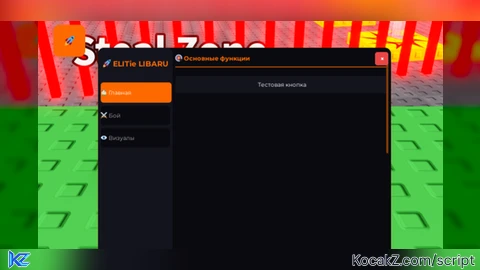
local MyWindow = EliteHub:CreateWindow("ELITie LIBARU")

-- Шаг 2: Добавляем кнопку открытия интерфейса
print("[DEBUG] Добавление кнопки открытия")
EliteHub:CreateOpenButton(MyWindow)

-- Шаг 3: Создаем вкладки для организации элементов
print("[DEBUG] Создание вкладок")
local MainTab = EliteHub:CreateTab(MyWindow, "Главная", "🏠")
local CombatTab = EliteHub:CreateTab(MyWindow, "Бой", "⚔️")
local VisualsTab = EliteHub:CreateTab(MyWindow, "Визуалы", "👁️")

-- Шаг 4: Добавляем разделы и элементы в вкладки
print("[DEBUG] Добавление элементов в вкладки")
EliteHub:CreateSection(MainTab, "Основные функции")
EliteHub:CreateButton(MainTab, "Тестовая кнопка", function()
    print("[DEBUG] Выполнение callback тестовой кнопки")
    EliteHub:Notify("Успех", "Кнопка работает! ✅", 3, "Success")
end)

EliteHub:CreateSection(CombatTab, "Настройки боя")
local AimbotToggle = EliteHub:CreateToggle(CombatTab, "Включить аимбот", false, function(Value)
    print("[DEBUG] Переключение аимбота: " .. tostring(Value))
    EliteHub:Notify("Аимбот", Value and "Аимбот включен 🎯" or "Аимбот выключен", 2, "Info")
end)

EliteHub:CreateSection(VisualsTab, "Настройки графики")
local BrightnessSlider = EliteHub:CreateSlider(VisualsTab, "Яркость", 0, 100, 50, function(Value)
    print("[DEBUG] Изменение яркости: " .. Value)
    EliteHub:Notify("Настройки", "Яркость установлена: " .. Value, 2, "Info")
end)

-- Сообщение об успешной загрузке
spawn(function()
    wait(1)
    EliteHub:Notify("ELITie LIBARU", "Библиотека загружена! Нажмите 🚀", 4, "Accent")
end)

print("🚀 ELITie LIBARU загружен!")
print("Нажмите кнопку 🚀 для открытия интерфейса")

-- ======== 📖 ИНСТРУКЦИИ ПО ИСПОЛЬЗОВАНИЮ ========

--[[
    ИНСТРУКЦИИ ПО ИСПОЛЬЗОВАНИЮ ELIT LIBARU:

    1. СОЗДАНИЕ ОКНА:
       local MyWindow = EliteHub:CreateWindow("Название вашего окна")
       Это создаст основное окно интерфейса.

    2. СОЗДАНИЕ КНОПКИ ОТКРЫТИЯ:
       EliteHub:CreateOpenButton(MyWindow)
       Это создаст перемещаемую кнопку 🚀 для открытия/закрытия окна.

    3. СОЗДАНИЕ ВКЛАДОК:
       local MyTab = EliteHub:CreateTab(MyWindow, "Название вкладки", "Иконка")
       Примеры иконок: "🏠", "⚔️", "👁️", "🎮"

    4. СОЗДАНИЕ СЕКЦИЙ:
       EliteHub:CreateSection(MyTab, "Название секции")
       Это создаст раздел для группировки элементов.

    5. СОЗДАНИЕ КНОПОК:
       EliteHub:CreateButton(MyTab, "Текст кнопки", function()
           -- Ваш код здесь
       end)

    6. СОЗДАНИЕ ПЕРЕКЛЮЧАТЕЛЕЙ:
       local MyToggle = EliteHub:CreateToggle(MyTab, "Текст переключателя", false, function(Value)
           -- Value будет true/false
       end)

    7. СОЗДАНИЕ СЛАЙДЕРОВ:
       local MySlider = EliteHub:CreateSlider(MyTab, "Текст слайдера", Мин, Макс, По умолчанию, function(Value)
           -- Value будет числом
       end)

    8. УВЕДОМЛЕНИЯ:
       EliteHub:Notify("Заголовок", "Сообщение", Длительность, "Тип")
       Типы: "Success", "Danger", "Warning", "Info", "Accent"

    9. ПРИМЕР ПОЛНОГО ИСПОЛЬЗОВАНИЯ:
       local MyWindow = EliteHub:CreateWindow("ELIT LIBARU")

       -- Добавляем кнопку открытия
       EliteHub:CreateOpenButton(MyWindow)

       -- Создаем вкладку
       local Tab = EliteHub:CreateTab(MyWindow, "Главная", "🏠")

       -- Добавляем секцию
       EliteHub:CreateSection(Tab, "Функции")

       -- Добавляем кнопку
       EliteHub:CreateButton(Tab, "Включить чит", function()
           print("Чит включен!")
       end)

       -- Добавляем переключатель
       EliteHub:CreateToggle(Tab, "Авто-атака", false, function(Value)
           print("Авто-атака:", Value)
       end)

    10. ЦВЕТА И ТЕМЫ:
        Вы можете изменить цвета в EliteHub.Colors для кастомизации внешнего вида.

    11. АВТОР И ПОДДЕРЖКА:
        Автор: gerkylesichakes
        Библиотека бесплатна и открыта для всех пользователей.
        Вы можете модифицировать код по своему усмотрению.
]]

return EliteHub


LOL chatgpt slop