
KeylessUniversal
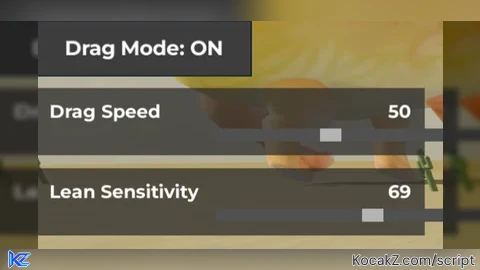
local Players = game:GetService("Players")
local RunService = game:GetService("RunService")
local UserInputService = game:GetService("UserInputService")
local Workspace = game:GetService("Workspace")

local player = Players.LocalPlayer
local mouse = player:GetMouse()
local camera = Workspace.CurrentCamera

local holdingE = false
local draggingEnabled = false
local dragging = false
local lastPos = nil
local bounceActive = false
local bounceTime = 0
local bounceDuration = 0.5
local lastTilt = 0
local bounceOrigin = nil

-- SETTINGS (default values)
local dragSpeedMultiplier = 0.5 -- start at default 50 mapped to 0.5
local leanSensitivity = 1 -- default 1.0
local maxTilt = 35 -- max degrees to lean back
local ceilingTilt = 70 -- max cap for dynamic max tilt

-- GUI SETUP
local gui = Instance.new("ScreenGui", player:WaitForChild("PlayerGui"))
gui.Name = "DragLeanGui"
gui.ResetOnSpawn = false

local toggle = Instance.new("TextButton")
toggle.Size = UDim2.new(0, 160, 0, 40)
toggle.Position = UDim2.new(0, 20, 0, 20)
toggle.BackgroundColor3 = Color3.fromRGB(60, 60, 60)
toggle.TextColor3 = Color3.new(1, 1, 1)
toggle.Font = Enum.Font.GothamBold
toggle.TextSize = 18
toggle.Text = "Drag Mode: OFF"
toggle.Parent = gui

-- Helper to create sliders with integer values from 0 to 100
local function createSlider(name, positionY, defaultVal, onChange, minVal, maxVal)
	minVal = minVal or 0
	maxVal = maxVal or 100

	local frame = Instance.new("Frame", gui)
	frame.Size = UDim2.new(0, 290, 0, 50)
	frame.Position = UDim2.new(0, 20, 0, positionY)
	frame.BackgroundTransparency = 0.25
	frame.BackgroundColor3 = Color3.fromRGB(45, 45, 45)
	frame.BorderSizePixel = 0

	local label = Instance.new("TextLabel", frame)
	label.Size = UDim2.new(0, 130, 0, 25)
	label.Position = UDim2.new(0, 10, 0, 5)
	label.BackgroundTransparency = 1
	label.TextColor3 = Color3.new(1, 1, 1)
	label.Font = Enum.Font.GothamBold
	label.TextSize = 16
	label.TextXAlignment = Enum.TextXAlignment.Left
	label.Text = name

	local valueLabel = Instance.new("TextLabel", frame)
	valueLabel.Size = UDim2.new(0, 50, 0, 25)
	valueLabel.Position = UDim2.new(1, -60, 0, 5)
	valueLabel.BackgroundTransparency = 1
	valueLabel.TextColor3 = Color3.new(1, 1, 1)
	valueLabel.Font = Enum.Font.GothamBold
	valueLabel.TextSize = 16
	valueLabel.TextXAlignment = Enum.TextXAlignment.Right
	valueLabel.Text = tostring(defaultVal)

	local sliderBar = Instance.new("Frame", frame)
	sliderBar.Size = UDim2.new(0, 170, 0, 10)
	sliderBar.Position = UDim2.new(0, 135, 0, 30)
	sliderBar.BackgroundColor3 = Color3.fromRGB(80, 80, 80)
	sliderBar.BorderSizePixel = 0
	sliderBar.ClipsDescendants = true

	local sliderKnob = Instance.new("Frame", sliderBar)
	sliderKnob.Size = UDim2.new(0, 16, 1, 0)
	local initialPos = (defaultVal - minVal) / (maxVal - minVal)
	sliderKnob.Position = UDim2.new(initialPos, 0, 0, 0)
	sliderKnob.BackgroundColor3 = Color3.fromRGB(180, 180, 180)
	sliderKnob.BorderSizePixel = 0
	sliderKnob.Active = true
	sliderKnob.Draggable = true
	sliderKnob.AnchorPoint = Vector2.new(0.5, 0)

	local draggingKnob = false

	local function updateValue(inputPosX)
		local relativePos = (inputPosX - sliderBar.AbsolutePosition.X) / sliderBar.AbsoluteSize.X
		relativePos = math.clamp(relativePos, 0, 1)
		sliderKnob.Position = UDim2.new(relativePos, 0, 0, 0)
		local newVal = math.floor(minVal + relativePos * (maxVal - minVal) + 0.5)
		valueLabel.Text = tostring(newVal)
		onChange(newVal)
	end

	sliderKnob.InputBegan:Connect(function(input)
		if input.UserInputType == Enum.UserInputType.MouseButton1 then
			draggingKnob = true
		end
	end)

	sliderKnob.InputEnded:Connect(function(input)
		if input.UserInputType == Enum.UserInputType.MouseButton1 then
			draggingKnob = false
		end
	end)

	sliderBar.InputChanged:Connect(function(input)
		if draggingKnob and input.UserInputType == Enum.UserInputType.MouseMovement then
			updateValue(input.Position.X)
		end
	end)

	UserInputService.InputChanged:Connect(function(input)
		if draggingKnob and input.UserInputType == Enum.UserInputType.MouseMovement then
			updateValue(input.Position.X)
		end
	end)

	return frame
end

local function updateDragSpeed(val)
	val = math.clamp(val, 0, 100)
	if val == 0 then
		dragSpeedMultiplier = 0 -- no dragging allowed
	elseif val < 50 then
		-- scales 0.01 to 0.5 roughly
		dragSpeedMultiplier = (val / 50) * 0.5
	else
		-- scales 0.5 to 1 from 50 to 100
		dragSpeedMultiplier = 0.5 + ((val - 50) / 50) * 0.5
	end
end

-- Create sliders below toggle button
local dragSpeedSlider = createSlider("Drag Speed", 70, 50, updateDragSpeed, 0, 100)
updateDragSpeed(50) -- initialize default drag speed

local function updateLeanSensitivity(val)
	-- lean sensitivity from 0.1 to 10 (slider 1 to 100)
	leanSensitivity = math.clamp(val / 10, 0.1, 10)
end

local leanSensitivitySlider = createSlider("Lean Sensitivity", 130, 10, updateLeanSensitivity, 1, 100)
updateLeanSensitivity(10) -- initialize default lean sensitivity

-- EASING FUNCTION
local function easeOutElastic(t)
	local c4 = (2 * math.pi) / 3
	return t == 0 and 0 or t == 1 and 1 or math.pow(2, -10 * t) * math.sin((t * 10 - 0.75) * c4) + 1
end

-- STATE VARS
local hrpo
local character

local function getMouseWorldPos()
	local ray = camera:ScreenPointToRay(mouse.X, mouse.Y)
	local y = hrpo and hrpo.Position.Y or 0
	local t = (y - ray.Origin.Y) / ray.Direction.Y
	return ray.Origin + ray.Direction * t
end

local function onCharacterAdded(char)
	character = char
	hrpo = char:WaitForChild("HumanoidRootPart")
	hrpo.AncestryChanged:Connect(function(_, parent)
		if not parent then
			hrpo = nil
		end
	end)

	RunService:BindToRenderStep("DragLeanRender", Enum.RenderPriority.Character.Value + 1, function(dt)
		if not hrpo then return end
		if draggingEnabled and holdingE and dragSpeedMultiplier > 0 then
			local mousePos = getMouseWorldPos()
			local newPos = Vector3.new(mousePos.X, hrpo.Position.Y, mousePos.Z)

			if lastPos then
				local dragDelta = newPos - lastPos
				local flatDelta = Vector3.new(dragDelta.X, 0, dragDelta.Z) * dragSpeedMultiplier

				if flatDelta.Magnitude > 0.01 then
					local faceCFrame = CFrame.lookAt(hrpo.Position, hrpo.Position + flatDelta)
					local speed = flatDelta.Magnitude / dt
					local dynamicMaxTilt = math.min(maxTilt * leanSensitivity, ceilingTilt)
					local tilt = math.clamp(speed * 0.04 * leanSensitivity, 0, dynamicMaxTilt)

					hrpo.CFrame = CFrame.new(newPos) * faceCFrame.Rotation * CFrame.Angles(math.rad(tilt), 0, 0)
				end
				lastPos = newPos
				dragging = true
				bounceActive = false
			else
				lastPos = newPos
			end
		elseif bounceActive and hrpo then
			bounceTime += dt
			local t = math.clamp(bounceTime / bounceDuration, 0, 1)
			local easedT = easeOutElastic(t)
			local pitch = lastTilt * (1 - easedT)

			local _, yaw, _ = hrpo.CFrame:ToEulerAnglesYXZ()
			hrpo.CFrame = CFrame.new(bounceOrigin) * CFrame.Angles(math.rad(pitch), yaw, 0)

			if t >= 1 then
				bounceActive = false
			end
		end
	end)
end

player.CharacterAdded:Connect(onCharacterAdded)
if player.Character then onCharacterAdded(player.Character) end

toggle.MouseButton1Click:Connect(function()
	draggingEnabled = not draggingEnabled
	toggle.Text = draggingEnabled and "Drag Mode: ON" or "Drag Mode: OFF"
end)

UserInputService.InputBegan:Connect(function(input)
	if input.KeyCode == Enum.KeyCode.E and draggingEnabled then
		holdingE = true
	end
end)

UserInputService.InputEnded:Connect(function(input)
	if input.KeyCode == Enum.KeyCode.E and draggingEnabled then
		holdingE = false
		if dragging then
			bounceActive = true
			bounceTime = 0
			lastTilt = maxTilt
			bounceOrigin = hrpo and hrpo.Position or Vector3.zero
		end
		dragging = false
		lastPos = nil
	end
end)No comments yet for this script.