KeylessUniversal
-- Services
local Players = game:GetService("Players")
local UserInputService = game:GetService("UserInputService")
local Player = Players.LocalPlayer
local PlayerGui = Player:WaitForChild("PlayerGui")

-- Create ScreenGui
local ScreenGui = Instance.new("ScreenGui")
ScreenGui.Name = "TeleportUI"
ScreenGui.Parent = PlayerGui
ScreenGui.ResetOnSpawn = false

-- Create Frame
local Frame = Instance.new("Frame")
Frame.Size = UDim2.new(0, 200, 0, 250)
Frame.Position = UDim2.new(0.5, -100, 0.5, -125)
Frame.BackgroundColor3 = Color3.fromRGB(40, 40, 40)
Frame.BorderSizePixel = 0
Frame.Parent = ScreenGui

-- Create UI Corner for rounded edges
local UICorner = Instance.new("UICorner")
UICorner.CornerRadius = UDim.new(0, 10)
UICorner.Parent = Frame

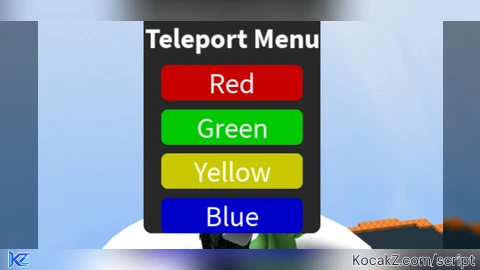
-- Create Title
local Title = Instance.new("TextLabel")
Title.Size = UDim2.new(1, 0, 0, 40)
Title.Position = UDim2.new(0, 0, 0, 10)
Title.BackgroundTransparency = 1
Title.Text = "Teleport Menu"
Title.TextColor3 = Color3.fromRGB(255, 255, 255)
Title.TextScaled = true
Title.Font = Enum.Font.SourceSansBold
Title.Parent = Frame

-- Teleport function
local function teleportTo(position)
    if Player.Character and Player.Character:FindFirstChild("HumanoidRootPart") then
        Player.Character.HumanoidRootPart.CFrame = CFrame.new(position)
    end
end

-- Button creation function
local function createButton(name, color, position, yOffset)
    local Button = Instance.new("TextButton")
    Button.Size = UDim2.new(0.8, 0, 0, 40)
    Button.Position = UDim2.new(0.1, 0, 0, yOffset)
    Button.BackgroundColor3 = color
    Button.Text = name
    Button.TextColor3 = Color3.fromRGB(255, 255, 255)
    Button.TextScaled = true
    Button.Font = Enum.Font.SourceSans
    Button.Parent = Frame

    local ButtonCorner = Instance.new("UICorner")
    ButtonCorner.CornerRadius = UDim.new(0, 8)
    ButtonCorner.Parent = Button

    Button.MouseButton1Click:Connect(function()
        teleportTo(position)
    end)
end

-- Create buttons with corresponding coordinates
createButton("Red", Color3.fromRGB(200, 0, 0), Vector3.new(-121.66, 23.60, -1.62), 60)
createButton("Green", Color3.fromRGB(0, 200, 0), Vector3.new(1.27, 24.56, -128.26), 110)
createButton("Yellow", Color3.fromRGB(200, 200, 0), Vector3.new(130.09, 23.60, 3.95), 160)
createButton("Blue", Color3.fromRGB(0, 0, 200), Vector3.new(1.63, 24.80, 129.31), 210)

-- Dragging functionality
local isDragging = false
local dragStart = nil
local startPos = nil

Frame.InputBegan:Connect(function(input)
    if input.UserInputType == Enum.UserInputType.MouseButton1 then
        isDragging = true
        dragStart = input.Position
        startPos = Frame.Position
    end
end)

Frame.InputChanged:Connect(function(input)
    if isDragging and input.UserInputType == Enum.UserInputType.MouseMovement then
        local delta = input.Position - dragStart
        Frame.Position = UDim2.new(
            startPos.X.Scale,
            startPos.X.Offset + delta.X,
            startPos.Y.Scale,
            startPos.Y.Offset + delta.Y
        )
    end
end)

UserInputService.InputEnded:Connect(function(input)
    if input.UserInputType == Enum.UserInputType.MouseButton1 then
        isDragging = false
    end
end)No comments yet for this script.