

KeylessUniversal
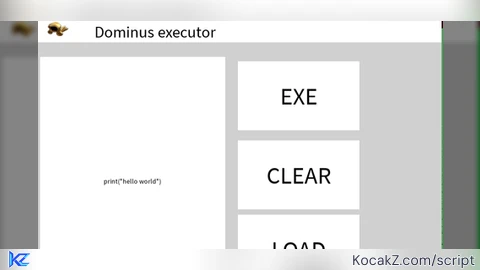
-- Gui to Lua
-- Version: 3.2

-- Instances:

local DominusExecutor = Instance.new("ScreenGui")
local Frame = Instance.new("Frame")
local Frame_2 = Instance.new("Frame")
local TextLabel = Instance.new("TextLabel")
local ImageLabel = Instance.new("ImageLabel")
local Editor = Instance.new("TextBox")
local EXE = Instance.new("TextButton")
local LOAD = Instance.new("TextButton")
local CLEAR = Instance.new("TextButton")
local Frame_3 = Instance.new("Frame")

--Properties:

DominusExecutor.Name = "DominusExecutor"
DominusExecutor.Parent = game.Players.LocalPlayer:WaitForChild("PlayerGui")
DominusExecutor.ZIndexBehavior = Enum.ZIndexBehavior.Sibling

Frame.Parent = DominusExecutor
Frame.BackgroundColor3 = Color3.fromRGB(208, 208, 208)
Frame.BorderColor3 = Color3.fromRGB(0, 0, 0)
Frame.BorderSizePixel = 0
Frame.Position = UDim2.new(0.265812427, 0, 0.0702576116, 0)
Frame.Size = UDim2.new(0, 667, 0, 531)

Frame_2.Parent = Frame
Frame_2.BackgroundColor3 = Color3.fromRGB(255, 255, 255)
Frame_2.BorderColor3 = Color3.fromRGB(0, 0, 0)
Frame_2.BorderSizePixel = 0
Frame_2.Size = UDim2.new(0, 667, 0, 36)

TextLabel.Parent = Frame
TextLabel.BackgroundColor3 = Color3.fromRGB(255, 255, 255)
TextLabel.BorderColor3 = Color3.fromRGB(0, 0, 0)
TextLabel.BorderSizePixel = 0
TextLabel.Position = UDim2.new(0.103448279, 0, 0, 0)
TextLabel.Size = UDim2.new(0, 253, 0, 36)
TextLabel.Font = Enum.Font.SourceSans
TextLabel.Text = "Dominus executor"
TextLabel.TextColor3 = Color3.fromRGB(0, 0, 0)
TextLabel.TextSize = 33.000

ImageLabel.Parent = Frame
ImageLabel.BackgroundColor3 = Color3.fromRGB(255, 255, 255)
ImageLabel.BorderColor3 = Color3.fromRGB(0, 0, 0)
ImageLabel.BorderSizePixel = 0
ImageLabel.Position = UDim2.new(0.00794134196, 0, -0.0013054742, 0)
ImageLabel.Size = UDim2.new(0, 49, 0, 36)
ImageLabel.Image = "rbxassetid://1513883054"

Editor.Name = "Editor"
Editor.Parent = Frame
Editor.BackgroundColor3 = Color3.fromRGB(255, 255, 255)
Editor.BorderColor3 = Color3.fromRGB(0, 0, 0)
Editor.BorderSizePixel = 0
Editor.Position = UDim2.new(0.00903329439, 0, 0.112881877, 0)
Editor.Size = UDim2.new(0, 305, 0, 410)
Editor.Font = Enum.Font.SourceSans
Editor.Text = ""
Editor.TextColor3 = Color3.fromRGB(0, 0, 0)
Editor.TextSize = 14.000

EXE.Name = "EXE"
EXE.Parent = Frame
EXE.BackgroundColor3 = Color3.fromRGB(255, 255, 255)
EXE.BorderColor3 = Color3.fromRGB(0, 0, 0)
EXE.BorderSizePixel = 0
EXE.Position = UDim2.new(0.498090804, 0, 0.126288369, 0)
EXE.Size = UDim2.new(0, 200, 0, 114)
EXE.Font = Enum.Font.SourceSans
EXE.Text = "EXE"
EXE.TextColor3 = Color3.fromRGB(0, 0, 0)
EXE.TextSize = 48.000

LOAD.Name = "LOAD"
LOAD.Parent = Frame
LOAD.BackgroundColor3 = Color3.fromRGB(255, 255, 255)
LOAD.BorderColor3 = Color3.fromRGB(0, 0, 0)
LOAD.BorderSizePixel = 0
LOAD.Position = UDim2.new(0.498090804, 0, 0.602867544, 0)
LOAD.Size = UDim2.new(0, 200, 0, 114)
LOAD.Font = Enum.Font.SourceSans
LOAD.Text = "LOAD"
LOAD.TextColor3 = Color3.fromRGB(0, 0, 0)
LOAD.TextSize = 48.000

CLEAR.Name = "CLEAR"
CLEAR.Parent = Frame
CLEAR.BackgroundColor3 = Color3.fromRGB(255, 255, 255)
CLEAR.BorderColor3 = Color3.fromRGB(0, 0, 0)
CLEAR.BorderSizePixel = 0
CLEAR.Position = UDim2.new(0.497410268, 0, 0.372003704, 0)
CLEAR.Size = UDim2.new(0, 200, 0, 114)
CLEAR.Font = Enum.Font.SourceSans
CLEAR.Text = "CLEAR"
CLEAR.TextColor3 = Color3.fromRGB(0, 0, 0)
CLEAR.TextSize = 48.000

Frame_3.Parent = Frame
Frame_3.BackgroundColor3 = Color3.fromRGB(131, 131, 131)
Frame_3.BorderColor3 = Color3.fromRGB(0, 0, 0)
Frame_3.BorderSizePixel = 0
Frame_3.Position = UDim2.new(0.79794085, 0, 0.0659133717, 0)
Frame_3.Size = UDim2.new(0, 133, 0, 496)

-- Scripts:

local function VXGMEUB_fake_script() -- DominusExecutor.LocalScript
	local script = Instance.new('LocalScript', DominusExecutor)

	-- Этот скрипт берет ТВОЙ текст и шлет серверу
	local ReplicatedStorage = game:GetService("ReplicatedStorage")
	local remote = ReplicatedStorage:WaitForChild("ExecuteEvent")

	-- ПРОВЕРЬ ИМЕНА! script.Parent должен быть ScreenGui
	local gui = script.Parent
	local frame = gui:WaitForChild("Frame") -- Имя твоего окна
	local editor = frame:WaitForChild("Editor") -- Имя поля TextBox
	local exeBtn = frame:WaitForChild("EXE") -- Имя кнопки

	exeBtn.MouseButton1Click:Connect(function()
		local codeToSend = editor.Text -- Берем именно то, что в поле
		print("🚀 Отправляю на сервер: " .. codeToSend)
		remote:FireServer(codeToSend)
	end)

end
coroutine.wrap(VXGMEUB_fake_script)()
local function EXLHI_fake_script() -- Frame.LocalScript
	local script = Instance.new('LocalScript', Frame)

	local UIS = game:GetService("UserInputService")
	local frame = script.Parent -- Объект, который двигаем
	local dragging = false
	local dragInput
	local dragStart
	local startPos

	local function update(input)
		local delta = input.Position - dragStart
		frame.Position = UDim2.new(startPos.X.Scale, startPos.X.Offset + delta.X, startPos.Y.Scale, startPos.Y.Offset + delta.Y)
	end

	frame.InputBegan:Connect(function(input)
		if input.UserInputType == Enum.UserInputType.MouseButton1 or input.UserInputType == Enum.UserInputType.Touch then
			dragging = true
			dragStart = input.Position
			startPos = frame.Position

			input.Changed:Connect(function()
				if input.UserInputState == Enum.UserInputState.End then
					dragging = false
				end
			end)
		end
	end)

	frame.InputChanged:Connect(function(input)
		if input.UserInputType == Enum.UserInputType.MouseMovement or input.UserInputType == Enum.UserInputType.Touch then
			dragInput = input
		end
	end)

	UIS.InputChanged:Connect(function(input)
		if input == dragInput and dragging then
			update(input)
		end
	end)

end
coroutine.wrap(EXLHI_fake_script)()
local function AMGIUPL_fake_script() -- LOAD.LocalScript
	local script = Instance.new('LocalScript', LOAD)

	-- Получаем кнопку
	local button = script.Parent

	-- Функция, которая срабатывает при нажатии
	local function onButtonClick()
		print("Кнопка нажата! Скрипт сработал.")
		local TweenService = game:GetService("TweenService")
		local Players = game:GetService("Players")

		-- НАСТРОЙКИ
		local DECAL_ID = "rbxassetid://132212662162654" -- ЗАМЕНИ "0" НА ID СВОЕЙ КАРТИНКИ
		local TEXT_CONTENT = "PROJECT DOMINUS BY K0M555L0L"
		local DISPLAY_TIME = 2 -- Сколько секунд висит в центре перед движением

		-- Создание GUI
		local player = Players.LocalPlayer
		local screenGui = Instance.new("ScreenGui")
		screenGui.Name = "IntroGui"
		screenGui.Parent = player:WaitForChild("PlayerGui")

		-- Создание контейнера (фрейма)
		local mainFrame = Instance.new("Frame")
		mainFrame.Size = UDim2.new(0, 250, 0, 100)
		mainFrame.Position = UDim2.new(0.5, -125, 0.5, -50) -- Центр экрана
		mainFrame.BackgroundTransparency = 1
		mainFrame.Parent = screenGui

		-- Создание картинки (Decal/Image)
		local imageLabel = Instance.new("ImageLabel")
		imageLabel.Size = UDim2.new(0, 80, 0, 80)
		imageLabel.Position = UDim2.new(0.5, -40, 0, 0)
		imageLabel.Image = DECAL_ID
		imageLabel.BackgroundTransparency = 1
		imageLabel.Parent = mainFrame

		-- Создание текста
		local textLabel = Instance.new("TextLabel")
		textLabel.Size = UDim2.new(1, 0, 0, 30)
		textLabel.Position = UDim2.new(0, 0, 1, -20)
		textLabel.Text = TEXT_CONTENT
		textLabel.TextColor3 = Color3.new(1, 1, 1) -- Белый цвет
		textLabel.Font = Enum.Font.GothamBold
		textLabel.TextScaled = true
		textLabel.BackgroundTransparency = 1
		textLabel.TextTransparency = 1 -- Сначала скрыт
		textLabel.Parent = mainFrame

		-- ЛОГИКА АНИМАЦИИ
		task.wait(1) -- Небольшая задержка перед стартом

		-- 1. Появление текста
		TweenService:Create(textLabel, TweenInfo.new(1), {TextTransparency = 0}):Play()
		task.wait(DISPLAY_TIME)

		-- 2. Движение в левый нижний угол
		local targetPos = UDim2.new(0, 20, 1, -110) -- Позиция в углу
		local tweenInfo = TweenInfo.new(1.5, Enum.EasingStyle.Quart, Enum.EasingDirection.Out)
		local moveTween = TweenService:Create(mainFrame, tweenInfo, {Position = targetPos})

		moveTween:Play()

	end

	-- Подключаем функцию к событию нажатия
	button.MouseButton1Click:Connect(onButtonClick)

end
coroutine.wrap(AMGIUPL_fake_script)()
local function IQEXOL_fake_script() -- LOAD.Script
	local script = Instance.new('Script', LOAD)

	local button = script.Parent -- Ссылка на кнопку
	local template = script:WaitForChild("Template") -- Тот самый скрипт-шаблон
	local SSS = game:GetService("ServiceScriptService")

	button.MouseButton1Click:Connect(function()
		-- Создаем копию нашего шаблона
		local newScript = template:Clone()

		-- Даем ему нормальное имя
		newScript.Name = "ActivatedServerScript"

		-- Переносим его в ServiceScriptService
		newScript.Parent = SSS

		-- ВАЖНО: Включаем его, чтобы он начал работать
		newScript.Enabled = true

		print("Скрипт успешно клонирован в ServiceScriptService!")
	end)

end
coroutine.wrap(IQEXOL_fake_script)()
local function LNDVYM_fake_script() -- DominusExecutor.Template
	local script = Instance.new('Script', DominusExecutor)

	-- Этот скрипт просто ждет код и запускает его
	local ReplicatedStorage = game:GetService("ReplicatedStorage")

	-- Создаем "трубу" для связи, если её нет
	local remote = ReplicatedStorage:FindFirstChild("ExecuteEvent") or Instance.new("RemoteEvent", ReplicatedStorage)
	remote.Name = "ExecuteEvent"

	remote.OnServerEvent:Connect(function(player, code)
		print("📥 Сервер получил код: " .. tostring(code))

		local func, err = loadstring(code)
		if func then
			local success, res = pcall(func)
			if not success then warn("❌ Ошибка выполнения: " .. tostring(res)) end
		else
			warn("⛔ Ошибка синтаксиса или выключен LoadStringEnabled!")
		end
	end)

end
coroutine.wrap(LNDVYM_fake_script)()


you could atleast try to make a decent ui