

KeylessUniversal
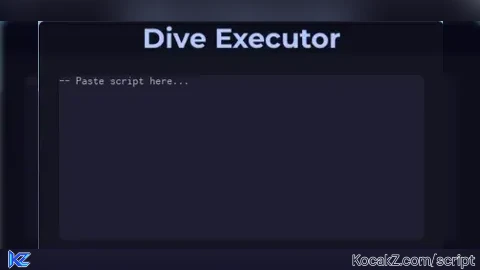
--[[ Dive Executor v1.1 ]]--

pcall(function() game.CoreGui.DiveExecutor:Destroy() end)

local player = game.Players.LocalPlayer
local gui = Instance.new("ScreenGui", game:GetService("CoreGui"))
gui.Name = "DiveExecutor"
gui.ResetOnSpawn = false
gui.ZIndexBehavior = Enum.ZIndexBehavior.Sibling

local frame = Instance.new("Frame", gui)
frame.Size = UDim2.new(0, 500, 0, 370)
frame.Position = UDim2.new(0.3, 0, 0.25, 0)
frame.BackgroundColor3 = Color3.fromRGB(20, 20, 35)
frame.BorderSizePixel = 0
frame.Name = "MainFrame"
frame.Active = true
frame.Draggable = true
frame.Visible = true
frame.ClipsDescendants = true

local UICorner = Instance.new("UICorner", frame)
UICorner.CornerRadius = UDim.new(0, 12)

local settingsBtn = Instance.new("TextButton", frame)
settingsBtn.Text = "⚙️ Settings"
settingsBtn.Size = UDim2.new(0, 120, 0, 30)
settingsBtn.Position = UDim2.new(0, 10, 0, 5)
settingsBtn.BackgroundColor3 = Color3.fromRGB(30, 30, 45)
settingsBtn.TextColor3 = Color3.fromRGB(200, 200, 255)
settingsBtn.Font = Enum.Font.GothamBold
settingsBtn.TextSize = 14
settingsBtn.BorderSizePixel = 0

local settingsCorner = Instance.new("UICorner", settingsBtn)
settingsCorner.CornerRadius = UDim.new(0, 6)

local settingsFrame = Instance.new("Frame", frame)
settingsFrame.Size = UDim2.new(0, 120, 0, 40)
settingsFrame.Position = UDim2.new(0, 10, 0, 40)
settingsFrame.BackgroundColor3 = Color3.fromRGB(40, 40, 60)
settingsFrame.Visible = false
settingsFrame.BorderSizePixel = 0

local dropdownCorner = Instance.new("UICorner", settingsFrame)
dropdownCorner.CornerRadius = UDim.new(0, 6)

local restartBtn = Instance.new("TextButton", settingsFrame)
restartBtn.Size = UDim2.new(1, 0, 1, 0)
restartBtn.Position = UDim2.new(0, 0, 0, 0)
restartBtn.Text = "Restart"
restartBtn.BackgroundColor3 = Color3.fromRGB(50, 50, 80)
restartBtn.TextColor3 = Color3.new(1, 1, 1)
restartBtn.Font = Enum.Font.Gotham
restartBtn.TextScaled = true
restartBtn.BorderSizePixel = 0

local restartCorner = Instance.new("UICorner", restartBtn)
restartCorner.CornerRadius = UDim.new(0, 6)

local title = Instance.new("TextLabel", frame)
title.Text = "Dive Executor"
title.Size = UDim2.new(1, 0, 0, 40)
title.Position = UDim2.new(0, 0, 0, 0)
title.BackgroundColor3 = Color3.fromRGB(15, 15, 30)
title.TextColor3 = Color3.fromRGB(180, 200, 255)
title.TextScaled = true
title.Font = Enum.Font.GothamBold
title.BorderSizePixel = 0

local titleCorner = Instance.new("UICorner", title)
titleCorner.CornerRadius = UDim.new(0, 8)

local textbox = Instance.new("TextBox", frame)
textbox.PlaceholderText = "-- Paste script here..."
textbox.Text = ""
textbox.Position = UDim2.new(0.05, 0, 0.18, 0)
textbox.Size = UDim2.new(0.9, 0, 0.55, 0)
textbox.BackgroundColor3 = Color3.fromRGB(30, 30, 50)
textbox.TextColor3 = Color3.new(1, 1, 1)
textbox.TextXAlignment = Enum.TextXAlignment.Left
textbox.TextYAlignment = Enum.TextYAlignment.Top
textbox.ClearTextOnFocus = false
textbox.MultiLine = true
textbox.TextWrapped = true
textbox.Font = Enum.Font.Code
textbox.TextSize = 14

local boxCorner = Instance.new("UICorner", textbox)
boxCorner.CornerRadius = UDim.new(0, 8)

local attachBtn = Instance.new("TextButton", frame)
attachBtn.Text = "Attach"
attachBtn.Size = UDim2.new(0, 100, 0, 35)
attachBtn.Position = UDim2.new(0.05, 0, 0.78, 0)
attachBtn.BackgroundColor3 = Color3.fromRGB(40, 100, 200)
attachBtn.TextColor3 = Color3.new(1, 1, 1)
attachBtn.Font = Enum.Font.GothamBold
attachBtn.TextScaled = true

local attachCorner = Instance.new("UICorner", attachBtn)
attachCorner.CornerRadius = UDim.new(0, 8)

local execBtn = Instance.new("TextButton", frame)
execBtn.Text = "Execute"
execBtn.Size = UDim2.new(0, 100, 0, 35)
execBtn.Position = UDim2.new(0.75, 0, 0.78, 0)
execBtn.BackgroundColor3 = Color3.fromRGB(0, 200, 120)
execBtn.TextColor3 = Color3.new(1, 1, 1)
execBtn.Font = Enum.Font.GothamBold
execBtn.TextScaled = true

local execCorner = Instance.new("UICorner", execBtn)
execCorner.CornerRadius = UDim.new(0, 8)

local function notify(text, color)
	local msg = Instance.new("TextLabel", gui)
	msg.Size = UDim2.new(0, 250, 0, 40)
	msg.Position = UDim2.new(0.35, 0, 0.05, 0)
	msg.BackgroundColor3 = color or Color3.fromRGB(40, 40, 60)
	msg.Text = text
	msg.Font = Enum.Font.Gotham
	msg.TextColor3 = Color3.new(1, 1, 1)
	msg.TextScaled = true
	msg.BorderSizePixel = 0

	local corner = Instance.new("UICorner", msg)
	corner.CornerRadius = UDim.new(0, 8)

	task.spawn(function()
		wait(2.5)
		for i = 1, 10 do
			msg.TextTransparency += 0.1
			msg.BackgroundTransparency += 0.1
			wait(0.05)
		end
		msg:Destroy()
	end)
end

notify("Dive Executor has launched.", Color3.fromRGB(0, 120, 255))

attachBtn.MouseButton1Click:Connect(function()
	notify("Attached to Roblox Player", Color3.fromRGB(0, 200, 255))
end)

execBtn.MouseButton1Click:Connect(function()
	local code = textbox.Text
	if code == "" then
		notify("❌ No script to execute", Color3.fromRGB(255, 80, 80))
	else
		local success, err = pcall(function()
			loadstring(code)()
		end)
		if success then
			notify("✅ Script executed!", Color3.fromRGB(50, 255, 100))
		else
			notify("❌ Error: "..err, Color3.fromRGB(255, 50, 50))
		end
	end
end)

settingsBtn.MouseButton1Click:Connect(function()
	settingsFrame.Visible = not settingsFrame.Visible
end)

restartBtn.MouseButton1Click:Connect(function()
	notify("🔁 Restarting...", Color3.fromRGB(255, 200, 0))
	wait(1)
	pcall(function() gui:Destroy() end)
	loadstring(game:HttpGet("https://yourdomain.com/DiveExecutor.lua"))() -- or re-run the local script
end)

local open = true
game:GetService("UserInputService").InputBegan:Connect(function(input, gpe)
	if not gpe and input.KeyCode == Enum.KeyCode.RightShift then
		open = not open
		frame.Visible = open
	end
end)


how is this useful if it's a script? wouldn't you already have another executor?
@Ashen Bro it's sometimes when you have a executor that is JJsploit And require Scripts don't work You get this executor