


KeylessUniversal
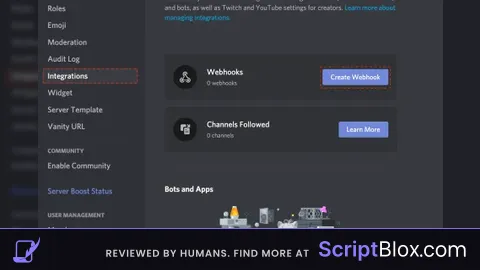
function SendMessage(url, message)
    local http = game:GetService("HttpService")
    local headers = {
        ["Content-Type"] = "application/json"
    }
    local data = {
        ["content"] = message
    }
    local body = http:JSONEncode(data)
    local response = request({
        Url = url,
        Method = "POST",
        Headers = headers,
        Body = body
    })
    print("Sent")
end

function SendMessageEMBED(url, embed)
    local http = game:GetService("HttpService")
    local headers = {
        ["Content-Type"] = "application/json"
    }
    local data = {
        ["embeds"] = {
            {
                ["title"] = embed.title,
                ["description"] = embed.description,
                ["color"] = embed.color,
                ["fields"] = embed.fields,
                ["footer"] = {
                    ["text"] = embed.footer.text
                }
            }
        }
    }
    local body = http:JSONEncode(data)
    local response = request({
        Url = url,
        Method = "POST",
        Headers = headers,
        Body = body
    })
    print("Sent")
end


--Examples

local url = "YOUR_WEBHOOK_HERE"
SendMessage(url, "EXAMPLE")


local embed = {
    ["title"] = "This is an embedded message",
    ["description"] = "This message has an embed with fields and a footer",
    ["color"] = 65280,
    ["fields"] = {
        {
            ["name"] = "Field 1",
            ["value"] = "This is the first field"
        },
        {
            ["name"] = "Field 2",
            ["value"] = "This is the second field"
        }
    },
    ["footer"] = {
        ["text"] = "This is the footer text"
    }
}
SendMessageEMBED(url, embed)
discord why kick me bruh
@323627983 huh??
You kicked me out.